Reactivesearch: ReactiveList repeated item re-rendering
Affected Projects
React
Library Version: x.y.z
3.0.0-rc.23
Describe the bug
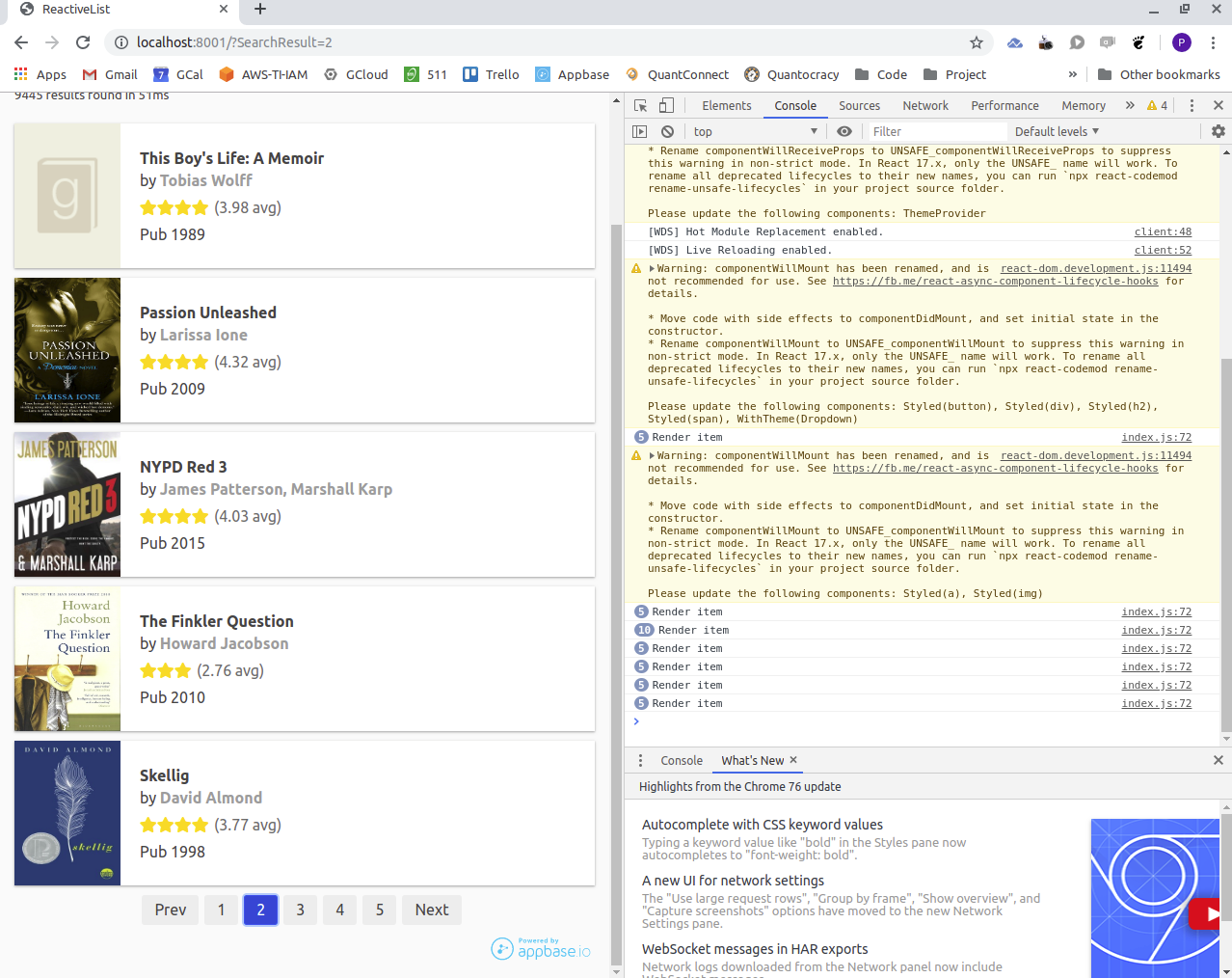
ReactiveList keeps re-rendering the same items multiple times consuming resources, both with pagination and with the infinite scroll.
To Reproduce
Steps to reproduce the behavior:
- Edit ReactiveList web-example by including
console.log('Render item');inbooksReactiveList. - Watch console output, go to results page 2 etc. The very first page with 5 items renders an item 10 times; when switching to page 2 it happens 30 times.
Expected behavior
No repeated re-rendering of the same items.
Screenshots
Desktop (please complete the following information):
- OS: Ubuntu 18.04
- Browser: Chrome
 multidis
All 13 comments
shall I look over the above issue? ...By the way, I'm doing it for my university assignment in which we have to contribute for a open source project.
 kvin97
on 4 Sep 2019
kvin97
on 4 Sep 2019
Hey, @kvin97 this issue was already closed by PR #1102 , I forgot to close the issue.
Thanks for your interest you can look into other issues which are not assigned or taken by others :)
 jyash97
on 4 Sep 2019
jyash97
on 4 Sep 2019
I still see the same problem (in fact identical to the screenshot above) with "@appbaseio/reactivesearch": "^3.0.1". Am I missing something?
multidis
on 14 Sep 2019
@jyash97
multidis
on 14 Sep 2019
When each item is rendered with e.g. a high-resolution image, any re-rendering noticeably affects the application performance.
multidis
on 17 Sep 2019
Hey @multidis sorry I missed the thread.
Currently, it's difficult to fix this from the library side. I created a fix that caused some other side effects. But there is a workaround that can help decrease the re renders. Here are the steps:
- Create a higher order component in the
rendermethod ofReactiveList
render={data => <Results {...data} />}
- Implement
shouldComponentUpdateinResults( higher order component ) by checkingdata&loadingprop.
shouldComponentUpdate(prevProps) {
    if (
      JSON.stringify(prevProps.data) === JSON.stringify(this.props.data) &&
      prevProps.loading === this.props.loading
    ) {
      return false;
    }
    return true;
  }
This would help you decrease the redundant renders. Check the attached CodeSandbox Link which implements this approach: https://codesandbox.io/s/reactivelist-less-renders-hmp7g
Hope this helps!
jyash97
on 1 Oct 2019
Thank you @jyash97 this approach helps to some extent. However there is still quite a bit of re-rendering happening. Hope a fix is still on the roadmap.
multidis
on 2 Oct 2019
Hey @multidis Can you create an example showing the extra re-rendering after doing the above approach maybe I can help you further on that.
Hope a fix is still on the roadmap.
It's on our roadmap and we will be figuring a way out in which it doesn't introduce side effects.
jyash97
on 2 Oct 2019
Taking your example @jyash97 with shouldComponentUpdate: with pagination, each page renders the entire set of ReactiveSearch results (i.e. the Results class) 4 times (per count updates). Each individual item (from data.map) is rendered twice; the total item renders per page is 2n where n is the number of results per page.
When infinite scroll is enabled this re-rendering slows things down dramatically...
multidis
on 3 Oct 2019
I agree on the above point whenever data changes data.map will re-render all items but re-rendering doesn’t always mean that it will unmount all the previous components ( Component present on DOM ) and create it again. It will discard the changes having the same keys.
Here is a detailed explanation of the above:
- Consider infinite scroll is on:
Whenever we scroll, the results are loaded and get appended to the data and does the re-render of theResultscomponent which meansdata.mapwould be re-render but as we provide akey={item._id}. React only updates ( creates ) the DOM which has been changed or added. You can read more about this here: https://reactjs.org/docs/reconciliation.html#recursing-on-children.
And you can check the performance of scroll using this chrome extension: https://github.com/sw-yx/async-render-toolbox
I used the above extension on the example and it wasn’t having a lagging behavior.
Here is one sandbox where I have used shouldComponentUpdate on the Item component and you can check the console each item gets render only 1 time.
Sandbox Link: https://codesandbox.io/s/reactivelist-less-renders-cls3u
And if we remove shouldComponentUpdate you will notice that unmount was never called because React never unmounted the components which had the same keys from DOM.
- Pagination is true:
Here also each component gets Mounted once and gets unmounted on page change. This is the expected behavior.
Sandbox Link: https://codesandbox.io/s/reactivelist-less-renders-4odv4
On another note: If you want to fix scroll lagging you can try to implement react-window or react-virtualized.
Keeping in thread @bietkul @lakhansamani @ShahAnuj2610
I hope this Helps!
jyash97
on 5 Oct 2019
Thank you @jyash97 for the helpful demo code.
We notice that lots of results are being added from ElasticSearch upon a relatively small scroll in some cases when infinite scroll is enabled in ReactiveList. This happens in scrollHandler here:
https://github.com/appbaseio/reactivesearch/blob/master/packages/web/src/components/result/ReactiveList.js#L359
When mentioning react-window did you mean there is a way to control when more results start loading using the functionality of that package's wrapper component?
multidis
on 24 Oct 2019
Hey @multidis
React-window can help you in improving performance when rendering large lists. You can read this article about react-window: https://addyosmani.com/blog/react-window/
jyash97
on 25 Oct 2019
It seems that react-window setup requires querying all ElasticSearch results at once and then rendering in portions, which is not practical for over 50k records.
We did however find a way to reduce re-renderings by fixing the height of result elements. In the past the height was fluid and as images were loading window scroll position was drifting, triggering more ReactiveSearch queries to the backend. The fixed-height performance seems acceptable now. Thank you Appbase Team for all the help.
multidis
on 8 Nov 2019
Related issues
 coommark
·
4Comments
coommark
·
4Comments
 rbeers
·
3Comments
rbeers
·
3Comments
 scheiblr
·
3Comments
scheiblr
·
3Comments
 kud
·
4Comments
kud
·
4Comments
kud
·
4Comments
kud
·
4Comments