Reactivesearch: Best practices for saving searches
Issue Type:
enhancement
Platform:
Web, React
Description:
How would you suggest keeping track of the state of selected filters for the purpose of saving a search?
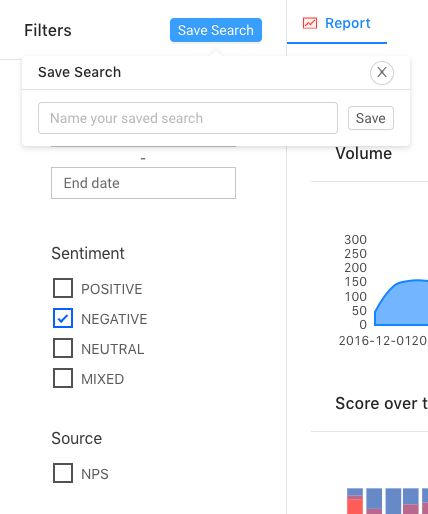
We have a "saved search" feature that I'm trying to refactor (See screenshot) but I can't figure out an ideal way to track the state of which filters have been selected. I've tried the following:
Parsing the URL params. This is messy and in the past some edge cases have ruled this out.
Accessing the ReactiveSearch Redux store. I understand the store is created with the
__REACTIVESEARCH__key, but I can't figure out how to access it.The "selectedValues" prop in the SelectedFilters component gives me exactly what I need, but I can't access it either.
Currently I'm using the "onValueChange" prop to track state changes and but it isn't ideal for many reasons (primarily reusability across the app.) Related issue (#398)
How would you suggest going about this?
My suggestion is to expose the selectedValues prop in the SelectedFilters component.
Reactivesearch version:
2.14.1
Screenshot:
 calebdel
All 4 comments
Thanks for filing this issue. This has been on my mind for a while now. I will look into this and expose a convenient way to get the selected-values. For now, maybe you can utilize URLParams, i.e. save URLParams string and retrieve when needed.
 metagrover
on 7 Dec 2018
metagrover
on 7 Dec 2018
@metagrover Your method would also address this issue: #705
 george-dotdev
on 19 Dec 2018
george-dotdev
on 19 Dec 2018
@metagrover I would also be interested in a convenient way to get the selected filter values other than URLParams :wink:
At the moment, we are tracking the query in the transformRequest function from ReactiveBase, then passing it as defaultQuery to the ResultList component. It works well enough for displaying only a result, but now we need to save the search filters so we can display it at a later date with pre-filled filters.
Nice job on this lib by the way :smiley:
 ThunderDev1
on 20 Feb 2019
ThunderDev1
on 20 Feb 2019
Hey everyone 👋
Thanks for the patience on this. We've added support for onChange prop on SelectedFilters component to support this. You can simply do:
<SelectedFilters
    onChange={(selectedValue) => {
        console.log(selectedValue);
    }}
/>
Shape of selectedValue:
{
    SearchFilter: {
        componentType: "DATASEARCH",
        label: "SearchFilter",
        value: "Harry Potter",
        category: null, // gives you selected category if it is category-search
        URLParams: false,
        showFilter: true,
    },
    ListFilter1: { ... },
    ListFilter2: { ... },
}
This will be out in v3.0.0-beta.8.
metagrover
on 28 Feb 2019
Related issues
 kud
·
4Comments
kud
·
4Comments
kud
·
4Comments
kud
·
4Comments
 rbeers
·
3Comments
rbeers
·
3Comments
 scheiblr
·
3Comments
scheiblr
·
3Comments
 ymzoughi
·
4Comments
ymzoughi
·
4Comments
Most helpful comment
Hey everyone 👋
Thanks for the patience on this. We've added support for
onChangeprop onSelectedFilterscomponent to support this. You can simply do:Shape of
selectedValue:This will be out in
v3.0.0-beta.8.