Reactivesearch: Custom sorting component with ReactiveList
Issue Type:
Question
Platform:
Web
Description:
I am currently trying to build complex sorting component and since there is not enough documentation on it I have to ask here. I will split the question in two parts.
1) Using the default sortOptions of the ReactiveList result component, there is a problem with result relevance. To be more precise, if I set default value to the sort and then try typing something in the search component, the results will still be sorted by default sort value instead by relevance. Is there a way to avoid this with the default sortOptions provided by Reactive Search? So to have ie. SingleDropdownList component to change the current sorting of the elements in the ReactiveList?
2) I tried to create and put CustomSort inside ReactiveComponent. The code for it is
<ReactiveComponent
  key="componentSort"
  componentId="ComponentSort"
>
  <CustomSort sortData={sortOptions} />
</ReactiveComponent>
CustomSort component has setQuery which gets triggered on button click (there are multiple sortOptions).
setValue(value) {
  this.props.setQuery({
    "query": {
      "match_all": {}
    },
    "sort": {
      value: {"order": "desc"}
    }
  });
}
Query is completely the same as the one being sent by default sortOptions (when checked in dev tools). However query does not update Reactive List component (ReactiveList has custom sort component in react). Should I have defaultQuery even if I do not want to set default sort? Is this the proper way to set up the custom sort?
Great project btw. Much more customizations available compared to SearchKit.
Screenshots: N/A
Reactivesearch version: 2.6.12
Browser: All
 NemanjaTck
All 15 comments
You could always use the defaultQuery prop its perfectly fine and return { match_all: {}} if you don't want to apply anything. The query from defaultQuery is combined with the query formed so sorting would also work fine. Could you try if using defaultQuery solves the issue?
 divyanshu013
on 14 Sep 2018
divyanshu013
on 14 Sep 2018
I added defaultQuery, however it doesn't help. If I remove sortOptions from the ReactiveList props, my custom component CustomSort doesn't even send the sort part of the query.
Is it supposed to be like this? I am attaching the screenshot of the query from dev tools.
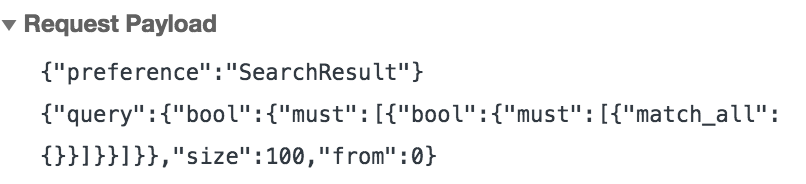
I tested the query using different match instead of match_all and the query works. It just looks like the sorting can not be applied from ReactiveComponent?
NemanjaTck
on 14 Sep 2018
Not sure about using from ReactiveComponent but I usually create a component to set the sort query in state and pass that to ReactiveList using defaultQuery prop.
divyanshu013
on 14 Sep 2018
@NemanjaTck Would love to hear whether you got this working and see an example. I am having the same issue.
 george-dotdev
on 31 Oct 2018
george-dotdev
on 31 Oct 2018
Quick thoughts: Setting sort via ReactiveComponent wouldn't work transitively (i.e. its sort key getting applied to ReactiveList). The reasoning is that since ReactiveList is the result component where sort should be applied, it should be the one setting the sort key. (If sorts could be transitively applied, then there would be a conflict when multiple input components had sort on them.) The sort key context for each component is applied locally to that component itself.
Here's how (I think) it can work with sortOptions:
sortOptions={[
    {
      label: "Best Match",
      dataField: "_score",
      sortBy: "desc"
    },
    {
      label: "Asc",
      dataField: "my_field",
      sortBy: "asc"
    }
]}
When you set dataField key to _score, it equals to scoring by relevance of the search. You can keep a React dropdown list component, which on value change will update the sortOptions prop via a state variable.
P.S. If anyone wants to submit a codesandbox demo showing this, will be happy to add it to the docs / playground.
 siddharthlatest
on 31 Oct 2018
siddharthlatest
on 31 Oct 2018
@siddharthlatest This is brilliant, thank you so much. I will try and get around to making a sandbox as an example for other people.
george-dotdev
on 31 Oct 2018
Hi @siddharthlatest . Do you have the sample sandbox demo for custom sort like above ?
 Arvind6353
on 27 Dec 2018
Arvind6353
on 27 Dec 2018
+1 for the independent component for sorting.
 kud
on 19 Jul 2019
kud
on 19 Jul 2019
It'd be nice if sortBy could take the dataField, so we could sort by relevance by default, without the filter dropdown that comes with the sortOptions.
E.g,
sortBy="={{dataField: "_score" ,order: "desc"}}
Also, I'm surprised that displaying results by score relevance isn't default in an ES framework
 gbentim
on 18 Oct 2019
gbentim
on 18 Oct 2019
@gbentim Not setting a dataField would sort by score the way you are thinking.
siddharthlatest
on 19 Oct 2019
This issue has been automatically marked as stale because it has not had recent activity. It will be closed if no further activity occurs. Thank you for your contributions.
![stale[bot] picture](https://avatars3.githubusercontent.com/in/1724?v=4&s=40) stale[bot]
on 16 Apr 2020
stale[bot]
on 16 Apr 2020
Hello everyone stay safe. I need to custom render the sortOptions object and use a component library to render a nice looking combo box. Unfortunately if you specify the sortOptions on the ReactiveList is renders an ugly looking select dropdown on a fix location. Is there a way to do this? I searched for a documentation and there is none.
 egonzal93
on 25 Apr 2020
egonzal93
on 25 Apr 2020
To be fair, I removed the display of the sort options, and did a ReactiveComponent by my self with custom queries.
kud
on 25 Apr 2020
sortOptions is pretty much useless if you can't customize it were using material-ui and need to make the ui consistent looking. It looks like a generic select component. I used innerClass sortOptions too and it is not enough also some of the styles are being overridden even though you specify it . It needs a custom component and that component should be able to pass the sort options to the reactivelist.
@kud Thanks for the reply, can you please post and share a sample of the a custom query using the values from this object? I am not familiar the query syntax.
sortOptions={[
{
label: "Best Match",
dataField: "_score",
sortBy: "desc"
},
{
label: "Asc",
dataField: "my_field",
sortBy: "asc"
}
]}
egonzal93
on 27 Apr 2020
+1, The sortOptions attribute is pretty much useless.. Does anyone have an example using a custom element?
 nithiz
on 24 Aug 2020
nithiz
on 24 Aug 2020
Related issues
kud
·
4Comments
 ymzoughi
·
4Comments
kud
·
4Comments
ymzoughi
·
4Comments
kud
·
4Comments
 metagrover
·
4Comments
metagrover
·
4Comments
 davidklebanoff
·
4Comments
davidklebanoff
·
4Comments
Most helpful comment
+1 for the independent component for sorting.