Reaction: Order Table, extra empty rows added erroneously
Expected behavior
Orders table should have the same number of rows as orders.
For example: If there are two orders, have just two rows displayed.
Actual Behavior
Extra empty rows appear
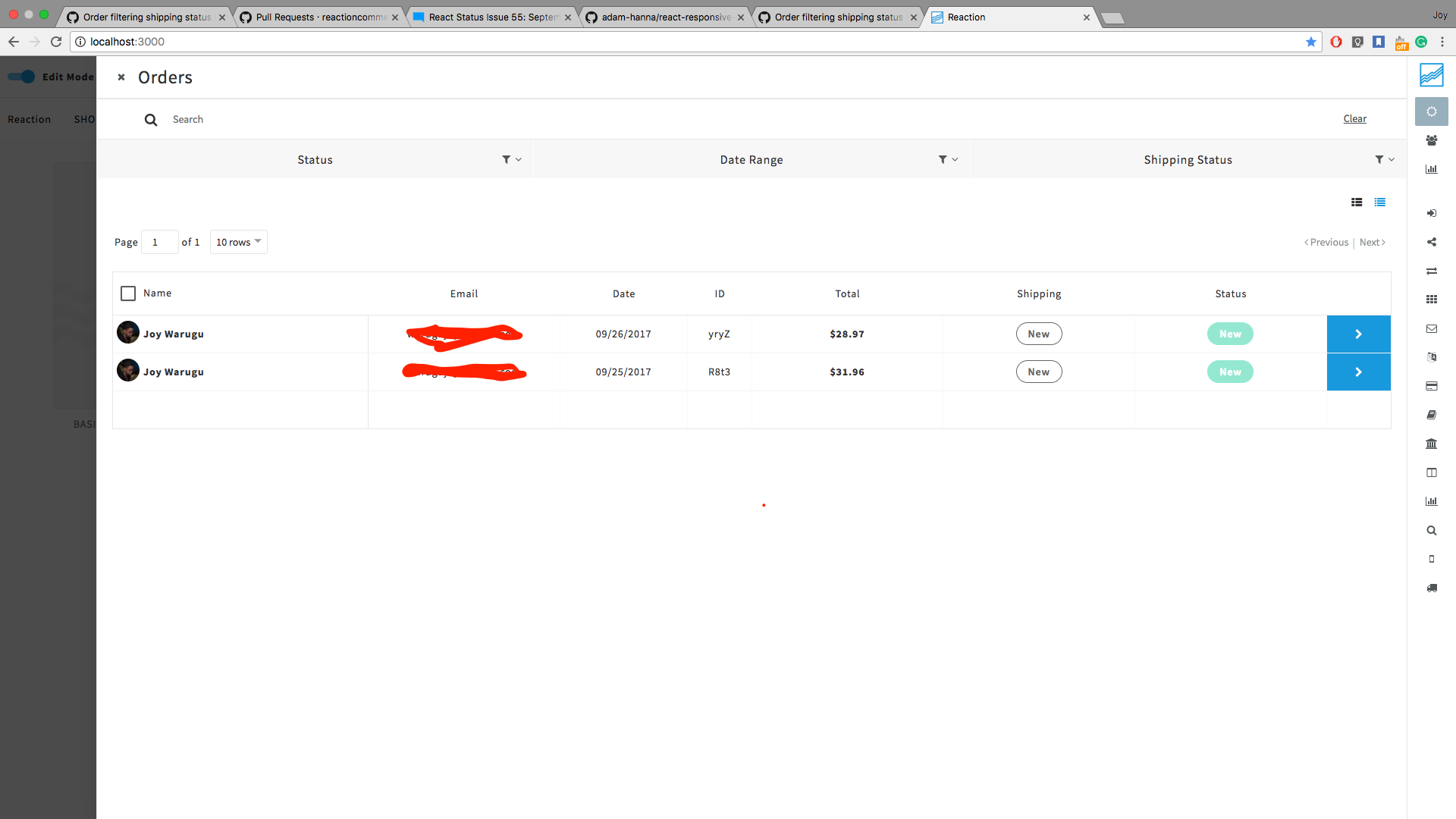
Steps to Reproduce the Behavior
Option 1:
- Create two orders
- Open order dashboard, observe extra rows displayed
Option 2:
- Have many orders and try using filter
- Observe extra rows on the order table
Versions
Node: 8.1.2
NPM: 5.0.3
Meteor Node: 4.8.4
Meteor NPM: 4.6.1
Reaction CLI: 0.10.0
Reaction: 1.5.0
Reaction branch: marketplace
 joykare
All 10 comments
@joykare we set a default minimum rows number on the minRows prop in the sortableTable component. It's set to 0 if there is data in the table, so it should automatically expand to fit the correct amount of results, however, if there are 0 results, we set the minRows to 3, just to make the table look better with the No Results message.
I'd take a look and see if somehow the results count isn't being updated correctly in the orders table, and the minRows prop is still set to 3.
 kieckhafer
on 26 Sep 2017
kieckhafer
on 26 Sep 2017
@kieckhafer So is that causing this: https://github.com/reactioncommerce/reaction/pull/2914#issuecomment-332239794
 rymorgan
on 26 Sep 2017
rymorgan
on 26 Sep 2017
@rymorgan. scratch that, it shouldn't be the cause. Looking into it now.
joykare
on 26 Sep 2017
Seen the problem: order-count is no longer published on order publication. Therefore its always zero.
Since this is happening on marketplace I'm re-opening this issue and solving it as a separate bug.
joykare
on 26 Sep 2017
I think @zenweasel may have removed the order-count in #2855
 spencern
on 26 Sep 2017
spencern
on 26 Sep 2017
Also, this is a pretty great example of something that we need automated testing for.
spencern
on 26 Sep 2017
It should be taking the data.length first though, and any new tables should be passing data in directly instead of using the old meteor pub/sub way.
kieckhafer
on 26 Sep 2017
At the moment, the order table still uses the old pub/sub way so till #2768 is done, we probably need to have some sort of count working in the meantime. @kieckhafer
joykare
on 26 Sep 2017
Solving this on ticket #2768
joykare
on 26 Sep 2017
Sorry, the fix for this was lost when I split up the Reactive Aggregate into a separate ticket. The container can just pass in orderCount as a prop. I'm not sure why we are trying to get it from the publication. That made sense for "PaginatedOrders" but makes no sense for this publication.
 zenweasel
on 27 Sep 2017
zenweasel
on 27 Sep 2017
Related issues
 hmouhtar
·
4Comments
hmouhtar
·
4Comments
 janus-reith
·
4Comments
spencern
·
3Comments
spencern
·
4Comments
janus-reith
·
4Comments
spencern
·
3Comments
spencern
·
4Comments
 aaronjudd
·
3Comments
aaronjudd
·
3Comments