Reaction: I failed to clone and log still shows it's successful
I'm trying to reaction init as below and it failed but log still says it's successful. i don't get it.
1010deiMac:Github gabriel$ reaction init

Cloning the master branch of Reaction from Github...
Cloning into 'reaction'...
error: RPC failed; curl 56 SSLRead() return error -36
fatal: The remote end hung up unexpectedly
fatal: early EOF
fatal: index-pack failed

Installing NPM packages...
/bin/sh: line 0: cd: reaction: No such file or directory

Reaction successfully installed!

To start your Reaction instance, just run:

 cd reaction
 reaction
Expected behavior
It's not supposed to say "Reaction successfully installed!"
Actual Behavior
Reaction successfully installed!
Steps to Reproduce the Behavior
And every time when i need to create a reaction app, i have to clone, i don't know why you don't use Yoeman to create it instead.
And it's better reaction app can be generated locally just using reaction-cli, because every time when create a reaction app, it's downloading from internet, it's slow and takes too much time.
 IamGabrielWu
All 12 comments
@IamGabrielWu sorry to hear about your issues. Thanks for taking the time to report it. It looks like git errors aren't throwing a proper exit code when the process fails. I'll look into it.
As for Yeoman... I think you might be underestimating the complexity of Reaction or overestimating how flexible Yeoman is. Yeoman is typically only for scaffolding an app structure as a starting point. Yeoman also requires you to write a proprietary template structure of the whole app. That would also require a whole separate repo for us that we'd regularly have to keep in sync with the latest version of Reaction. We'd also have to publish it to npm after every Reaction update. Aside from the fact that publishing to npm is not currently possible for a Meteor app, a Yeoman app scaffold template and a fully functional Meteor app are two fundamentally different things.
As for having to clone every time you run reaction init, how often is that really going to happen in the average use case? That's not really an every day command unless you're Reaction contributor. In many (most?) cases, that may not even happen more than once.
Also, the CLI does a lot more than just clone the app. It'd be pretty tough to make the case for having to use/support a whole separate CLI tool and maintain a separate repo for the proprietary scaffold template just to make a single command faster. So I'll certainly fix that git error handling, but I think our efforts would be far better spent on fixing/optimizing the existing tools. Perhaps a good solution for avoiding the full clone each time is we can cache the repo locally and then just pull any changes that exist when reaction init is run.
Until we get a chance to build that... if you really do need to run that command regularly, you can keep an untouched clone somewhere on your filesystem and copy it to a new working directory as needed (which is essentially what the caching idea I mentioned would be doing).
Can you please try running git clone directly and let me know if you get any errors? If that works, please try reaction init again too. I suspect it was a network connectivity issue, so I wouldn't be surprised if the issue didn't happen every time.
Thanks again for reporting the issue!
 jshimko
on 25 Sep 2016
jshimko
on 25 Sep 2016
@jshimko thank you for your reply. And yes it is " network connectivity" issue i couldn't smoothly clone it by reaction init. I can clone it just by git clone, it works faster. I could have a repo backup and any time if i want to run reaction init, i could just use my backup instead of cloning from internet. But i still have doubts what else steps i need to take to make sure the clone from my backup will be the same like the running the command reaction init. Really appreciate your answer on this.
IamGabrielWu
on 27 Sep 2016
You can cd into the clone you save and run git pull to get the latest code updates.
jshimko
on 27 Sep 2016
@jshimko all right. after i get the latest code, what else does reaction init do so i can use git clone and git pull instead ?
IamGabrielWu
on 27 Sep 2016
reaction init does this...
git clone https://github.com/reactioncommerce/reaction.git
cd reaction
meteor npm install
Using those commands directly is identical to the shorter reaction init command. It offers absolutely no performance advantage because reaction-cli is running the exact same thing under the hood. Any time difference is highly likely to just be a coincidence. But certainly feel free to do whatever you prefer. It won't break anything to run them manually.
jshimko
on 27 Sep 2016
Closing issue, has manual fix. Re-open if necessary.
 aaronjudd
on 19 Oct 2016
aaronjudd
on 19 Oct 2016
I don't know why it show like that
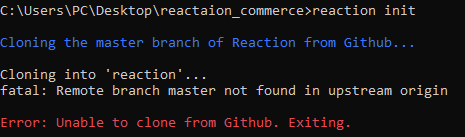
 phearakthefoundry
on 14 Oct 2020
phearakthefoundry
on 14 Oct 2020
@phearakthefoundry You're using the Reaction CLI which was deprecated a long time ago. You should use the new Makefile from reaction-development-platform instead.
 loan-laux
on 14 Oct 2020
loan-laux
on 14 Oct 2020
git clone [email protected]:reactioncommerce/reaction-development-platform.git
cd reaction-development-platform
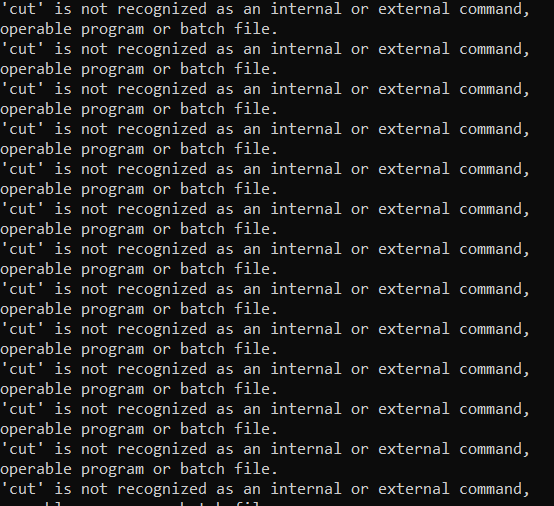
make
After I run make command it show like image below, I use window 10.
 Heanphearak
on 14 Oct 2020
Heanphearak
on 14 Oct 2020
@Heanphearak If you're running reaction-development-platform on Windows, you need to do it through WSL 2. I would also recommend that we move the discussion to the reaction-development-platform repo or to Gitter if you still have issues with this.
loan-laux
on 15 Oct 2020
Hi @loan-laux, how can I customize reaction commerce ? I try to update UI but it not change.
phearakthefoundry
on 19 Oct 2020
Hi @phearakthefoundry, could you please open an issue in the correct repo and tag me there? Or simply ask on our Gitter channel to get an instant response. This thread is very old so I'd rather not have it brought back to life.
loan-laux
on 19 Oct 2020
Related issues
 coooolers
·
4Comments
coooolers
·
4Comments
 ajporlante
·
4Comments
ajporlante
·
4Comments
 rlamostre0
·
4Comments
rlamostre0
·
4Comments
 spencern
·
3Comments
spencern
·
3Comments
 zikeji
·
4Comments
zikeji
·
4Comments
Most helpful comment
reaction initdoes this...Using those commands directly is identical to the shorter
reaction initcommand. It offers absolutely no performance advantage becausereaction-cliis running the exact same thing under the hood. Any time difference is highly likely to just be a coincidence. But certainly feel free to do whatever you prefer. It won't break anything to run them manually.