React: Bug: Devtools in Firefox does not allow adding props or editing props/state/hooks
Version:
- React @
16.13.1 - Firefox @
75.0(version for Manjaro Linux) - DevTools version
4.6.0-6cceaeb67
IMPORTANT: I have the same React DevTools version 4.6.0-6cceaeb67 installed in Google Chrome Beta 81 and it's working as expected.
Steps To Reproduce
- Open React DevTools Components tab
- Select a component with props/state
- Try to add props or edit props, state or hooks.
Here's a screen grab of the issue:

Between the clicks, I'm typing on my keyboard, but nothing happens.
The current behavior
All keys typed in this tab are ignored.
The expected behavior
I should be able to add props or alter props, state, hooks, etc.
 hbarcelos
All 9 comments
Cannot reproduce on windows:
"react": "^16.13.1"
 "react-dom": "^16.13.1"
Firefox 74.0 and Firefox 75 latest also tested
Dev-tools 4.6.0
Could you verify that this issue is specific to Firefox in manjaro/linux?
 daniel-sudz
on 10 Apr 2020
daniel-sudz
on 10 Apr 2020
Distributor ID: Ubuntu
Description: Ubuntu 18.04.4 LTS
Release: 18.04
Codename: bionic
"react": "^16.13.1"
"react-dom": "^16.13.1"
Firefox 75.0
Changing props/state works.

 AlexKorobko
on 10 Apr 2020
AlexKorobko
on 10 Apr 2020
So, I've done the following:
- Checked for patch updates for Firefox Manjaro (none by the time I'm writing).
- Rebooted my PC
- Uninstalled and reinstalled React Developer Tools addon for Firefox (without trying to remove any related config though).
Now I get this for my app:
This is Firefox: the component tree won't even load.

This happens only in my app, others I testes seem to be working fine
This is Firefox in Private Mode:
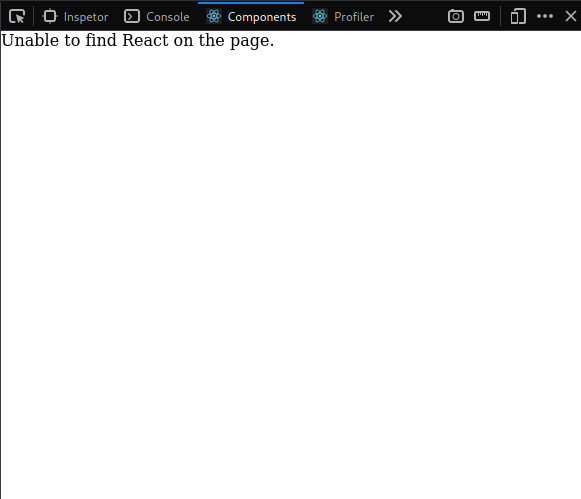
This happens only in every app I tried
This is Chrome (which still works just fine):

Further Information
- My app uses the latest
[email protected]as bundler. - If I remove everything from the app, leaving just an empty div, the problem still persists.
This was a long week for me, I'll keep digging and let you know if I find anything, but I probably won't have any news before next Monday.
hbarcelos
on 11 Apr 2020
Created one component react app with : "parcel-bundler": "^1.12.4".
Works fine in mozilla and chrome.

AlexKorobko
on 11 Apr 2020
I think we should close this issue because its not possible to reproduce on a standard setup.
daniel-sudz
on 11 Apr 2020
Quick update:
I completely removed Firefox from my PC, along with all cache and metadata and installed it again from scratch.
I chose the Firefox Developer Version this time:

The behavior I get now is:
- I still cannot edit content properly
- Some keys like Backspace, Space, ", ` work properly
- Alphanumeric keys don't work at all
- However, if I copy the value from some place else, pasting in the field works fine
hbarcelos
on 15 Apr 2020
@hbarcelos Do you, by chance, have the "search as you type" feature enabled?
Seems like there's something unique going on with your version of Firefox because this works for me (and seems to work for others above)
This is Firefox: the component tree won't even load.
With regard to this, have you tried reloading the page? Occasionally the Components tab doesn't populate (not sure of the reason) but a reload always fixes it.
 bvaughn
on 17 Apr 2020
bvaughn
on 17 Apr 2020
Bulls eye, @bvaughn!
I did have the "Search for text when you start typing" feature on (I don't remember setting this on though).
After I disabled it, the dev tools started working again.
The weird part is that I haven't changed my configs in a while (I'd say for more than 2 years) and the day I posted here was the first time I ever experienced this issue. Maybe something in that regard changed in the recent Firefox releases.
With regard to this, have you tried reloading the page? Occasionally the Components tab doesn't populate (not sure of the reason) but a reload always fixes it.
Regarding that, yes, for sure... Reloading and fresh reloading were the first things I tried. This issue went away with the clean install though.
Thank you very much!
hbarcelos
on 17 Apr 2020
Ah! Lucky guess :smile:
I think that was recently fixed and rolled out to nightly (about a week ago): https://bugzilla.mozilla.org/show_bug.cgi?id=1610141
bvaughn
on 17 Apr 2020
Related issues
 MoOx
·
3Comments
MoOx
·
3Comments
 huxiaoqi567
·
3Comments
huxiaoqi567
·
3Comments
 trusktr
·
3Comments
trusktr
·
3Comments
 tleunen
·
3Comments
tleunen
·
3Comments
 jmullo
·
3Comments
jmullo
·
3Comments