React: [DevTools] Cannot type into search box in Firefox when browser find-as-you-type setting enabled
Do you want to request a feature or report a bug?
Bug
What is the current behavior?
- Enable Firefox Preferences > Browsing > Search for text when you start typing
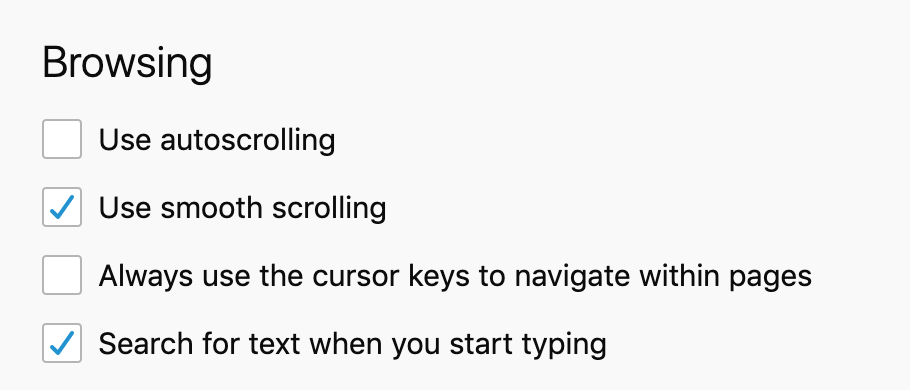
- Open React Devtools
- Note that you can paste text into the search box, but keyboard input will not show any input
- Disable above setting
- Note that Devtools search accepts keyboard input
What is the expected behavior?
- Components search works regardless of find-as-you-type setting
Which versions of React, and which browser / OS are affected by this issue? Did this work in previous versions of React?
Firefox 72.0b10 on macOS 10.14.6
Devtools 4.3.0
 swrobel
All 15 comments
Possible fix: Use event.preventDefault() as recommended by FF developers within SearchInput.js
swrobel
on 26 Dec 2019
I'm not familiar with the "Search for text when you start typing" feature. Sounds kind of annoying 😅 I imagine a lot of input elements would break it?
Anyway since you seem to have the most context here, would you be willing to submit a PR with the change you're suggesting?
 bvaughn
on 28 Dec 2019
bvaughn
on 28 Dec 2019
I have this problem and don't understand concretely what to do as per @swrobel's recommendation. The inability to search components in the component view (which is happening to me in Mozilla but not in Chrome) is tantamount to not using the dev tools at all in Mozilla. Please take this report seriously, instead of snidely asking for PR's like @bvaughn
 victorkane
on 12 Jan 2020
victorkane
on 12 Jan 2020
I'm not sure which part of my response above struck you as "snide", @victorkane :smile:
Literally millions of people use React DevTools and literally only one person (me) regularly contributes code to it. I can't keep up with bug reports and feature requests, and in some cases I rely on people who have more context to chip in and help fix/test things.
Encouraging users to submit PRs is a healthy part of open source.
bvaughn
on 12 Jan 2020
@bvaughn "Encouraging users to submit PRs is a healthy part of open source." Absolutely, absolutely, but in the appropriate context. If millions of people use react dev tools perhaps more should be done to encourage the formation of a community of developers... What I'm saying is that the bug (or lack of configuration) mentioned here should also be taken seriously, and perhaps an effort should be made to include more people capable of a solution. Not being able to use the search bar tool in Component view has an extremely high impact, and wastes the work being put into the extension (for Mozilla). Thanks for all your hard work on this.
victorkane
on 12 Jan 2020
I wouldn't characterize the impact of this bug quite that strongly. I'm under the impression that it only affects users who have enabled the "Search for text when you start typing" option. (It's disabled by default.)
I've added the "good first issue" tag just now to let folks know that we'd accept PRs for this. Beyond that, I'm not sure what more to do to encourage folks to look at this. I don't think we need to ping any browser vendors or anything, since a likely solution seems known. It's more just a matter of implementing it and testing it. :smile:
bvaughn
on 12 Jan 2020
@bvaughn So:
I wouldn't characterize the impact of this bug quite that strongly. I'm under the impression that it only affects users who have enabled the "Search for text when you start typing" option. (It's disabled by default.)
- What about the users who want to enable "Search for text when you start typing" option??
- How would users, especially beginners, even know this???
victorkane
on 12 Jan 2020
I'm not sure how to respond to this thread, @victorkane. Would you be interested in contributing a PR for this? I'd be happy to review it promptly. Thoroughly testing it is the thing I'd need the most help with to be honest.
For some insight into how I (internally) prioritize bugs like this: React DevTools has a couple million active users, but the Firefox extension accounts for < 5% of them. And of that 5%, only people who have enabled the "Search for text when you start typing" option will be impacted by this bug. I understand that it's a poor user experience. I don't mean to be discounting that. I just don't think it invalidates the extension or the work put into it.
How would users, especially beginners, even know this???
The same way you found this thread :smile:
bvaughn
on 12 Jan 2020
I would like to take a look at this issue, if possible:)
@bvaughn
 M-Izadmehr
on 12 Jan 2020
M-Izadmehr
on 12 Jan 2020
This issue is all yours, @M-Izadmehr 😄
I've added the "good first issue (taken)" label so that others will know not to start work on the issue. If you change your mind about the issue, no worries! Just let me know so that I can remove the label and free it up for someone else to claim.
Cheers!
bvaughn
on 12 Jan 2020
@bvaughn I did dig a little bit about this issue.
It seems to be an internal bug in firefox itself, it bocks inputs (just in devtool extensions) to receive the following events/cases:
- onchange
- oninput (the only time devtool receives it is after
onpasteand not with typing) - contenteditable elements
However, the following events are working fine:
- onclick
- oncut/onpaste
- onKey events
Also, adding event.preventDefault does not solve the issue because the element does not receive the event in the first place to be able to run the callback function on that.
I also created a simple Firefox devtool extension to test it with vanillaJs, the problem also exists there too.
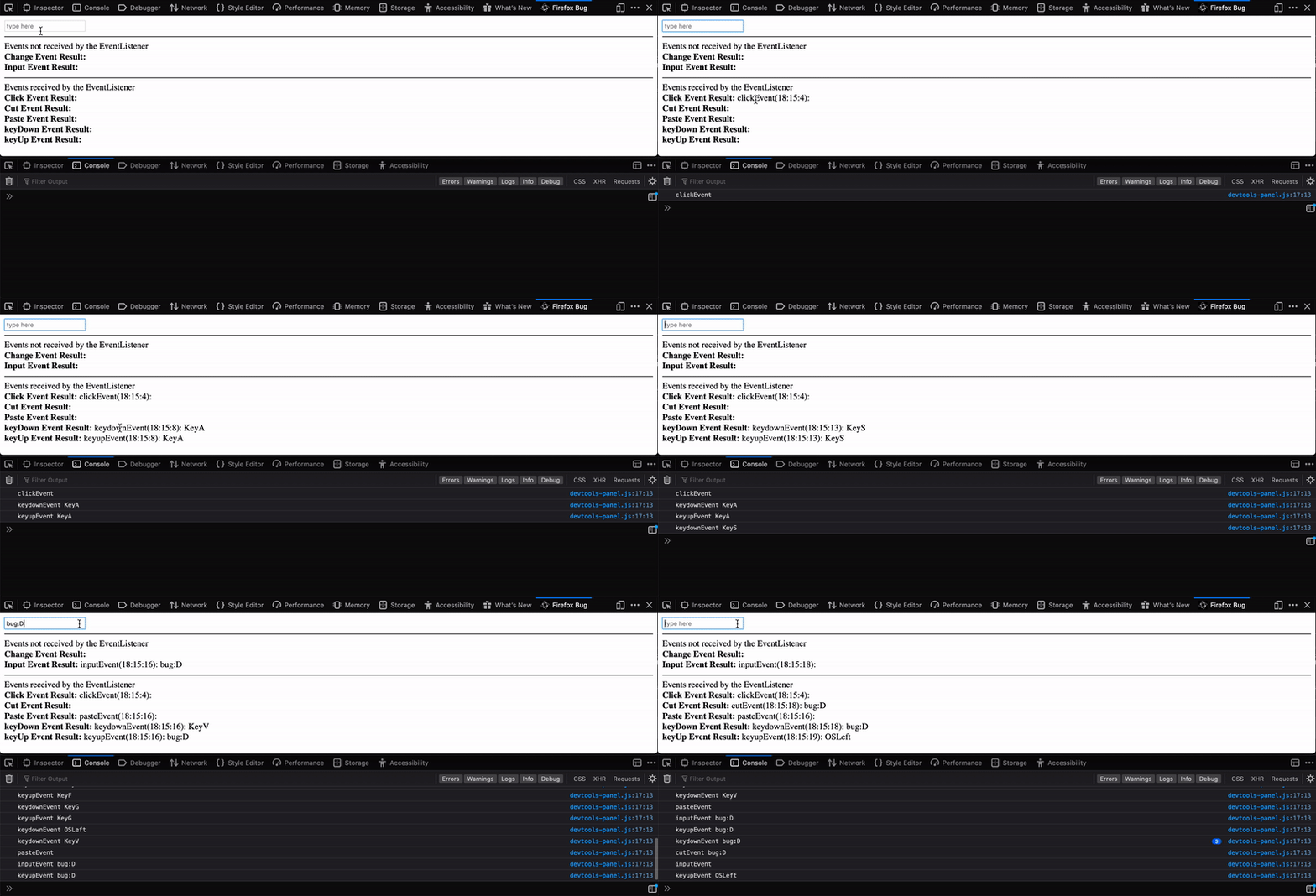
The interesting point is that inside the firefox devtool source code, this problem does not exist, and they simply add the event listener for input, and only external extensions suffer from this. As a result, I reported this on bugzilla and am waiting for their response.
One probable solution is to write an eventlistener for keyDown, and simulate onChange, it is possible but I guess it will be an overkill.
M-Izadmehr
on 19 Jan 2020
Thank you for the detailed follow up @M-Izadmehr! and thanks for filing an issue on bugzilla! 🙇
Given what you said, let's wait and see what the Firefox folks say about this before making any changes on our end.
bvaughn
on 19 Jan 2020
Thanks for the fun that I had reading this profound conversation! :joy:
 bl00mber
on 8 Mar 2020
bl00mber
on 8 Mar 2020
@bvaughn I have some news:)
The cause of this issue inside firefox was that the FindBar internals intercepted the events, and then they call event.preventDefault(), and so the extension page never receives those events.
After a lot of discussions that you can follow here the issue is now fixed and already deployed to the latest version of firefox nightly (as you can see in the gif, now both findbar and devTool search works).
I think now we can move on and close this issue.

M-Izadmehr
on 2 Apr 2020
Thanks for the update, @M-Izadmehr!
Closing!
bvaughn
on 2 Apr 2020
Related issues
 UnbearableBear
·
3Comments
UnbearableBear
·
3Comments
 zpao
·
3Comments
zpao
·
3Comments
 jvorcak
·
3Comments
jvorcak
·
3Comments
 tleunen
·
3Comments
tleunen
·
3Comments
 h1orz
·
3Comments
h1orz
·
3Comments
Most helpful comment
This issue is all yours, @M-Izadmehr 😄
I've added the "good first issue (taken)" label so that others will know not to start work on the issue. If you change your mind about the issue, no worries! Just let me know so that I can remove the label and free it up for someone else to claim.
Cheers!