React: Create React App builds empty document (blank screen) with react-router and firebase
I get a white screen on my deployed react webapp, it worked perfectly before. I tried everything I could find here but it didn t worked.
Below is the link to my website : https://numbr-d1a20.firebaseapp.com/
And below the link to my git repo : github.com/rosanche/Numbr I just took of the firebase.js file because I have my private config in it.
I tried everything,
Change the homepage, look for error in the console, clear my cache and a lot more...
Below is my package.json
{
      "name": "numbr",
      "version": "0.1.0",
      "private": true,
      "dependencies": {
        "@material-ui/core": "^4.3.1",
        "express": "^4.17.1",
        "firebase": "^6.3.4",
        "mysql": "^2.17.1",
        "node-sass": "^4.12.0",
        "nodemon": "^1.19.1",
        "react": "^16.8.6",
        "react-dom": "^16.8.6",
        "react-native-indicators": "^0.13.0",
        "react-router-dom": "^5.0.1",
        "react-scripts": "3.0.1",
        "recompose": "^0.30.0"
      },
      "scripts": {
        "start": "react-scripts start",
        "build": "react-scripts build",
        "test": "react-scripts test",
        "eject": "react-scripts eject"
      },
      "eslintConfig": {
         "extends": "react-app"
      },
      "browserslist": {
        "production": [
          ">0.2%",
          "not dead",
          "not op_mini all"
        ],
        "development": [
          "last 1 chrome version",
          "last 1 firefox version",
          "last 1 safari version"
        ]
      }
}
I expect to see my sign in page and not a blank screen.
Thanks in advance for your help!
 rosanche
All 2 comments
Hello @rosanche! First, your github repository is missing a file required to launch your application. You are importing Firebase here:
import Firebase from './firebase';
On your website you do have that file so I assume you just forgot to commit it :)
The real problem though lies here
React is working like expected, it's just that your condition(authUser) returns false and therefore your wrapper returns null instead of your real component
<AuthUserContext.Consumer>
    {authUser =>
        condition(authUser) ? <Component {...this.props} /> : null
    }
</AuthUserContext.Consumer>
You could verify it by breakpoint:
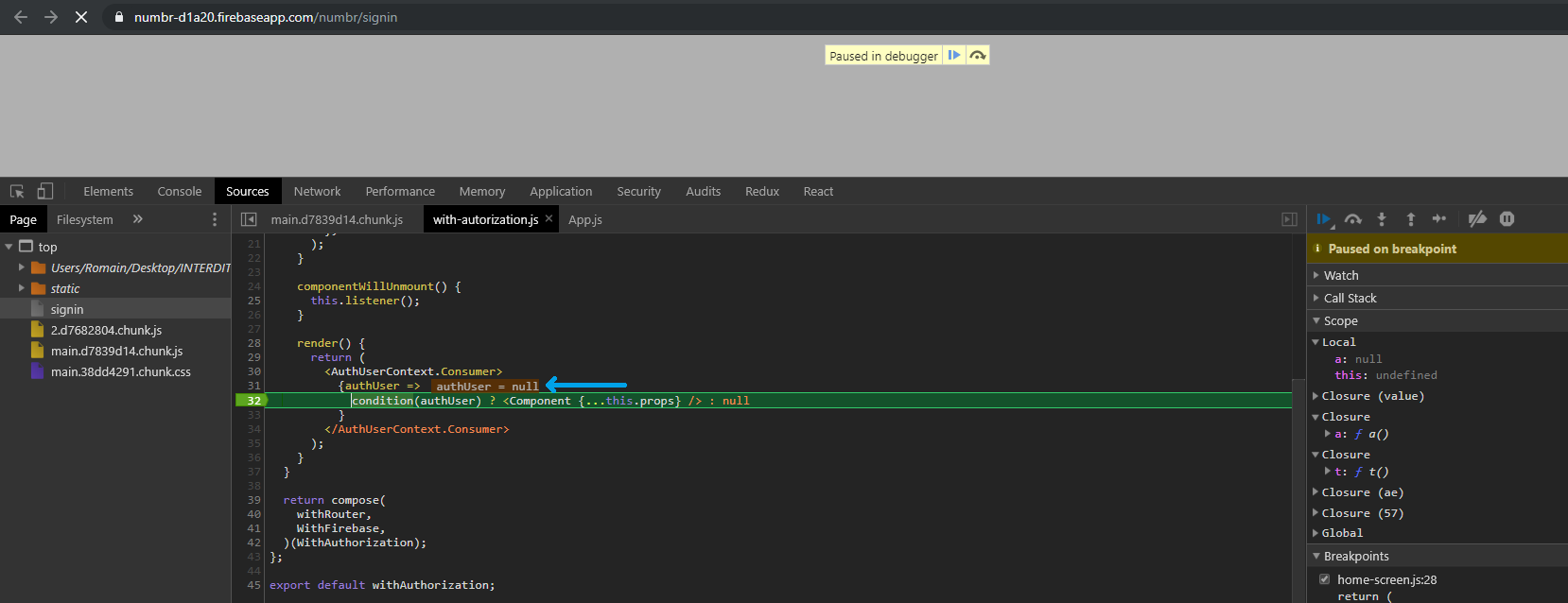
edit: If you was following this article then you probably missed something. You should call
this.props.firebase.doSignInWithEmailAndPassword(this.state.username, this.state.password)
_before_ trying to access components wrapped in with-autorization. So:
- First you show authorization form, it shouldn't be wrapped in with-authorization, or at least not return null instead of form when authUser is null
- Then you push route for your with-autorization component and that component will get authUser.
 Dergash
on 9 Aug 2019
Dergash
on 9 Aug 2019
also this issue could probably be opened in the https://github.com/facebook/create-react-app repo for proper review
 ahtee
on 9 Aug 2019
ahtee
on 9 Aug 2019
Related issues
 zpao
·
3Comments
zpao
·
3Comments
 jmullo
·
3Comments
jmullo
·
3Comments
 MoOx
·
3Comments
MoOx
·
3Comments
 DimitarChristoff
·
3Comments
DimitarChristoff
·
3Comments
 tleunen
·
3Comments
tleunen
·
3Comments
Most helpful comment
Hello @rosanche! First, your github repository is missing a file required to launch your application. You are importing Firebase here:
But there is no such file
On your website you do have that file so I assume you just forgot to commit it :)
The real problem though lies here
React is working like expected, it's just that your condition(authUser) returns false and therefore your wrapper returns null instead of your real component
You could verify it by breakpoint:

edit: If you was following this article then you probably missed something. You should call
_before_ trying to access components wrapped in with-autorization. So: