React: Context Consumer forcing the first child to always re-render on state change
Do you want to request a feature or report a bug?
bug
What is the current behavior?
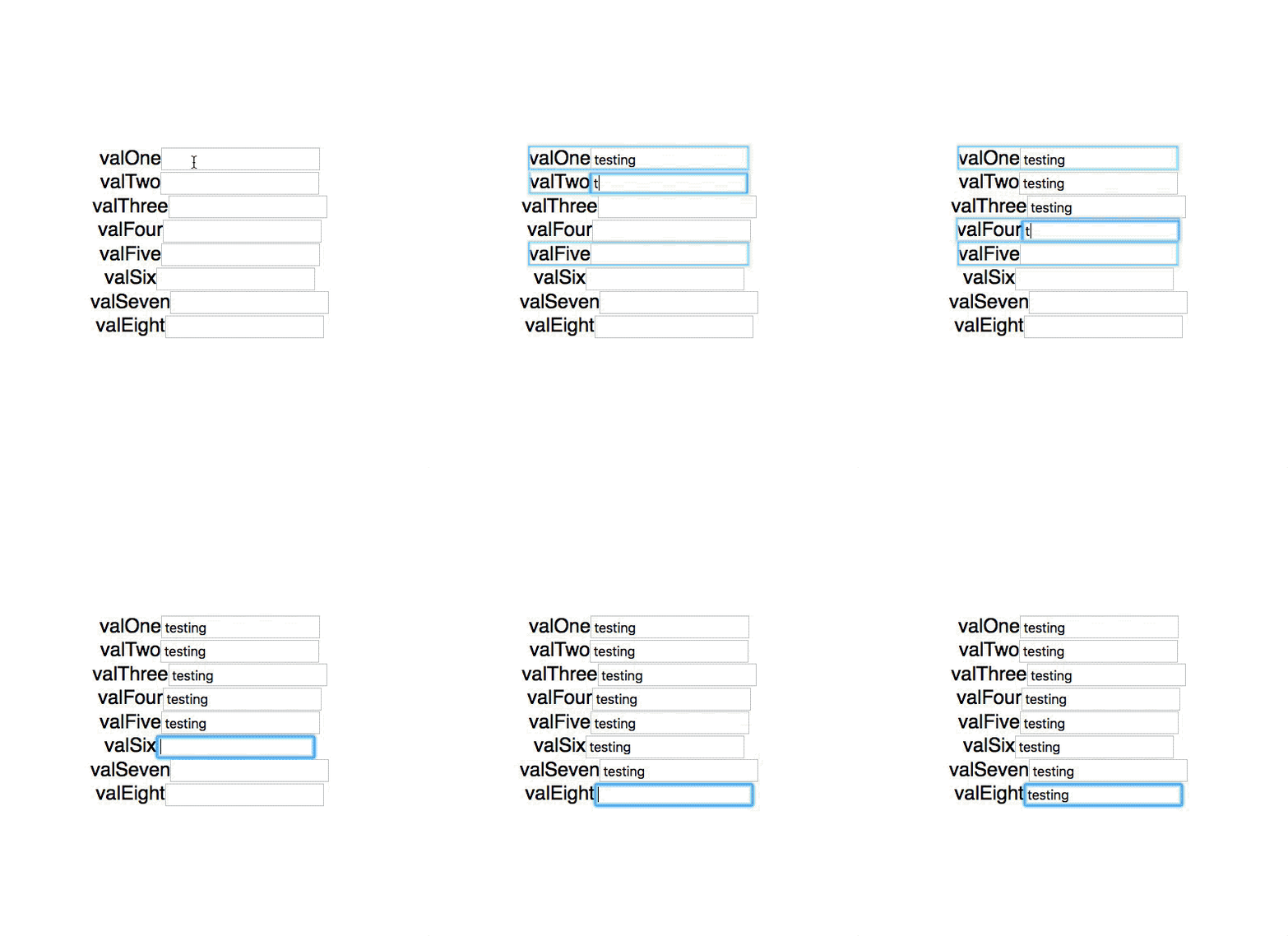
When using the context API, the first element inside of a consumer will always re-render on context change, whether it should or not.
If the current behavior is a bug, please provide the steps to reproduce and if possible a minimal demo of the problem. Your bug will get fixed much faster if we can run your code and it doesn't have dependencies other than React. Paste the link to your JSFiddle (https://jsfiddle.net/Luktwrdm/) or CodeSandbox (https://codesandbox.io/s/new) example below:
While I was getting deeper into optimization in react (and getting rid of Redux), I was working on an example component that holds the state of a group of inputs. In the gif above, there is a Provider that holds that state, and then 8 inputs (which have been wrapped in PureComponent) split into 2 groups of 4 that consume the context from a consumer. Each input is looking at a different piece of state.
It appears, however, that the first child of a consumer will always re-render, regardless of if it should or not.
https://codesandbox.io/s/yvx63kk87v
What is the expected behavior?
I would expect that the PureComponents that shouldn't re-render, wouldn't unless its assigned piece of state changed. Unless I'm misunderstanding the reconciliation/rendering step when you're looking at a consumer.
Which versions of React, and which browser / OS are affected by this issue? Did this work in previous versions of React?
React - 16.5.2
React DOM - 16.5.2
Chrome - 69.0.3497.100 (haven't tested others)
Not sure about if this happened in other versions of react.
 CarsonMcKinstry
All 7 comments
Sorry for digression but, is that some kind of extension for tracking re-rendered component? that looks very useful so I was looking for it but couldn't find one.
 godon019
on 12 Oct 2018
godon019
on 12 Oct 2018
@godon019 It's the React Dev Tools. In the settings, there's an option for highlighting renders
CarsonMcKinstry
on 12 Oct 2018
Take a look at the caveats section in react context docs. Because the provider value is always a new object (by reference) the consumer will re-render.
In the example provided, all of the consumer children are being rendered, not just the first child. Add a Math.random() call in there if you're interested in visually seeing the updates. Only 'highlighting' the first child _might_ be a bug in react dev tools which can be filed in that repo.
 chasestarr
on 12 Oct 2018
chasestarr
on 12 Oct 2018
Only 'highlighting' the first child might be a bug in react dev tools which can be filed in that repo.
 gaearon
on 12 Oct 2018
gaearon
on 12 Oct 2018
Because the provider value is always a new object (by reference) the consumer will re-render.
To be clear, the consumer will re-render but the Input components in this example seem to bail out correctly. If I put console.log into the Input I only see one log for every keystroke, not many.
I think that maybe there's a bug in how we determine whether to highlight updates or not. I don't see an actual performance problem here — but feel free to file an issue in React DevTools about over-counting updates.
gaearon
on 12 Oct 2018
The highlighting bug seems related to Fragment rather than context. Similar to how if your hover over an element that has a Fragment as child, only the first element of the Fragment is highlighted as being a child of the hovered element.
 Jessidhia
on 12 Oct 2018
Jessidhia
on 12 Oct 2018
Yes, that part is https://github.com/facebook/react-devtools/issues/1007.
gaearon
on 12 Oct 2018
Related issues
 UnbearableBear
·
3Comments
UnbearableBear
·
3Comments
 kocokolo
·
3Comments
kocokolo
·
3Comments
 jimfb
·
3Comments
jimfb
·
3Comments
 zpao
·
3Comments
zpao
·
3Comments
 tleunen
·
3Comments
tleunen
·
3Comments
Most helpful comment
@godon019 It's the React Dev Tools. In the settings, there's an option for highlighting renders