React: Multiple onFocus events fired on single focus in Safari
I'd like to report a possible bug.
Brief description
OnFocus synthetic event is fired multiple times on single focus occurrence in Safari. Expected behaviour is for it to be fired only once per focus.Live demo: https://codesandbox.io/s/101pnjxq27
Minimal steps to reproduce
- install create-react-app
$ npm install -g create-react-app
create an example application
$ create-react-app input-focus-test
$ cd input-focus-testedit application file and add input with onFocus event handler
$ vi src/App.js
import React, { Component } from 'react';
import logo from './logo.svg';
import './App.css';

class App extends Component {
  handleOnFocus = evt => {
        console.log('handleOnFocus', evt);
  }

  render() {
    return (
      <div className="App">
        <header className="App-header">
          <img src={logo} className="App-logo" alt="logo" />
          <h1 className="App-title">Welcome to React</h1>
        </header>
        <p className="App-intro">
          To get started, edit <code>src/App.js</code> and save to reload.
        </p>
        <p>
          Input
          <input onFocus={this.handleOnFocus}/>
        </p>
      </div>
    );
  }
}

export default App;
start application
$ npm run startopen up locahost:3000 in Safari
- click on the input field with developer’s console opened
- notice focus event fired multiple times
- Additional info
This issue has been found in the following environment: - macOS Sierra version 10.12.6 (also tested and found on High Sierra)
- Safari 10.1.2 (also tested and found in Safari 10.0 and Safari 11, seems to work on latest Safari mobile, Chrome and Firefox)
- React JS 15.5.4 (also tested and found in React 16)
- example steps to reproduce above generated with create-react-app version 1.4.1
Some of our observations that might come in handy:
- this issue seems to behave randomly to some extent
- event is usually fired twice when changing focus from input to input (so first click on input fires two events, consequential fire only one, but when changing focus to a different input field it fires twice again)
- additional interesting behavior happens with multiple input fields; for instance with input fields 1 and 2, first focus on input 1 generates two events onFocus with input 1, but then focus on input 2 sometimes generates three events: onFocus with input 1, then input 2, then input 1 again as targets.
 mbryla
All 15 comments
@mbryla this is reproducible without React; see this jsfiddle.
I came across a similar issue in react-datepicker (IMO) and was able to create a workaround that fixes my issue in a very narrow case, but in a way that I am uncomfortable with (storing a value on the actual dom elements, referring to the "relatedTarget" of the event, &c).
I'm just curious if you (or anyone besides me) agrees that this seems to be a Safari issue and not really a react issue.
also, reproduction video:

 pmacmillan
on 6 Nov 2017
pmacmillan
on 6 Nov 2017
@pmacmillan - what Safari version did you test it on? You might be right that this is Safari related issue, especially because I have recently upgraded to Version 11.0.1 (12604.3.5.1.1) and both your and mine fiddles seem to behave correctly (without spurious events). Can you please try to upgrade and verify? If so this ticket can be closed...
mbryla
on 7 Nov 2017
Hmm.. I feel like I'm insane because testing now at home on my personal laptop and, yes, it works correctly... (Safari Version 11.0 (11604.1.38.1.7)
pmacmillan
on 7 Nov 2017
So it is reproducible in 10.1 (which is currently 20% of my audience -- and me at work, apparently)... Sigh....
pmacmillan
on 7 Nov 2017
I cannot right now confirm on my work laptop (although I know I upgraded to safari 11 beta because of this issue), but I am 90% confident that this is a safari 10 issue.
pmacmillan
on 7 Nov 2017
Reproduces in Version 11.0.1 (12604.3.5). About to apply an update.
Reproduces in Version 11.0.1 (12604.3.5.1.1).
I wonder if there is an OS setting that is affecting this...
pmacmillan
on 8 Nov 2017
For me, it's the "Force Click" option available in newer macbooks and external trackpads.
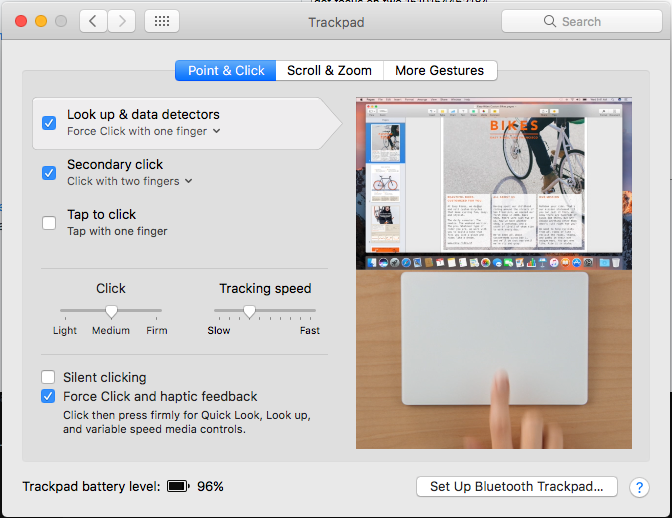
Disabling the "Look up & data detectors" causes the issue to go away.
pmacmillan
on 8 Nov 2017
I'm able to recreate the bug in Safari Tech Preview 44 (Safari 11.1, WebKit 13605.1.13.2 - released today) and Safari 11.0.1 (13604.3.5). Disabling Look up & data detectors also prevents the problem.
I've seen this with touch events in iOS 10.x and 11.0.x. Can't seem to recreate in 11.1.1 with the demo above.
That said, React DatePicker still breaks in iOS 11.1.1 with the same root cause. Could be it's too hard to trigger the fiddle on touch.
 cliener
on 16 Nov 2017
cliener
on 16 Nov 2017
@cliener ; I didn't create the fiddle with touch in mind at all (I would add listeners for the touch* events), and I lack a force-touch capable device to evaluate it 😛 .
pmacmillan
on 16 Nov 2017
I wrote "touch"… meant "tap" which triggers the same blur/focus chain.
cliener
on 16 Nov 2017
With further testing, it seems this particular problem is unique to Safari/Mac. I can't reproduce the event chain on iOS even after constructing a mobile-friendly version of the test.
cliener
on 16 Nov 2017
Webkit bug (MacOS): https://bugs.webkit.org/show_bug.cgi?id=179990
cliener
on 24 Nov 2017
I've put together a fix (in part borrowing @pmacmillan's work) though I'm unsure if it should live inside React or as a separate library. Assuming the latter, it's now available for implementation: https://github.com/cliener/input-fixer
Applying this fix globally without knowing the implications might well break current functionality.
Importantly, focus/blur events are throttled to within 50ms of the first event of that type. The question is: when is that likely to happen?
cliener
on 28 Nov 2017
The WebKit bug is logged as FIXED but I haven't been able to figure out what public release (if any) the fix has gone out in. Can anyone confirm/deny this bug is still present in the latest update of Safari?
 craigkovatch
on 26 Feb 2019
craigkovatch
on 26 Feb 2019
I ended up here because I'm seeing a double onFocus event when using Elm. Only in Safari.
I just updated my mac, running:
OS X 10.14.4 (18E226)
Safari Version 12.1 (14607.1.40.1.4)
So I'd say the bug is still there.
 z5h
on 8 Apr 2019
z5h
on 8 Apr 2019
Related issues
 jimfb
·
3Comments
jimfb
·
3Comments
 DimitarChristoff
·
3Comments
DimitarChristoff
·
3Comments
 MoOx
·
3Comments
MoOx
·
3Comments
 Prinzhorn
·
3Comments
Prinzhorn
·
3Comments
 hnordt
·
3Comments
hnordt
·
3Comments
Most helpful comment
Webkit bug (MacOS): https://bugs.webkit.org/show_bug.cgi?id=179990