React-virtualized: Bug with react-lifecycles-compat
Bug
I've created a simple app based off one of the examples on the website:
import React from 'react';
import { AutoSizer, List } from 'react-virtualized';

const list = [
  'Brian Vaughn',
  'Willson Mock',
  'Tiffany Wang'
];

function rowRenderer ({ key, index, style}) {
    return (
        <div key={key} style={style}>
            {list[index]}
        </div>
    )
}

export default class SubAppWithVirtualized extends React.Component {
    constructor(props) {
        super(props);
    }

    render() {
        <AutoSizer>
            {({ height, width }) => (
            <List
                height={height}
                rowCount={list.length}
                rowHeight={20}
                rowRenderer={rowRenderer}
                width={width}
            />
            )}
        </AutoSizer>
    }
}
When my app compiles, I'm getting this output in my terminal:
WARNING in ./node_modules/react-virtualized/dist/es/Grid/Grid.js
1529:0-8 "export 'default' (imported as 'polyfill') was not found in 'react-lifecycles-compat'

WARNING in ./node_modules/react-virtualized/dist/es/ArrowKeyStepper/ArrowKeyStepper.js
184:0-8 "export 'default' (imported as 'polyfill') was not found in 'react-lifecycles-compat'

WARNING in ./node_modules/react-virtualized/dist/es/Masonry/Masonry.js
455:0-8 "export 'default' (imported as 'polyfill') was not found in 'react-lifecycles-compat'

WARNING in ./node_modules/react-virtualized/dist/es/Collection/CollectionView.js
616:0-8 "export 'default' (imported as 'polyfill') was not found in 'react-lifecycles-compat'

WARNING in ./node_modules/react-virtualized/dist/es/MultiGrid/MultiGrid.js
851:0-8 "export 'default' (imported as 'polyfill') was not found in 'react-lifecycles-compat'
Here's the relevant part of my package.json as well:
"devDependencies": {
    "autoprefixer": "8.5.0",
    "babel-core": "6.26.3",
    "babel-loader": "7.1.4",
    "babel-plugin-transform-object-rest-spread": "6.26.0",
    "babel-polyfill": "6.26.0",
    "babel-preset-env": "1.7.0",
    "babel-preset-react": "6.24.1",
    "babel-register": "6.26.0",
    "clean-webpack-plugin": "0.1.19",
    "css-loader": "0.28.11",
    "file-loader": "1.1.11",
    "postcss": "6.0.22",
    "postcss-loader": "2.1.5",
    "resolve-url-loader": "2.3.0",
    "sass-loader": "7.0.1",
    "style-loader": "0.21.0",
    "uglifyjs-webpack-plugin": "1.2.5",
    "url-loader": "1.0.1",
    "webpack": "3.6.0"
  },
  "dependencies": {
    "prop-types": "^15.6.1",
    "react": "^16.3.2",
    "react-dom": "^16.3.2",
    "react-router-dom": "^4.2.2",
    "react-virtualized": "^9.19.0"
  }
I've tried modifying my imports like this and still get similar results:
import Autosizer  from 'react-virtualized/dist/commonjs/AutoSizer'
import List from 'react-virtualized/dist/commonjs/List'
WARNING in ./node_modules/react-virtualized/dist/es/Grid/Grid.js
1529:0-8 "export 'default' (imported as 'polyfill') was not found in 'react-lifecycles-compat'
This time the warning in the terminal is shorter. In both cases though, I get the following error in my browser:

 fay-jai
All 10 comments
related: #1114
 wuweiweiwu
on 18 May 2018
wuweiweiwu
on 18 May 2018
For the moment you can modify the webpack configuration to avoid this problem.
Specified resolve.mainFields equals to ['main']
Or waiting react-lifecycles-compat to bump a new version.
 pigcan
on 18 May 2018
pigcan
on 18 May 2018
@pigcan are you suggesting I update my project's webpack.config.js to include mainFields: ['main']? I just tried doing that and that unfortunately seemed to show a new error:
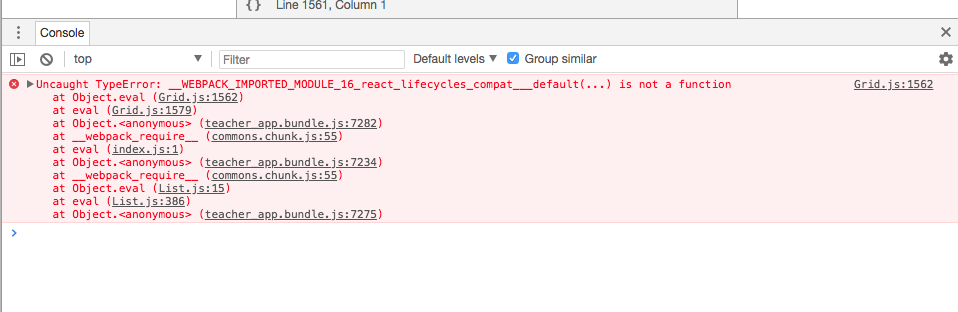
Any thoughts on this?
fay-jai
on 21 May 2018
@wuweiweiwu do you have any timing on when 9.19.1 will be released to include these changes? Thanks!
fay-jai
on 21 May 2018
@fay-jai could you provide a example repo?
I solved this issue simply by setting mainFields: ['main'] in my project.
pigcan
on 22 May 2018
@fay-jai I'll try to release in the next two days!
wuweiweiwu
on 22 May 2018
the version 9.19.0 cant work well, plz bump 9.19.1 asap for this issue @wuweiweiwu
 sbyps
on 22 May 2018
sbyps
on 22 May 2018
[email protected] has been released! https://www.npmjs.com/package/react-virtualized
wuweiweiwu
on 23 May 2018
Please open a new issue if this problem persists.
thanks! 👍
wuweiweiwu
on 23 May 2018
@wuweiweiwu thank you so much - this issue seems to be resolved for me!
fay-jai
on 24 May 2018
Related issues
 zllc
·
3Comments
zllc
·
3Comments
 djeeg
·
3Comments
djeeg
·
3Comments
 johnnyji
·
3Comments
johnnyji
·
3Comments
 mccambridge
·
3Comments
mccambridge
·
3Comments
 EdBoucher
·
3Comments
EdBoucher
·
3Comments
Most helpful comment
[email protected]has been released! https://www.npmjs.com/package/react-virtualized