React-virtualized: Dropdown DateTimePicker on header not show: z-index issue
I added a DateTimePicker (from react-widgets) onto a column header, however when it drops down, the date selection widget doesn't get shown:
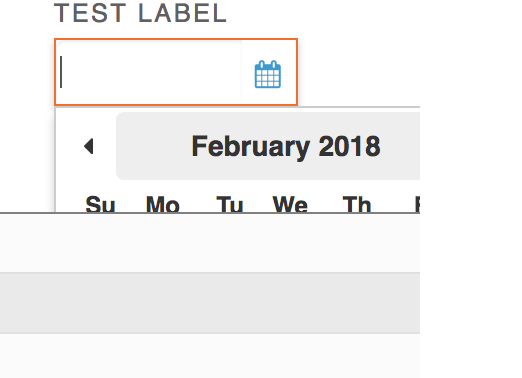
Below is the basically the code I've used (minus some other logic and styling). I added the DateTimePicker in the headerRenderer of the Column component:
<Column
   .....props
   headerRenderer={this.headerRenderer}
/>

//headerRenderer function
headerRenderer = ({dataKey, label}) => {
    return (
        <div>
            {this.Label(label)}
            <div>
                 <DateTimePicker ...props />
            </div>
        </div>
    );
}
I've tried changing the z-index for the div wrapping DateTimePicker and also the headerStyle on the Table component, but the dropdown calender is still hidden. Is there any way to make it show over the rows?
 davidychow87
All 3 comments
@davidychow87 were you able to resolve this? How? Thx.
 mpmeyer
on 17 Oct 2018
mpmeyer
on 17 Oct 2018
@mpmeyer No sorry, I changed the design to have the DateTimePicker in another elsewhere outside of the header. Never figured it out.
davidychow87
on 18 Oct 2018
@mpmeyer I just hit this issue today.
The problem is the header row element has style="...overflow: hidden;..."
I fixed it by adding the following to my css
.ReactVirtualized__Table__headerRow {
  overflow: visible !important;
}
The !important is necessary to override the element style.
 joshlongerbeam
on 12 Nov 2018
joshlongerbeam
on 12 Nov 2018
Related issues
 wnz99
·
3Comments
wnz99
·
3Comments
 ellatrix
·
3Comments
ellatrix
·
3Comments
 athorwall
·
4Comments
athorwall
·
4Comments
 bee0060
·
3Comments
bee0060
·
3Comments
 miraage
·
4Comments
miraage
·
4Comments