React-virtualized: ScrollSync doesn't seem to sync correctly/fast enough
After setting up a ScrollSync with three grids (similar to the ScrollSync example) I realized that in both cases (ScrollSync example and my own code), the headers don't sync up to the main grid. It always shows a slight delay. I read somewhere that this could be fixed by putting a canvas on top of the grid, but that didn't work for me.
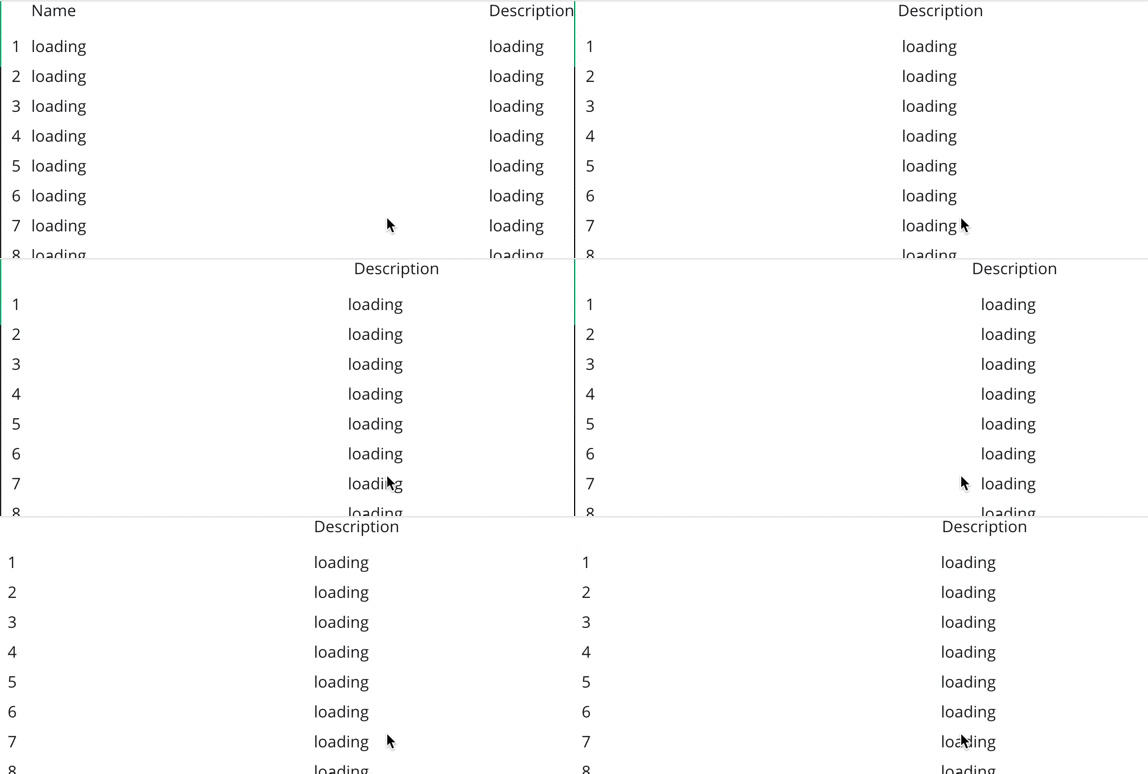
See how the Description doesn't align with the rest of the content?
import * as React from 'react'
import {AutoSizer, InfiniteLoader, FlexColumn, FlexTable, Grid, ScrollSync} from 'react-virtualized'
const classes: any = require('./InfiniteTable.scss')

interface Props {
  model: any
}

export default class InifiniteTable extends React.Component<Props, {}> {
  list = [
      { name: 'Brian Vaughn', description: 'Software engineer', loaded: false },
      { name: 'John Doe', description: 'PM', loaded: false },
  ];

  constructor() {
    super()
    for (let i = 0; i < 100; i++) {
      this.list.push({ name: 'John Doe', description: 'PM', loaded: false })
    }
  }

  loadMoreRows = ({startIndex, stopIndex}) => {
    console.log(`loading more rows ${startIndex} - ${stopIndex}`)
    return new Promise(
      (resolve) =>
          setTimeout(() => {
            for (let i = startIndex; i < stopIndex; i++) {
              this.list[i].loaded = true
            }
            resolve(this.list.slice(startIndex, stopIndex))
          }, 1000)
    )
  }

  renderCell = ({rowIndex, columnIndex}) => {
    let value;
    if (this.list[rowIndex].loaded) {
      value = columnIndex === 0 ? this.list[rowIndex].name : this.list[rowIndex].description
    } else {
      value = 'loading'
    }
    return (
      <div style={{display: 'flex', alignItems: 'center', height: 30}}>
        {value}
      </div>
    )
  }

  render() {
    return (
      <div style={{height: '100%'}}>
        <canvas style={{position: 'absolute', top: 0, width: '100%', height: '100%', pointerEvents: 'none'}}>

        </canvas>
        <InfiniteLoader
          rowCount={this.list.length}
          isRowLoaded={({index}) => this.list[index].loaded}
          loadMoreRows={this.loadMoreRows}
          >
          {({onRowsRendered, registerChild}) => (
          <ScrollSync>
            {({clientHeight, clientWidth, onScroll, scrollHeight, scrollLeft, scrollTop, scrollWidth}) =>
            <div style={{display: 'flex', flexDirection: 'row', height: '100%'}}>
              <div style={{display: 'flex', flexDirection: 'column'}}>
                <div style={{marginTop: 30}}>
                  <Grid
                    className={classes.sideContainer}
                    cellRenderer={({rowIndex}) => <div style={{display: 'flex', justifyContent: 'center', alignItems: 'center', height: 30}}>{rowIndex + 1}</div>}
                    columnWidth={30}
                    columnCount={1}
                    height={clientHeight}
                    rowHeight={30}
                    rowCount={this.list.length}
                    scrollTop={scrollTop}
                    width={30}
                  />
                </div>
              </div>
              <AutoSizer>
                {({width, height}) => (
                <div>
                  <Grid
                    className={classes.headerContainer}
                    columnWidth={({index}) => index === 0 ? width * 0.8 : width * 0.5}
                    columnCount={2}
                    height={30}
                    cellRenderer={({columnIndex}) => columnIndex === 0 ? 'Name' : 'Description'}
                    rowHeight={30}
                    rowCount={1}
                    scrollLeft={scrollLeft}
                    width={width}
                  />
                  <Grid
                    ref={registerChild}
                    width={width}
                    height={height}
                    onRowsRendered={onRowsRendered}
                    headerHeight={30}
                    onScroll={onScroll}
                    rowHeight={30}
                    columnCount={2}
                    columnWidth={({index}) => index === 0 ? width * 0.8 : width * 0.5}
                    rowCount={this.list.length}
                    cellRenderer={this.renderCell}
                    rowGetter={({index}) => this.list[index].loaded ? this.list[index] : ({name: 'loading', description: 'loading'})}
                    >
                  </Grid>
                </div>
                )}
              </AutoSizer>
            </div>
            }
          </ScrollSync>
          )}
        </InfiniteLoader>
      </div>
    )
  }
}
 renebrandel
All 10 comments
Unfortunately this is not an issue I can fix. (I've spent several days over the past 2 months trying different approaches and have yet to find a better one than what's in master at the moment.)
Essentially the issue is that browsers run the scrolling animation- (the thing that makes a trackpad or mouse wheel scroll kind of slow down gradually at the end)- in a separate thread than the UI thread. The UI thread is notified that it needs to update at intervals. This means that for the time in between these intervals, the component that's _watching_ for scroll events lags behind a little.
FWIW you can force the browser to block scrolling on the UI thread by adding a touch event listener (as well as a few other ways) which will keep both grids in lock-step but may negatively impact performance if your cells take a long time to render. I believe this is because the browser needs to give JavaScript the chance to cancel default behavior on each touch-move event- so it has to wait for the JS to run.
The transparent, overlayed <canvas> was mentioned by another user as having helped their performance. I'm not sure why it works or what the downsides are TBH.
 bvaughn
on 30 Aug 2016
bvaughn
on 30 Aug 2016
I feel bad about doing this, but I'm going to close this issue for now- since I've literally tried everything I could think of trying to improve the scroll sync behavior already (and I don't like letting the issues list fill up with things unless there's clear action to be taken).
We can still chat about it here though. I'll still respond to comments. And I'd welcome any ideas or PRs you'd like to share with suggestions on ways to improve this. Maybe it's possible and it just hasn't yet occurred to me.
bvaughn
on 30 Aug 2016
FYI - there is a chrome issue that I think is applicable here: "Give web developers control over scroll blocking behavior" - https://bugs.chromium.org/p/chromium/issues/detail?id=347272
I think the idea is to give you a way to tell it not to do the scrolling off the main thread when you want that. While started in 2014, it is still actively being worked.
 nowherenearithaca
on 28 Jun 2017
nowherenearithaca
on 28 Jun 2017
@bvaughn this is kind of a silly idea but -- what if we made a way to set the absolute position on both the elements in the grid and the scroll synced elements in response to scroll events? As far as I understand the grid relies on relatively positioning the elements, but if it had an option to absolutely position them, it could ensure that the scrolling thread can't actually move the displayed position of anything. The downside is of course that the grid scrolling won't be as smooth.
 jedwards1211
on 27 Sep 2018
jedwards1211
on 27 Sep 2018
I acknowledge that this has been closed for many moons, but for the faint of heart who are worried they will never be able to get around this bug: if you get a ref to the elements you want to sync up, you can add mousewheel event listeners, prevent default, and manage the scrolling yourself. For vertical scroll, it's something like:
mainGridRef.addEventListener('mousewheel', e => {
  e.preventDefault();
  const scrollTop = mainGridRef.scrollTop + e.deltaY;
  mainGridRef.scrollTop = scrollTop;
  frozenColumnRef.scrollTop = scrollTop;
});
You're basically disabling smooth scrolling and swapping in scrolling which acts much more like dragging the scrollbar.
I'll update with cleaner example code if I get a chance (and I'd love to ditch the refs entirely), but I wanted to make sure the partial solution was recorded to empower whatever hero ends up coming up with a total solution.
Inspiration from stackoverflow
 thielium
on 10 Dec 2018
thielium
on 10 Dec 2018
Morning, @thielium
Did you make an example for it?
 dnguyenlearning
on 5 Aug 2019
dnguyenlearning
on 5 Aug 2019
Sorry, @dnguyenlearning, haven't gotten a chance to do more than just the snippet above :(
thielium
on 6 Aug 2019
Thank you, I tried your snippet, now it synced. but performance is not good
 dngld
on 9 Aug 2019
dngld
on 9 Aug 2019
I remove the will-change style,it works. Although it scroll not smoothly as before,but it better than use mousewheel event.
There is a demo.
https://codesandbox.io/s/react-window-scroll-sync-044m2?fontsize=14&hidenavigation=1&theme=dark
 NexxLuo
on 30 Dec 2019
NexxLuo
on 30 Dec 2019
 dhffdh
on 13 Feb 2020
dhffdh
on 13 Feb 2020
Related issues
 barbalex
·
3Comments
barbalex
·
3Comments
 athorwall
·
4Comments
athorwall
·
4Comments
 wnz99
·
3Comments
wnz99
·
3Comments
 rodcorsi
·
3Comments
rodcorsi
·
3Comments
 bee0060
·
3Comments
bee0060
·
3Comments
Most helpful comment
I acknowledge that this has been closed for many moons, but for the faint of heart who are worried they will never be able to get around this bug: if you get a ref to the elements you want to sync up, you can add
mousewheelevent listeners, prevent default, and manage the scrolling yourself. For vertical scroll, it's something like:You're basically disabling smooth scrolling and swapping in scrolling which acts much more like dragging the scrollbar.
I'll update with cleaner example code if I get a chance (and I'd love to ditch the refs entirely), but I wanted to make sure the partial solution was recorded to empower whatever hero ends up coming up with a total solution.
Inspiration from stackoverflow