React-virtualized: Faster onScroll with Scrollsync
I'm using your example https://bvaughn.github.io/react-virtualized/ to create big datatable with fixed table header. Problem is when I start scrolling to the sides. You can see it on your example (tested in MacOS Chrome with magic mouse). If you scroll to the side you can see that header is updated with some delay. Is there any chance how to improve this speed. I know that it's Javascript solution that calculations take some time, but if you check different solution from Facebook http://facebook.github.io/fixed-data-table/example-object-data.html it's also achieved by Javascript and scrolling is fluid.
Thanks for your help.
 martinpesout
All 44 comments
Hey @martinpesout,
Unfortunately fixed-data-table is kind of an apples-to-oranges comparison. ScrollSync is synchronizing the scroll offsets between multiple, individually-scrollable items. Because scrolling is managed by a separate thread, and JavaScript is only periodically notified of the updated position, there's some latency issues with this. Unfortunately they can't be avoided (at least not to my knowledge, having spent a great deal of time trying to optimize things like this).
That being said, I'm always trying to reduce latency and increase FPS. (I spent most of this past weekend working on FPS improvements for FlexTable.) And I'd welcome any PRs or contributions that you or others would like to make to help out in this regard.
But I'm going to close this issue for now. There isn't any direct action I can take to resolve it- at least none that I'm aware of. If you find some time to experiment and you have suggestions though- let's talk! :)
 bvaughn
on 22 Jun 2016
bvaughn
on 22 Jun 2016
(We can keep talking here too. I'll see and respond to comments on this issue.)
bvaughn
on 22 Jun 2016
Out of curiosity: why doesn't this happen when using the scrollbar? (It moves in sync then)
 vincent-io
on 22 Jun 2016
vincent-io
on 22 Jun 2016
I _think_ scrollbar dragging is done in the UI thread. The reason scroll-wheel scrolling is in a separate thread is so they can do the smooth animation (without it being janky).
bvaughn
on 22 Jun 2016
Hi, if I understand it correctly, ScrollSync is relying on native scrolling and synchronization of the scroll position is happening ex post? Therefore to achieve sooner synchronization one would have to sacrifice benefits of native scrolling - is that the problem?
 vojtech-dobes
on 22 Jun 2016
vojtech-dobes
on 22 Jun 2016
So, as a work-around, can we actually artificially drag the scrollbar when scrolling?
vincent-io
on 22 Jun 2016
You are both correct.
There are things you could do to force the browser to scroll in the UI thread (eg adding a mousewheel handler somewhere in the DOM ancestry) but this can cause the UI to feel unresponsive in other ways.
bvaughn
on 22 Jun 2016
Hi Brian, I've been thinking :).
ScrollSync seems having its own way and reasons, and it's probably not worth to hack it. Adding something on top of it will only lead to performance downgrade, so that doesn't seem like right way to solve our problem.
So I think about Grid itself. If I am not omitting some important factor, fixed header is just a "row" that is special because:
- Is never removed from table unlike regular rows going out of "viewport".
- Its vertical position remains untouched.
Maybe fixed header functionality could be achieved in Grid itself in the end :). It would be extra "row" that would stay rendered regardless scroll position and would keep its vertical position (it would be independent on vertical scroll). When we would scroll horizontally, same "momentum" would be applied on it as on other rows.
Do you think something like this would be acceptable approach?
vojtech-dobes
on 23 Jun 2016
Have considered that before but could not think of an Api for it that wasn't clunky.
I tend to think that overriding the cellRangeRenderer may be the best/easiest way for someone who wants fixed rows or columns. Because there are a lot of possible things you might want. Fixed left or right column or both? Fixed header or footer row or both? More than one fixed row/column? All of the above?
bvaughn
on 23 Jun 2016
Thanks, this looks very interesting, will look into it first. The combinations you mention are all desired after all as well :).
vojtech-dobes
on 23 Jun 2016
Hi @bvaughn
I've found solution for this problem. We don't need to "hack" your Grid. Solution is in clever trick. I'll never render table with smaller width than is summary width of all columns. So you won't have horizontal scrollbars in your Grid. I'll add another wrapper around your Grid which contains header and allow us only to scroll horizontally (so you will scroll horizontally together with header and Grid). With this trick you can do table with fixed header and native scrollbars. And you don't need ScrollSync.
There is one small problem with vertical scrollbar which is positioned on the right end of table. So if you have a lot of columns it will be outside screen. This can be fixed by transparent element which will be always on the right side and will be looking Grid vertical scrollbar.

This solution works when you have the same height for each row (for now). But can be easily updated.
/*global document */
import classNames from 'classnames';
import React, { PropTypes } from 'react';
import { Grid } from 'react-virtualized';
import { $ } from '../../../../globals.js';
import scrollbarSize from 'dom-helpers/util/scrollbarSize';
export default React.createClass({
propTypes: {
bodyCellRenderer: PropTypes.func.isRequired,
columnCount: PropTypes.number.isRequired,
columnWidth: PropTypes.oneOfType([
PropTypes.number,
PropTypes.func,
]).isRequired,
headerCellRenderer: PropTypes.func.isRequired,
headerHeight: PropTypes.number.isRequired,
height: PropTypes.number.isRequired,
overscanColumnCount: PropTypes.number,
onScroll: PropTypes.func,
rowCount: PropTypes.number.isRequired,
rowHeight: PropTypes.number.isRequired,
scrollTop: PropTypes.number,
width: PropTypes.number.isRequired,
},
_wrapPropertyGetter (value) {
return value instanceof Function
? value
: () => value
},
_wrapSizeGetter (size) {
return this._wrapPropertyGetter(size)
},
getInitialState: function() {
return {
scrollTop: 0,
};
},
_getAllColumnsWidth: function() {
const {
columnCount,
columnWidth,
} = this.props;
var width = 0;
var columnWidthGetter = this._wrapSizeGetter(columnWidth);
for (var i = 0; i < columnCount; i++) {
width += columnWidthGetter({index: i});
}
return width + scrollbarSize();
},
_handleGridScroll(props) {
const {
onScroll,
} = this.props;
this.setState({
scrollTop: props.scrollTop,
});
this.refs.Scrollbar.scrollTop = props.scrollTop;
if (onScroll) {
onScroll(props);
}
},
componentDidMount: function() {
$(this.refs.Scrollbar).on('scroll.FixedHeaderGrid', (e) => {
this.setState({
scrollTop: e.target.scrollTop,
});
});
},
componentWillUnmount: function() {
$(document).unbind('.FixedHeaderGrid');
},
componentWillReceiveProps: function(nextProps) {
const {
scrollTop,
} = this.props;
const {
scrollTop: nextScrollTop,
} = nextProps;
if (scrollTop !== nextScrollTop) {
this.setState({
scrollTop: nextScrollTop,
});
this.refs.Scrollbar.scrollTop = scrollTop;
this.refs.BodyGrid.forceUpdate();
}
},
_renderHeader() {
const {
columnCount,
headerCellRenderer,
} = this.props;
var cells = [];
for (var i = 0; i < columnCount; i++) {
cells.push(
<div key={'hcell' + i}>
{headerCellRenderer({columnIndex: i})}
</div>
);
}
return cells;
},
render: function() {
const {
bodyCellRenderer,
columnCount,
columnWidth,
headerHeight,
height,
overscanColumnCount,
rowCount,
rowHeight,
width,
} = this.props;
const {
scrollTop,
} = this.state;
return (
<div
className="rv-table"
style={{
width: width,
height: height - scrollbarSize(),
}}
>
<div
className="rv-table__scrollbar"
ref="Scrollbar"
style={{
top: headerHeight,
}}
>
<div
style={{
height: rowHeight * rowCount,
}}
>
</div>
</div>
<div className="rv-table__content">
<div
className={classNames({
'rv-table__grid': true,
'rv-table__grid--header': true,
'rv-table__grid--bottom-shadow': scrollTop > 0,
})}
style={{
top: 0,
left: 0,
width: this._getAllColumnsWidth(),
height: headerHeight,
}}
>
{this._renderHeader()}
</div>
<Grid
cellRenderer={bodyCellRenderer}
className="rv-table__grid"
columnCount={columnCount}
columnWidth={columnWidth}
height={height - headerHeight - scrollbarSize()}
onScroll={this._handleGridScroll}
overscanColumnCount={overscanColumnCount}
ref="BodyGrid"
rowHeight={rowHeight}
rowCount={rowCount}
scrollTop={scrollTop}
width={this._getAllColumnsWidth()}
/>
</div>
</div>
);
},
});
Important SCSS:
/**
* react-virtualized table
*
* 1. Never use box-shadow because scrolling performance will be bad
* 2. Hide scrollbars
*/
.rv-table {
position: relative;
&__content {
position: relative;
overflow: auto;
z-index: 950;
}
&__grid {
&::-webkit-scrollbar {
display: none; /* [2] */
}
&--header {
display: flex;
position: relative;
z-index: 10000;
will-change: all;
transform: translate3d(0, 0, 0);
background-color: map-get($table, bg-header);
}
&--bottom-shadow { /*[1]*/
&:after {
content: "";
display: block;
height: 4px;
left: 0;
right: 0;
bottom: -4px;
position: absolute;
right: 0;
z-index: 1000000;
background: 0 0 url(data:image/png;base64,iVBORw0KGgoAAAANSUhEUgAAAAEAAAAECAYAAABP2FU6AAAAF0lEQVR4AWPUkNeSBhHCjJoK2twgFisAFagCCp3pJlAAAAAASUVORK5CYII=) repeat-x;
}
}
}
&__scrollbar {
position: absolute;
right: 0;
top: 0;
bottom: 0;
overflow: auto;
width: 20px;
z-index: 1000;
pointer-events: auto;
}
}
Hey @martinpesout,
Thanks for sharing your solution. Don't suppose it's anywhere online that I could access to see for myself? :)
bvaughn
on 27 Jun 2016
I'll try to give you an access to our app as soon as possible. So you will be able to see it in action. But we have to solve something before release. I'll let you know.
martinpesout
on 27 Jun 2016
Sounds great! I look forward to seeing it.
Didn't sleep well last night so my brain's a bit fuzzy this morning. But when I'm a bit more alert, I want to look at what you mentioned above and try to see if there's something generic / reusable there for others.
bvaughn
on 27 Jun 2016
Fun fact: placing a canvas above the element which fires the scroll events removes the delay in scroll event firing (and, consequently, delay in fixed column/row scrolling). Easiest way to reproduce: enable "Trace React updates" in React DevTools (it works by overlaying a viewport-wide canvas over the document).
This, of course, comes at a small (negligible IMO) performance cost.
 sbichenko
on 24 Jul 2016
sbichenko
on 24 Jul 2016
There are other ways of forcing scrolling to happen in the UI thread as well (eg attaching position: fixed to a Grid) but the performance cost probably makes them not worth it. At least in my limited testing, it really slows down how responsive a grid feels. :(
I _think_ in the case you described, it's the position: fixed style of the <canvas> that's forcing the synchronous scrolling.
bvaughn
on 24 Jul 2016
Nope, it actually works even without position: fixed (at least with
position: absolute). I feel like the performance cost is not that
noticeable, actually! However, I haven't tested this with React
Virtualized, just with a custom-made table with "frozen" header and first
column. Anyway, something to maybe investigate.
On Sun, Jul 24, 2016 at 3:53 PM, Brian Vaughn [email protected]
wrote:
There are other ways of forcing scrolling to happen in the UI thread as
well (eg attaching position: fixed to a Grid) but the performance cost
probably makes them not worth it. At least in my limited testing, it really
slows down how responsive a grid feels. :(I _think_ in the case you described, it's the position: fixed style of
the—
You are receiving this because you commented.
Reply to this email directly, view it on GitHub
https://github.com/bvaughn/react-virtualized/issues/291#issuecomment-234775690,
or mute the thread
https://github.com/notifications/unsubscribe-auth/ADjAaxzsmXm4u6doG5ljKe4DdjsvaxbCks5qY2BUgaJpZM4I7n39
.
sbichenko
on 24 Jul 2016
I see! That didn't seem to be the case for me when I looked earlier but I just confirmed you are correct. :)
Any time in the past I've forced scrolling to be in the UI thread (like I assume this is causing) it has opened up some performance problems for larger grids.
Doing some quit spot-testing now with one of my playground files. It _does_ seem to negatively impact performance. But not a huge amount. May be worth exploring further! :D
bvaughn
on 24 Jul 2016
If you place something above grid, this will solve scrolling detail, but you won't be able to select text inside cells, implement onRowClick events. Maybe I'm wrong but this is really big disadvantage I see in @sbichenko's suggestion.
martinpesout
on 25 Jul 2016
You can if you set pointer-events: none on the top layer.
bvaughn
on 25 Jul 2016
Okey thanks. Is it possible to paste here some example of JS code with canvas layer?
martinpesout
on 25 Jul 2016
You could test it out by running the following in your Console:
const canvas = document.createElement('canvas');
canvas.style.position = 'absolute';
canvas.style.top = 0;
canvas.style.width = '100%';
canvas.style.height = '100%';
canvas.style.pointerEvents = 'none';
document.body.appendChild(canvas);
Getting pretty poor performance on this.

Having a table, err, grid, with a header is probably a pretty common enough use-case that it'd probably be worthwhile to figure out an API for it. I'm not sure I want to invest too much time in all the hack solutions, I don't even think they'll work for me.
 gravitypersists
on 29 Sep 2016
gravitypersists
on 29 Sep 2016
This looks like a problem somewhere in your application code, @gravitypersists. ScrollSync works fine. I use it in production apps. You can see it on the react-virtualized demo site as well.
I would be happy to take a look at your code, if you provided me access to it. A gif without any context is not something I can help with in any way.
bvaughn
on 29 Sep 2016
Yeah, I kinda realized that after submitting this comment. I'm overlaying events on top of my grids since I'm doing things like resize/reorder (akin to google spreadsheets) and the perf drain was coming in there.
But I do think somebody should abstract away all this syncing and stitching together, and I feel like the cleanest solution would be to get off js callback syncing.
gravitypersists
on 29 Sep 2016
But I do think somebody should abstract away all this syncing and stitching together, and I feel like the cleanest solution would be to get off js callback syncing.
Are you volunteering? 😁
bvaughn
on 29 Sep 2016
Maybe, but first I'd like to understand a bit better the motivation for having Grid and Table being distinct. From what I can tell, a Table is the same thing as a Grid except columns are windowed in the Grid. But why doesn't Table use this?
Is this something that would be better handled by Table? Rather than stitching together grids or overloading this lower level component with extra functionality, what if Table became capable of windowing columns as well as Grid? Right now it's a bit weird, it's like, pick one: Header or Horizontal scrolling, of course you can achieve both with both approaches, with some extra work, but I personally started Grid, went Table, then went back to Grid in the learning process as I was learning.
gravitypersists
on 29 Sep 2016
Grid and Table serve different needs. If someone wants a component that behaves similar to an HTML table, but with fixed headers- there's Table. If they want something that supports horizontal windowing as well- there's Grid. The design wasn't arbitrary. I was attempting to provide the greatest amount of flexibility.
Supporting fix cells in the base Grid component (which I _think_ is what you're looking for) is one of those features that's deceptively complex. _You_ might want fixed headers. Someone _else_ might want a fixed first column. Another person still might want a sticky header and footer. And so forth. It gets really complicated. I'm just one guy and this a free open-source project, so I attempted to give people the max configuration options without code-explosion on my end.
Browser's async scrolling animations are also a little tricky when it comes to using fixed-position cells without destroying performance.
Anyway, if you think a simpler-to-use hybrid of Grid and Table exists- I'd love to see you create one. Maybe it could be merged into react-virtualized, or maybe it could be published as a HOC (similar to these). I have a lot on my plate right now though so I won't be able to spend any cycles on it.
If you do decide to tackle this problem, please keep me posted. 😄 Maybe we can learn from each other.
bvaughn
on 29 Sep 2016
I've been using ScrollSync and it works well but there definitely is sometimes a noticeable lag.
I think it would be great if Grid had fixed column and row header support built in, especially if it solved the lag issue. The simplest API could be something like fixedColumnCount and fixedRowCount props (or even fixedLeftColumnCount fixedRightColumnCount fixedTopRowCount and fixedBottomRowCount if you want to support bottom/right as well).
This maps naturally to the spreadsheet use-case where you can drag a divider to make 1 or more rows/columns fixed:

But it could also be used in other situations by providing different rowHeight / columnWidth / cellRenderer for the header row/columns, e.x.
<Grid
  rowCount={rows.length + 1}
  fixedRowCount={1}
  rowHeight={({ index }) => index === 0 ? HEADER_HEIGHT : CELL_HEIGHT}
  cellRenderer={({ key, style, rowIndex, columnIndex }) =>
    rowIndex === 0 ?
      <Header key={key} style={style} columnIndex={columnIndex}> :
      <Cell key={key} style={style} columnIndex={columnIndex} rowIndex={rowIndex - 1}>
  }
  ...
/>
 tlrobinson
on 11 Nov 2016
tlrobinson
on 11 Nov 2016
Hey @tlrobinson,
This is something I have thought about (and continue to think about) but have no immediate plans for action on. It's unfortunate that scrolling involves so many difficulties and trade-offs.
In the meanwhile, you may consider looking at fixed-data-table if you're looking to try out a different approach to fixed columns and rows. It's not very actively maintained but it is fairly stable so far as I know. 😄
bvaughn
on 11 Nov 2016
I'm actually bringing this up because I'm switching _from_ FixedDataTable to react-virtualized, but thanks for the suggestion :) (FixedDataTable doesn't virtualize columns)
tlrobinson
on 11 Nov 2016
😁 Fair enough. I just wanted to be fair and make sure to let folks know about alternatives.
bvaughn
on 11 Nov 2016
@sbichenko here from my work account. The canvas hack doesn't work in Safari.
 gstanislav
on 20 Nov 2016
gstanislav
on 20 Nov 2016
I have been using the canvas hack successfully until recently. I believe that it may be due to a recent Chrome upgrade. Has anyone else noticed this?
What's the latest best way to avoid ScrollSync lag @bvaughn?
 oldo
on 3 Oct 2017
oldo
on 3 Oct 2017
@oldo try this workaround:
Put an absolutely positioned div inside your ScrollSync (like the canvas hack, with pointer-events: none) & use will-change: transform on it.
(My case is a little different, I was doing a two way ScrollSync, but this hack made it much more smoother for me)
 palashkaria
on 6 Dec 2017
palashkaria
on 6 Dec 2017
Oooo, @palashkaria this sounds promising. Thanks for the response.
I tried as follows but it made no difference:
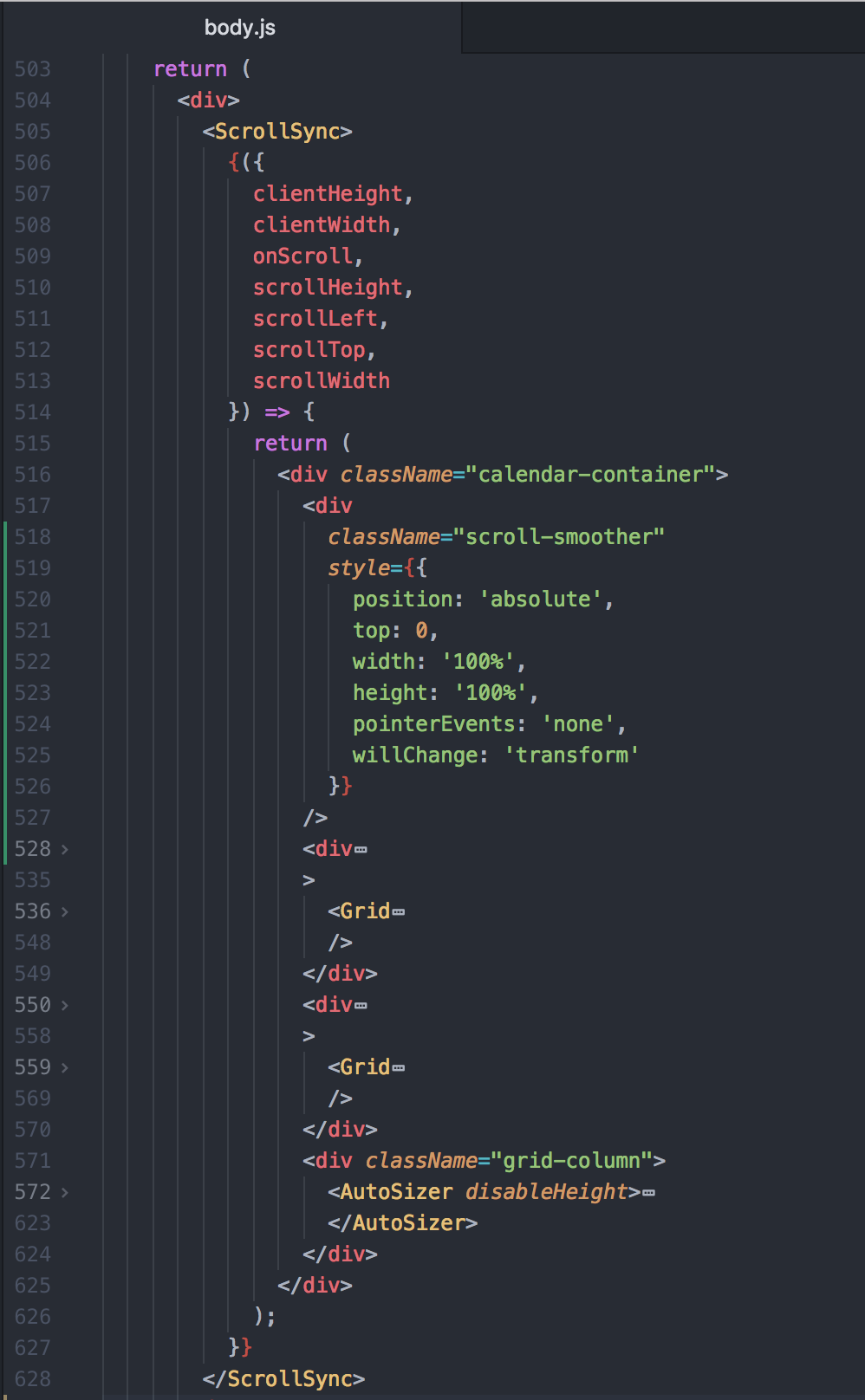
Does that look like what you are suggesting?
oldo
on 6 Dec 2017
@oldo yes, that's exactly what I'm doing, but I also have a z-index set, maybe that might be making difference? I think this div needs to be above all others. If you have set a zindex on any children, they might be coming up.
Also, are you sure your .scroll-smoother div is covering the whole thing (parent is positioned?)? My styles are:
    z-index: 100;
    pointer-events: none;
    position: absolute;
    top: 0;
    left: 0;
    right: 0;
    bottom: 0;
    will-change: transform;
and position: relative on parent, to make sure it is positioned properly
palashkaria
on 6 Dec 2017
Thanks @palashkaria, that works beautifully for me in chrome.
But for a more sustainable solutions, I was thinking why doesn't ember table have this problem? Their main example on the site is the same as most us with a fixed header and left columns.
Does anyone have an idea? @bvaughn what do you think?
 abhishiv
on 25 Dec 2017
abhishiv
on 25 Dec 2017
@abhishiv Because it has single scroll viewport, common for all parts of table. I'm gonna to propose deprecating ScrollSync in favor of WindowScroller which does exact the same task but in a much smoother way similar to ember table.
 TrySound
on 25 Dec 2017
TrySound
on 25 Dec 2017
ScrollSync and WindowScroller are intended for different use cases.
WS watches a window and syncs its scroll position and offset. SS syncs 1 RV
component to other(s). Not sure how you'd deprecate either in favor of the
other.
On Mon, Dec 25, 2017 at 7:45 AM Bogdan Chadkin notifications@github.com
wrote:
@abhishiv https://github.com/abhishiv Because it has single scroll
viewport, common for all parts of table. I'm gonna to propose deprecating
ScrollSync in favor of WindowScroller which does exact the same task but in
a much smoother way similar to ember table.—
You are receiving this because you were mentioned.
Reply to this email directly, view it on GitHub
https://github.com/bvaughn/react-virtualized/issues/291#issuecomment-353876770,
or mute the thread
https://github.com/notifications/unsubscribe-auth/AABznYuMCWrEjAveMv3vd4t1iYTivFm5ks5tD8MAgaJpZM4I7n39
.
bvaughn
on 25 Dec 2017
Great news! With the most recent Chrome update the <canvas /> hack is working again 😎
oldo
on 26 Dec 2017
Thanks everyone for the very helpful discussion 🙏
As suggested above, I was able to use the below CSS snippet to fix the scroll lag issue in my Grid in Chrome. But I'm at a loss to how it works. Is it forcing the scroll to happen in the UI thread? How so?
    z-index: 100;
    pointer-events: none;
    position: absolute;
    top: 0;
    left: 0;
    right: 0;
    bottom: 0;
    will-change: transform;
 rufusraghunath
on 26 Nov 2019
rufusraghunath
on 26 Nov 2019
Has anyone found a way to "fix" this in Firefox? The canvas thing "appears" to work at first but I believe that's just because the dev tools are open. If I open the dev tools it gets "fixed" and after I close them, but if I do a refresh it's no longer synced.
 comfroels
on 27 Jan 2020
comfroels
on 27 Jan 2020
@palashkaria hey, thanks for your workaround but why are you using will-change: transform ? Wouldn't be will-change: scroll-position more suitable here?
 MikeYermolayev
on 10 Feb 2020
MikeYermolayev
on 10 Feb 2020
Related issues
 kof
·
81Comments
kof
·
81Comments
 Guria
·
24Comments
bvaughn
·
125Comments
Guria
·
24Comments
bvaughn
·
125Comments
 michaeldzjap
·
20Comments
kof
·
40Comments
michaeldzjap
·
20Comments
kof
·
40Comments
Most helpful comment
You could test it out by running the following in your Console: