React-transition-group: Is componentDidMount expected to be called twice?
Using version 1.2 in Chrome I can see that componentDidMount is getting called twice.
I am doing an Ajax call in the componentDidMount of my component, so this is not ideal. Is this the expected behaviour?
Example:
 <CSSTransitionGroup className='my-container'
                            transitionEnterTimeout={500}
                            transitionLeave={false}
                            transitionName='example'
                            component='div'
                        >
                        <MyComponent location={location} key={getKey(location.pathname)}>
getKey gets a basic, but unique key from React Router
 ghost
ghost
All 36 comments
Your key is probably changing more often them you think. Every time the key changes react will see the component as different and unmount it and remount it.
 jquense
on 21 Jun 2017
jquense
on 21 Jun 2017
I have logged the key when I click a link to go from the current page (page 1) to the next page (page 2) and I see this:
- key-page-2
- key-page-1
- key-page-2
If I remove the parent <CSSTransitionGroup/> then it just logs key-page-2 as expected.
My transition group will only have direct child item e.g. page 1 or page 2. It might be working as expected, but it seems a bit odd that it is loading the next page, then loading the current page and then finally loading the next page.
ghost
on 21 Jun 2017
meet your same problem, i'm looking forward to how to solve it
 Chryseis
on 28 Jun 2017
Chryseis
on 28 Jun 2017
@Chryseis I went with a simple solution:
- Removed usage of CSSTransitionGroup
- Add an animation class to my element e.g. fade-in
- Add an
onTransitionEndevent handler to my element which removes the animation class
ghost
on 28 Jun 2017
@rowanwork thanks for your solution
Chryseis
on 29 Jun 2017
I'm not sure where your key is logged so its hard to know if anything is weird. If you can put together a reproduction I can take a closer look
jquense
on 29 Jun 2017
I'm experiencing this as well. I'll try to add some information - both componentDidMount and componentWillMount of children seem to be firing more than once
I can see the behavior stops when I remove the CSSTransition. In my case I can see that the key is certainly identical, I'm using the location.key and using the transition for transitioning components when the route changes.
I can also see that the double fire only happens on initial page load, not sure why.
 the-simian
on 3 Aug 2017
the-simian
on 3 Aug 2017
@rowanwork , Are you still using Transition, or TransitionGroup ? Is the only thing you removed CSSTransition?
the-simian
on 3 Aug 2017
think my issue might be related to this: https://github.com/reactjs/react-transition-group/issues/136
the-simian
on 3 Aug 2017
Ok I worked on this much longer than i'd liked, heres my results. no matter how hard I tried, I could NOT prevent a lot of unusual behavior, like multiple mounting events. At the end of the day I opted for a very brutish, but effective solution - I kept the animation classes in state, and used timers to update them when I needed the classes added and removed.
waaaay simpler, but nontheless got the job done.
the-simian
on 3 Aug 2017
Do you have a repro of the issue? Lifecycle hooks getting called more than once would be a serious bug in React, amoung other things.
jquense
on 3 Aug 2017
I can tell you this happened when I tried to wrap a <Route /> that rendered <Switch /> with a <TransitionGroup /> and <CssTransition />. something about the router and this library don't play nice together unfortunately.
I wish I could dedicate more time to debugging, but I kind of blew my time budget just localizing the issue to the interaction between this library and React Router.
I'm not sure what the best approach is, but for now, the best approach is to do something like this, and completely forego this lib.
class SomeThingLoadedByReactRouter extends Component {
componentDidMount() {
let ctx = this;
setTimeout(function() {
ctx.setState({
animationClasses: "slide-enter slide-enter-active"
});
});
setTimeout(function() {
ctx.setState({
animationClasses: ""
});
}, 2000);
}
render() {
return (
<div className={this.state.animationClasses}>Your stuff in here.</div>
);
}
}
componentDidMount only get's called the first time the view is mounted onto the DOM. So unless you don't set your key as your location.pathname, it can be re-created several times.
There's a exit property that's provided to react-transition-group. Setting it to false would fix your problem, as you're literally just disabling the exit animation another way.
I don't think there's a problem with your component.
Example I used for my portfolio:
<TransitionGroup component="main">
<CSSTransition
key={location.pathname}
timeout={timeout}
exit={false}
classNames="fade">
<Switch location={location}>
<Route exact path="/" component={Home} />
<Route path="/blog" component={BlogList} />
<Route path="/about" component={About} />
<Route path="/contact" component={Contact} />
<Route component={NotFound} />
</Switch>
</CSSTransition>
</TransitionGroup>
 browne0
on 17 Aug 2017
browne0
on 17 Aug 2017
I'll swing back another time and try again with the exit={false}, and see how that works
I was using location.key as my key, not location.pathname, but I was able to confirm the key was identical every time.
the-simian
on 17 Aug 2017
@the-simian after looking at the example of @browne0 i've found the fix for me. He had the location as a prop on the Switch. After doing this in my case it also causes the componentDidMount to only fire once!
Changing the key to location.pathname or the prop exit to false did not make a difference for me.
Thanks @browne0 for saving my time 🎖
Not working
<TransitionGroup>
    <CSSTransition
        key={location.key}
        classNames="fade"
        timeout={{ enter: 500, exit: 0 }}
        exit={false}
    >
        <Switch>
            <Route exact path={`${basePath}start`} component={Start} />
            <Route exact path={`${basePath}questions`} component={Questions} />
            <Route exact path={`${basePath}comments`} component={Comments} />
            <Route exact path={`${basePath}capture`} component={Capture} />
            <Route exact path={`${basePath}disclaimer`} component={Disclaimer} />
            <Route exact path={`${basePath}finish`} component={Finish} />
        </Switch>
    </CSSTransition>
</TransitionGroup>
Working
<TransitionGroup>
    <CSSTransition
        key={location.key}
        classNames="fade"
        timeout={{ enter: 500, exit: 0 }}
    >
        <Switch location={location}>
            <Route exact path={`${basePath}start`} component={Start} />
            <Route exact path={`${basePath}questions`} component={Questions} />
            <Route exact path={`${basePath}comments`} component={Comments} />
            <Route exact path={`${basePath}capture`} component={Capture} />
            <Route exact path={`${basePath}disclaimer`} component={Disclaimer} />
            <Route exact path={`${basePath}finish`} component={Finish} />
        </Switch>
    </CSSTransition>
</TransitionGroup>
 nealoke
on 20 Aug 2017
nealoke
on 20 Aug 2017
@nealoke no problem :)
Unless modified, the location key and pathname are usually the same. If so then the same route will attempt to remount. There is an important reason we pass the location to the Switch component.
Another thing to note, there are two types of locations:
the history.location,
and the location object provided by React Router v4.
A react element rendered by a Switch or Route can provide three props: history, match, and location. The history prop also has a location property, but that's a live object that changes the context every time it changes. The location prop is immutable, which is the reason you pass it into your CSSTransition.
Think of it like a controlled input vs uncontrolled input. A controlled input gets it's value from its parent component. Likewise, a "controlled" route or switch gets the location from the app, while an uncontrolled component gets it from the router object.
Transitions need some type of relationship between different screens in order to know what to do with them. And the best way to let the switch know where you are is to pass it your immutable location.
Hope this helps!
browne0
on 20 Aug 2017
I also came across exactly the same issue and find the solution right here. Even though my problem is already solved, I would like to provide some insight how the solution work.
Firstly, why the componentDidMount invoked twice:
When the key changed, TransitionGroup tend to unmount the component matching the previous key first and then mount the component matching the new key. However, the obsoleted component is not unmounted immediately, rather it keeps in the (virtual)DOM until "exit timeout".
The evil thing happens during the process of unmounting the previously component. Before unmounted, the Switch choose the new Route already.componentDidMount is invoked when the Route match, even though the whole thing is due to unmount.
The solution is when the path change, Prevent Switch choose Route based on latest path, thus, the new component will not be mounted and after timeout, it will be unmounted silently.
By default, Switch use the latest location based on history. By setting location, we force it to choose "previous" one
 GuichiZhao
on 7 Oct 2017
GuichiZhao
on 7 Oct 2017
Really appreciate all the information in this thread. If I revisit this I'll try to post my results also. More example code is handy, especially when something is tricky to implement correctly
the-simian
on 9 Oct 2017
Thanks everyone, I was having the same issue and this thread allowed me to go back to the important stuff. Thanks to @GuichiZhao for providing details on why this happens, too.
Is this something that could/should be fixed in react-transition-group or react-router, or is there a fundamental incompatibility (without the suggested workaround) between the two?
 fortinmike
on 18 May 2018
fortinmike
on 18 May 2018
Meet the same problem.
 ovaldi
on 30 May 2018
ovaldi
on 30 May 2018
@fortinmike I haven't used React Router in a really long time, so I forgot its syntax, but I'll work on either making react-transition-group play well with it or provide an official workaround.
 silvenon
on 14 Jun 2018
silvenon
on 14 Jun 2018
use react-addons-css-transition-group same here.
 huangming1994
on 20 Jun 2018
huangming1994
on 20 Jun 2018
Any thoughts on how to deal with this?
 alexdmejias
on 10 Jul 2018
alexdmejias
on 10 Jul 2018
@alexdmejias My problem was that I was missing the location prop on the <Switch> element.
Have you tried that?
<Switch location={location}>
// some routes
</Switch>
ghost
on 11 Jul 2018
This is the POC that I'm working with. Using the latest version of both react-router-dom and react-transition-group.
<BrowserRouter>
<Route render={({ location }) => (
<Fill>
<Navigation />
<Content>
<TransitionGroup>
<CSSTransition key={location.key} classNames='fade' timeout={300}>
<Switch location={location}>
<Route exact path='/' render={() => {
const A = HOC(testRouteA);
return <A />
}} />
<Route path='/a' render={() => {
const A = HOC(testRouteA);
return <A />
}} />
<Route path='/b' render={() => {
const B = HOC(testRouteB);
return <B />
}} />
</Switch>
</CSSTransition>
</TransitionGroup>
</Content>
</Fill>
)} />
</BrowserRouter>
const HOC = function (WrappedComponent) {
return class WithHOC extends Component {
componentWillUnmount() {
console.log('++++++++++', 'HOC componentWillUnmount');
}
componentWillMount() {
console.log('++++++++++', 'HOC componentWillMount');
}
render() {
console.log('~~~~~~~~~', 'HOC render', this.state);
return (
<div>
<WrappedComponent />
</div>
);
}
};
};
class testRouteA extends Component {
componentWillUnmount() {
console.log('++++++++++', 'route A componentWillUnmount');
}
componentWillMount() {
console.log('++++++++++', 'route A componentWillMount');
}
render() {
console.log('~~~~~~~~~', 'route A render', this.state);
return (
<div className="test-route">
<p>test route A</p>
</div>
);
}
}
md5-b7432f69e024ef17ef3e9e20bbf67520
++++++++++ HOC componentWillMount
~~~~~~~~~ HOC render
++++++++++ route B componentWillMount
~~~~~~~~~ route B render
++++++++++ HOC componentWillMount
~~~~~~~~~ HOC render
++++++++++ route A componentWillMount
~~~~~~~~~ route A render
++++++++++ HOC componentWillUnmount
++++++++++ route A componentWillUnmount
++++++++++ HOC componentWillMount
~~~~~~~~~ HOC render
++++++++++ route B componentWillMount
~~~~~~~~~ route B render
++++++++++ HOC componentWillUnmount
++++++++++ route B componentWillUnmount
++++++++++ HOC componentWillMount
~~~~~~~~~ HOC render
++++++++++ route A componentWillMount
~~~~~~~~~ route A render
++++++++++ HOC componentWillUnmount
++++++++++ route A componentWillUnmount
++++++++++ HOC componentWillMount
~~~~~~~~~ HOC render
++++++++++ route A componentWillMount
~~~~~~~~~ route A render
++++++++++ HOC componentWillUnmount
++++++++++ route A componentWillUnmount
++++++++++ HOC componentWillMount
~~~~~~~~~ HOC render
++++++++++ route B componentWillMount
~~~~~~~~~ route B render
++++++++++ HOC componentWillUnmount
++++++++++ route B componentWillUnmount
++++++++++ HOC componentWillUnmount
++++++++++ route A componentWillUnmount
++++++++++ HOC componentWillMount
~~~~~~~~~ HOC render
++++++++++ route B componentWillMount
~~~~~~~~~ route B render
++++++++++ HOC componentWillUnmount
++++++++++ route B componentWillUnmount
is this what you have @LennardSennep ?
alexdmejias
on 11 Jul 2018
@alexdmejias Hmm no that is not the issue I had tbh. I had the issue immediately after navigating to an element where you have to navigate 2 times back and forwards? Or am I I reading your console output wrong?
ghost
on 11 Jul 2018
@LennardSennep in the output above it is just me navigating once from route A to route B, no back and forth
alexdmejias
on 11 Jul 2018
@alexdmejias Can you try to add the prop exact on the other Routes and see what happens in the console
ghost
on 11 Jul 2018
exact same output
alexdmejias
on 11 Jul 2018
@alexdmejias sorry for the late reply. Can you maybe share your repo so I can see what’s going on?
ghost
on 13 Jul 2018
i have the same problem, i solved it by using location.pathname instead of location.key in <Switch> component, i dont know why, but same pathnames outputs differents keys
 arcollector
on 14 Jul 2018
arcollector
on 14 Jul 2018
I added a piece of the documentation accompanied by a demo about usage with React Router. It will be deployed in the next release.
Basically you shouldn't wrap Route or Switch components with a TransitionGroup because it requires hacky solutions like location.key/location.pathname and it's not how this library (in its current form) is meant to be used. You should use CSSTransition at the end of each route, like in the demo.
If you see a limitation in that approach and it doesn't fit into your specific use case, please share it in a new issue, providing a CodeSandbox demo. Thanks!
silvenon
on 20 Jul 2018
Hi
I have created the one HOC component in React Native
In componentDidMount have written the code for checking Internet Connection
please find the below code
componentDidMount() {
console.log('WrappedComponent ----' + WrappedComponent);
NetInfo.isConnected.addEventListener('connectionChange',this.handleFirstConnectivityChange.bind(this));
}
function handleFirstConnectivityChange(connectionInfo: any) {
alert(connectionInfo);
NetInfo.isConnected.removeEventListener(
'connectionChange',
this.handleFirstConnectivityChange,
);
}
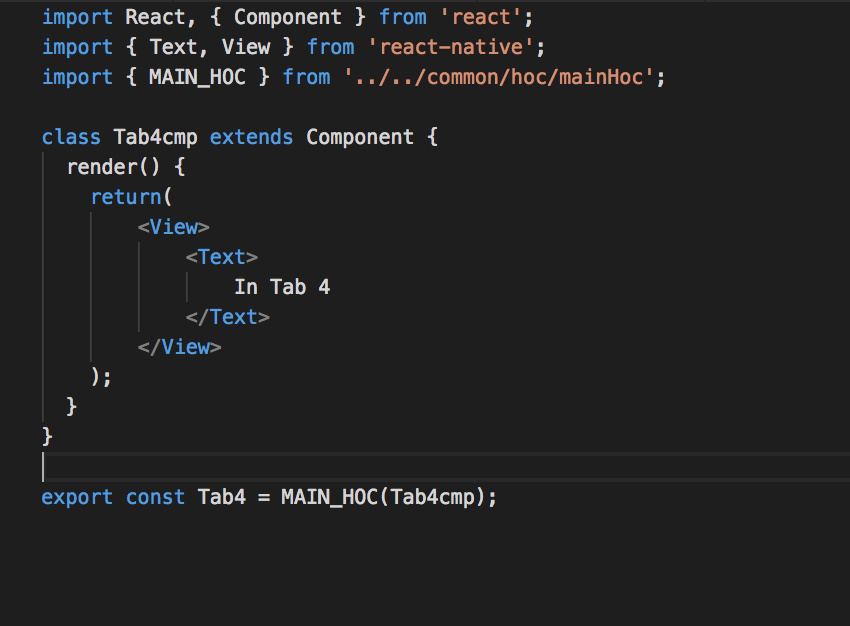
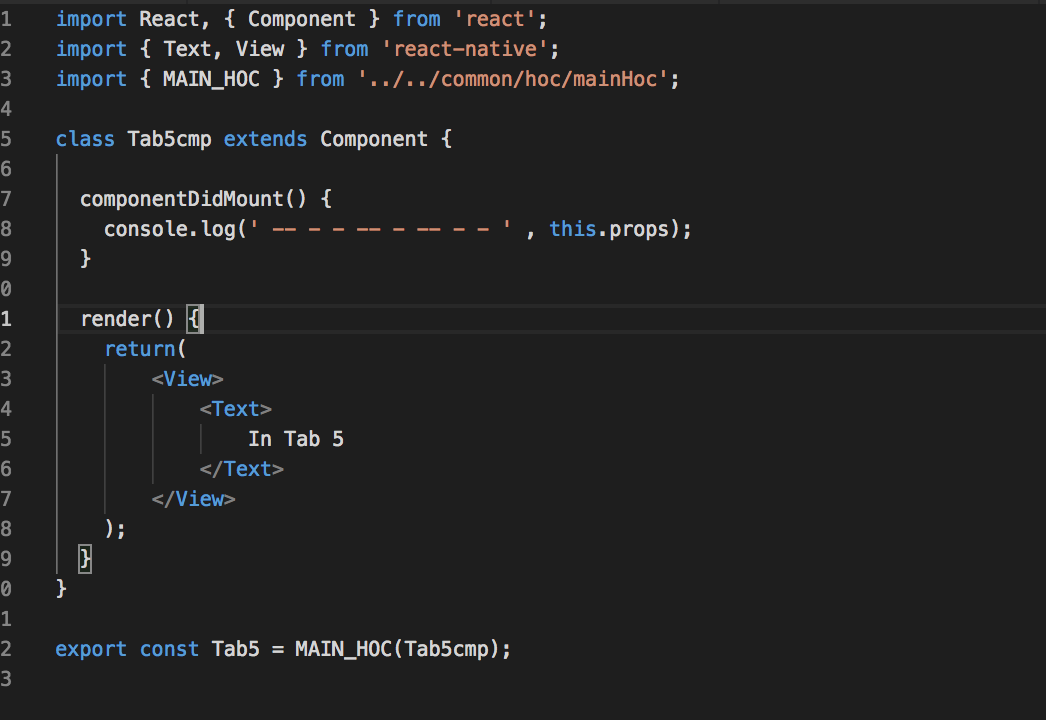
now I am calling this HOC from two tabs ( Tab 1 and Tab 2)
Whenever I am changing the Connection Type my addEventListener connectionChange is triggered two times, Is there any way to avoid this I want to trigger the connection change for once. as I have to load 7 Tabs
Thanks,
Dhiraj
 Dhirajbhujbal
on 16 Apr 2019
Dhirajbhujbal
on 16 Apr 2019
I think your issue is that you add an Event Listener but not removing it on ComponentWillUnmount(). Always remove Event Listeners if you do not use them anymore or remove it otherwise they will stay in active and could even crash your app in the worst case.
ghost
on 16 Apr 2019
I tried to removeListner in commponentWillUnmount but it still triggering twice
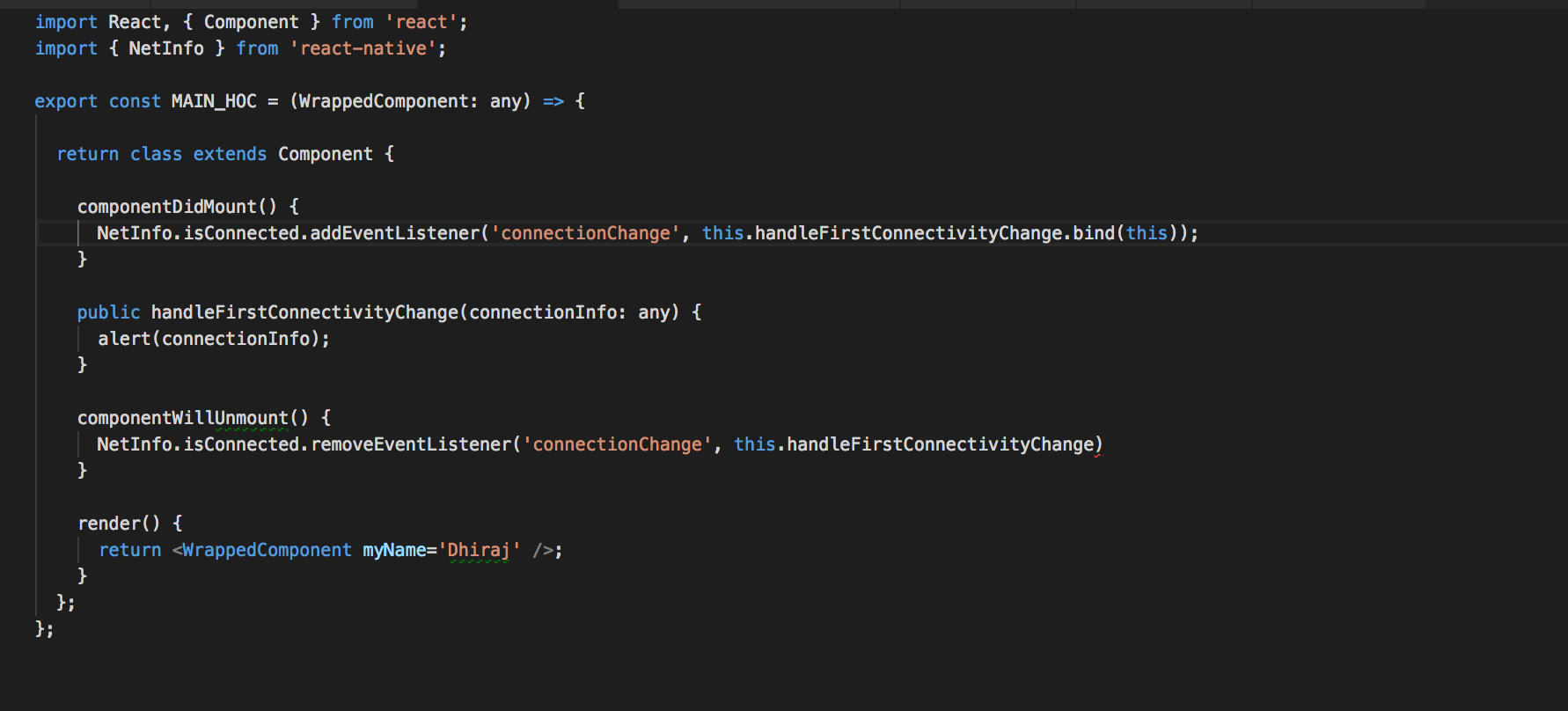
Please find above screenshot still getting two alerts
Dhirajbhujbal
on 16 Apr 2019
@the-simian after looking at the example of @browne0 i've found the fix for me. He had the
locationas a prop on theSwitch. After doing this in my case it also causes thecomponentDidMountto only fire once!Changing the key to
location.pathnameor the propexittofalsedid not make a difference for me.Thanks @browne0 for saving my time 🎖
Not working
<TransitionGroup>
    <CSSTransition
        key={location.key}
        classNames="fade"
        timeout={{ enter: 500, exit: 0 }}
        exit={false}
    >
        <Switch>
            <Route exact path={`${basePath}start`} component={Start} />
            <Route exact path={`${basePath}questions`} component={Questions} />
            <Route exact path={`${basePath}comments`} component={Comments} />
            <Route exact path={`${basePath}capture`} component={Capture} />
            <Route exact path={`${basePath}disclaimer`} component={Disclaimer} />
            <Route exact path={`${basePath}finish`} component={Finish} />
        </Switch>
    </CSSTransition>
</TransitionGroup>
Working
<TransitionGroup>
    <CSSTransition
        key={location.key}
        classNames="fade"
        timeout={{ enter: 500, exit: 0 }}
    >
        <Switch location={location}>
            <Route exact path={`${basePath}start`} component={Start} />
            <Route exact path={`${basePath}questions`} component={Questions} />
            <Route exact path={`${basePath}comments`} component={Comments} />
            <Route exact path={`${basePath}capture`} component={Capture} />
            <Route exact path={`${basePath}disclaimer`} component={Disclaimer} />
            <Route exact path={`${basePath}finish`} component={Finish} />
        </Switch>
    </CSSTransition>
</TransitionGroup>
I know we have all felt this many times before, but I feel compelled to say, I am not sure that I have ever been so happy to read a git comment more than this one. thanks for taking the time to post.
 justinmacnutt
on 5 Mar 2021
justinmacnutt
on 5 Mar 2021
Related issues
 carly1987
·
3Comments
carly1987
·
3Comments
 alisd23
·
5Comments
alisd23
·
5Comments
 Kylian030903
·
3Comments
Kylian030903
·
3Comments
 bluefire2121
·
3Comments
bluefire2121
·
3Comments
 DeyLak
·
4Comments
DeyLak
·
4Comments
Most helpful comment
@the-simian after looking at the example of @browne0 i've found the fix for me. He had the
locationas a prop on theSwitch. After doing this in my case it also causes thecomponentDidMountto only fire once!Changing the key to
location.pathnameor the propexittofalsedid not make a difference for me.Thanks @browne0 for saving my time 🎖
Not working
Working