React-tooltip: Incorrect positioning on mobile using effect='solid'
Code:
<button data-tip='bla bla bla blbllblb lbalballbl blaba bla bal bal'>'Test'</button>
<ReactTooltip effect='solid' place='bottom' event='click' />
The current mobile result:

Expected result (Centered tooltip):

PS: the arrow positioning also is wrong
 levymoreira
All 8 comments
Yes, that result is much more desirable. How did you generate the 'expected result'? some style hacking we could use to fix the problem?
Do you have a suggested fix? I'm not set up to develop or test fixes on mobile...
 aronhelser
on 11 Apr 2018
aronhelser
on 11 Apr 2018
To fix it I just changed the left property to 0, my suggestion is when you calculating the left value check if it's mobile if it's just don't set it, once that you are setting it directly in the element.style we just can't change it using CSS (actually we can but we need use !import).
You can test it easily using the Google Chrome mobile device view.
levymoreira
on 15 Apr 2018
Any update on this? I have this issue as well
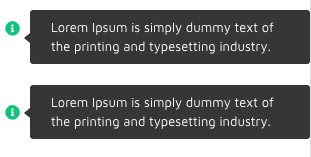
Position render correctly after second render; top (first render) bottom (second render). In my case, top property got wrong calculation in the first render but correct in second render
 archansel
on 13 Jul 2018
archansel
on 13 Jul 2018
The position is always wrong on first appearance however we use it. Since this issue is 2 years old I figure we're better off finding another package.
 mxcl
on 7 May 2020
mxcl
on 7 May 2020
Or you could help debug and contribute a fix!
On Thu, May 7, 2020 at 1:27 PM Max Howell notifications@github.com wrote:
The position is always wrong on first appearance however we use it. Since
this issue is 2 years old I figure we're better off finding another package.—
You are receiving this because you commented.
Reply to this email directly, view it on GitHub
https://github.com/wwayne/react-tooltip/issues/374#issuecomment-625392123,
or unsubscribe
https://github.com/notifications/unsubscribe-auth/AEX6THPFX6BSP6QQQM4SUVDRQLVO7ANCNFSM4E2ANJYA
.
aronhelser
on 7 May 2020
So…. no, I won’t. I am an extremely prolific contributor to open source, but only if it looks like it's a maintained package. Sorry.
mxcl
on 20 May 2020
@mxcl your comment is gross
 briangonzalez
on 19 Feb 2021
briangonzalez
on 19 Feb 2021
This can be achieved using the place prop. Like if you have a question mark on the left side of the screen as I have. Then use place = right similarly left if the question mark is on the right.
<ReactTooltip
        id={id}
        type="success"
        effect="solid"
        multiline={true}
        border
        textColor="#fff"
        place="right"
        backgroundColor="#042E60"
      />

 abdulbasit1248
on 6 Apr 2021
abdulbasit1248
on 6 Apr 2021
Related issues
 benbro
·
3Comments
benbro
·
3Comments
 alex6633
·
3Comments
alex6633
·
3Comments
 Ericky14
·
3Comments
Ericky14
·
3Comments
 donilan
·
4Comments
donilan
·
4Comments
 bonbonio
·
4Comments
bonbonio
·
4Comments
Most helpful comment
Any update on this? I have this issue as well

Position render correctly after second render; top (first render) bottom (second render). In my case,
topproperty got wrong calculation in the first render but correct in second render