React-tooltip: Tooltip does not work when using unique IDs within a table component
I'm actually using ag-grid to render some html along with ReactTooltip in a cell of a table. I actually use React components to render each cell and within each react component, I embed an unique ReactTooltip. I actually want to hover a validation error if the cell has an error from user input.
In my render method, I have the following
return (
                <div>
                    <ReactTooltip id={uniqueID} type="error" effect="float" />
                       <div data-tip data-for={uniqueID} >
                               {cell.stringValue}
                    </div>
                </div>
            );
It's weird, just for testing purposes I used a static and constant string for the id, the tool tip will render on the first render but after the cell is rerendered, the tooltip disappears.
Gif of ReactTooltips having the same ID:

Gif of me inspecting the cell and the html markup of the corresponding ReactToolTip

When do I use uniqueIDs for each ReactTooltip within a cell of a table, the tooltip simply does not show.
Gif of ReactTooltips having unique IDs with the same exact code, everything is the same exact uniqueID is different for each cell and each id of ReactToolTip

I've tried putting ReactTooltip.rebind() in my React Component's componentDidUpdate() for each cell in hopes of tooltips being associated with the appropriate cell but to no avail.
Any input would be much appreciated.
 dkwin
dkwin
All 11 comments
@dkwin You can try putting the <ReactTooltip /> out of the cell, for example, you can put it under className='ag-body-container'
 wwayne
on 14 Oct 2016
wwayne
on 14 Oct 2016
I see some weird behaviour with the tooltip not working for instances where you map over a collection and render some items (for instance tds). I can only get it to work if I nest a ReactTooltip for each cell element, which is horribly inefficient.
I am a little strapped for time, else I will try to get a fiddle up which replicates the issue.
 karthikiyengar
on 24 Oct 2016
karthikiyengar
on 24 Oct 2016
Was there any resolution to this issue?
 TheTFo
on 24 Mar 2017
TheTFo
on 24 Mar 2017
Any resolution?
 polina-c
on 14 Jan 2018
polina-c
on 14 Jan 2018
Also trying to use this in ag-grid and experiencing some weird results when new cells that use tooltips are rendered into the viewport.
 ssilve1989
on 2 Mar 2018
ssilve1989
on 2 Mar 2018
I have the same problem, any solution???
 dor1633
on 12 Oct 2018
dor1633
on 12 Oct 2018
I solved it using ReactTooltip.show and hide
<span className={style.mainBox} ref={(c) => { this.ref = c; }}
data-tip={`${item.name} ID`} data-for={id}
onMouseOver={() => { ReactTooltip.show(this.ref); }}
onMouseLeave={() => { ReactTooltip.hide(this.ref); }}
>
{template}
{isLastItem ? null: ', '}
<ReactTooltip id={id} place="top" className="tooltip" type="light" />
</span>
Works fine for me with ag-grid cells now
 oleksiivasylchenko
on 8 Jan 2019
oleksiivasylchenko
on 8 Jan 2019
Not sure if that will help you, but to those having issues with the tooltip locking in to only one id, I just pass this prop tooltipId={Math.random().toString(36).substr(2, 5)} to my ReactTooltip and lots of bugs are solved.
 B4R05
on 29 Mar 2019
B4R05
on 29 Mar 2019
I solved it using ReactTooltip.show and hide
<span className={style.mainBox} ref={(c) => { this.ref = c; }} data-tip={`${item.name} ID`} data-for={id} onMouseOver={() => { ReactTooltip.show(this.ref); }} onMouseLeave={() => { ReactTooltip.hide(this.ref); }} > {template} {isLastItem ? null: ', '} <ReactTooltip id={id} place="top" className="tooltip" type="light" /> </span>Works fine for me with ag-grid cells now
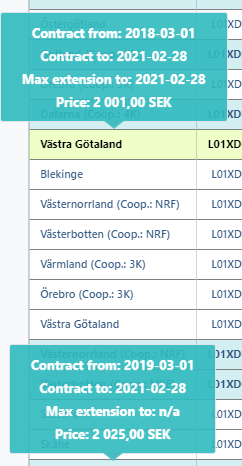
Problem I am having with this approach is I am having two tips at the same time- one that I pointed and the other one is the last tip element. Here is the screenshot.
 nasimjibs
on 29 Apr 2020
nasimjibs
on 29 Apr 2020
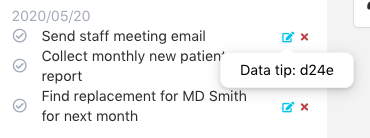
I had a similar issue: I had a table of tasks and the tooltip wouldn't show when clicking on the one of the edit buttons.
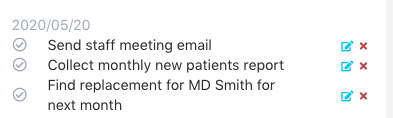
What I ended up doing was calling rebuild in componentDidMount
 componentDidMount() {
    this.setState({...someState I had to set first}, () => ReactTooltip.rebuild()
 }
I'm using reactTooltip's getContent function to customize my tooltip:
Hope it helps
 tuancaraballo
on 23 May 2020
tuancaraballo
on 23 May 2020
Thanks! It helped.
nasimjibs
on 26 May 2020
Related issues
 Ganasist
·
3Comments
Ganasist
·
3Comments
 donilan
·
4Comments
donilan
·
4Comments
 mmyoji
·
4Comments
mmyoji
·
4Comments
 oran1248
·
3Comments
oran1248
·
3Comments
 Ericky14
·
3Comments
Ericky14
·
3Comments
Most helpful comment
I had a similar issue: I had a table of tasks and the tooltip wouldn't show when clicking on the one of the edit buttons.

What I ended up doing was calling rebuild in componentDidMount
I'm using reactTooltip's getContent function to customize my tooltip:
Hope it helps