React-toastify: twice loaded same time
Hello
I use this component fkhadra/react-toastify, twice loaded for me same time, i want only once loaded other thing is correct and i dont have wrong or error on code writting , What is your solution ?
notify({type,text}){
    toast(text, {
        position: "top-center",
        autoClose: 5000,
        hideProgressBar: false,
        closeOnClick: true,
        pauseOnHover: true,
        draggable: true,
        type: type
      });
  }
Thanks
 cyaxares
All 18 comments
Hello @cyaxares,
I don't understand your question. Could you describe me the current behavior?
Thanks.
 fkhadra
on 20 May 2018
fkhadra
on 20 May 2018
Hey @fkhadra , I think I know what @cyaxares means.
I'm also using toastify since it's really intuitive. There's one issue though. When autoClose > 2000 I get two toasts.
For example, if I set autoClose=5000, then the first toast that shows up, disappears in about 2 seconds, then a second one shows up and stays there for around 5 seconds.
I could provide a gif if you need some visual aid.
 Claim0013
on 28 May 2018
Claim0013
on 28 May 2018
Hey @Claim0013,
Yes, please 😁
fkhadra
on 28 May 2018
Hold up! :>
Claim0013
on 28 May 2018
And here's the code
dispatch(action, toast.info("5 seconds")); - note that it also happens if I just call it somewhere else.
<ToastContainer
          autoClose={5000}
          closeOnClick
/>
Thanks a lot. Could you show me where you are rendering the ToastContainer component. The best is to render it at the root of your App.
Do you have a way to reproduce the bug on codesandbox ?
Thanks again
fkhadra
on 28 May 2018
No problem. Mhh I may be using it wrong.
I use <ToastContainer..> in each Components' main <div>...</<div> So, everywhere I nee a popup, in case I change something.
Sadly it's a quite large app.
Claim0013
on 28 May 2018
Could you try to remove all the ToastContainer and use only one at the root of your app ?
fkhadra
on 28 May 2018
If I remove
import { ToastContainer, toast } from 'react-toastify';
import 'react-toastify/dist/ReactToastify.css';
from a component and put it in let's say index.js - I automatically get a Failed to compile exception in the class I removed those lines.
Claim0013
on 28 May 2018
Keep the toast import in your component as follow:
import { toast } from 'react-toastify';
// omit the ToastContainer and the css
Then at the root of your app:
import { ToastContainer } from 'react-toastify';
import 'react-toastify/dist/ReactToastify.css';

const App = () => (
  <div>
    <YourComponent />
    <ToastContainer />
  </div>
)
I added <ToastContainer /> and the imports (without toast) to the index.js file where my paths are. I am using react router.
Looks like this:
ReactDOM.render(
<Provider store={store}>
    <Router>
        <div>
            <PropsRoute exact path="/" component={App} store={store}/>
            <PrivateRouteA path="/pathA" component={A}/>
            <PrivateRouteB path="/pathB" component={B} />
            <PrivateRouteC path="/pathC" component={C} />
            <PrivateRouteD path="/pathD" component={D} />
            <PrivateRouteE path="/pathE" component={E} />
            <ToastContainer />
        </div>
    </Router>
</Provider>, document.getElementById('root'));
I am pretty sure I now only have once <ToastContainer /> in the whole app and it's doing this - there's the 5 second toast and then it looks like a 2 seconds one moves around behind it.
EDIT: I solved it. There was still one <ToastContainer /> hanging around. I can't set the autoClose prop though. It's getting ignored.
toast.info("Hello", {autoClose: 2000, hideProgressBar: true} ) still yields a 5 seconds toast with a progress bar.
If I use <ToastContainer autoClose={2000} /> it overrides all toasts to 2 seconds and changing toast's props like autoClose: 5000 doesn't do anything.
EDIT: All works, I am just too stupid to see that there's a difference between
toast.info("Hello"), {autoClose: 2000, hideProgressBar: true}) and
toast.info("Hello", {autoClose: 2000, hideProgressBar: true}))
Sorry for wasting your time 😭
Claim0013
on 29 May 2018
Hey @Claim0013,
Sorry, I couldn't answer earlier, I'm glad you fixed your issue. Everything works as expected for you now?
fkhadra
on 29 May 2018
No worries @fkhadra ! Yes it's working flawlessly!
Claim0013
on 29 May 2018
I have something like this issue at the moment.
I see the toasters loads two times also. I am using it with formik validation.
something like that :
{this.props.touched.location && this.props.errors.location ? notify('locationRequired') : null}
and here is my toastify :
const notify = (status) => {
  // console.log(status);
  // toast("Wow so easy !")
  switch (status) {
    case 'uploaded':
      toast.success('Uploading success !');
      break;
    case 'postingSuccess':
      toast.success('Posting success !');
      break;
    case 'maxSize':
      toast.warn('Maximum file upload size is 2MB !');
      break;
    case 'delete':
      toast.info('Deleted !');
      break;
    case 'locationRequired':
      toast('Please Select a location !',{closeOnClick: true});
      break;
      case 'startDateRequired':
      toast.warn('Please Select a start date !');
      break;
    default:
      toast('Wow so easy !');
  }
};
 heshamelmasry77
on 12 Sep 2018
heshamelmasry77
on 12 Sep 2018

heshamelmasry77
on 12 Sep 2018
Hey @heshamelmasry77,
The toast function is probably called twice. You can provide a unique toastId to prevent duplicate.
You can find how to here
fkhadra
on 12 Sep 2018
Thanks a lot. Could you show me where you are rendering the ToastContainer component. The best is to render it at the root of your App.
Do you have a way to reproduce the bug on codesandbox ?
Thanks again
Perfect! I had the same problem
 alexticovschi
on 30 Dec 2019
alexticovschi
on 30 Dec 2019
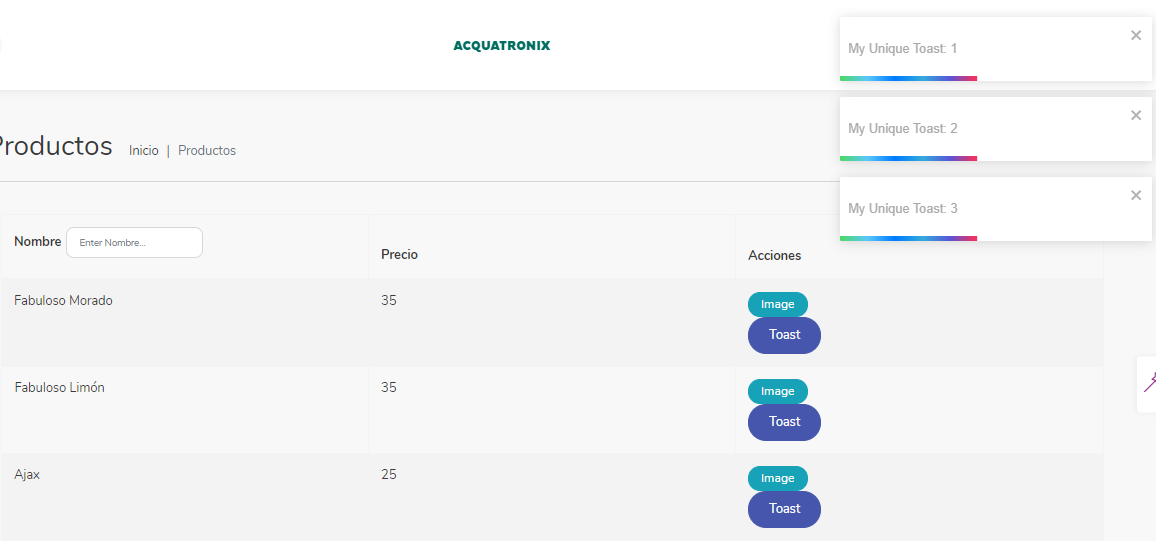
I have the same problem, it shows all notifications at the same time without even clicking the button, then clicking it does nothing. Tried everything but nothing works.
Products.js
import React from 'react';
import { Row, Button } from 'reactstrap';
import { Colxx, Separator } from '../../components/common/CustomBootstrap';
import Breadcrumb from '../../containers/navs/Breadcrumb';
import BootstrapTable from 'react-bootstrap-table-next';
import filterFactory, { textFilter } from 'react-bootstrap-table2-filter';
import paginationFactory from 'react-bootstrap-table2-paginator';
import { toast } from 'react-toastify';


function buttonsFormatter(cell, row) {
  return (
    <>
      <a
        className="btn btn-info btn-xs mobile-menu-cta"
        target="_blank"
        rel="noopener noreferrer"
        href={row.image}>Image
      </a>
      {' '}
      <div>
        <Button onClick={
          toast("My Unique Toast: " + row.id, {
            toastId: row.id
          })
        }>Toast</Button>

      </div>
    </>
  );
}

const products = [
  {
    image: 'https://res.cloudinary.com/walmart-labs/image/upload/w_960,dpr_auto,f_auto,q_auto:best/gr/images/product-images/img_large/00750103590534L.jpg',
    id: 1,
    name: 'Fabuloso Morado',
    'price': 35
  },
  {
    image: 'https://res.cloudinary.com/walmart-labs/image/upload/w_960,dpr_auto,f_auto,q_auto:best/gr/images/product-images/img_large/00750103590536L.jpg',
    id: 2,
    name: 'Fabuloso Limón',
    'price': 35
  },
  {
    'image': 'https://res.cloudinary.com/walmart-labs/image/upload/w_960,dpr_auto,f_auto,q_auto:best/gr/images/product-images/img_large/00750103590504L.jpg',
    id: 3,
    name: 'Ajax',
    'price': 25
  }
];

const columns = [
  {
    filter: textFilter(),
    dataField: 'name',
    text: 'Nombre',
    sort: true,
  }, {
    dataField: 'price',
    text: 'Precio',
    sort: true
  }, {
    text: "Acciones",
    formatter: buttonsFormatter
  }
];


const Products = ({ match }) => {
  return (
    <>
      <Row>
        <Colxx xxs="12">
          <Breadcrumb heading="menu.products" match={match} />
          <Separator className="mb-5" />
        </Colxx>
      </Row>
      <Row>
        <Colxx xxs="12" className="mb-4">
          <div className="container">
            <BootstrapTable
              striped
              hover
              keyField='id'
              data={products}
              columns={columns}
              filter={filterFactory()}
              pagination={paginationFactory()}
            />
          </div>
        </Colxx>
      </Row>
    </>
  );
};

export default Products;
My App.js
import React, { Suspense } from 'react';
import { connect } from 'react-redux';
import {
  BrowserRouter as Router,
  Route,
  Switch,
  Redirect,
} from 'react-router-dom';
import { IntlProvider } from 'react-intl';
import AppLocale from './lang';
import ColorSwitcher from './components/common/ColorSwitcher';
import { NotificationContainer } from './components/common/react-notifications';
import { isMultiColorActive, adminRoot } from './constants/defaultValues';
import { getDirection } from './helpers/Utils';
import { ToastContainer } from 'react-toastify';


const ViewHome = React.lazy(() =>
  import(/* webpackChunkName: "views" */ './views/home')
);
const ViewApp = React.lazy(() =>
  import(/* webpackChunkName: "views-app" */ './views/app')
);

const ViewError = React.lazy(() =>
  import(/* webpackChunkName: "views-error" */ './views/error')
);

class App extends React.Component {
  constructor(props) {
    super(props);
    const direction = getDirection();
    if (direction.isRtl) {
      document.body.classList.add('rtl');
      document.body.classList.remove('ltr');
    } else {
      document.body.classList.add('ltr');
      document.body.classList.remove('rtl');
    }
  }

  render() {
    const { locale } = this.props;
    const currentAppLocale = AppLocale[locale];

    return (
      <>
        <div className="h-100">
          <IntlProvider
            locale={currentAppLocale.locale}
            messages={currentAppLocale.messages}
          >
            <>
              <NotificationContainer />
              {isMultiColorActive && <ColorSwitcher />}
              <Suspense fallback={<div className="loading" />}>
                <Router>
                  <Switch>
                    <Route
                      path={adminRoot}
                      render={(props) => <ViewApp {...props} />}
                    />
                    <Route
                      path="/error"
                      exact
                      render={(props) => <ViewError {...props} />}
                    />
                    <Route
                      path="/"
                      exact
                      render={(props) => <ViewHome {...props} />}
                    />
                    <Redirect to="/error" />
                  </Switch>
                </Router>
              </Suspense>
            </>
          </IntlProvider>

        </div>
        <ToastContainer />
      </>
    );
  }
}

const mapStateToProps = ({ settings }) => {
  const { locale } = settings;
  return { locale };
};
const mapActionsToProps = {};

export default connect(mapStateToProps, mapActionsToProps)(App);
and My AppRenderer.js
import React, { Suspense } from 'react';
import ReactDOM from 'react-dom';
import { Provider } from 'react-redux';
import * as serviceWorker from './serviceWorker';
import { configureStore } from './redux/store';

const App = React.lazy(() => import(/* webpackChunkName: "App" */ './App'));

ReactDOM.render(
  <Provider store={configureStore()}>
    <Suspense fallback={<div className="loading" />}>
      <App />
    </Suspense>
  </Provider>,
  document.getElementById('root')
);
/*
 * If you want your app to work offline and load faster, you can change
 * unregister() to register() below. Note this comes with some pitfalls.
 * Learn more about service workers: https://bit.ly/CRA-PWA
 */
serviceWorker.unregister();
 ErikQuiterioAcquatronix
on 14 Aug 2020
ErikQuiterioAcquatronix
on 14 Aug 2020
Related issues
 tumdav
·
4Comments
tumdav
·
4Comments
 jorgecuesta
·
5Comments
jorgecuesta
·
5Comments
 spiritedfang
·
3Comments
spiritedfang
·
3Comments
 AiBaby19
·
4Comments
AiBaby19
·
4Comments
 JaLe29
·
5Comments
JaLe29
·
5Comments
Most helpful comment
Hey @heshamelmasry77,
The
toastfunction is probably called twice. You can provide a uniquetoastIdto prevent duplicate.You can find how to here