React-toastify: Toast doesn't work when using with axios and redux-thunk
When I try to show a toast with a function that has a action dispatcher with axios along with redux-thunk, the toast doesnt appear. but when I just comment out the action dispatcher It works fine. note ( It doesnt matter whether I fire before or after the action dispatch call )
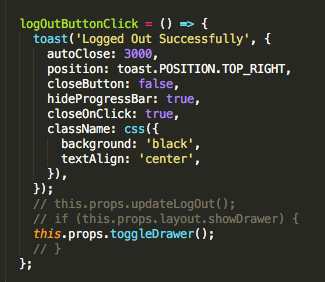 ---- works fine with action dispatch commented
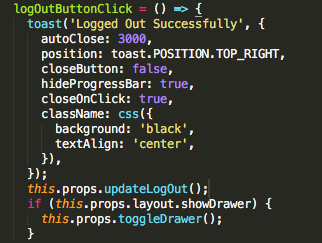 ---- doesnt work with action dispatch
 --- my action dispatch
 GaudamThiyagarajan
All 14 comments
Hey @GaudamThiyagarajan,
I'll try to reproduce the issue.
 fkhadra
on 23 Dec 2017
fkhadra
on 23 Dec 2017
Hello @GaudamThiyagarajan,
Could you provide me the following information's so I can try to reproduce the issue:
- react version
- redux version
- react-toastify version
Thanks
fkhadra
on 24 Dec 2017
I can verify this issue occurs for me too. Using reduxThunk as middleware
 heyhujiao
on 19 Jan 2018
heyhujiao
on 19 Jan 2018
Thank for the feedback. I'll try to find a boilerplate to reproduce the issue
fkhadra
on 19 Jan 2018
If it helps, these are my packages version.
"react": "^15.6.2",
"redux": "^3.0.4",
"react-toastify": "^3.2.2"
heyhujiao
on 19 Jan 2018
Sorry for the delay. These are the versions that you requested for:
"react-toastify": "^3.2.1",
"react-redux": "^5.0.6",
"react": "^16.0.0",
"axios": "^0.17.1",
"redux": "^3.7.2",
GaudamThiyagarajan
on 19 Jan 2018
Thanks guys. I'll work on it this week.
fkhadra
on 19 Jan 2018
I tried to reproduce the issue using this boilerplate without success.
Could you suggest me another boilerplate to try ?
fkhadra
on 19 Jan 2018
Did you try with same versions of react redux and axios as I have mentioned?
Please try following similar versions because the versions doesn't seem to match from in the boilerplate. Also are you sure it has nothing to do with axios?
GaudamThiyagarajan
on 16 Feb 2018
@GaudamThiyagarajan I never had an issue combining axios and react-toastify.
I don't use redux for state management, this is way I used a boilerplate found on github. If you can setup a boilerplate on codesanbox it will help me to find what's going on.
fkhadra
on 16 Feb 2018
Hey @GaudamThiyagarajan,
Could you update to the latest version v3.3.4 and tell me if it fixes your issue, please.
Thank you
fkhadra
on 16 Feb 2018
Hello @GaudamThiyagarajan
i think you are involved with hard coding,
previously i was working with redux thunk and axios upload progress event listener, toastify could intergrate with that in an awesome super easy way.
do any work on its own side, dispatching function is better to be placed in action files, it's easy to refactor later
it's better to take this approach
in your action func
const updateLogout = () => dispatch => {
    try {
       const res = await axios.post('/logout');
       // nice, we dont have any errors and status code is OK so everything is fine. go to the next line
       toast.success('logged out successfully')
       dispatch(updateLoggingOut(res.data.isLoggedIn));
    }
    catch(err){
        //ops internal server err or bad status code is occured
        toast.error('somthing went wrong, sry about that')
    }
}
and then move your if statement in componentWillUpdate and check are there new props or not ,everythink will be ok, i hope :D
and :D sry for any typo...
 SaeedSheikhi
on 22 Feb 2018
SaeedSheikhi
on 22 Feb 2018
@SaeedSheikhi thanks for the suggestion let me check.
@fkhadra will update to version you specified and let you know if it works.
Sorry Im currently busy working on something else right now.
Thanks for your help guys
GaudamThiyagarajan
on 22 Feb 2018
I am having the same issue with these versions:
"react-scripts": "3.0.0",
"react-toastify": "5.3.1"
"redux": "4.0.4"
"redux-thunk": "2.3.0"
It seems to be intermittent. sometimes it works. sometimes it only shows the loading toast. 'IM HERE' always shows.
function getPosts() {
  return dispatch => {
    dispatch(getPostsPending());
    toast.info("Loading posts...", { autoClose: 2000 });

    postService.getPosts().then(
      posts => {
        dispatch(getPostsSuccess(posts));
        console.log('IM HERE');
        toast.success("Enjoy!", {autoClose: 2000 });
      },
      error => {
        dispatch(getPostsError(error));
      }
    );
  };
}
 TravisKool
on 19 Jul 2019
TravisKool
on 19 Jul 2019
Related issues
 LouisCuvelier
·
3Comments
LouisCuvelier
·
3Comments
 giocodes
·
3Comments
giocodes
·
3Comments
 spiritedfang
·
3Comments
spiritedfang
·
3Comments
 JaLe29
·
5Comments
JaLe29
·
5Comments
 albert-olive
·
5Comments
albert-olive
·
5Comments
Most helpful comment
Hello @GaudamThiyagarajan
i think you are involved with hard coding,
previously i was working with redux thunk and axios upload progress event listener, toastify could intergrate with that in an awesome super easy way.
do any work on its own side, dispatching function is better to be placed in action files, it's easy to refactor later
it's better to take this approach
in your action func
and then move your if statement in componentWillUpdate and check are there new props or not ,everythink will be ok, i hope :D
and :D sry for any typo...