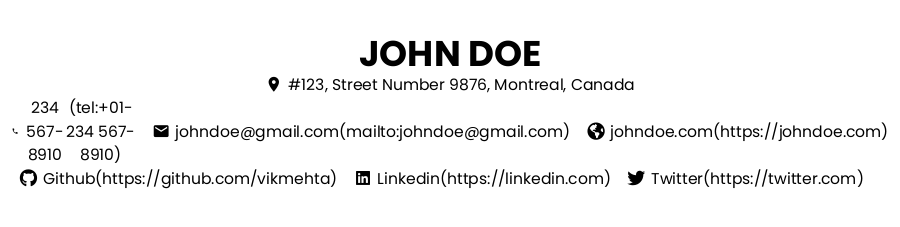
React-to-print: The links are expanded and display the attributes next to it in a pair of parenthesis (like mark down format). The styles are not applied in the print preview.
I am using this package to print one of my React component.
Everything works fine except the links in the printed document (or in the print preview) is not styled (Colors are not getting applied). Also links instead of appearing like normal links, it appears more like a text with its href attribute next to it in a pair of parenthesis (like mark down format).
I tried searching for a similar issue related to this package, but couldn't find anything related, so I am creating this issue. Any help will be appreciated.
Following is how the document looks like:
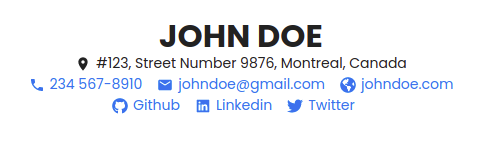
Following is how the printed document appears:
Following is the link to the codesandbox: https://codesandbox.io/s/wonderful-nobel-3fxxn?file=/src/components/PrintButton/PrintButton.js
 vikmehta
All 3 comments
Hi, sorry for the delayed response. Will look into this more soon
 MatthewHerbst
on 15 Mar 2021
MatthewHerbst
on 15 Mar 2021
Thank you for your response. Sorry for the late reply. Did you get a chance to look into the issue. Thanks :)
vikmehta
on 8 Apr 2021
Played around with this more. I don't see it in the CSS you have, but my guess is that in one of the libraries you use (Twitter Bootstrap from the looks of it) they have CSS that looks something like: a[href]:after { content: " (" attr(href) ")" }. Many frameworks do this since of course anyone who actually prints the page won't be able to see the link value otherwise.
To fix, you just need to turn it off. Add this to your global styles:
@media print {
  // Ensures the links are blue in the printout
  a {
    color: $linkColor !important;
  }
  // Ensures links don't expand in the printout
  a[href]:after {
    content: none !important;
  }
}
Note: you'll need to do a little extra work to make sure the Icons are the blue link color as well if you want that. See how to do that with react-icons in their README
Hope that helps, please let me know if you have any other questions/concerns
MatthewHerbst
on 10 Apr 2021
Related issues
 FernandoLuizNemeChibli
·
5Comments
FernandoLuizNemeChibli
·
5Comments
 hoangdoan267
·
8Comments
hoangdoan267
·
8Comments
 Dastnbek
·
4Comments
Dastnbek
·
4Comments
 theghostyced
·
8Comments
theghostyced
·
8Comments
 avniraiyani
·
3Comments
avniraiyani
·
3Comments
Most helpful comment
Hi, sorry for the delayed response. Will look into this more soon