React-table: Select row [Virtualized Rows (React-Window)]
Describe the bug (required)
When I select a line, the checkbox is not 'true', just by moving the mouse.
Screenshots:

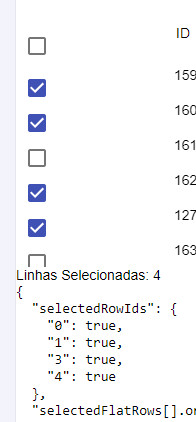
Steps To Reproduce (required)
select the checkboxes and move the mouse up or down.
 felipepxavier
All 10 comments
Please provide minimal example for replication of this issue.
 gargroh
on 19 Mar 2020
gargroh
on 19 Mar 2020
I'm having the same issue. What I was trying to do was the following:
import React from 'react'
import { useTable, useFlexLayout, useRowSelect } from 'react-table'
import { FixedSizeList } from 'react-window'
import AutoSizer from 'react-virtualized-auto-sizer'

import makeData from './makeData'

const IndeterminateCheckbox = React.forwardRef(
    ({ indeterminate, ...rest }, ref) => {
        const defaultRef = React.useRef()
        const resolvedRef = ref || defaultRef

        React.useEffect(() => {
            resolvedRef.current.indeterminate = indeterminate
        }, [resolvedRef, indeterminate])

        return <input type="checkbox" ref={resolvedRef} {...rest} />;
    }
)

function Table({ columns, data }) {
    // Use the state and functions returned from useTable to build your UI

    const defaultColumn = React.useMemo(
        () => ({
            // When using the useFlexLayout:
            minWidth: 30, // minWidth is only used as a limit for resizing
            width: 150, // width is used for both the flex-basis and flex-grow
            maxWidth: 200, // maxWidth is only used as a limit for resizing
        }),
        []
    )

    const {
        getTableProps,
        getTableBodyProps,
        headerGroups,
        rows,
        prepareRow,
        selectedFlatRows,
        state: { selectedRowIds },
    } = useTable(
        {
            columns,
            data,
            defaultColumn,
        },
        useRowSelect,
        useFlexLayout,
        hooks => {
            hooks.visibleColumns.push(columns => [
                // Let's make a column for selection
                {
                    id: 'selection',
                    // The header can use the table's getToggleAllRowsSelectedProps method
                    // to render a checkbox
                    Header: ({ getToggleAllRowsSelectedProps }) => (
                        <div>
                            <IndeterminateCheckbox {...getToggleAllRowsSelectedProps()} />
                        </div>
                    ),
                    // The cell can use the individual row's getToggleRowSelectedProps method
                    // to the render a checkbox
                    Cell: ({ row }) => (
                        <div>
                            <IndeterminateCheckbox {...row.getToggleRowSelectedProps()} />
                        </div>
                    ),
                },
                ...columns,
            ])
        }
    )

    const RenderRow = React.useCallback(
        ({ index, style }) => {
            const row = rows[index]
            prepareRow(row)
            return (
                <div
                    {...row.getRowProps({
                        style,
                    })}
                    className="tr"
                >
                    {row.cells.map(cell => {
                        return (
                            <div {...cell.getCellProps()} className="td">
                                {cell.render('Cell')}
                            </div>
                        )
                    })}
                </div>
            )
        },
        [prepareRow, rows]
    )

    // Render the UI for your table
    return (
        <>
            <div {...getTableProps()} className="virtualized-table">
                <div className="thead">
                    {headerGroups.map(headerGroup => (
                        <div {...headerGroup.getHeaderGroupProps()} className="tr">
                            {headerGroup.headers.map(column => (
                                <div {...column.getHeaderProps()} className="th">
                                    {column.render('Header')}
                                </div>
                            ))}
                        </div>
                    ))}
                </div>

                <AutoSizer>
                    {({ height, width }) => (
                        <div className="tbody" {...getTableBodyProps()}>
                            <FixedSizeList
                                height={580}
                                width={width + 18}
                                itemCount={rows.length}
                                itemSize={35}
                            >
                                {RenderRow}
                            </FixedSizeList>
                        </div>
                    )}
                </AutoSizer>
            </div>
            <p>Selected Rows: {Object.keys(selectedRowIds).length}</p>
            <pre>
                <code>
                    {JSON.stringify(
                        {
                            selectedRowIds: selectedRowIds,
                            'selectedFlatRows[].original': selectedFlatRows.map(
                                d => d.original
                            ),
                        },
                        null,
                        2
                    )}
                </code>
            </pre>
        </>
    )
}

function App() {
    const columns = React.useMemo(
        () => [
            {
                Header: 'Row Index',
                accessor: (row, i) => i,
            },
            {
                Header: 'Name',
                columns: [
                    {
                        Header: 'First Name',
                        accessor: 'firstName',
                    },
                    {
                        Header: 'Last Name',
                        accessor: 'lastName',
                    },
                ],
            },
            {
                Header: 'Info',
                columns: [
                    {
                        Header: 'Age',
                        accessor: 'age',
                        width: 50,
                    },
                    {
                        Header: 'Visits',
                        accessor: 'visits',
                        width: 60,
                    },
                    {
                        Header: 'Status',
                        accessor: 'status',
                    },
                    {
                        Header: 'Profile Progress',
                        accessor: 'progress',
                    },
                ],
            },
        ],
        []
    )

    const data = React.useMemo(() => makeData(1000), [])

    return (
        <Table columns={columns} data={data} />
    )
}

export default App
(makeData.js is the same as this)
Reproducing the error
Go to the table and select a column.
Expected
The row to be selected
What actually happens
The row is put in state, but the checkbox does not change its state. If you scroll down, to the point where the selected row is no longer displayed, and come back to said row, the row now appears to be selected.
 vsSanti
on 25 Mar 2020
vsSanti
on 25 Mar 2020
Please please please resubmit this issue with a codesandbox example. We can't help debug this unless we have an example that is consistently failing. Thanks!
 tannerlinsley
on 2 Apr 2020
tannerlinsley
on 2 Apr 2020
Hey @tannerlinsley - i'm actually experiencing this issue too and put together a repro of it: https://codesandbox.io/s/wizardly-maxwell-9upvj?file=/src/App.js
(excuse the formatting - it's ugly but demonstrates the issue)
to reproduce:
- select any row. the row will not appear selected, but will "be" selected.
- scroll down and back up in the virtualized list. the row will now appear selected.
I'm a bit stumped on a solution tbh, but I think it has to do w/ prepareRow's laziness and/or what happens when prepareRow is called.
In any case, regardless of what I try the isSelected property for any particular row in the virtualized list is always the same, so the row doesn't rerender when memoized (and that's really not an option b/c of the cost of re-rendering every visible row adds up quickly).
Any help would be appreciated. Hope you and your fam are safe and healthy :)
 jackmccloy
on 1 May 2020
jackmccloy
on 1 May 2020
Curious if there are any updates here. I was able to achieve the functionality I needed but had to do some pretty inelegant (and potentially difficult to maintain) things in order to make things work
jackmccloy
on 13 May 2020
My recommendation is to start using react-virtual instead of react-window
tannerlinsley
on 13 May 2020
@tannerlinsley Could you update the example to use react-virtual now that your recommendation has changed?
 m4tta
on 17 Jul 2020
m4tta
on 17 Jul 2020
I ran into this as well when using react-virtualized (not react-virtual) if the render row function was wrapped in a useCallback.
Removing the useCallback for that function seems to work, and doesn't seem to be too big of a hit from a performance standpoint.
Removing React.memo from the react-window example codesandbox above didn't help.
 rickbergfalk
on 4 Aug 2020
rickbergfalk
on 4 Aug 2020
@rickbergfalk thank you! Removing the useCallback from the RenderRow function in the Virtualized Rows example (https://react-table.tanstack.com/docs/examples/virtualized-rows) did the trick.
 AdrianZielonka
on 11 Aug 2020
AdrianZielonka
on 11 Aug 2020
key parts:
- RenderRow function outside of Table component
- itemData with rows + prepareRow (this is ok to have inside of Table component)
  const itemData = {
    rows,
    prepareRow,
  }
````
- itemData added to FixedSizeList
```javascript
<FixedSizeList
  height={height}
  itemCount={rows.length}
  itemData={itemData}
  itemSize={size}
  width="100%"
>
  {RenderRow}
</FixedSizeList>
This will get you selectable rows where every row doesn't re-render on select or update
 zyzski
on 6 Oct 2020
zyzski
on 6 Oct 2020
Related issues
 danielmariz
·
3Comments
danielmariz
·
3Comments
 ocalde
·
3Comments
ocalde
·
3Comments
 kieronsutton00
·
3Comments
kieronsutton00
·
3Comments
 dilipsundarraj1
·
3Comments
dilipsundarraj1
·
3Comments
 missmellyg85
·
3Comments
missmellyg85
·
3Comments
Most helpful comment
I ran into this as well when using react-virtualized (not react-virtual) if the render row function was wrapped in a useCallback.
Removing the useCallback for that function seems to work, and doesn't seem to be too big of a hit from a performance standpoint.
Removing React.memo from the react-window example codesandbox above didn't help.