React-table: Accessor keys don't work with Dots
Using v7?
Yawps!
Describe the bug
Table rows aren't able to access the columns in data when they have a . in the accessor key.
To Reproduce
With columns and data described below, the values for the broken column are undefined.
const columns = [
  {
    Header: 'broken column',
    accessor: 'first.column',
  },
  {
    Header: 'working column',
    accessor: 'first-column',
  },
]

const data = [
  {
     'first.column': 'hello world',
     'first-column': 'hello again',
  },
  {
    'first.column': 'fizz',
    'first-column': 'buzz',
  },
]

...
<Table columns={columns} data={data} />
...
Expected behavior
I expect the cell to still be able to access the data even with dot in the accessor key.
Codesandbox!
Use a new react-table codesandbox to reproduce the issue.
Screenshots
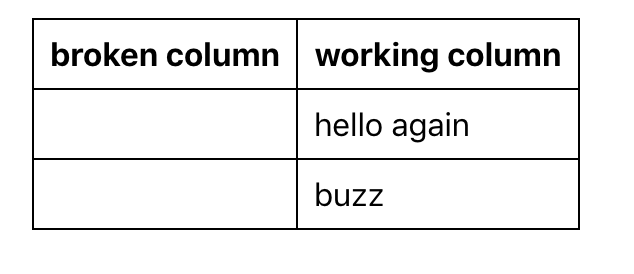
Desktop (please complete the following information):
- OS: iOS
- Browser: chrome
- Version: 79.0.3945.36 (Official Build) beta (64-bit)
Additional context
Not sure if this is by design or a limitation of my data model or a bug.
 ajtran
All 5 comments
A period in an accessor is used for accessing properties on a data object.
Your column definition
const columns = [
{
Header: 'broken column',
accessor: 'first.column',
},
{
Header: 'working column',
accessor: 'first-column',
},
]
Would work well with data like this:
const data = [
{
first: { column: "hello world" },
"first-column": "hello again"
},
{
first: { column: "fizz" },
"first-column": "buzz"
}
];
Result:

You can see it in this working codesandbox: https://codesandbox.io/s/tannerlinsleyreact-table-basic-vxlcg
 burtyish
on 30 Nov 2019
burtyish
on 30 Nov 2019
Oh! I see. Thank you for the clarification!
ajtran
on 30 Nov 2019
@tannerlinsley @burtyish is there any way to disable the deep inspection and treat the accessor as a normal string?
 kderbalah
on 15 Jan 2020
kderbalah
on 15 Jan 2020
@kderbalah idk about that. But you can get full control of the logic by supplying a function as the accessor
burtyish
on 15 Jan 2020
@burtyish thanks for the quick reply. Yea, I managed to fix it by using a custom accessor
{
    Header: 'First Column',
    accessor: (d) => d[key], // example key first.column
    id: key
}
Thanks for the hint!
kderbalah
on 15 Jan 2020
Related issues
 DaveyEdwards
·
3Comments
DaveyEdwards
·
3Comments
 dwjft
·
3Comments
dwjft
·
3Comments
 kieronsutton00
·
3Comments
kieronsutton00
·
3Comments
 esetnik
·
3Comments
esetnik
·
3Comments
 mlajszczak
·
3Comments
mlajszczak
·
3Comments
Most helpful comment
@burtyish thanks for the quick reply. Yea, I managed to fix it by using a custom accessor
Thanks for the hint!