React-table: No way to supply and use classNames v7
Describe the bug
In v7, I can't find a way to supply classes in my columns or cells and have them be applied. This is surprising since in each getTableLevelProps() function className, key, and style are all returned but key is the only one that appears to be used.
The class attribute is added and visible in the DOM but not ever used.
Expected behavior
Giving className keys to columns should result in them being applied.
Screenshots
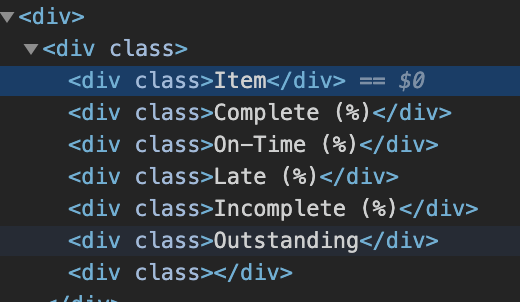
Desktop (please complete the following information):
- OS: macOS Mojave 10.14.6 (18G87)
- Browser: Chrome 77.0.3865.120 (Official Build) (64-bit)
 abominab
All 8 comments
I'm kinda struggling with this myself, but I've found that custom props can be passed thru getCellProps() for example:
<td {...cell.getCellProps({ className: 'my-class-here' })}>
{cell.render('Cell')}
</td>
Actually, maybe https://github.com/tannerlinsley/react-table/issues/1612 will explain it better.
 skube
on 15 Nov 2019
skube
on 15 Nov 2019
@skube Yes, that is the right idea. You can pass your own props through to the prop getters. So you could easily do this:
<td {...cell.getCellProps({ className: cell.column.className })}>
    {cell.render('Cell')}
</td>
I can't say this enough, but many are so used to API's providing every single option and knob to customize markup. In React Table's case, you own the rendering phase of the table, so you can essentially create your own markup API's as needed. This is no different.
 tannerlinsley
on 15 Nov 2019
tannerlinsley
on 15 Nov 2019
I'm using typescript. I have the latest type definitions installed. I am seeing the following error:
Type '{ Header: string; id: string; accessor: (user: User) => JSX.Element; className: string; }' is not assignable to type 'Column
'.
Object literal may only specify known properties, and 'className' does not exist in type 'Column'.ts(2322)
const columns = React.useMemo(
(): Column<User>[] => [
{
Header: 'Enabled',
id: 'loginEnabled',
accessor: (user: User) => <FontAwesomeIcon icon={ faThumbsUp }/>,
className: 'td--centered'
}
],
[]
);
...
<td {...cell.getCellProps({ className: cell.column.className })}>
    {cell.render('Cell')}
</td>
Is this a shortcoming of the typings, or am I doing this wrong?
 JWess
on 7 Jan 2020
JWess
on 7 Jan 2020
@JWess You are adding additional properties to an existing type (Column in this case), I assume that you are already extending Column based upon the plugins used, following the description in https://github.com/DefinitelyTyped/DefinitelyTyped/blob/master/types/react-table/Readme.md. If so, just add a className: string to the Column definition.
 ggascoigne
on 7 Jan 2020
ggascoigne
on 7 Jan 2020
@ggascoigne I have the same issue with Typescript, I added className: string to the Column definition to the Column and now it reports that the className doesn't exists in 'Partial
I am using rc.15
Any suggestions how to add the TableCellProps?
 govi74
on 19 Feb 2020
govi74
on 19 Feb 2020
Do you mean column or cell? Adding a property to the column won't make it appear on the cell regardless of typescript errors. But, you can access it via cell.column.className in your cell renderer if that's what you are after.
ggascoigne
on 19 Feb 2020
It was exactly the same as "JWess commented on Jan 7", after adding the "className: string to the Column definition." as per your suggestion, I dont get typescript error on "'Column", but started getting typescript errors on "TableCellProps" - Btw I am using semantic UI Table for the styling.
So finally ended up adding like this...
<Table.Cell
                          {...cell.getCellProps()}
                          className={cell.column.className}
                        >
                          {cell.render("Cell")}
                        </Table.Cell>
govi74
on 19 Feb 2020
ah I see, I wasn't paying enough attention to the thread as a whole rather than just the last comment. Sorry about that.
This link https://github.com/ggascoigne/react-table-example/blob/master/src/Table/Table.tsx#L134 might help a bit. It's passing in style objects rather than className, but the principle is similar.
That said, looking at the types, it might make sense to just add className?: string to TableCommonProps since this is likely to be a common use case.
In the short term you could try adding
export interface TableCommonProps {
    className?: string
}
to whatever file you are using to configure the table types, then the declaration merging should just add that as a valid option.
ggascoigne
on 19 Feb 2020
Related issues
 alexanderwhatley
·
3Comments
alexanderwhatley
·
3Comments
 kieronsutton00
·
3Comments
kieronsutton00
·
3Comments
 Codar97
·
3Comments
Codar97
·
3Comments
 panfiva
·
3Comments
panfiva
·
3Comments
 missmellyg85
·
3Comments
missmellyg85
·
3Comments
Most helpful comment
@skube Yes, that is the right idea. You can pass your own props through to the prop getters. So you could easily do this:
I can't say this enough, but many are so used to API's providing every single option and knob to customize markup. In React Table's case, you own the rendering phase of the table, so you can essentially create your own markup API's as needed. This is no different.