React-table: react table lose input focus on change. V 6.10 - 6.8.6
Describe the bug
Live https://codesandbox.io/s/6l7op9lovr
After input value change, input is losing focus and we cannot type in more than 1 letter. When downgrade to 6.8.6 input is not losing focus after typing in 1 letter
To Reproduce
Steps to reproduce the behavior:
- Go to https://codesandbox.io/s/6l7op9lovr website
- Click first input
- try to write more than 1 letter in input
- check that input has lost focus
- downgrade to 6.8.6
- Click first input
- try to write more than 1 letter
- notice that it s possible now
 Oskii2311
All 46 comments
I have the same problem.
 kicomeister
on 17 May 2019
kicomeister
on 17 May 2019
We are having same issue, Cell components seem to be unmounting and mounting whenever input value changes, which causes lost focus. With previous ver., this did not happened.
https://codesandbox.io/s/reacttable-simple-table-6t7er?fontsize=14
 wataru358
on 21 May 2019
wataru358
on 21 May 2019
Same here. Took a while to figure this out but luckily downgrade fixed it. I wonder how much will this change in v7
 PeterKottas
on 29 May 2019
PeterKottas
on 29 May 2019
@PeterKottas, v7 is going to be headless, so anything pertaining to markup, or actually rendering components will be in your hands. Please check out the alpha sandbox in the readme to get a feel for what will be possible.
 tannerlinsley
on 30 May 2019
tannerlinsley
on 30 May 2019
This is a major bug @tannerlinsley. It makes the tables totally unusable (double click is also failing for me because of lost focus).
I think just saying upgrade to v7 is not enough! Let's figure out which commit caused this issue and fix it!
 tnrich
on 5 Sep 2019
tnrich
on 5 Sep 2019
Indeed, it is a major bug.
I would love that! If you can find the bug and fix it, I will merge a PR for it.
tannerlinsley
on 5 Sep 2019
@tannerlinsley I'll take a peak, I do think you should probably revert/publish over v6.10 in the mean time
tnrich
on 5 Sep 2019
This could mean removing and breaking a lot of features that people have PR'd in since then. Which version were you thinking?
tannerlinsley
on 5 Sep 2019
I'm doing some sleuthing on my end. Here is my best guess as to where the issue may have been introduced:
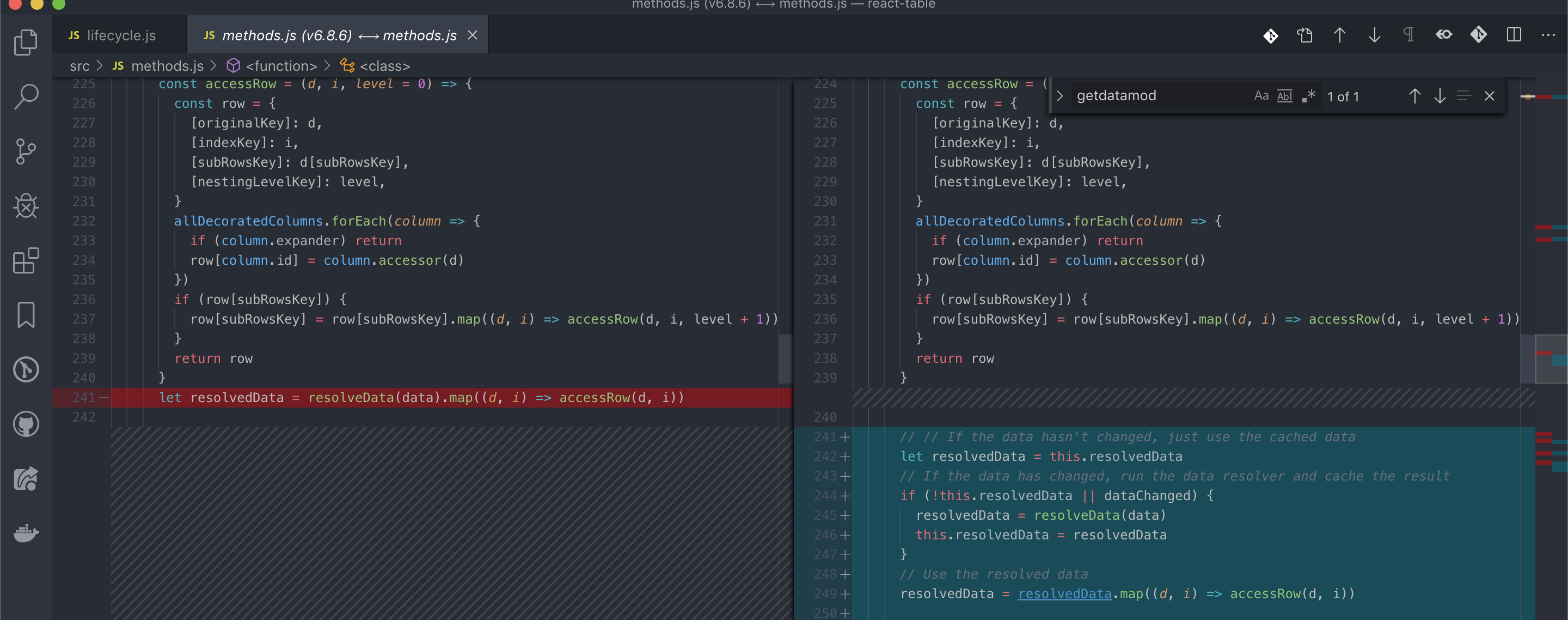
All the other changes between v6.8.6 and v.6.10 seem unlikely to have caused the issue to me.
You're maybe correct to hold off publishing over v6.10 if people are using the features they've added since. Let's try to find where this issue is arising
tnrich
on 5 Sep 2019
Yep. I would rather find the issue and patch it, rather than take a step backwards. It's bad either way: existing users are either having issues with this bug right now, or will have compatibility issues if we reset.
tannerlinsley
on 5 Sep 2019
@tannerlinsley Ok, after playing with it a bit, it appears that the following change breaks double click for me:
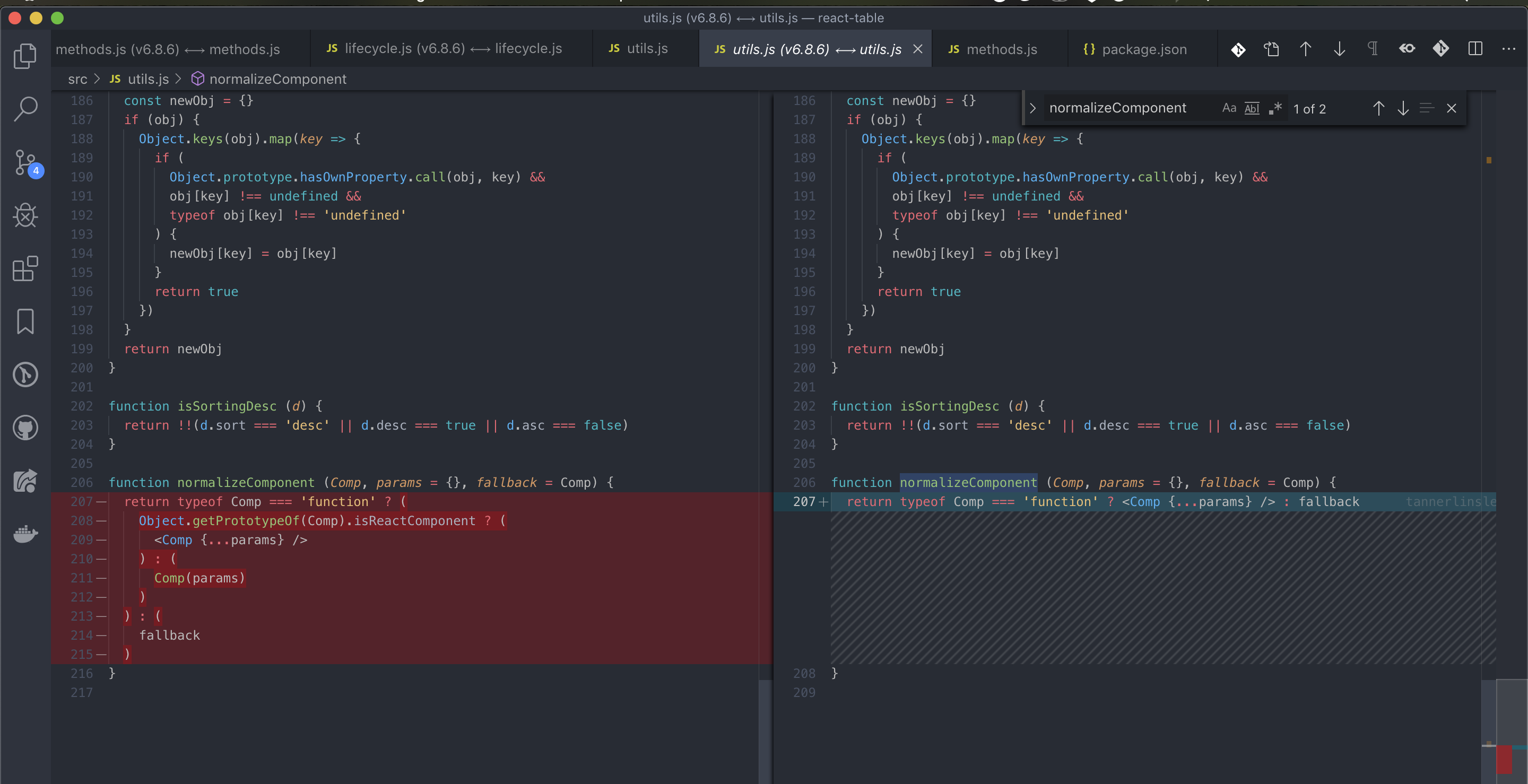
I'm not sure if that change also causes the input focus loss that was the original issue filed here, but it definitely breaks double click for me.
@tannerlinsley what was that change meant to do?
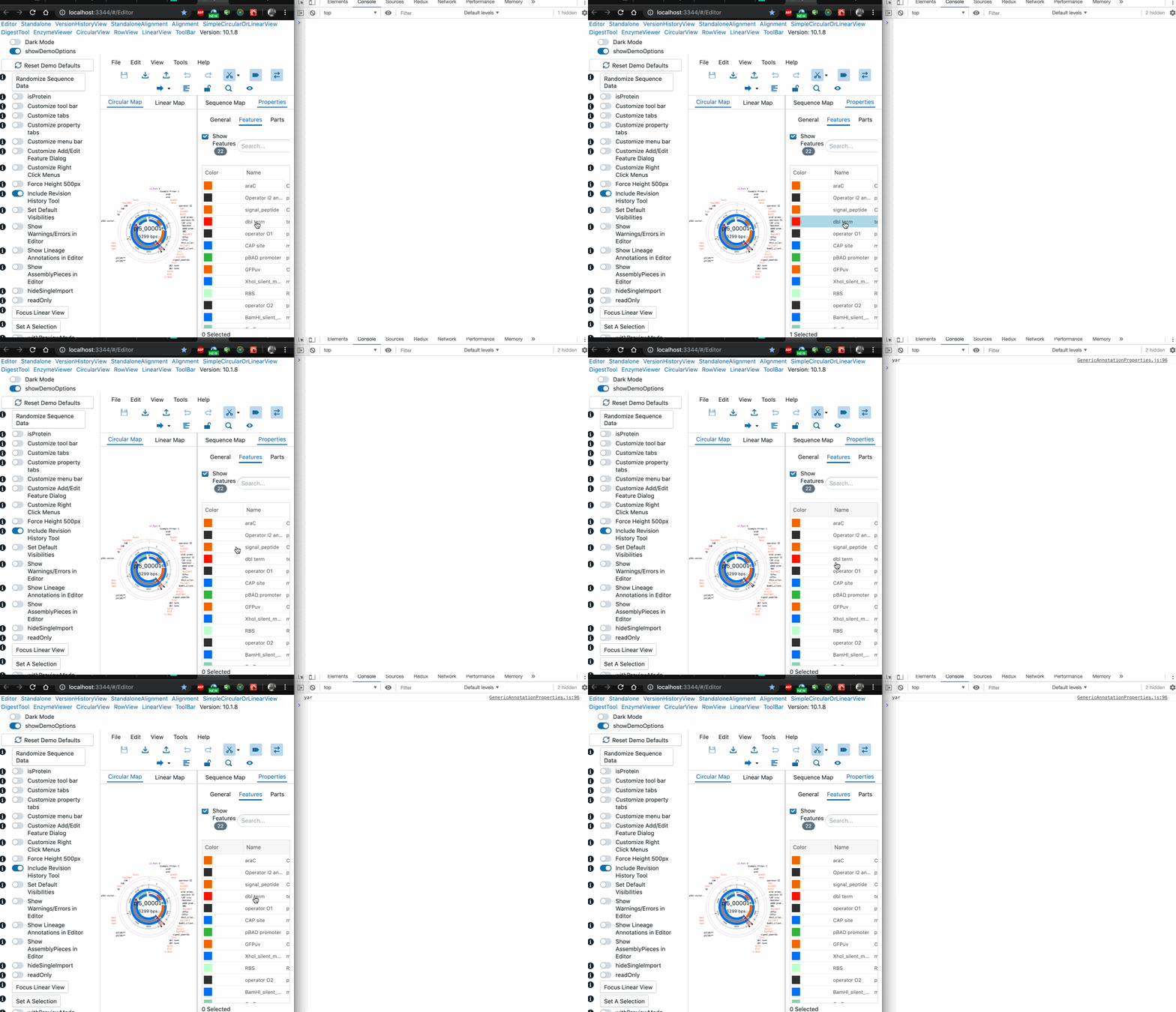
Here I'm console logging "yar" on double click:
With v6.8 code:
function normalizeComponent (Comp, params = {}, fallback = Comp) {
  return typeof Comp === 'function' ? (
    Object.getPrototypeOf(Comp).isReactComponent ? (
      <Comp {...params} />
    ) : (
      Comp(params)
    )
  ) : (
    fallback
  )
}

With v6.10 code:
function normalizeComponent (Comp, params = {}, fallback = Comp) {
  return typeof Comp === 'function' ? <Comp {...params} /> : fallback
}
tnrich
on 5 Sep 2019
Hmm.. This was a long time ago in dev years, but I think React deprecated or discouraged using isReactComponent. We needed a quick way to tell if a component was a class, function, or JSX.
It's likely that if we simply improve that function to handle all of those edge cases we'll be okay.
Not that this is perfect, but here is what we are working with in v7:
export function flexRender(Comp, props) {
  if (typeof Comp === 'function' || typeof Comp === 'object') {
    return <Comp {...props} />
  }
  return Comp
}
Currently, it doesn't handle detecting JSX primitives, so you have to do this: Header: () => <span>Yo</span>, instead of just Header: <span>Yo</span>. I wish it did detect this though.
tannerlinsley
on 5 Sep 2019
maybe we can follow the top voted answer here: https://stackoverflow.com/questions/33199959/how-to-detect-a-react-component-vs-a-react-element
?
tnrich
on 5 Sep 2019
tannerlinsley
on 5 Sep 2019
It's really the difference between a react component and a react element.
A component is a class or function that has not been
tannerlinsley
on 5 Sep 2019
I meant this one: https://stackoverflow.com/a/41658173/2178112
tnrich
on 5 Sep 2019
Yep. Those are perfect. We need to incorporate those into the render function for voth v6 and v7.
tannerlinsley
on 5 Sep 2019
Would you like to test those out and update the older function? I'll work on the v7 impl.
tannerlinsley
on 5 Sep 2019
Okay I put a PR in @tannerlinsley
tnrich
on 5 Sep 2019
Merged.
tannerlinsley
on 5 Sep 2019
I'll try and get a release out tonight.
tannerlinsley
on 5 Sep 2019
@tannerlinsley @tnrich to check if something is react component you should use react-is, or the elementType from prop-types https://github.com/ReactTraining/react-router/issues/6819. Component can be also object in later versions of react, not just class/function. https://github.com/facebook/react/tree/master/packages/react-is
 croraf
on 6 Sep 2019
croraf
on 6 Sep 2019
@croraf If you'd like to submit a PR to improve what @tnrich has done in v6, then please do.
tannerlinsley
on 6 Sep 2019
@tannerlinsley has it been released yet? Using 6.10.3 and just faced the same issue. My own workaround here https://github.com/tannerlinsley/react-table/issues/1346#issuecomment-533811901 doesn't really work for me as I need to pass additional data to render function from upper scope.
 evenfrost
on 21 Sep 2019
evenfrost
on 21 Sep 2019
Issue says closed but I'm still having the same issue.
 emanual4real
on 9 Oct 2019
emanual4real
on 9 Oct 2019
I have the same issue since v6.9.0.
v6.8.6 works fine.
 Dozalex
on 9 Oct 2019
Dozalex
on 9 Oct 2019
Still an issue in 6.10.3. This shouldn't be closed
 peterspliid
on 21 Oct 2019
peterspliid
on 21 Oct 2019
This is still an issue
 dayanrr91
on 1 Nov 2019
dayanrr91
on 1 Nov 2019
@Dozalex @dayanrr91 @peterspliid can you please describe the issue and give steps for reproducing? I think this issue has been fixed for me
tnrich
on 6 Nov 2019
@tnrich I just tested on version 6.10.3, and it is still an issue for me
I have a table with a controlled input text field, something like this:
const [data, setData] = useState([ {name: 'Peter'} ])

let columns: Column[] = [
        {
            id: 'name',
            Header: 'Your name',
            accessor: 'name',
            Cell: (row: RowInfo) => (
                <input
                    type="text"
                    value={row.original.name}
                    onChange={e=> setData([ {name: e.target.value} ])}
                />
            )
        }
]
<ReactTable
            data={data}
            columns={columns}
            showPagination={false}
            minRows={0}
        />
@peterspliid have u tried evenfrost's suggestion here:
#1346 (comment)
 tareqdayya
on 7 Nov 2019
tareqdayya
on 7 Nov 2019
@peterspliid have u tried evenfrost's suggestion here:
#1346 (comment)
It didn't work when I just moved the cell rendering function to a function (inside my functional component), but it worked when I moved it into a useCallback. So I'll do that to 'fix' it.
It wasn't necessary on 6.8.6, so although there now is a workaround, I still think that this is an issue that needs to be fixed.
And Thanks @tareqdayya for the workaround.
For people in this thread looking for a workaround:
Move the cell rendering function into a useCallback function. Applying it to my example above, it will look like this:
...
Usecallback does not work if you have multiple controlled input fields in the table. I've also try to move the function out of the functional component, which works when testing it, but when it has been built, it stops working. So back to 6.8.6
peterspliid
on 15 Nov 2019
Usecallback does not work if you have multiple controlled input fields in the table. I've also try to move the function out of the functional component, which works when testing it, but when it has been built, it stops working. So back to 6.8.6
Same here, 6.10.3, 6.8.2, 6.8.6 works fine in dev build, in prod build only version 6.8.6 keeps focus.
 almadigabor
on 21 Nov 2019
almadigabor
on 21 Nov 2019
I'm facing the same problem! :(
What is the workaround that is working for now? Instead of downgrade of react table?!
Someone know another react component for build table with input columns?, thanks
 vitorlans
on 14 Jan 2020
vitorlans
on 14 Jan 2020
I just tryed for several hours and I couldn't find any workaround for it. At the end I downgraded the react table version and everything was fine by me.
dayanrr91
on 14 Jan 2020
Same problem here. Did someone find a way to correct this, maybe by modifying react-table itself? I will soon adopt react-table 6 in my project to upgrade it myself (for further deprecated...), but I don't have the time now, and this bug is really annoying.
 arwandar
on 24 Jan 2020
arwandar
on 24 Jan 2020
Same here... I cannot understand why this bug has Closed status.
 tsilomit
on 28 Jan 2020
tsilomit
on 28 Jan 2020
I'm also facing the same issue and after downgrade to 6.8.6 issue remains same
 prakashio
on 30 Mar 2020
prakashio
on 30 Mar 2020
As I understood, the problem here is that when you pass the function to the Header it's re-mounted with every change. So, I tried to passing the component and this solved my problem
const Search = <SearchUI onSearch={handleSearchUpdate}/>;

const columns = [
  {
    name: 'Name',
    columns: [
      accessor: 'name',
      id: 'Name',
      width: 200,
      Header: Search,
    ],
  },
];
 vovanezha
on 7 May 2020
vovanezha
on 7 May 2020
This lib was completely rewritten for v7. Since v6 is not supported anyways, does it really matter if you keep on using 6.8.6? You are using an outdated version anyways unless you are willing to do a complete rewrite for v7 (which doesn't suffer from this bug).
PeterKottas
on 8 May 2020
This lib was completely rewritten for v7. Since v6 is not supported anyways, does it really matter if you keep on using 6.8.6? You are using an outdated version anyways unless you are willing to do a complete rewrite for v7 (which doesn't suffer from this bug).
I'm using 7.0.0 and from what i can tell still have this bug.
It could be because i have a conditional?
Sorry quickly posted this last night before I went to bed after about an hour of surfing the web for a solution. Just tested without the conditional and it's still bugging.
...
Cell: ({ cell: { value }, row: { original } }: CellProps<Data>) =>
        editingObjectId !== original.id ? (
          <>{value}</>
        ) : (
          <Input
            name="year"
            value={formData.year}
            onChange={onChange}
            size="sm"
          />
        )
 Premm
on 14 May 2020
Premm
on 14 May 2020
The arrow function is changing in every render, you need to create that cell component once and assign it to a variable. That's React if not javascript basics mate, nothing to do with this lib.
PeterKottas
on 18 May 2020
I'm also facing the same issue with versions waht ever you mentioned in the above comments. Please help me on this
 lakshmi24111990
on 14 Jul 2020
lakshmi24111990
on 14 Jul 2020
I use small hack. Solution is not change columns after change rows.
But, usually, we need access to rows to handle input change.
So, we can use small hack - use onChangeRef, and useMemo for columns.
Example:
const onChange = (row: FinancePlanRow, fieldName: keyof FinancePlanRow, value: number) => {
        if (props.onChange) {
            props.onChange(props.rows.map((checkingRow: FinancePlanRow) => {
                if (row.year !== checkingRow.year) {
                    return row;
                }

                return {
                    ...row,
                    [fieldName]: value
                }
            }));
        }
    };

    const onChangeRef = useRef(onChange);
    onChangeRef.current = onChange;

    const columns = useMemo((): Column[] => {
        return [{
            Header: 'EBIDTA',
            accessor: 'ebidta',
            Cell: (cellProps) => {
                return (
                    <NumberInput
                        readonly={props.readonly}
                        value={cellProps.value}
                        name='ebidta'
                        placeholder='0.00'
                        prepend={currency.symbol}
                        withoutBorder={true}
                        onChange={(newValue) => onChangeRef.current(cellProps.row, 'ebidta', newValue)}
                    >{cellProps.value}</NumberInput>
                );
            },
        }];
    }, [currency, props.readonly]);
 EgorKluch
on 16 Jul 2020
EgorKluch
on 16 Jul 2020
I have to down grand to 6.8.3 to solve the same problem.
 thomas81528262
on 5 Sep 2020
thomas81528262
on 5 Sep 2020
Related issues
 danielmariz
·
3Comments
danielmariz
·
3Comments
 dilipsundarraj1
·
3Comments
dilipsundarraj1
·
3Comments
 mlajszczak
·
3Comments
mlajszczak
·
3Comments
 esetnik
·
3Comments
esetnik
·
3Comments
 krishna-shenll
·
3Comments
krishna-shenll
·
3Comments
Most helpful comment
Same here... I cannot understand why this bug has Closed status.