React-table: React-table 5.6.0 -> 6.0.0 content no longer displayed
What version of React-Table are you using?
In the latest version (6.5.0), the table data and columns no longer appear.
The latest version that doesn't have this issue is 5.6.0.
What bug are you experiencing, or what feature are you proposing?
- Bug is similar to a previously reported one: #496 , and it's happening in the latest versions of Chrome and Safari.
Screenshots
Using 6.0.0 - 6.5.0
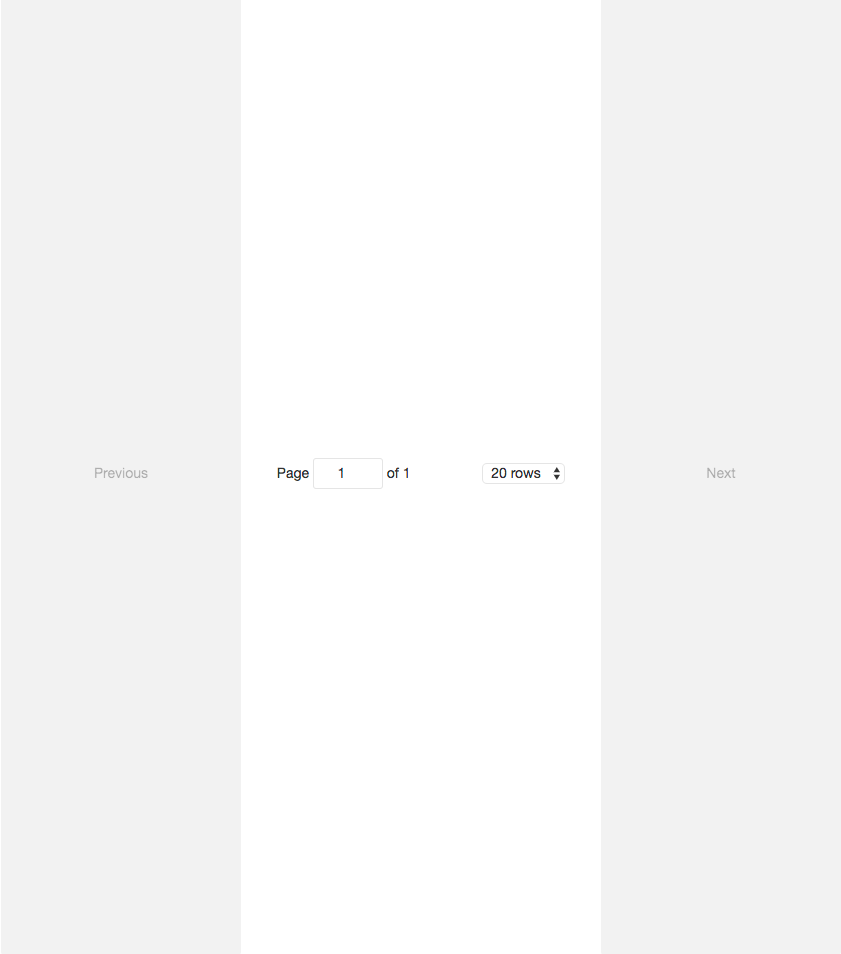
Using 5.6.0 (works as intended)

My environment:
- Webpack: 1.12.15
- react-redux: 4.4.5
- react-router: 2.3.0
- react-router-redux: 4.0.2
The issue is that the recommended solution, which is adding <!DOCTYPE html> to the start of the HTML page isn't a viable/proper solution for React apps (see https://github.com/facebook/react/issues/1035). For pure React apps that use react-router-redux (https://github.com/reactjs/react-router-redux) to generate pages, adding the doctype isn't feasible (or would be hacky).
Use https://codesandbox.io/s/X6npLXPRW (by clicking the "Fork" button) to reproduce the issue.
- Was unable to reproduce in the sandbox.
What are the steps to reproduce the issue?
- Create react app with main.js entry point configured in webpack.config
- Use react-router-redux to set up routes in main.js (as shown in the getting started example here: https://github.com/reactjs/react-router-redux)
Next steps:
- For devs that can't apply the recommended solution, downgrading to v5.6.0 should be listed in the FAQ as an alternative.
- I eventually plan on running through each commit from 5.6.0 to 6.0.0 to find which code changes are causing this issue. I'll keep this issue updated.
Thanks!
 EddyIonescu
All 7 comments
Hi I've had the same problem. My issue was caused by webpack and postcss with postcss-flexbugs-fixes where the compiled default css on .ReactTable .rt-table would be set to 1 1 0%
Try changing or removing this style in your browser inspector to see if the table shows. If it does you can overwrite the the react-table default css with
:global(.ReactTable .rt-table) {
  flex: auto;
}
and it should work.
If this fixes your problem maybe I can do a PR. I didn't do it before because I was unsure anyone else had the same issue. It was a bit tricky to find out what was causing it 😄
 slackday
on 24 Oct 2017
slackday
on 24 Oct 2017
Hey, thanks for the quick reply.
So I added
.rt-table {
  flex: auto !important;
}
to my main.scss file and it works :) Unfortunately we have no choice but to override here. It's definitely worth updating the FAQ with this.
As for the underlying issue, I think it's related to the flex not being properly defined for the rt-table (as this fix essentially tells the browser to ignore it).
I should add that taking flex out completely also works:
.ReactTable {
  display: block !important;
}
So next steps:
- There should be a PR to update the FAQ.
- Maybe I'll look into any new styling/layouts that were added between 5.6.0 and 6.0.0.
EddyIonescu
on 24 Oct 2017
Glad it helped you solve the problem in the short term. I have a feeling like you that the root of the issue is caused by faulty definition of flex in the default css. So I think this should be investigated further to see if changing the css solves the issue without causing other display errors.
My suggestion feels a bit too hacky to be part of general FAQ but that is just my opinion.
slackday
on 24 Oct 2017
I agree - but it works as a temporary workaround until it gets fixed (I'll be sure to include a link to this issue).
What's already on the FAQ isn't a solution for some react apps (especially those using react-redux-routes) (see https://github.com/facebook/react/issues/1035) - but adding the doctype should be the first option.
- I'll make a PR for the FAQ shortly, and close this issue once the FAQ gets updated (and once we make a new issue for rt-table flex :)
EddyIonescu
on 24 Oct 2017
Check the FAQ here on the github Wiki - there are requirements around doctype as well as the flex fix for IE11.
 gary-menzel
on 25 Oct 2017
gary-menzel
on 25 Oct 2017
So I also had the problem where the pagination section kept expanding (the solution in #496 worked).
This ended up solving all my problems (added to my main.scss file)
.ReactTable .rt-table {
    flex: auto 1 !important;
}

.-pagination {
    height: 50px;
}
I had this issue with Chrome/Safari as setting the doctype would've been really hacky for me (as react-router-redux generates the HTML pages, and React doesn't intend us to directly set HTML - https://github.com/facebook/react/issues/1035), so this isn't just for IE11.
Otherwise react-table works great and it's really well documented - thanks :)
EddyIonescu
on 25 Oct 2017
There is a PR in already for the flex fix. @tannerlinsley is looking into it (as it needs to be tested across all browsers). I think this is a duplicate of other issues that are already in the pipeline for PR consideration.
gary-menzel
on 25 Oct 2017
Related issues
 krishna-shenll
·
3Comments
krishna-shenll
·
3Comments
 kieronsutton00
·
3Comments
kieronsutton00
·
3Comments
 pasichnyk
·
3Comments
pasichnyk
·
3Comments
 DaveyEdwards
·
3Comments
DaveyEdwards
·
3Comments
 danielmariz
·
3Comments
danielmariz
·
3Comments