React-table: Changing pageSize based on container height
So, I've accomplished to change the pageSize based on my live resizable container: It works well until I change page.
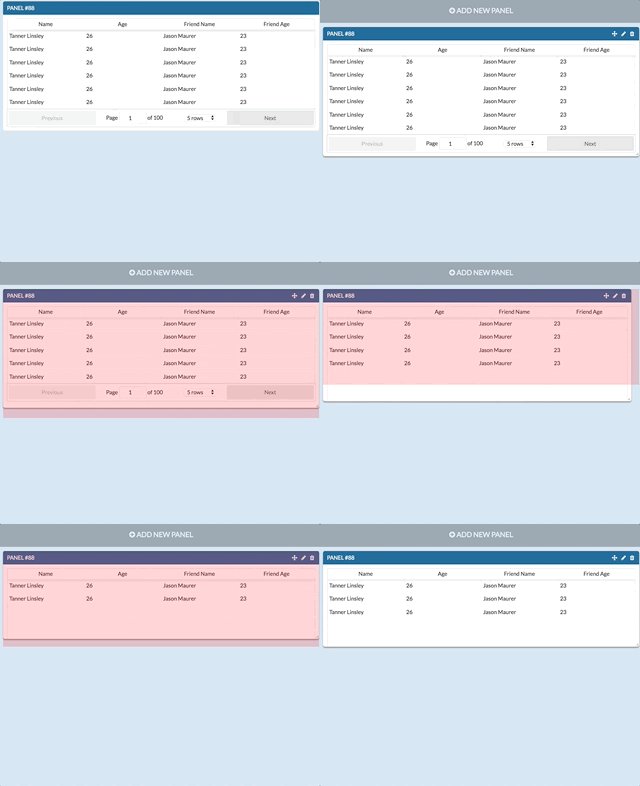
Once I change page, if i reduce the height of the container, the height of the table can't go lower then the height when I changed the page.
In other words when I change the page (from page 1 to page 2 for example), let's say the height is 360px with ~12 rows, if I go higher the 360px rows are "added" smoothly, but when I go under 360px, the height of the table doesn't change anymore.
NOTE: before changing the page everything works smoothly.
 pinkynrg
All 4 comments
This is an implementation issue. We suggest you join the #react-table Slack channel where there are a wider range of people to assist with your question. You may also like to consider putting up a codesandbox of the issue for others to review. Thanks.
 gary-menzel
on 15 Oct 2017
gary-menzel
on 15 Oct 2017
Is this really an implementation issue? My implementation is pretty straight forward (See the footer of table in the gif after changing page):
import React from "react";
import ReactTable from 'react-table'
export default class Table extends React.Component {
constructor() {
...
}
componentWillReceiveProps(newProps) {
if (this.props.y != newProps.y) {
// size row
let rowHeight = 32.88;
// size resizable panel
let panelHeight = newProps.y;
// size of the extra y of the table (header + footer)
let extraTable = 27 + (this.props.x < 650 ? 75 : 45);
// setting pageSize of the table
this.setState({pageSize: parseInt((panelHeight - extraTable) / rowHeight)});
}
}
render() {
return (
<ReactTable
data={this.props.data}
columns={this.props.columns}
pageSize={this.state.pageSize}
/>
)
}
}
Given that react-table is designed for fixed page sizes (modified by the using by setting the the provided page size dropdown) this more dynamic use of pageSize could potentially break due to how react-table tries to pad rows to maintain the page size.
You could try using defaultPageSize as the prop instead. You may need to consider setting the pageSizeOptions to a finer level of detail (even though you have them disabled.
This is why I said it was an implementation issue because even though what you want to do may seem simple it may be fighting against some of the design goals of react-table.
gary-menzel
on 15 Oct 2017
Solved by using the defaultPageSize instead of pageSize, and changing the key of the component to force re-render (based on the pageSize itself):
render() {
    return (
      <ReactTable
        key={this.state.pageSize}
        data={this.data}
        columns={this.columns}
        defaultPageSize={this.state.pageSize}
        showPageSizeOptions={false}
      />
    )
  }
Related issues
 LeonHex
·
3Comments
LeonHex
·
3Comments
 kieronsutton00
·
3Comments
kieronsutton00
·
3Comments
 tremby
·
3Comments
tremby
·
3Comments
 ocalde
·
3Comments
ocalde
·
3Comments
 dwjft
·
3Comments
dwjft
·
3Comments
Most helpful comment
Solved by using the defaultPageSize instead of pageSize, and changing the key of the component to force re-render (based on the pageSize itself):