React-stripe-elements: paymentRequest.canMakePayment() is always false
Summary
Hello, it seems paymentRequest.canMakePayment() always returns false, also in browsers that supports it and with credit cards added.
I've tested with both Chrome and Safari, and it turns out it never works. In fact, if I console.log the result in the callback, it is always false.
Here's my code, almost copy/pasted from the official repo:
import React from 'react'
import { injectStripe, PaymentRequestButtonElement } from 'react-stripe-elements'

class PaymentRequestForm extends React.Component {
  constructor(props) {
    super(props)

    // For full documentation of the available paymentRequest options, see:
    // https://stripe.com/docs/stripe.js#the-payment-request-object
    const paymentRequest = props.stripe.paymentRequest({
      country: 'US',
      currency: 'usd',
      total: {
        label: 'Demo total',
        amount: 1000
      }
    })

    paymentRequest.on('token', ({ complete, token, ...data }) => {
      console.log('Received Stripe token: ', token)
      console.log('Received customer information: ', data)
      complete('success')
    })

    paymentRequest.canMakePayment().then(result => {
      console.log('canMakePayment', !!result)
      this.setState({ canMakePayment: !!result })
    })

    this.state = {
      canMakePayment: false,
      paymentRequest
    }
  }

  render() {
    return this.state.canMakePayment ? (
      <PaymentRequestButtonElement
        paymentRequest={this.state.paymentRequest}
        className="PaymentRequestButton"
        style={{
          // For more details on how to style the Payment Request Button, see:
          // https://stripe.com/docs/elements/payment-request-button#styling-the-element
          paymentRequestButton: {
            theme: 'light',
            height: '64px'
          }
        }}
      />
    ) : null
  }
}
export default injectStripe(PaymentRequestForm)
If I console.log it, no matter what browser I'm using, it'll always print canMakePayment false in my console.
Other information
To double-check, I've tried the 'try it out' in your official documentation, and it actually works with both chrome and safari. I've done that in order to be sure my browsers were actually supporting it, and they do.
 gventuri
All 9 comments
Hi there! Thanks for the report. I've tested this and it seems to work for me, so I don't believe it is an issue with this project. Could you verify that your testing environment matches what's specified here? https://stripe.com/docs/stripe-js/elements/payment-request-button#testing
A common issue in development is not using HTTPS which these payment request buttons require. Using a service like ngrok can help with this.
I'm going to close this since I don't think it's a bug with the repo, but please reopen if you have additional information and you feel otherwise. If you're still running into issues, please reach out to our support team at https://support.stripe.com/contact or come chat with us at #stripe on freenode.
 oliver-stripe
on 16 Jul 2019
oliver-stripe
on 16 Jul 2019
Hello @oliver-stripe,
Why stripe require user saved payment card in advance? Browser native payment request does not require this.
 Jerry-Hong
on 30 Jul 2019
Jerry-Hong
on 30 Jul 2019
@Jerry-Hong Our implementation is geared towards conversion usefulness, not whether it's strictly available. There's no conversion benefit to showing the payment request button if there is not already a saved payment method. Merchants generally don't want to pay the onboarding cost to add a card to the platform's wallet.
oliver-stripe
on 30 Jul 2019
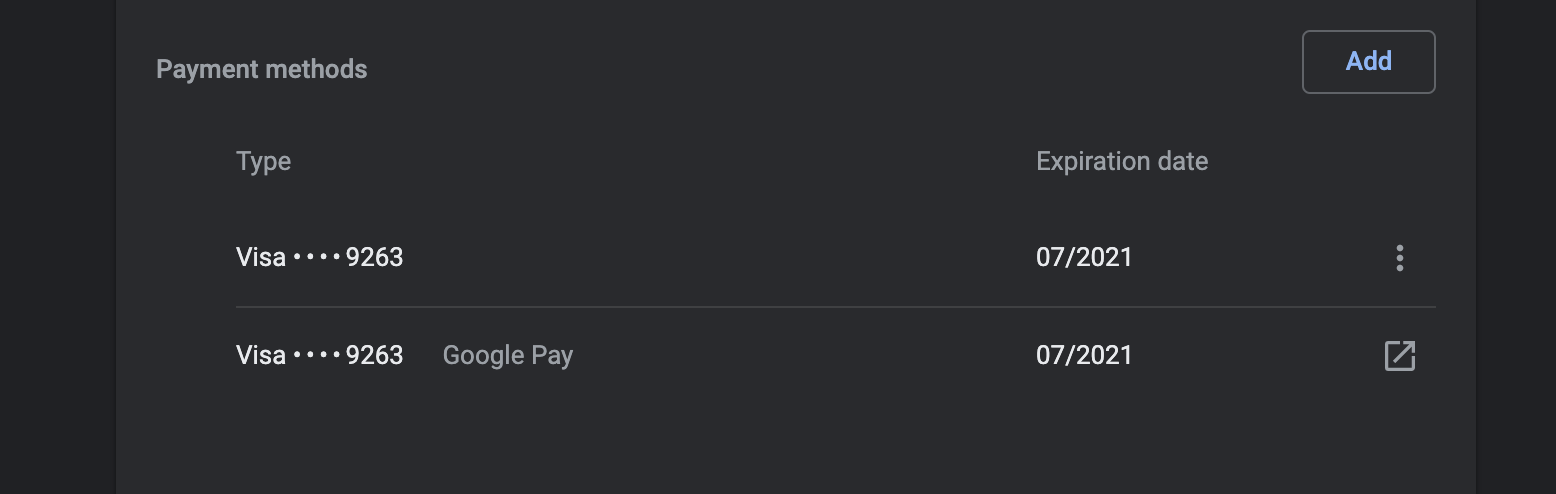
For anyone else having this problem, it may well be that you don't have a card setup for Payment Request API in chrome. (Don't trust the "payment methods" part of chrome settings, it's not the same as payment requests it seems).
You can set up a card by entering
var details = {total: {label: 'x', amount: {currency: 'GBP', value: '9.99'}}}
new PaymentRequest([{supportedMethods: ['basic-card']}], details).show()
in the console on a page with HTTPS and add a card.
After that stripe's canMakePayment API should work.
 samuelcolvin
on 27 Mar 2020
samuelcolvin
on 27 Mar 2020
The current implementation in Chrome seems to only consider a saved card as available for the PaymentRequest API if the card number, future expiration date, and cardholder name is configured in the settings.
Apparently their goal is to also make sure a valid billing address is associated with the card, but according to our tests, this isn't currently enforced.
More information: https://www.chromestatus.com/feature/5532279906500608
 hofman-stripe
on 27 Mar 2020
hofman-stripe
on 27 Mar 2020
So no matter what I do I can't get the Google Pay button show up, I was about to open up an issue when I see this, I've checked docs (https://stripe.com/docs/stripe-js/elements/payment-request-button#testing), Google Pay properly setup but I'm getting null from canMakePayment().
 samuelcastro
on 21 Apr 2020
samuelcastro
on 21 Apr 2020
Ok, got it working now, the issue was that even though I had my credit card in place in my Google Account I did need to add it again in the browser, this is weird but fixed the problem.
samuelcastro
on 21 Apr 2020
Yes! That's exactly the problem I had.
samuelcolvin
on 21 Apr 2020
There are a lot of known issues with how Chrome handles Google Pay on desktop. Unfortunately because you see a Google Pay card listed in the Chrome settings doesn't mean the card is actually available to be used through PaymentRequest.
For the longer technical explanation, there are 2 root causes:
- the browser
PaymentRequest.hasEnrolledInstrument()resolves tofalseif the Payment Handler is not installed. This is a spec limitation that is getting resolved at the Web standards level right now. - Chrome doesn't automatically install a Payment Handler and offer it as a choice unless it's the only handler selected when creating the
PaymentRequestobject. Doing so is not possible as we wouldn't be able to check if there might also be cards saved directly in the browser along with the Payment Handler.
It's a bit of a chicken and egg problem, with Chrome not being able to say that Google Pay is available until it has been available once.
There is unfortunately not much we can do about it right now. We may also be able to workaround the issue for Google Pay specifically after the fixes for some other Payment Handler bugs land in Chrome 83.
hofman-stripe
on 22 Apr 2020
Related issues
 kongakong
·
4Comments
kongakong
·
4Comments
 abachuk
·
3Comments
abachuk
·
3Comments
 Dasyel
·
4Comments
Dasyel
·
4Comments
 michael811
·
5Comments
michael811
·
5Comments
 michael-reeves
·
3Comments
michael-reeves
·
3Comments
Most helpful comment
For anyone else having this problem, it may well be that you don't have a card setup for Payment Request API in chrome. (Don't trust the "payment methods" part of chrome settings, it's not the same as payment requests it seems).
You can set up a card by entering
in the console on a page with HTTPS and add a card.
After that stripe's
canMakePaymentAPI should work.