React-stripe-elements: CardElement fields not focusing on a quick tap (Safari, on iOS)
Summary
When focusing the textfield on a CardElement it either takes 2 quick taps or 1 longer tap. The quick tap calls the onFocus function, but doesn't focus the field. After the element is focused, I can focus the textfield by tapping again. Pressing and holding a card element until the textfield highlights also lets me focus the textfield.
Other information
I have only experienced this on mobile (iOS, Safari)
 danielnho22
All 19 comments
+1 I am experiencing this as well.
 eli0shin
on 12 Jun 2019
eli0shin
on 12 Jun 2019
Hi @danielnho22 - sorry for our delay in getting back to you on this. This sounds like a pretty painful bug. We're going to try and reproduce this issue, and we'll get back to you when we know more.
 mbarrett-stripe
on 17 Jun 2019
mbarrett-stripe
on 17 Jun 2019
I believe this is a known issue in regards to iOS and Safari.
There are a lot of search results to find online regarding focus not being set correctly on elements within iframes on iOS devices.
We are experiencing this issue as well.
 johanalkstal
on 26 Jun 2019
johanalkstal
on 26 Jun 2019
@danielnho22 we're having some trouble reproducing this issue ourselves. Any more information you can give us would be great - especially what version of iOS/Safari you're seeing this happen in, and any info you can give about your implementation of elements. Same goes for others who have been experiencing this as well. Thanks!
mbarrett-stripe
on 9 Aug 2019
@mbarrett-stripe I'm also getting this issue with Apple Pay via the Payment Request Button. This is on iOS 12.4 on iPhone X.
 jdpowell1
on 22 Aug 2019
jdpowell1
on 22 Aug 2019
Any more information you can give us would be great
We are experiencing this issue. We're using a pretty standard implementation:
- Using the CardNumberElement/CardExpiryElement/CardCVCElement components
- Not using any CSS that would conflict with click/touch events (e.g. no overlaying labels, no absolute positioning, etc.)
- Not programmatically calling
focus(),blur(), etc.
Versions:
react-stripe-elements 5.1.0
iPhone 6s
iOS 12.4
 mulleady1
on 15 Nov 2019
mulleady1
on 15 Nov 2019
Hey all -
We are aware and empathetic about this being an enigmatic issue. We're still digging into this to see if there is something we can do on our end regarding recent changes to Safari's management of focus in 3rd party iFrames (which Stripe Elements are). As of now we believe this may be a browser level issue and are tracking a resolution.
When we have more information I'll be sure to update you.
mbarrett-stripe
on 18 Dec 2019
Hi @mbarrett-stripe, do you have any update on this issue, by any chance?
 AdrianMrn
on 12 Feb 2020
AdrianMrn
on 12 Feb 2020
Hi @mbarrett-stripe ,
I can only reproduce this behavior when using a card form that is composed of individual elements. There is no issue when using Stripe's inline card element. Also of interest is that the issue is not present on the Stripe Element Examples page when using an iOS device.
I added the suggested css pointer-events: none without any success. Suggestion here.
I am curious if others observe that the issue is not present on the Stripe Element Examples page.
Kind Regards,
 paymentplugins
on 3 Mar 2020
paymentplugins
on 3 Mar 2020
I'm having a similar issue on safari. Also, the tabindex seems to be broken.
When I focus elements the first time by pressing tab, the cursor is not visible and I can't type anything. Only the second time it works, also the tab index is completely broken, it sometimes randomly switches between input fields when clicking tab. The same thing is actually happening on your examples page in safari.. https://stripe.dev/elements-examples/
 thki91
on 6 Mar 2020
thki91
on 6 Mar 2020
Hey everyone,
We're aware of these issues and appreciate you chiming in. @thki91, your reported issue is not actually tabindexing issues, but the focus blocking issues that Safari rolled out recently. We've reached out to Apple with all of this information and are working to come to a solution. This is unfortunately out of our hands at the moment, and we're looking into ways we can alleviate this issue in the meantime. I will update this thread when we have more information but at this time we don't have anything new to share.
We're aware that this causes UX issues in Safari and we want to see it resolved as well. Again, the issue stems from a change Apple made in Safari which blocks focusing into cross-domain iframes without prior user focus. Stripe Elements relies heavily on frames to provide PCI-compliant secure form elements. Its the same issue as the one documented in this help page.
I know hearing "we're looking into it" for months isn't particularly useful, but it's true, and we're doing what we can to provide Apple with the information needed to resolve this.
mbarrett-stripe
on 6 Mar 2020
I am facing the same issue on google chrome where pressing tab doesn't focus the element on first attempt. Pressing tab second time gives focus to the first stripe element in the form. Subsequent tab key press gives focus to stripe elements correctly
 akbarkhawaja
on 7 Mar 2020
akbarkhawaja
on 7 Mar 2020
If it is Chrome on iOS, that would be expected as all browsers on iOS/iPadOS are forced to use Apple's WebKit rendering engine that's part of the system.
If it's on Chrome Desktop or Android, would you be able to provide a reproduction or further information on when this happens?
 hofman-stripe
on 8 Mar 2020
hofman-stripe
on 8 Mar 2020
@hofman-stripe its Chrome Version 80.0.3987.132 (Official Build) (64-bit) Desktop on Ubuntu 16.04.
I am trying to use stripe elements along with materializecss. Got it working though, thanks
akbarkhawaja
on 8 Mar 2020
I have similar issue on Safari 13 (iOS 13.5.1). I can't use navigation buttons on Safari keyboard (Up and Down). It moves the focus to next iframe but It doesn't focus on the input field.
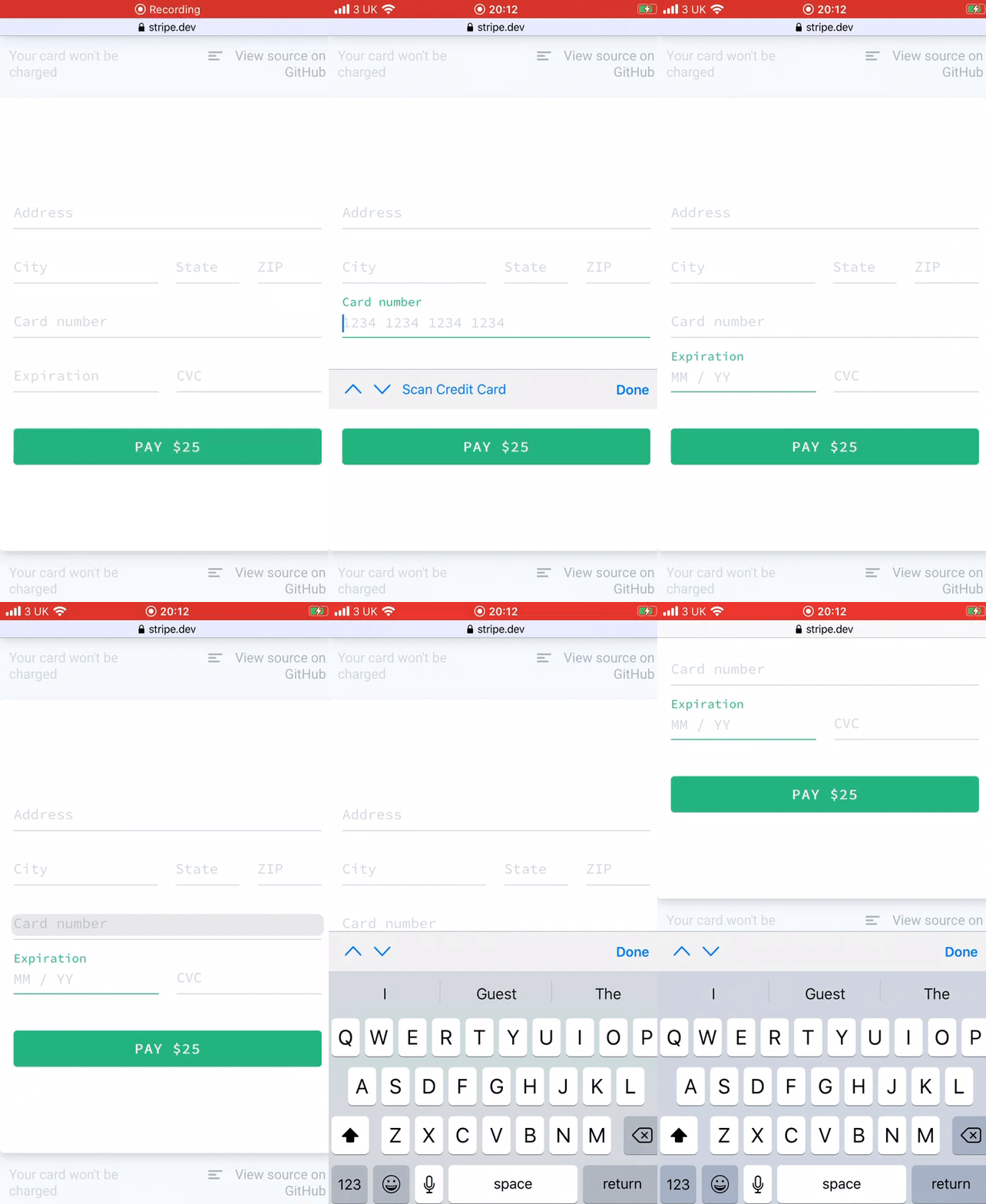
I have tried my custom implementation, https://stripe.dev/elements-examples and https://codesandbox.io/s/react-stripe-official-q1loc?fontsize=14&hidenavigation=1&theme=dark&file=/src/components/demos/SplitForm.js
They all have the same issue.
Any suggestion how to workaround?
 pettomartino
on 14 Jul 2020
pettomartino
on 14 Jul 2020
Unfortunately none, as this is related to Safari's preventing of programmatic focus into iframes. Unless Apple changes this behavior, I'm not sure there is much we can do right now.
hofman-stripe
on 15 Jul 2020
Hi @hofman-stripe
I am also facing this issue in Mozilla Firefox on ubuntu as well. I am unable to focus to CardExpiryElement from CardNumberElement.
Please suggest me for tab indexing.
 ramayan
on 6 Aug 2020
ramayan
on 6 Aug 2020
@ramayan I tried reproducing on Firefox 79.0 on Linux, but don't see the issue. Is this something that you can reproduce on stripe.dev/elements-examples? What are the exact steps you take to see the issue? Is it intermittent, or does it happen all the time?
 christopher-stripe
on 13 Aug 2020
christopher-stripe
on 13 Aug 2020
Hi folks -- sounds like this issue has a few different parts and may also be different across browsers. I'm closing this as this project has migrated to React Stripe.js. If you believe this is still important, please re-open it there, and let's perhaps track issues in different browsers separately.
 sashko-stripe
on 26 Mar 2021
sashko-stripe
on 26 Mar 2021
Related issues
 mmmikeal
·
4Comments
mmmikeal
·
4Comments
 iMerica
·
5Comments
iMerica
·
5Comments
 rstone770
·
5Comments
rstone770
·
5Comments
 drwpow
·
4Comments
drwpow
·
4Comments
 shortcircuit3
·
5Comments
shortcircuit3
·
5Comments
Most helpful comment
Hey all -
We are aware and empathetic about this being an enigmatic issue. We're still digging into this to see if there is something we can do on our end regarding recent changes to Safari's management of focus in 3rd party iFrames (which Stripe Elements are). As of now we believe this may be a browser level issue and are tracking a resolution.
When we have more information I'll be sure to update you.