React-stripe-elements: Unsupported prop change: paymentRequest is not a customizable property
Summary
I'm trying to make a PaymentButton component that supports dynamically changing the total and displayItems values, because the parent component has a slider and text boxes that let the user dynamically adjust $ values that will be presented to the user when clicking the payment request button.
To accomplish this I attempted to move the paymentRequest object construction out of the component constructor (where it is in the README demo code) and into a separate function that gets called whenever props update, however it isn't working and I'm getting the warning "Unsupported prop change: paymentRequest is not a customizable property" in the browser console:
import React from 'react'
import {injectStripe} from 'react-stripe-elements'
import {PaymentRequestButtonElement} from 'react-stripe-elements'

class PaymentButton extends React.Component {
  constructor(props) {
    super(props)
    this.setPaymentRequest = this.setPaymentRequest.bind(this)
    const paymentRequest = this.setPaymentRequest(props)
    this.state = {
      canMakePayment: false,
      paymentRequest
    }
  }

  setPaymentRequest(props) {
    // For full documentation of the available paymentRequest options, see:
    // https://stripe.com/docs/stripe.js#the-payment-request-object
    const paymentRequest = props.stripe.paymentRequest({
      country: 'US',
      currency: 'usd',
      total: {
        label: 'Total',
        amount: props.totalCents,
      },
      displayItems: props.displayItems,
    })

    paymentRequest.on('token', (ev) => {
      this.props.handlePaymentToken(ev.token.id, ev)
    })

    paymentRequest.canMakePayment().then((result) => {
      this.setState({canMakePayment: !!result})
    })

    return paymentRequest
  }

  componentDidUpdate(prevProps, prevState) {
    if (
      (prevProps.totalCents != this.props.totalCents) ||
      (prevProps.displayItems != this.props.displayItems)
    ) {
      this.setState({
        paymentRequest: this.setPaymentRequest(this.props),
      })
    }
  }

  render() {
    const button = this.state.canMakePayment ? (
      <div className="row">
        <div className="col-md-6 offset-md-3 col-12">
          <PaymentRequestButtonElement
            paymentRequest={this.state.paymentRequest}
            className="PaymentRequestButton"
            style={{
              // For more details on how to style the Payment Request Button, see:
              // https://stripe.com/docs/elements/payment-request-button#styling-the-element
              paymentRequestButton: {
                type: 'donate',
                theme: 'dark',
                height: '48px',
              },
            }}
          />
        </div>
      </div>
    ) : (
      null
    )
    return (
      <React.Fragment>
        {button}
        {this.state.error &&
          <p className="text-danger">{this.state.error}</p>
        }
      </React.Fragment>
    )
  }
}

export default injectStripe(PaymentButton)
The component is called very simply from the render() method of the parent component:
render () {
  const paymentItems = this.state.stuff.map((x) => /* ... */ )
  const totalCents = this.state.stuff.map(/* ... */).reduce(/* ... */)
  return (
    <StripeProvider
      apiKey={this.stripe.publishable_key}>
      <Elements>
        <PaymentButton
          totalCents={totalCents}
          displayItems={paymentItems}
          apiKey={this.stripe.publishable_key}
          stripeCheckoutImage={this.stripe.checkout_image}
          handlePaymentToken={this.handlePaymentToken}
        />
      </Elements>
    </StripeProvider>
  )
}
What's the correct way to accomplish this?
 abevoelker
All 11 comments
If I set the key prop on the PaymentButton, I sorta get the desired behavior by forcing React to completely recreate the PaymentButton component:
const hash = require('object-hash')
/* ... */
render () {
  const paymentItems = this.state.stuff.map((x) => /* ... */ )
  const totalCents = this.state.stuff.map(/* ... */).reduce(/* ... */)
  return (
    <StripeProvider
      apiKey={this.stripe.publishable_key}>
      <Elements>
        <PaymentButton
          key={hash(paymentItems)}
          totalCents={totalCents}
          displayItems={paymentItems}
          apiKey={this.stripe.publishable_key}
          stripeCheckoutImage={this.stripe.checkout_image}
          handlePaymentToken={this.handlePaymentToken}
        />
      </Elements>
    </StripeProvider>
  )
}
However the button disappears for a brief period (1-2 seconds, not great) until paymentRequest.canMakePayment() can asynchronously resolve. Also I'd have to probably debounce this because if a user quickly slides a slider from $1.00 to $50.00 (in 0.05 increments), React could be initializing hundreds of these components, which each seem to be making Stripe API requests.
So I'm still interested in if there is a better way to do this.
abevoelker
on 4 Dec 2018
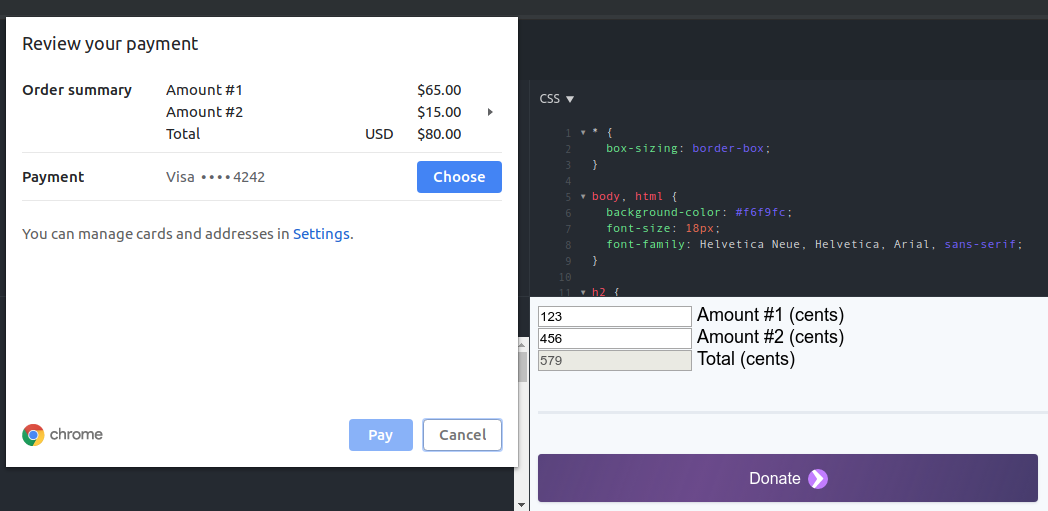
Here's a JSFiddle illustrating the problem: https://jsfiddle.net/kdynvjsq/
If you change either Amount value, then click the Donate button, the numbers in the Payment Request API popup do not reflect the updated amounts, and you see "Unsupported prop change: paymentRequest is not a customizable property." in the browser console.
abevoelker
on 5 Dec 2018
Hi @abevoelker: thanks for reporting! Darn, it looks like we don't have a way to update the underlying payment request without re-rendering our button. I'll take a look at how hard it would be for us to enable that.
In the mean time, one workaround would be to build your own UI button and just use our payment request API directly. Then you could dynamically change which payment request is used when the user clicks on your button.
 asolove-stripe
on 10 Dec 2018
asolove-stripe
on 10 Dec 2018
Thanks @asolove-stripe, I will take a look at building my own button for now. But being able to make this work out of the box with react-stripe-elements button would be great, if you are able to look into it when you have time :relaxed:
abevoelker
on 15 Dec 2018
@abevoelker I'm going to close this issue out for now (I have filed this into our backlog and we'll follow up when we have the time to implement this feature). Thanks for filing and raising with us, much appareciated!
 matt-stripe
on 19 Dec 2018
matt-stripe
on 19 Dec 2018
For what it's worth, I found that using the paymentRequest.update() method will update the underlying price without a re-render.
 ejcho623
on 26 Apr 2019
ejcho623
on 26 Apr 2019
Maybe I'm doing something wrong, but I'm running into this issue when trying to render a PaymentRequestButtonElement in a stateless functional component with useEffect()/useState() used to create the PaymentRequest out of props.
For what it's worth, I found that using the paymentRequest.update() method will update the underlying price without a re-render.
According to the docs:
paymentRequest.update() can only be called when the browser payment interface is not showing. ... To update the PaymentRequest right before the payment interface is initiated, call paymentRequest.update() in your click event handler.
So I think this will still be a problem for any time the button is already rendered. I also noticed that the update() method will not update properties like country and postalCode, which in my component are props that might change between renders.
Not allowing a prop to be updated seems to break the implicit contract of a React component that it should update itself in whatever way necessary to handle changing props.
 sirbrillig
on 22 Aug 2019
sirbrillig
on 22 Aug 2019
For anyone stumbling on this issue as I did, here's an alternate version of a PaymentRequestButton which allows re-creating the payment request. Make sure to memoize paymentRequest when calling this!
function PaymentRequestButton( { paymentRequest, stripe } ) {
    const buttonContainer = useRef();
    useEffect( () => {
        const elements = stripe.elements();
        const buttonElement = elements.create( 'paymentRequestButton', { paymentRequest } );
        paymentRequest.canMakePayment().then( result => {
            if ( ! result || ! buttonContainer.current ) {
                return;
            }
            buttonElement.mount( buttonContainer.current );
        } );
        return () => buttonElement.parentNode && buttonElement.destroy();
    }, [ buttonContainer, stripe, paymentRequest ] );
    return <div ref={ buttonContainer } />;
}
@sirbrillig: Definitely agreed that the API here is not good. There are some reasons we would prefer not to regenerate the payment request on every change there, but we should make that clearer and name the prop something that clearly just sets an initial value.
So I think this will still be a problem for any time the button is already rendered.
This part though is not quite true. What the docs are saying is that you can't call update once the user clicks the button and is looking at the actual payment sheet. You definitely can call update when just the button is rendered.
asolove-stripe
on 22 Aug 2019
Thanks for the reply @asolove-stripe!
What the docs are saying is that you can't call update once the user clicks the button and is looking at the actual payment sheet. You definitely can call update when just the button is rendered.
Oh! I misunderstood. Now I see that "browser payment interface" of course means the payment sheet.
There are some reasons we would prefer not to regenerate the payment request on every change there,
That makes sense. I can imagine that even the overhead of regenerating an iframe a ton of times could be an issue. Do you have a recommendation for the best way to handle a situation where a form's price or postal code might change before the user clicks the button? I guess probably the best idea would be to make a custom button (as suggested above) which keeps recreating the paymentRequest but leaves the button alone?
The biggest benefit I was thinking of to using the PaymentRequestButton was its ability to show a nice UI for different payment request types without having to style each of those separately, but maybe that's just not enough reason to force re-creating the button like this.
sirbrillig
on 22 Aug 2019
I would expect that updating the amount/currency would work, and it's just providing a completely new paymentRequest object that you created manually that doesn't allow prop updates.
If that's not true, we should look at it again.
asolove-stripe
on 22 Aug 2019
Related issues
 iMerica
·
5Comments
iMerica
·
5Comments
 mmmikeal
·
4Comments
mmmikeal
·
4Comments
 alenadrex
·
3Comments
alenadrex
·
3Comments
 stephenhuh
·
4Comments
stephenhuh
·
4Comments
 sonarforte
·
4Comments
sonarforte
·
4Comments
Most helpful comment
Thanks @asolove-stripe, I will take a look at building my own button for now. But being able to make this work out of the box with react-stripe-elements button would be great, if you are able to look into it when you have time :relaxed: