React-stripe-elements: Feature request: disable animations on CardElement
It would be nice to have the option to disable the default CardElement animations/transitions (sliding on appear/moving to next field)
 trevordmiller
All 21 comments
Hey @trevordmiller, thanks for this request. Can you share some more about your use case and why you are interested in turning off animations? As a first reaction, we think the animations help usability by making it clear to the user what's happening at each step. But we're open to learning more.
If you don't like all the different fields being on one line and animated together, you could also use the separate elements for each field, like the second and third third forms on our examples page.
 asolove-stripe
on 13 Dec 2017
asolove-stripe
on 13 Dec 2017
@asolove-stripe Thanks for the response. My use case is I like the extra features that CardElement has (automatic zip inclusion based on card number, card icon graphics + error/success UI etc.), but our app doesn't use animations anywhere else so they feel a bit out of place; they also make our end-to-end tests more brittle as we have to wait for animations to complete before typing. I will probably just switch to using the individual elements on their own lines, but it would be nice if they could be updated to have some of the abstractions that CardElement has like:
- [ ] Add a
CardIconElementshowing the card type graphic + success/errors likeCardElementhas - [ ] Update
PostalCodeElementto conditionally show automatically based on if a zip code is needed from the credit card number likeCardElementhas
trevordmiller
on 13 Dec 2017
Makes sense! Those two requests have been brought up by other users, so they're definitely under consideration.
asolove-stripe
on 13 Dec 2017
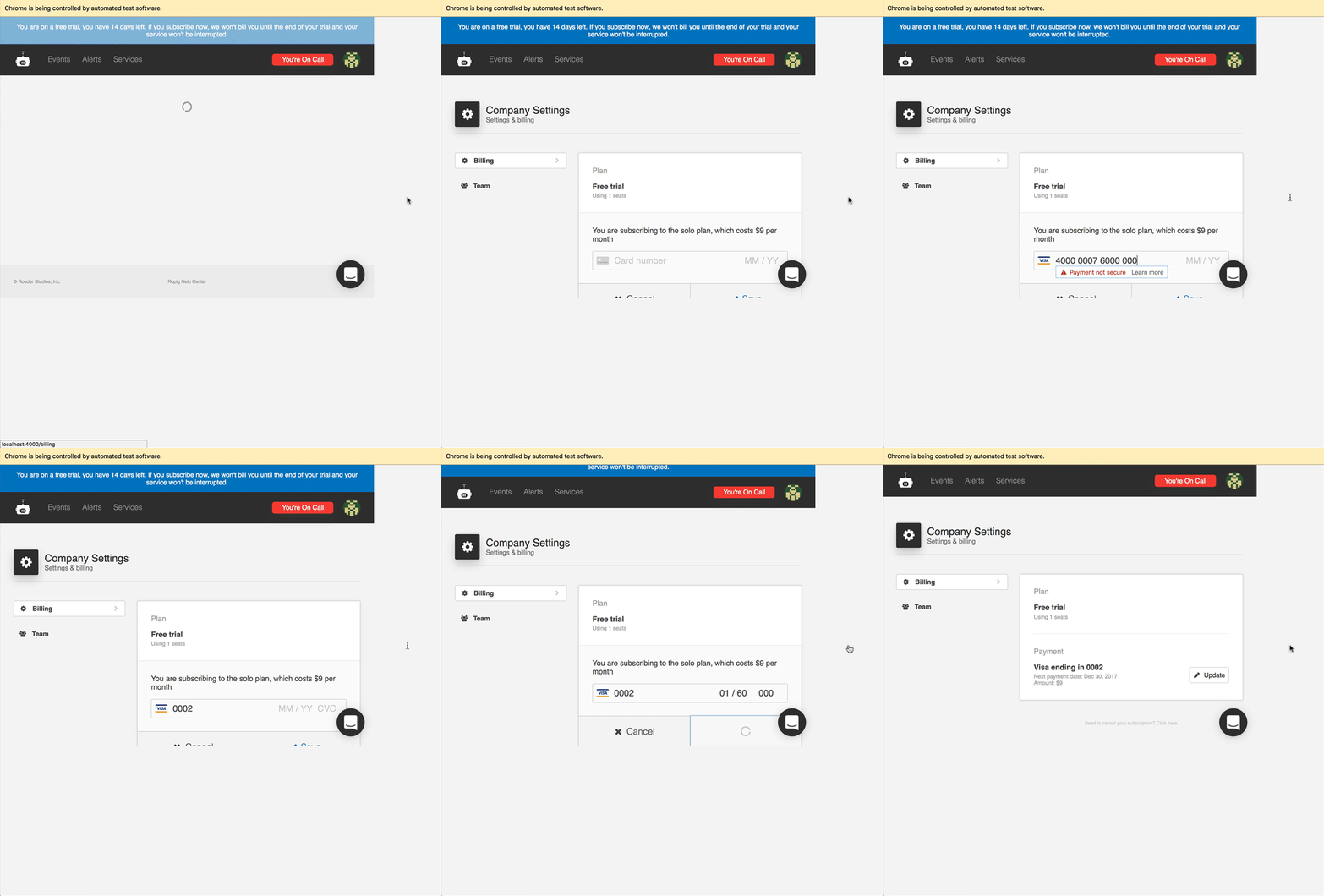
Here are our credit card end-to-end tests (using Puppeteer as described in this blog post); as you can see, they have arbitrary wait times for both typing speed delay and sleeps between credit card sections to account for the CardElement animations:
  const card = {
    number: '4000000760000002',
    month: '01',
    year: '60',
    cvc: '000',
  }

  test('can enter a credit card', async () => {
    await page.waitForSelector('[data-testid="billingSubscribeButton"]')
    await page.click('[data-testid="billingSubscribeButton"]')
    await page.waitForSelector('[data-testid="billingCardWrapper"]')
    await sleep(2000) // wait for initial mounting stripe CardElement animations
    await page.click('[data-testid="billingCardWrapper"]')
    await page.keyboard.type(card.number, { delay: 50 })
    await sleep(2000) // wait for post-credit card number sliding CardElement animation
    await page.keyboard.type(card.month, { delay: 50 })
    await page.keyboard.type(card.year, { delay: 50 })
    await page.keyboard.type(card.cvc, { delay: 50 })
    await page.click('[data-testid="billingSubmitButton"]')
  })

  test('shows payment details', async () => {
    await page.waitForSelector('[data-testid="billingPayment"]')
  })

  test('hides trial banner after credit card is entered', async () => {
    await page.waitForSelector('[data-testid="trialBanner"]', { hidden: true })
  })
When these tests run, it looks like this:
trevordmiller
on 15 Dec 2017
Hey @trevordmiller, thanks for this extra level of detail! It definitely helps us feel your pain: that test is already brittle, and it's even worse since you have to cross over an interface boundary into details of the DOM structure in our implementation. Which means we could break your tests due to minor DOM changes inside Elements, even while maintaining the promised API contract for Elements.
If the goal of your test is primarily to check what your code does with the token, our testing docs describe how to use test tokens and basically mock out the actual Elements UI from the picture.
Unfortunately, that approach doesn't let you test details of your UI integration, like ensuring that you handle change events by displaying validation errors, etc. 😢 We know this is a problem and are thinking about how we could make this easier.
asolove-stripe
on 15 Dec 2017
@asolove-stripe Yep, you got it :) Yeah that's why it has been bothering me - because all of our other end-to-end tests are not brittle like this.
"If the goal of your test is primarily to check what your code does with the token, our testing docs describe how to use test tokens and basically mock out the actual Elements UI from the picture."
Yep, I've got unit tests in place for the token logic. But the end-to-end test is meant to check that all the full-stack parts of our payment setup are working (UI is tied to our GraphQL payment mutation that takes the stripe token, our database stores PCI compliant data, the UI updates after from a GraphQL query with the subscription data from the database etc.). So these tests are valuable for us to know that payments are working fully for our users.
"We know this is a problem and are thinking about how we could make this easier."
If the two element improvements I mentioned could be added that would solve the problem as I could use the individual elements without animations and add data-testid props on the inputs themselves. What do you think of that?
Another option to make CardElement itself testable would be to update it's layout to not require animations; or add prepopulating values from props.
trevordmiller
on 15 Dec 2017
I am also trying to disable the MM/YY moving animation when the component renders. Here is a fiddle, when you first load the page, you'll notice the MM/YY slide in from the right to the left. Is there anyway to disable that so it renders without animation on load just like Card number loads without animation?
Note: I am fine with future animations sliding in/out as you fill in the different fields, but just the animation on load is the one I am trying to prevent from happening. Any idea how to accomplish this?
 MovingGifts
on 28 Jan 2018
MovingGifts
on 28 Jan 2018
@MovingGifts: sorry, but this is not currently possible.
asolove-stripe
on 29 Jan 2018
No worries, thanks for getting back!
MovingGifts
on 29 Jan 2018
Closing for lack of activity. Feel free to reopen if someone is going to work on it. I would but don't have the bandwidth currently.
trevordmiller
on 30 Apr 2018
We would like to turn off automations too, although there are quite nice, we feel they're a bit unnecessary.
 lucvanloon
on 25 Jun 2018
lucvanloon
on 25 Jun 2018
+1
 UniqueTokens
on 25 Aug 2018
UniqueTokens
on 25 Aug 2018
Just another datapoint - our CardElement appears in a dialog, and the way it starts out blank for several seconds before the initial animation in looks slightly awkward. I would turn off the first animation if I could.
However, it actually looks good if you re-open the dialog because it does the animation sooner since it has already loaded.
 jahooma
on 7 Nov 2018
jahooma
on 7 Nov 2018
There is a short initialization time between mounting an Element and it being ready. To not make the transition abrupt, we show an animation. While there isn't a way to disable the animation today, you can get around this by mounting the Element early (say in the dialog before the dialog is actually visible.) That way by the time the Element is actually shown to the user, it has already mounted and initialized.
 atty-stripe
on 12 Nov 2018
atty-stripe
on 12 Nov 2018
Makes sense, thanks. I wonder if it would help to have an explicit API to preload the component (and eliminate the start animation when it mounts)?
jahooma
on 12 Nov 2018
Hey @trevordmiller I'm having an issue as @MovingGifts but seems even more 'bouncey'. Looks to be only on load. I like the animations but would just want to remove that intro one. Maybe there's a hack around that rather than disabling all.
Demo of issue: https://www.dropbox.com/s/cixc8wvm198xata/Screen%20Recording%202018-12-08%20at%2010.00.04.mp4?dl=0
Was thinking if I could just target the spans that wrap those inputs and set the transition to none. But not sure if you allow targeting any selector in the JS file.
 andyshaw85
on 8 Dec 2018
andyshaw85
on 8 Dec 2018
@andyshaw85 I think maybe you meant to tag the repo maintainer? I was a user of this library posting my own issue. I’ve since moved on to other projects and don’t use this library anymore :)
trevordmiller
on 8 Dec 2018
It's 2019 and there's still no way to disable to sliding MM/YY animations?
They don't fit the look and feel of my website and I'd really like to turn them off!
 timokleemann
on 16 Jun 2019
timokleemann
on 16 Jun 2019
We're halfway through 2020 now and I can't find any way to disable the totally unnecessary animation?
 Alan-Stewart
on 5 Jun 2020
Alan-Stewart
on 5 Jun 2020
Same problem, we want to disable all animations.
 aralroca
on 9 Nov 2020
aralroca
on 9 Nov 2020
The other animations are natural enough, but the MM/YY slide-in is surprisingly extreme for a “non-event” that shouldn’t be drawing user attention. In a context without other animations, it’s kinda comical even: _drumroll: presenting ... MM/YY!_ (confetti drops).
UX/aesthetic effects aside though, a bigger problem is that it doesn’t honor the prefers-reduced-motion: reduce accessibility preference.
Edit: just realized I landed in react-stripe-elements when searching for info about this. This is seemingly a general Stripe Elements issue, but given this is a Stripe-maintained repo too I imagine the feedback is seen either way.
 bathos
on 26 Mar 2021
bathos
on 26 Mar 2021
Related issues
 shortcircuit3
·
5Comments
shortcircuit3
·
5Comments
 michael-reeves
·
3Comments
michael-reeves
·
3Comments
 max-favilli
·
5Comments
max-favilli
·
5Comments
 Dasyel
·
4Comments
Dasyel
·
4Comments
 kongakong
·
4Comments
kongakong
·
4Comments
Most helpful comment
It's 2019 and there's still no way to disable to sliding
MM/YYanimations?They don't fit the look and feel of my website and I'd really like to turn them off!