React-stripe-elements: Error message: You did not specify the type of Source or Token to create.
I have a basic setup like it is documented, when I call the createToken method, I get this error:
_Uncaught Error: You did not specify the type of Source or Token to create. We could not infer which Element you want to use for this operation._
Would appreciate any ideas on how I could tackle this issue.
 JonathanWbn
All 14 comments
Figured it out.
I had many stripe forms mounted at the same time. Each one was wrapped in it's own
JonathanWbn
on 19 Jul 2017
@JonathanWbn would love to see what your setup was! It could be confusing for others, too, and we should fix that.
 michelle
on 19 Jul 2017
michelle
on 19 Jul 2017
We are running into the same error message with our react bootstrap modals. @JonathanWbn any code that you can show on how you fixed this?
 isaacjtullis
on 22 Jul 2017
isaacjtullis
on 22 Jul 2017
I'll try my best.
My setup was that my page was rendering multiple cardstacks (react-slick) next to each other, with one of the card in each cardstack having a payment form. (many cardstacks, each has many cards, one of the cards has a payment form with react stripe elements)
I was wrapping each cardstack inside the
My fix was that i didn't wrap each cardstack in the
As you might recognise I can't say that I fully understand what's going on here, but I hope this helps.
JonathanWbn
on 22 Jul 2017
I ran into this issue when passing the "injectStripe" high level component into my redux "connect" function. Swapping the order fixed it.
 bewestphal
on 5 Aug 2017
bewestphal
on 5 Aug 2017
@bewestphal could you actually how you have done it? I don't understand the order.
 richban
on 15 Aug 2017
richban
on 15 Aug 2017
@richban Here is my code, "_PaymentDetailsForm" is my component which contains the payment elements (CardNumberElement, CardExpiryElement, etc.)
_PaymentDetailsForm = connect(mapStateToProps)(_PaymentDetailsForm)
_PaymentDetailsForm = injectStripe(_PaymentDetailsForm)
The following below will not work
_PaymentDetailsForm = injectStripe(_PaymentDetailsForm)
_PaymentDetailsForm = connect(mapStateToProps)(_PaymentDetailsForm)
Hope this helps
bewestphal
on 16 Aug 2017
@bewestphal it doesn't unfortunately here is a code snippet:
```javascript
const Cardnumber = connect(
state => ({
prop1: state.prop1,
prio2: state.prop2,
}), {
dispatch1,
dispatch2,
})(CardNumberForm);
export default injectStripe(Cardnumber);
richban
on 18 Aug 2017
I still got the same error as above any idea what's the problem?
Uncaught (in promise) Error: You did not specify the type of Source or Token to create.
        We could not infer which Element you want to use for this operation.
richban
on 22 Aug 2017
Hey @richban would you mind emailing Stripe support with some more details about your application? Ideally include a link to a URL that we can use to test. Or, if you're able to create a minimal page that demonstrates the error and share a gist here, that'd be excellent.
For specific application development questions, the fastest way to get help is to contact Stripe support: https://support.stripe.com/email/login
 fred-stripe
on 23 Aug 2017
fred-stripe
on 23 Aug 2017
We got the same error message and solve it by putting the components in the correct order.
The following pseudo code demonstrate how you can reproduce the issue:
<StripeProvider>
   <FormWithInjectStripe>
      <Elements>
         <CardElement />
       </Elements>
   </FormWithInjectStripe>
</StripeProvider>
Putting the Elements Component outside of the form Component that is wrapped with injectStripe fix the issue:
<StripeProvider>
   <Elements>
      <FormWithInjectStripe>
         <CardElement />
      </FormWithInjectStripe>
    </Elements>
</StripeProvider>
 pithu
on 28 Feb 2018
pithu
on 28 Feb 2018
I got this error due to a programming error with conditional rendering.. had a case where CardElement was not being rendered inside Elements but createToken was being called. This error message is not very helpful.
 keeth
on 11 Jan 2019
keeth
on 11 Jan 2019
@keeth sorry to hear that! Do you want to open a PR to improve the error message? No obligation to — we'll do it otherwise.
 atty-stripe
on 16 Jan 2019
atty-stripe
on 16 Jan 2019
Hi, I`m having similar issue
My component is exported like this
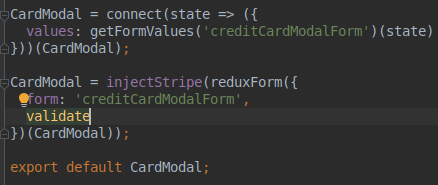
this is how it looks on page structure, Provider is StripeProvider, just renamed it

there is an error
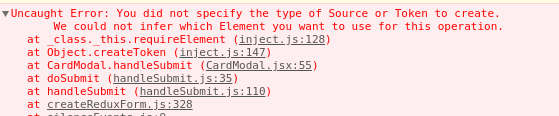
this is what I`m doing
this.props.stripe.createToken({ type: 'card' }).then((token, ...args) => console.log(token, args));
the issue is reproduced when I`m trying to wrap stripe element and pass it to redux-form Field
I tried to inject stripe into each wrapper, but it did not help
 SergeyShablenko
on 2 Apr 2019
SergeyShablenko
on 2 Apr 2019
Related issues
 Dasyel
·
4Comments
Dasyel
·
4Comments
 michael811
·
5Comments
michael811
·
5Comments
 alenadrex
·
3Comments
alenadrex
·
3Comments
 indiesquidge
·
5Comments
indiesquidge
·
5Comments
 sonarforte
·
4Comments
sonarforte
·
4Comments
Most helpful comment
I ran into this issue when passing the "injectStripe" high level component into my redux "connect" function. Swapping the order fixed it.