React-starter-kit: Websockets with new Isomorphic Hot Module Replacement
Hello,
I'm looking for a way to integrate websockets into an app with current version of HMR, after changes being made to the start script.
In previous version I could easily access http server to attach WS capability (exactly Apollo Subscriptions server for GraphQL Subscriptions)
// server.js
//...
import { createServer } from 'http';
import { SubscriptionServer } from 'subscriptions-transport-ws';

// ...
const server = createServer(app);
server.listen(config.port, () => {
    console.info(`The server is running at http://localhost:${config.port}/`);
    SubscriptionServer.create({
      subscriptionManager,
    }, {
      server,
      path: config.subscriptions.path,
    });
  });
With current way the HMR is done Browsersync's server is used. I was thinking to attach own websocket server directly to Browsersync's by changing a little start script like:
// start.js
// ...
// Launch the development server with Browsersync and HMR
const b = await new Promise((resolve, reject) => browserSync.create().init({
    // https://www.browsersync.io/docs/options
    server: 'src/server.js',
    middleware: [server],
    open: !process.argv.includes('--silent'),
    ...isDebug ? {} : { notify: false, ui: false },
}, (error, bs) => (error ? reject(error) : resolve(bs))));

SubscriptionServer.create({
      subscriptionManager,
}, {
      b.server,
      path: config.subscriptions.path,
});
this enables GraphQL subscriptions but sadly breaks socket.io in Browsersync, so no HMR then (probably overrides socket.io from BS server).
I'm looking for a hint how could it be implemented with current setup, without Browsersync's proxy. Is it at all possible to be done this way?
 pdeszynski
All 16 comments
I use them and they work fine with "yarn start" script so far, HMR too.
 lobnico
on 13 Jul 2017
lobnico
on 13 Jul 2017
@lobnico do you use latest version of React Starter Kit and are you sure that the websocket connection you see is only the one Browsersync uses for HMR and not your app's websockets?
If yes, then how do you attach your own socket.io handlers? To attach any events you need to have a socket.io server reference and to create a socket.io server you need a reference to http server. Traditionally you do it this way:
const app = express();
const server = http.createServer(app);
const io = socketioServer(server);
io.on('connection', () => do_something);
With new version even if you do this way, this server is never started when HMR is turn on:
//
// Launch the server
// -----------------------------------------------------------------------------
const promise = models.sync().catch(err => console.error(err.stack));
if (!module.hot) {
promise.then(() => {
server.listen(config.port, () => {
console.info(`The server is running at http://localhost:${config.port}/`);
});
});
}
so the listen is never executed (and it shouldn't be because you would end with 2 servers being started on the same ports).
Requests from browsersync's server are just forwarded to the the app with this code:
server.use((req, res) => {
appPromise.then(() => app.handle(req, res)).catch(error => console.error(error));
});
but i'm not sure if something similar would be possible with Websockets.
So summarizing, your websockets shouldn't work as your server with attached handlers probably shouldn't be started, but maybe I'm missing something. 😄
pdeszynski
on 13 Jul 2017
Well, not sure with a separate ws server instance; but subscriptions-transport-ws can be attached along
with same server instance (same address/port) with a different path
e.g. server is running on http://smthin:3000,
graphql on http://smthin:3000/graphql
apollo websocket interface on http://smthin:3000/subscribs
To have it working you will have to update starter kit dependencies,
here s my corresponding packages used
"apollo-client": "^1.4.2", "graphql": "^0.10.3", "graphql-server-express": "^1.0.0", "graphql-subscriptions": "^0.4.3", "graphql-tag": "^2.4.0", "graphql-tools": "^1.1.0", "subscriptions-transport-ws": "0.8.0",But I might not have understood well your question.
lobnico
on 13 Jul 2017
@lobnico yes, it's exactly as you write, you can attach to a single server using different paths. But in the newest React Starter Kit your server from server.js file is not run at all when you use Hot Module Reload. Instead of that Browsersync's server is started, which has already websockets server attached and you cannot simple attach there another WS server on different path. So you cannot anymore do
// server.js
const app = express();
const server = createServer(app);
const io = socketioServer(server);
io.on(...);
Because this server will be never run.
If i don't use HMR then this works as it should and it's really easy. It's also simple in older versions of React Starter Kit (before this PR https://github.com/kriasoft/react-starter-kit/pull/1317).
I'm thinking if it would be possible to get Browsersync's socket.io reference and then proxy requests or somehow get the direct socket reference and pass it to SubscriptionServer for reuse, but I'll have to dig further. Just wondering if there's better / easier way to achieve it.
pdeszynski
on 13 Jul 2017
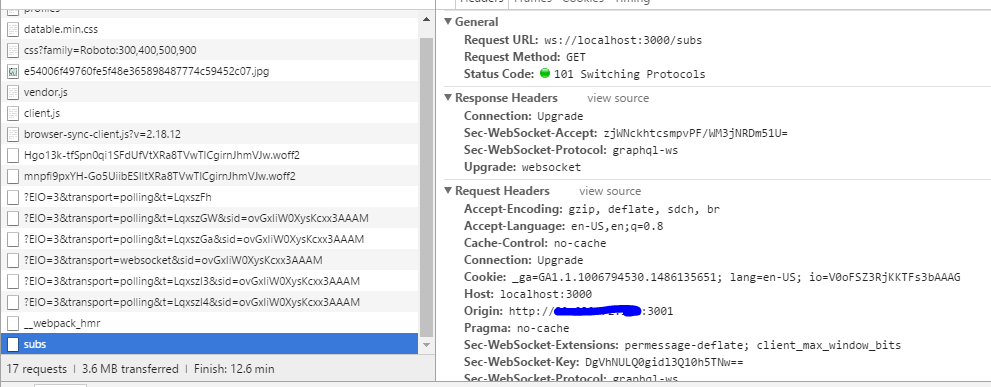
" Instead of that Browsersync's server is started, which has already websockets server attached and you cannot simple attach there another WS server on different path. "
Well I tried to but I can't reproduce any error described :3
inspiration from sysGearsApp starter kit, they have some subscription server rolling along with
hotreload. I ve tried to remove the "hot.module" parts but it doesn t seem to affect anything :3using 'graphql-server-express' instead of graphql-server,
not sure if it would have an incidence. Here s what I use
// ./core/server/subscriptions.js
import { SubscriptionServer } from 'subscriptions-transport-ws';
import { execute, subscribe } from 'graphql';
import schema from '../../data/schema';
import log from '../log'
// private var
let subscriptionServer;
const addSubscriptions = httpServer => {
subscriptionServer = SubscriptionServer.create({
schema,
execute,
subscribe,
onConnect: (connectionParams, webSocket) => {
console.log({ connectionParams, })
return ({ connectionParams, })
},
},
{
server: httpServer,
path: '/subs',
});
};
const addGraphQLSubscriptions = httpServer => {
if (module.hot && module.hot.data) {
const prevServer = module.hot.data.subscriptionServer;
if (prevServer && prevServer.wsServer) {
log.debug('Reloading the subscription server.');
prevServer.wsServer.close(() => {
addSubscriptions(httpServer);
});
}
} else {
addSubscriptions(httpServer);
}
};
if (module.hot) {
module.hot.dispose(data => {
try {
data.subscriptionServer = subscriptionServer;
} catch (error) {
log(error.stack);
}
});
}
export default addGraphQLSubscriptions;
// --- Server.js
import { graphqlExpress as expressGraphQL, graphiqlExpress } from 'graphql-server-express';
import addGraphQLSubscriptions from './core/server/subscriptions';
// [ . . .]
//
// Launch the server
// -----------------------------------------------------------------------------
let server = http.createServer(app);
addGraphQLSubscriptions(server);
const promise = mongoConnector.sync().catch(err => console.error(err.stack));
if (!module.hot) {
promise.then(() => {
server.listen(config.port, () => {
console.info(`The server is running at http://localhost:${config.port}/`);
});
server.on('close', () => {
server = undefined;
});
});
}
//
// Hot Module Replacement
// -----------------------------------------------------------------------------
if (module.hot) {
// no idea at all about this part usefulness / functionalness
app.hot = module.hot;
module.hot.dispose(() => {
try {
if (server) {
server.close();
}
} catch (error) {
console.error(error.stack);
}
});
// no idea at all about this part usefulness / functionalness
module.hot.accept(['./core/subscriptionServer', './router'], () => {
try {
addGraphQLSubscriptions(server);
console.log("attached addGraphQLSubscriptions to module.hot")
} catch (error) {
console.error(error.stack);
}
});
}
lobnico
on 13 Jul 2017
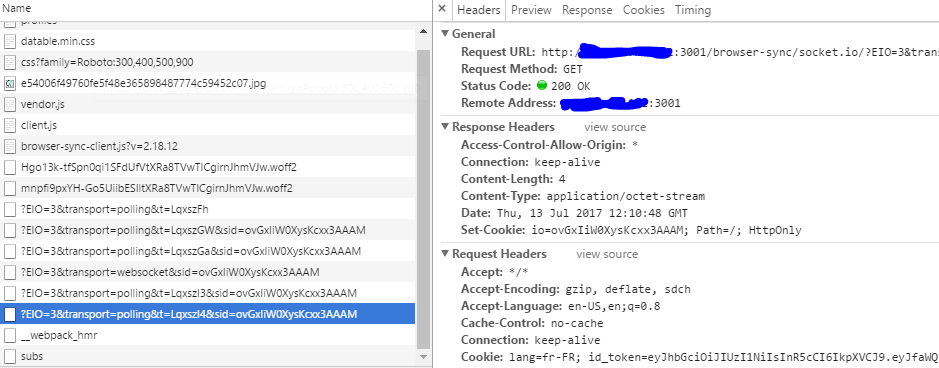
@lobnico thanks for the code, I'll test it if it solves my problem also. But looking at the screenshot you've added, your browsersync is listening on a different port than your app, so it means you have 2 servers up and running. Are you using Browsersync in a proxy mode?
pdeszynski
on 13 Jul 2017
Someone have a solution ?
 Asthor
on 19 Jul 2017
Asthor
on 19 Jul 2017
@Asthor for now I've reverted to the Proxy mode using the older start.js script from this version https://github.com/kriasoft/react-starter-kit/blob/a8fa75d5d2d6c252a73e08c3d8c705e812b90f89/tools/start.js
and added ws: true option to the proxy settings for Browsersync. Didn't have time to dig deeper.
pdeszynski
on 19 Jul 2017
@Asthor I solved this problem by giving the socket server it's own port and then managing it's creation/destruction via HMR's dispose/accept functions like what @lobnico proposed.
Doing it this way accomplishes two things:
- [X] Browser-Sync and your own socket server can coexist
- [X] The socket server won't break HMR/crash the app when it goes to reload
Assuming you have the latest version of RSK (after start.js got redone)
Add a value for your socket port in /src/config.js (I call it subPort)
module.exports = {
// Node.js app
port: process.env.PORT || 3000,
// GraphQL subscriptions websocket port
subPort: process.env.SUB_PORT || 4040,
{Stuff...}
Create /src/core/server/subscriptions.js
import { SubscriptionServer } from 'subscriptions-transport-ws';
import { execute, subscribe } from 'graphql';
import schema from '../../data/schema';
import config from '../../config';
let subscriptionServer;
const addSubscriptions = httpServer => {
subscriptionServer = SubscriptionServer.create({
execute,
subscribe,
schema,
onConnect: (connectionParams, webSocket) => {
return ({ connectionParams, })
},
},
{
server: httpServer,
path: '/subscriptions'
},
);
};
const addGraphQLSubscriptions = httpServer => {
if (module.hot && module.hot.data) {
const prevServer = module.hot.data.subscriptionServer;
if (prevServer && prevServer.wsServer) {
console.log('Reloading the subscription server.');
prevServer.wsServer.close(() => {
addSubscriptions(httpServer);
});
}
} else {
addSubscriptions(httpServer);
}
};
if (module.hot) {
module.hot.dispose(data => {
try {
data.subscriptionServer = subscriptionServer;
} catch (error) {
console.log(error.stack);
}
});
}
export default addGraphQLSubscriptions;
Then modify /src/server.js
import { graphqlExpress, graphiqlExpress } from 'apollo-server-express';
import { execute, subscribe } from 'graphql';
import { SubscriptionServer } from 'subscriptions-transport-ws';
import { createServer } from 'http';
import addGraphQLSubscriptions from './core/server/subscriptions';
import config from './config';
{Stuff...}
// Add in your graphql endpoint
app.use('/graphql', bodyParser.json(), graphqlMiddleware);
// Enable graphiql with subscriptions
app.use('/graphiql', graphiqlExpress({
endpointURL: '/graphql',
subscriptionsEndpoint: `ws://supercoolsite.com:${config.subPort}/subscriptions`
}));
// Create websocket server
const websocketServer = createServer((_request, response) => {
response.writeHead(404);
response.end();
});
// Try to spin up the websocket server with diff port
websocketServer.listen(config.subPort, () => {
console.log(`Websocket server listening on port ${config.subPort}`);
addGraphQLSubscriptions(websocketServer);
});
//
// Launch the server
// -----------------------------------------------------------------------------
const promise = models.sync(
//{ force: true },
).catch(err => console.error(err.stack));
if (!module.hot) {
promise.then(() => {
app.listen(config.port, () => {
console.info(`The server is running at http://supercoolsite.com:${config.port}/`);
});
});
}
//
// Hot Module Replacement
// -----------------------------------------------------------------------------
if (module.hot) {
app.hot = module.hot;
module.hot.dispose(() => {
try {
if (websocketServer) {
websocketServer.close();
}
} catch (error) {
console.error(error.stack);
}
});
module.hot.accept(['./core/server/subscriptions', './router'], () => {
try {
addGraphQLSubscriptions(websocketServer);
console.log("attached addGraphQLSubscriptions to module.hot")
} catch (error) {
console.error(error.stack);
}
});
}
export default app;
You can verify that it's working by going to graphiql and looking through the dev console. If you _don't_ see some variation of handshake failed, then it's probably working. In chrome, if you go in dev console -> network and find the subscription request, look in the frames tab to further verify your subscriptions are working.

This one was a bit of a headscratcher, there are probably better ways to solve this problem but here's where I said "It's good enough". Many thanks to @lobnico for getting me 80% of the way to working subscriptions :)
 tim-soft
on 8 Sep 2017
tim-soft
on 8 Sep 2017
@tim-soft i used your solution but ended having issues with HMR, any update i did throw error EADDRESS already in use. any solutions?
 rmoura-92
on 26 Sep 2017
rmoura-92
on 26 Sep 2017
@ricardomoura EADDRESS already in use means that something already listening on port. In really weird situation it can be ending process which not release resource yet, but, this is very rare :stuck_out_tongue:
If you get EADDRESS without any reason, try kill widely used (video)chat application :rofl:
 langpavel
on 7 Oct 2017
langpavel
on 7 Oct 2017
@ricardomoura I don't know if this will be still useful for you, but I had the same problem after reloads as it was not always calling dispose from hot reload (depending which file I was exactly editing). Sadly I still didn't have luck to make subscriptions working on the same port as the server (maybe this could help solve this problem https://github.com/websockets/ws/pull/885), but for now I've solved EADDRESS, by closing previous subscription server not using webpack's hot module accept/dispose but inside of start.js script. Code looks like:
// server.js
import createSubscriptionsServer from './core/createSubscriptionsServer';
import { createServer } from 'http';
// other RSK imports

//...

//
// Launch the server
// -----------------------------------------------------------------------------
if (!module.hot) {
  const server = createServer(app);
  createSubscriptionsServer({ server });
  server.listen(config.port, () => { // on production it will be working under the same port as main app
    console.info(`The server is running at http://localhost:${config.port}/`);
  });
}

//
// Hot Module Replacement
// -----------------------------------------------------------------------------
if (module.hot) {
  app.hot = module.hot;
  const server = createServer();
  createSubscriptionsServer({ server });
  server.listen(config.subscriptionsPort, () => {
    console.info(
      `The subscription server is running at http://localhost:${
        config.subscriptionsPort
      }`,
    );
  });

  app.subsciptionsServer = server;
  module.hot.accept('./router');
}

export default app;
// createSubscriptionsServer
import { SubscriptionServer } from 'subscriptions-transport-ws';
import { execute, subscribe } from 'graphql';
import config from '../config';
import schema from '../data/schema';

export default function createSubscriptionServer(socketOpts = {}) {
  return SubscriptionServer.create(
    {
      schema,
      execute,
      subscribe,
      async onConnect(connectionParams, webSocket) {
       // stuff to create a context for subscriptions like logged in user
        return context;
      },
    },
    {
      ...socketOpts,
      path: '/subscriptions',
    },
  );
}
And the last part is an update in tools/start.js to close previously opened websocket server:
// start.js
//...

function checkForUpdate(fromUpdate) {
  const hmrPrefix = '[\x1b[35mHMR\x1b[0m] ';
 // ...

return app.hot
  .check(true)
  //...
  .catch(error => {
        if (['abort', 'fail'].includes(app.hot.status())) {
          console.warn(`${hmrPrefix}Cannot apply update.`);
          app.subsciptionsServer.close(); // close the previous subscription server, getting here it means that server side code needs to be reloaded
         // ... rest of function body
  });
}
It's important that on production it will be working under the same port as your app, so for e.g. if you have set a port 3000 then it will also listen for subscriptions under the port 3000. Locally you will have to setup port inside of a config and use other one for subscriptions.
It would be great if somebody could share a better solution.
pdeszynski
on 14 Feb 2018
@pdeszynski Did you manage to run subscription server on the same port?
 WiktorKa
on 15 Mar 2018
WiktorKa
on 15 Mar 2018
@WiktorKa not for development, only for production. I didn't have time to investigate this further and solve it without the need of switching BrowserSync to proxy mode.
pdeszynski
on 18 Mar 2018
I dont know if its clean but i could get the server run under the same port. (in development)
  // start.js
  .....
  const timeStart = new Date();
  console.info(`[${format(timeStart)}] Launching server...`);
  // Load compiled src/server.js as a middleware
  // eslint-disable-next-line global-require, import/no-unresolved
  app = require('../build/server').default;
  // eslint-disable-next-line global-require, import/no-unresolved
  const dataForWSServer = require('../build/server').dataForWSServer; // <--- very important
  appPromiseIsResolved = true;
  appPromiseResolve();

  const graphQLServer = await createServer(server);

  await new Promise(resolve => {
    graphQLServer.listen(projectConfig.port, () => {
      console.info(
        `The server is running at http://localhost:${projectConfig.port}`,
      );
      resolve();
    });
  });

  // eslint-disable-next-line no-unused-vars
  const subscriptionServer = await SubscriptionServer.create(dataForWSServer, {
    server: graphQLServer,
    path: '/subscriptions',
  });

  console.info(
    `GraphQL Subscriptions are now running on ws://localhost:${
      projectConfig.port
    }/subscriptions`,
  );

  const timeEnd = new Date();
  const time = timeEnd.getTime() - timeStart.getTime();
  console.info(`[${format(timeEnd)}] Server launched after ${time} ms`);
  return server;
}

export default start;
i removed browsersync und replaced it with the server. Maybe browsersync still works with it but i didnt test it.
To get the server run you need to export your schema in server.js (dataForWSServer). Otherwise your pubsub as @WiktorKa mentioned have two instances and the publish will not work. Furthermore in this way my modelschemas dont get loaded twice and i dont need delete Mongoose.connection.models anymore.
// server.js
....
global.Promise = bluebird;

export const dataForWSServer = {
  schema,
  execute,
  subscribe,
};

const app = express();

global.navigator = global.navigator || {};
global.navigator.userAgent = global.navigator.userAgent || 'all';
.....
 testbuddy
on 22 Mar 2018
testbuddy
on 22 Mar 2018
About HMR, have you tried use global?
const ws = global.ws || new WebSocket(...)
global.ws = ws
 frenzzy
on 3 Jun 2018
frenzzy
on 3 Jun 2018
Related issues
WiktorKa
·
3Comments
 satyavrat
·
3Comments
satyavrat
·
3Comments
 shikelong
·
4Comments
shikelong
·
4Comments
 buildbreakdo
·
3Comments
buildbreakdo
·
3Comments
 artkynet
·
4Comments
artkynet
·
4Comments
Most helpful comment
@ricardomoura I don't know if this will be still useful for you, but I had the same problem after reloads as it was not always calling
disposefrom hot reload (depending which file I was exactly editing). Sadly I still didn't have luck to make subscriptions working on the same port as the server (maybe this could help solve this problem https://github.com/websockets/ws/pull/885), but for now I've solvedEADDRESS, by closing previous subscription server not using webpack's hot moduleaccept/disposebut inside ofstart.jsscript. Code looks like:And the last part is an update in
tools/start.jsto close previously opened websocket server:It's important that on production it will be working under the same port as your app, so for e.g. if you have set a port
3000then it will also listen for subscriptions under the port3000. Locally you will have to setup port inside of a config and use other one for subscriptions.It would be great if somebody could share a better solution.