React-starter-kit: Best way import jQuery plugins or external client scripts?
My projects comes with quite many external jQuery plugins. And I got troubles to import them into a specific component and make them work with development mode by npm start (server side rendering).
My current solutions is to add them all to the bottom of Html.js return func. But, this way increases page load.
 manhhailua
All 21 comments
Add link to jQuery lib to your Html.js and use plugins inside componentDidMount function
 frenzzy
on 19 Sep 2016
frenzzy
on 19 Sep 2016
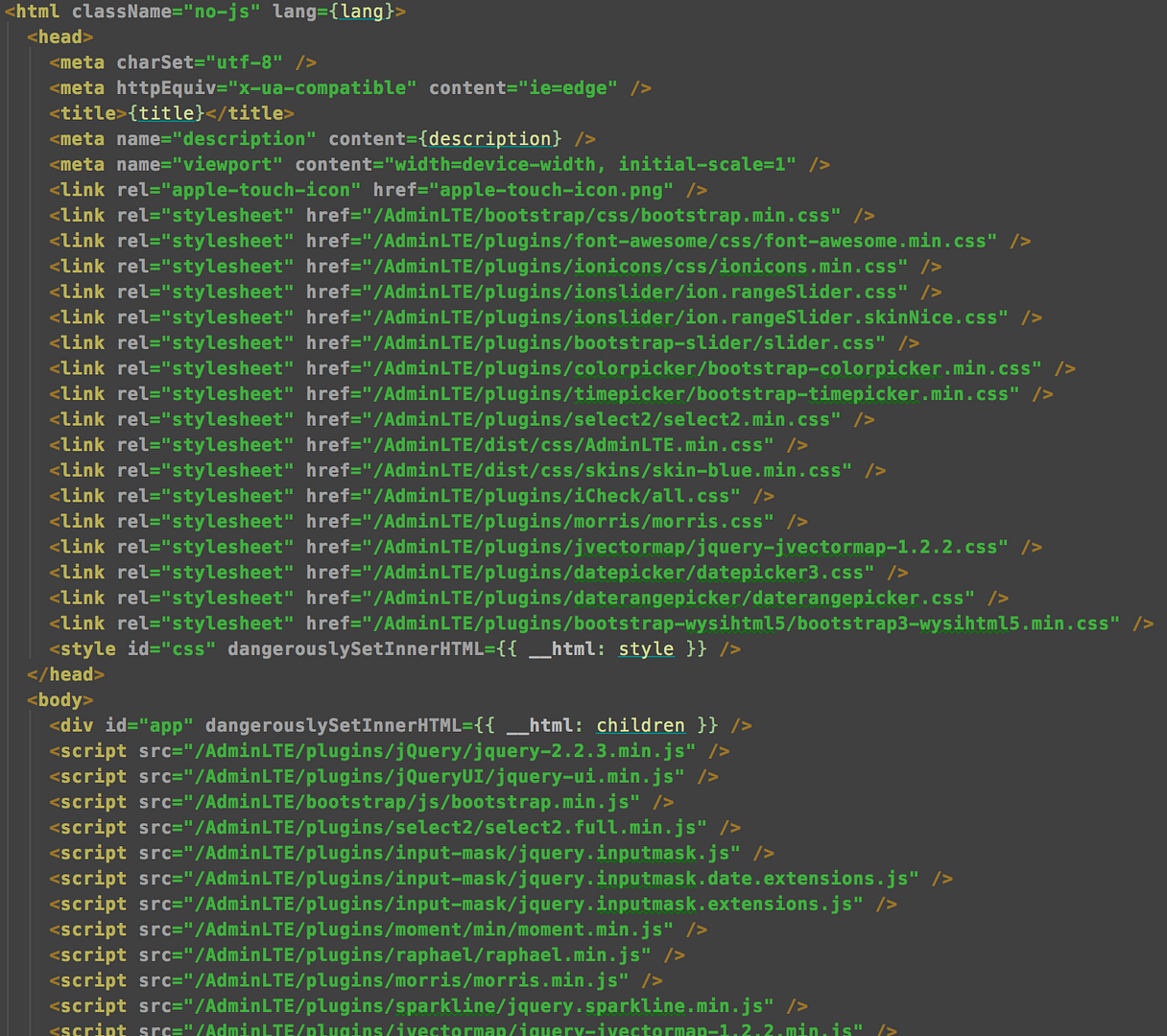
@frenzzy : there will be too many things in Html. Is that good?
My Html is now like this!
manhhailua
on 19 Sep 2016
I usually add external vendor libraries in /assets/
 codetony25
on 19 Sep 2016
codetony25
on 19 Sep 2016
@codetony25 : would you please show some peaces of code?
manhhailua
on 19 Sep 2016
I have same problem with this.
how can i use jquery plugin in React comp.
i did:
- import jquery plugin in Html.js
- in componentDidMount of Component i run .slick({...})
and i got this error.

My code

 minhnguyenwp
on 21 Jun 2017
minhnguyenwp
on 21 Jun 2017
If third-party plugins change DOM, you need to create uncontrolled components for them, i.e.
shouldComponentUpdate() {
  return false;
}
And I do not see where you add slick plugin to jQuery
frenzzy
on 21 Jun 2017
@minhnguyenwp : please stop importing jQuery into your component, that will increase the time on bundling process of Webpack and the size of bundle.js/vendor.js file as well. Just add a <script /> tag which has src attribute link to your jquery file and use $ in every components' componentDidMount functions without re-importing jQuery.
Be aware of eslint alert that '$' is not defined, put a comment /* global $ */ on top of your files or update .eslintrc.js file at globals property to ignore this alert.
Anyway, using jQuery to handle the DOM might cause React DOM tree crash (React indexes all the actual rendered DOMs by it virtual DOM tree). So, please ensure you read these posts before getting your hands dirty with React and jQuery co-operation.
manhhailua
on 21 Jun 2017
Hi @manhhailua ,
thank you so much for your reply.
i pretty sure to know using jquery is limited in react. but in this case i need to do that.
So could you tell me more about. eslint alert that '$' is not defined.
i imported jquery in html and jquery plugins too.
and i get that issue.


minhnguyenwp
on 21 Jun 2017
@minhnguyenwp : .slick function does not belong to origin $ or jQuery object. Moreover, Webpack separates each package that is imported to a component, so you cannot call .slick via $ or jQuery object if you continue importing jQuery this way. Sorry.
manhhailua
on 21 Jun 2017
@manhhailua I did like your words.
- Html.js
```
```
- in Component, no longer importing jQuery or jQ plugin.
- Just using $('...').slick()
Please show me a right way. im just a new-comer in react.
minhnguyenwp
on 21 Jun 2017
@minhnguyenwp : are you currently using React-Starter-Kit? You wrote the right way in your most recent comment. Try it.
manhhailua
on 21 Jun 2017
Also having trouble with this. I imported jquery and a plugin in index like so:
 <script src = "imports/jquery-3.2.1.js"></script>
 <script src = "imports/jquery.form.min.js"></script>
And I still get $ is undefined. If I import jquery in the component with:
import $ from 'jquery';
I can use jquery, but then I can't use my plugin.
 Dr-Steve
on 14 Feb 2018
Dr-Steve
on 14 Feb 2018
@Dr-Steve you should not import jQuery. Just attach it via <script> tags and you're good to go use it inside componentDidMount.
manhhailua
on 15 Feb 2018
Create one component jQuery, example (components/Jquery.js:
import React from 'react'
import jQuery from 'jquery' // Import directly from node-modules
window.jQuery = jQuery

export default () => (jQuery)
In your component you will use a jQuery plugin, example (components/Slider.js):
import React, {Component} from 'react'
import $ from './Jquery' // Import component
import flexSlider from 'flexslider' // Import directly from node-modules

class Slider extends Component {
    componentDidMount() {
         $(".hero-slider").flexslider({
            controlNav: true,
            directionNav: false,
            animation: "fade"
        });
    }

    render = () => (
        <div className="hero hero-slider">
        <ul className="slides">
            <li data-bg-image="dummy/slider-1.jpg">
            <div className="container">
                         <h3 className="slider-subtitle">Your header goes here</h3>
            <h2 className="slider-title">Professional</h2>
            <p>Lorem ipsum dolor sit amet, consectetur adipisicing elit. Ipsa molestiae necessitatibus possimus ducimus facere, error, nostrum. Quos sapiente ducimus maxime odio alias dolor consequuntur, maiores commodi exercitationem veniam. Id, ex?</p>
            <a href="#" className="button large">Read more</a>
            </div>
        </li>
                 <li data-bg-image="dummy/slider-2.jpg">
            <div className="container">
                <h3 className="slider-subtitle">Your header goes here</h3>
            <h2 className="slider-title">Professional</h2>
            <p>Lorem ipsum dolor sit amet, consectetur adipisicing elit. In maiores illo eligendi obcaecati reiciendis, vel perspiciatis aliquid esse architecto deleniti asperiores, laboriosam nemo rerum! Ipsam numquam delectus minus iure sit!</p>
            <a href="#" className="button large">Read more</a>
            </div>
        </li>
        <li data-bg-image="dummy/slider-3.jpg">
            <div className="container">
            <h3 className="slider-subtitle">Your header goes here</h3>
            <h2 className="slider-title">Professional</h2>
            <p>Lorem ipsum dolor sit amet, consectetur adipisicing elit. Laboriosam iure, alias error suscipit porro quidem minus, autem repellendus rerum labore corrupti! Quia quas, architecto, quis non pariatur quisquam nisi magnam.</p>
            <a href="#" className="button large">Read more</a>
            </div>
        </li>
        </ul>
    </div>
    )
}

export default Slider
 rorteg
on 22 Mar 2018
rorteg
on 22 Mar 2018
@rorteg there's going to be unit testing issue on your solution.
manhhailua
on 22 Mar 2018
@manhhailua I'm a beginner in frontend, I work more with backend and I have no experience with frontend unit testing. Could you give me a more detailed answer as to why I would have problems with the tests?
rorteg
on 22 Mar 2018
@rorteg
windowis a browser instance. Most of time you will test or bundle innodejsenvironment wherewindowis definitelyundefined. jsdom or karma can handle this issue, but you will have to spend more time on further mocking and configuration.flexslideris also a component and you can't test it. You should wrap it by a react component.- if
flexslidersomehow changes the rendered DOM you will not able to test it andreactwill throw errors.
manhhailua
on 22 Mar 2018
I have this error !!
ERROR in ./src/components/home/slider_section_element/FlexSlider.js
Module not found: Error: Cannot resolve module 'flexslider' in /Volumes/Data/Front_Project/my-project-name/src/components/home/slider_section_element
@ ./src/components/home/slider_section_element/FlexSlider.js 29:18-39
 AbdelhafidFutureTrendz
on 5 Dec 2018
AbdelhafidFutureTrendz
on 5 Dec 2018
Follow this solution:
https://stackoverflow.com/a/33351325/4980017
 mgolshan-talentnet
on 8 Jan 2019
mgolshan-talentnet
on 8 Jan 2019
@frenzzy : there will be too many things in
Html. Is that good?
MyHtmlis now like this!
thank you!
 gucompi
on 29 Mar 2019
gucompi
on 29 Mar 2019
hello everyone , can anyone please help in this problem I am doing conversion from html template to react project.In html template external libraries like jquery , chosenjs are used but when i add them in index.html file of react project following error message is shown on console window and these libraries arenot working

 Zill-Saqee
on 18 Mar 2020
Zill-Saqee
on 18 Mar 2020
Related issues
 pfftdammitchris
·
3Comments
pfftdammitchris
·
3Comments
 mykhas
·
4Comments
mykhas
·
4Comments
 fchienvuhoang
·
3Comments
fchienvuhoang
·
3Comments
 WiktorKa
·
3Comments
WiktorKa
·
3Comments
 shawn-dsz
·
4Comments
shawn-dsz
·
4Comments
Most helpful comment
@minhnguyenwp : please stop importing jQuery into your component, that will increase the time on bundling process of Webpack and the size of
bundle.js/vendor.jsfile as well. Just add a<script />tag which hassrcattribute link to your jquery file and use$in every components'componentDidMountfunctions without re-importing jQuery.Be aware of eslint alert that
'$' is not defined, put a comment/* global $ */on top of your files or update.eslintrc.jsfile atglobalsproperty to ignore this alert.Anyway, using jQuery to handle the DOM might cause React DOM tree crash (React indexes all the actual rendered DOMs by it virtual DOM tree). So, please ensure you read these posts before getting your hands dirty with React and jQuery co-operation.