React-spring: v9.0.0-rc.3 –– Questions and feedback
Go here first: v9 docs
Please leave your questions and feedback about v9.0.0-rc in this thread.
🐛 Bug reports deserve their own issue. Fork this sandbox to create a minimal repro.
npm install [email protected] -E
# or
npm install react-spring@next -E
Last Updated: May 11, 2020
Try the UMD bundle:
https://cdn.jsdelivr.net/npm/@react-spring/web@9.0.0-rc.3/index.umd.min.js
Read the source:
https://github.com/react-spring/react-spring/tree/v9.0.0-rc.3
Have any suggestions to improve the docs?
Speak up here: #967
Want to write a blog post for the docs?
Speak up here: #973
 aleclarson
All 81 comments
986 Unfortunately, it looks like the .cjs bundle is broken. 😢
aleclarson
on 6 May 2020
@aleclarson I'm getting typescript errors when using RC1.
````
node_modules/@alloc/types/react.d.ts:1:8 - error TS1259: Module '"C:/.../node_modules/@types/react/index"' can only be default-imported using the 'allowSyntheticDefaultImports' flag
1 import React, { ReactElement, MutableRefObject } from 'react'
node_modules/@react-spring/core/index.d.ts:1:8 - error TS1259: Module '"C:/../@types/react/index"' can only be default-imported using the 'allowSyntheticDefaultImports' flag
1 import React, { ReactNode, RefObject } from 'react';```
 dagstuan
on 6 May 2020
dagstuan
on 6 May 2020
Shared package has circular dependencies which may lead to unwanted effect in some cases.
[!] Error: Circular dependency:
../node_modules/@react-spring/shared/esm/globals.js ->
../node_modules/@react-spring/shared/esm/FrameLoop.js ->
../node_modules/@react-spring/shared/esm/globals.js
 TrySound
on 6 May 2020
TrySound
on 6 May 2020
Using event props with useTransition in 9.0.0-rc.1 seems to have no effect. At least I'm not getting anything in the console with a transition such as this one:
useTransition(items, {
  from: { opacity: 0 },
  enter: { opacity: 1 },
  leave: { opacity: 0 },
  onChange: () => console.log('change'),
  onRest: () => console.log('rest'),
  onProps: () => console.log('props'),
})
I can make a repro once #986 is fixed.
dagstuan
on 6 May 2020
@aleclarson I'm getting typescript errors when using RC1.
I guess libraries can't use esModuleInterop or allowSyntheticDefaultImports if they emit a declaration file. 😢
See here: https://github.com/microsoft/TypeScript/issues/28009
For now, you can work around it by using esModuleInterop: true in your project's tsconfig.json.
aleclarson
on 6 May 2020
@aleclarson Named exports is recommended way to import react. Default export will be gone eventually. Import like this if jsx is used.
import * as React from 'react';
import { useState } from 'react';
9.0.0-rc.2 is now available 🚢
aleclarson
on 7 May 2020
I'm wondering, does v9 allow the following: transition between two routes, but second route has child elements that should animate on route enter and on route leave. And page element should only be removed from DOM, when animations of child elements finish.
 smashercosmo
on 7 May 2020
smashercosmo
on 7 May 2020
@smashercosmo It's feasible, yes. You could use async to function in the leave transition to wait for animation promises passed up from the child components. If you have more questions about that particular use case, please open a discussion.
aleclarson
on 7 May 2020
Hi, I just create a sandbox to try React Spring but got an error: Could not find module in path: 'react-spring/renderprops'
Here is the sandbox: https://codesandbox.io/s/react-spring-0bbg0?file=/src/App.js:87-98
 minhtranite
on 8 May 2020
minhtranite
on 8 May 2020
@minhtranite See here: https://aleclarson.github.io/react-spring/v9/#Unified-API
aleclarson
on 8 May 2020
@aleclarson thanks for the new release! In v9-beta.34, I could pass onFrame to useSpring like this
const [props, set] = useSprings(pages.length, i => ({
    x: i * window.innerWidth,
    scale: 1,
    display: 'block',
    onFrame: f => console.log(f),
    onRest: f => console.log(f)
}))
I've updated onFrame -> onChanged, but neither onChange or onRest seem to get called
```jsx
const [props, set] = useSprings(pages.length, i => ({
x: i * window.innerWidth,
scale: 1,
display: 'block',
onChange: f => console.log(f),
onRest: f => console.log(f)
}))
````
repro: https://codesandbox.io/s/viewpager-s2ukf?file=/src/index.js
 tim-soft
on 9 May 2020
tim-soft
on 9 May 2020
I'm getting TypeScript issues when using animated(component). It complains "Type instantiation is excessively deep and possibly infinite". Is this something I'm doing wrong or is this a known issue?
 christianvonlehe
on 10 May 2020
christianvonlehe
on 10 May 2020
Can Globals accept a default animations config?
Like:
Globals.assign({
  config: config.gentle,
});
 ElForastero
on 10 May 2020
ElForastero
on 10 May 2020
@ElForastero No but SpringContext supports it, I think.
import { SpringContext } from 'react-spring'

<SpringContext config={config.gentle}>
  <App />
</SpringContext>
edit: Nevermind, that's not possible yet... but you'll see support for the config prop with SpringContext in v9.0.0-rc.3. Would that work for you?
aleclarson
on 11 May 2020
9.0.0-rc.3 is now available 🚢
Notable changes
- Added
configprop toSpringContextcomponent - Improved stability of nested async
toprops - Fixed event props defined with async
toprop - Fixed return type of
useSpringwhentoprop is possibly falsy - Fixed integration with
react-three-fiber(and upgraded to v4)
Fixed issues
- #993
- #997
- #1000
aleclarson
on 11 May 2020
Hi,
I just upgraded to rc3 and have a found a small change that messes with some of my code. I am animating springs to 0, and then in their onChange handlers triggering functions once the spring value passed into the handler displays 0. I think the reason for this was in a previous canary version onRest was not being successfully triggered for some reason, this was my way around this. What actually ends up happening is the spring gets progressively closer to 0 without actually reaching it. I think maybe there is a spring config property that maybe I'm missing or has changed?
Thanks,
 HQ92
on 14 May 2020
HQ92
on 14 May 2020
Hi again,
I've found a small issue with the way rc3 reacts to a spring onchange prop update when triggering a separate state update due to a drag event. I've created a repro for it and filed it under https://github.com/react-spring/react-spring/issues/1010. Hopefully its something I just need to tweak, but it was working in 808.17.
Thanks!
HQ92
on 15 May 2020
When using /web.cjs I seem to be having an issue in IE11 where the element fades in, but won't fade out or unmount.
Example component that fails to "leave" in IE
```js
import React from "react";
import { useTransition, animated } from "react-spring/web.cjs";
export default function App() {
const [hidden, setHidden] = React.useState(false);
const transition = useTransition(hidden, {
from: { opacity: 0 },
enter: { opacity: 1 },
leave: { opacity: 0 }
});
return (
{transition(
(props, item) =>
item &&
)}
);
}
````

Everything appears to work without issue in all other browers I've tested so I'm guessing it's just a bug. There aren't any exceptions thrown.
 KB1RMA
on 15 May 2020
KB1RMA
on 15 May 2020
@KB1RMA Your best bet is to transpile react-spring for ie11 in your webpack config, pass anything in that folder (/node_modules/react-spring) thru babel-loader. There is stuff in the cjs build that is gonna break ie11. Polyfilling via babel-'s core-js setup in your app is also a given.
tim-soft
on 15 May 2020
@KB1RMA Your best bet is to transpile react-spring for ie11 in your webpack config, pass anything in that folder (/node_modules/react-spring) thru babel-loader. There is stuff in the cjs build that is gonna break ie11. Polyfilling via babel-'s core-js setup in your app is also a given.
I just tried that and it's still broken in the same way unfortunately! Still no console errors either - silent failure.
Edit: And yeah, everything else is all polyfilled properly - This is a pretty large project and this is my only IE11 issue. I just pulled a small reproduction out.
KB1RMA
on 15 May 2020
I just tried that and it's still broken in the same way unfortunately!
Maybe you messed up? How are you using babel-loader?
Be sure every package in node_modules/@react-spring/** is compiled. (Note the @)
aleclarson
on 15 May 2020
@KB1RMA this way has worked for me in the past (separate loaders + unix/windows path regex) https://github.com/webpack/webpack/issues/2031#issuecomment-573271725
tim-soft
on 15 May 2020
Maybe you messed up? How are you using
babel-loader?
Be sure every package innode_modules/@react-spring/**is compiled. (Note the@)
It's most entirely possible! I'm using Nextjs and next-transpile-plugins, but it looks like the loader config it sets up should be okay. And I see transpiled code in my bundles.
Here's a CodeSandbox of essentially what I have setup: https://codesandbox.io/s/happy-breeze-p37cl?file=/next.config.js
What's throwing me is plenty of other things appear to work okay. And it does animate, it just doesn't complete or unmount. And no console errors.
KB1RMA
on 15 May 2020
In the example (useTransition) https://codesandbox.io/s/fervent-wildflower-39dc9 if you look at the console, the information on transition will mislead people.
Current behavior:
false "mount"
-- click
false "enter"
true "mount"
true "enter"
--click
true "enter"
false "mount"
false "enter"
We do not see leave state
Expected behavior:
false "mount"
false "enter"
-- click
false "leave"
true "mount"
true "enter"
--click
true "leave"
false "mount"
 b2whats
on 17 May 2020
b2whats
on 17 May 2020
https://codesandbox.io/s/hungry-rgb-0w76q?file=/src/index.js
How can I reset the animation queue? Now if you click many times, the animation will be added to the queue, and then launched many times, which is an undesirable behavior
b2whats
on 17 May 2020
The desired behavior can be achieved in this way https://codesandbox.io/s/agitated-water-7utbi but it seems that the onRest event should not be raised
these expressions are not equivalent ?
    enter: item => async (next, cancel) => {
      await next({ opacity: 1 })
    },
    ...
    enter: { opacity: 1 }
In the example (useTransition) codesandbox.io/s/fervent-wildflower-39dc9 if you look at the console, the information on transition will mislead people.
The transition phase isn't updated until the commit phase (eg: when useLayoutEffect callbacks are invoked), so its value is indeed misleading during the render phase.
https://codesandbox.io/s/hungry-rgb-0w76q?file=/src/index.js
How can I reset the animation queue? Now if you click many times, the animation will be added to the queue, and then launched many times, which is an undesirable behavior
There's currently no API to cancel a delayed update, apart from the cancel prop or stop function (named cancel in your sandbox), but that will interrupt the async function too. Not sure if there's a workaround, but maybe.
When I get a chance, I'll probably change the behavior to this: When an async animation is interrupted (eg: when leave transition starts before enter transition is done), all of its delayed updates are interrupted too. Currently, delayed updates are not associated with async animations in any way.
The desired behavior can be achieved in this way codesandbox.io/s/agitated-water-7utbi but it seems that the onRest event should not be raised
It doesn't look like you changed anything in that forked sandbox. Did you forget to save changes?
these expressions are not equivalent ?
    enter: item => async (next, cancel) => {
      await next({ opacity: 1 })
    },
    ...
    enter: { opacity: 1 }
They are mostly equivalent. When enter is a function, the onRest prop won't be called until the function exits, but (in your example) that's inconsequential.
aleclarson
on 19 May 2020
was the native prop removed from the renderprops api? Are all of them native by default now, like hooks are?
 fozzle
on 20 May 2020
fozzle
on 20 May 2020
Right-o!
aleclarson
on 20 May 2020
https://github.com/react-spring/react-spring/issues/873 related issue
in
example https://codesandbox.io/s/unruffled-cerf-orh4x?file=/src/index.js
b2whats
on 20 May 2020
https://codesandbox.io/s/hungry-rgb-0w76q
Sorry, corrected an example to see how the animation blinks when quickly pressed many times
They are mostly equivalent. When enter is a function, the onRest prop won't be called until the function exits, but (in your example) that's inconsequential.
now you can see the difference between this example (https://codesandbox.io/s/agitated-water-7utbi) and the example above
It turns out that you can reset(fake) the animation queue and avoid blinking
b2whats
on 20 May 2020
873 related issue
in ref callback on an animated component is called three times with the same node,
example codesandbox.io/s/unruffled-cerf-orh4x?file=/src/index.js
Not tested yet, but I think memoizing the ref function will fix it: 8ed5a42e8a762592aeddb4ce1a130af67cdfa067
That commit will be in the next RC.
aleclarson
on 20 May 2020
Thanks 🤗 is there a public commit with these changes? I could try it on my own
And why the component is unmounted, I can’t find this place in the code.
b2whats
on 20 May 2020
Hi,
I have an issue using useSpring in typescript. Whenever animated props are simple, like radius:number , everything works as expected. but if animated prop is an array like position:number[] , I get an typescript error :

I defined the type of animated props like this example,
type AnimatedProps = {
  position: number[];
  radius: number;
};
// in useSpring:
const [springPops, setSprops] = useSpring<AnimatedProps>(() => ({
        position: [0, 0, 0],
        radius: 0,
    }))
and wonder if I'm missing something here?
sandbox : https://codesandbox.io/s/tyepechecking-react-t4ih5?file=/src/App.tsx
 kurosh-z
on 25 May 2020
kurosh-z
on 25 May 2020
Hi, the syntax for typescript incorrect in @react-spring/[email protected] at ReactNative environment.
The error report is below:

if I change to
export { AnimationResult } from './AnimationResult'
export { UnknownProps } from './types/common'
It works.
What should i do or how can i resolve it?
 moonrailgun
on 26 May 2020
moonrailgun
on 26 May 2020
I also experienced similar errors with react-three-fiber. @aleclarson @kurosh-z

 gtolarc
on 28 May 2020
gtolarc
on 28 May 2020
I've found a bug with React Spring rc3 that I can't figure out how to make an isolated repro for, it only seems to occur within the context of our app (Discord). The repro that I could create in our app however was spamming a bunch of hide/show events in a useTransition using mouse overs.
However, with lots of logging, experimenting and modifying of the source code, I have figured out the issue and how I think it needs to be solved.
The high level is - if a useTransition transition animation, somehow evaluates to a noop result, via this code path here:
the onRest callback for that transition is never fired, and cleanup of the dom node never happens. I could alleviate the problem by tweaking that line to:
const result = getNoopResult(this, value);
const onRest = coerceEventProp(get('onRest'), key);
onRest != null && onRest(result);
resolve(result);
But I am not really sure if that's the correct way to fix, so figured I would post here instead.
 amadeus
on 28 May 2020
amadeus
on 28 May 2020
@amadeus I cooked up a test (0133a9fdbff0ae0dfe7e171465af52d60dfb9b4e) that reproduces the issue. The resolve(getNoopResult(...)) line is only hit when the transition is idle before the leave animation starts. Will look into it deeper sometime soon. 👍
aleclarson
on 29 May 2020
@kurosh-z @gtolarc Will take a look soon. Thanks for reporting! 💯
aleclarson
on 29 May 2020
useTransition stopped working after upgrading to this version. this is an error that I am getting:
Uncaught TypeError: Cannot destructure property 'ref' of 'props' as it is null.
const transitions = useTransition(viewMode, null, {
    from: ...,
    enter: ...,
    leave: ...,
  })
As you see, I use null as second argument. If I put ref there, it works, but makes 3 instances of animated object for some reason (should be one). Does anyone have similar problem?
 Okami92
on 30 May 2020
Okami92
on 30 May 2020
@Okami92 Please see the Breaking Changes page.
aleclarson
on 30 May 2020
@aleclarson thanks, sorry, haven't seen this page.
I have a question regarding Globals -> skipAnimation: I have multistep animations on the website, and with skipAnimation enabled they immediately go to the final state without transition, as expected, but still do it in a queue. For example, I have dropdown, where firstly I remove opacity in content of it, and then collapse dropdown itself. And with disabled animation it awkwardly doing it in steps and it looks clunky. Is there a way to disable chaining with Globals also, without passing props to any component which uses chaining?
Okami92
on 31 May 2020
@Okami92 Can you provide a minimal repro that shows the clunkiness? You can use this template if you want. 👍
aleclarson
on 31 May 2020
@aleclarson https://codesandbox.io/s/festive-germain-rv1fb?file=/src/index.js please take a look. With disabled animations, it still waits for next turn.
Okami92
on 31 May 2020
@Okami92 Awesome, thanks. I'll fix it before the next release. 👍
aleclarson
on 31 May 2020
@aleclarson Thank you for all this work! It is looking great.
I've tried updating to next today([email protected]) and having an issue with animating the interpolated value. Here is the sandbox - https://codesandbox.io/s/quiet-sunset-02sjn?file=/src/components/link.js. If you replace react-spring@next version of react-spring with [email protected] the animation of the Link component will work smoothly. If it's on next version, it just updates to the end scale without interpolating the value.
 aamorozov
on 2 Jun 2020
aamorozov
on 2 Jun 2020
@aamorozov Please open an issue. Thanks!
aleclarson
on 2 Jun 2020
@aamorozov Please open an issue. Thanks!
@aleclarson Added one here - https://github.com/react-spring/react-spring/issues/1039
aamorozov
on 2 Jun 2020
Hi @aleclarson has the issue with stale nodes been fixed? Also is there a chance of an rc-4? Thanks
 zenios
on 13 Jun 2020
zenios
on 13 Jun 2020
I'm using import {animated} from "@react-spring/konva" and it seems that none of the components inherit original typescript props i.e. typing sc in this scenario would normally give autocomplete on scale / scaleY / scaleX
<animated.Group sc...>
Here is codesandbox (try to complete any known props on that a.Group and normal Group): https://codesandbox.io/s/quiet-cherry-qku6q?file=/src/index.tsx
 IljaDaderko
on 17 Jun 2020
IljaDaderko
on 17 Jun 2020
ie11 not works, when a webpack builds a package, it looks at the file from animated package "module": "index.js" which is not a valid esmodule and contains non-transpile code
const $node = Symbol.for('Animated:node');
const isAnimated = value => !!value && value[$node] === value;
And @react-spring/core/index.js
default param
function useChain(refs, timeSteps, timeFrame = 1000)
Can be added to the build ie11 target?
b2whats
on 17 Jun 2020
Im trying to use react-three-fiber and react-spring to animate a rubics cube.
When an event is emitted, one side of the cube should be rotated by 90 degrees.
This works fine so far, but if the events are triggered fast after another, the animations get interrupted and the cube side is left in a state which is somewhere in between 90 degrees.
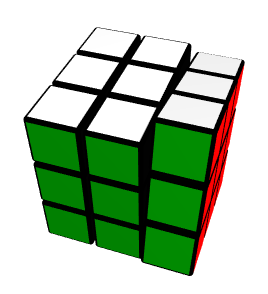
Is there a way to chain / queue the animations programatically?
Im using React-hooks to observe the changes and each button click triggers a hook which then uses set() to start a new animation.
I played around with different async / and chaining methods mentioned in the docs and the latest changelog, but no success so far.
 hoestreich
on 19 Jun 2020
hoestreich
on 19 Jun 2020
Hi @aleclarson I am using v9.0.0-rc-3 in my project. I am animating list using useTransition and I need to access phase. But accessing phase from the new useTransition is not working properly.
transitions((style, item, state) => {
    const { phase } = state;
    console.log(state, phase);
    return <animated.div style={style}>{item.value}</animated.div>;
)
I don't get proper phase value here. When the phase is enter I get mount and when its leave I get update.
Here is an example https://codesandbox.io/s/trusting-worker-xopyj?file=/src/App.js
 shresthabijay
on 27 Jun 2020
shresthabijay
on 27 Jun 2020
@aleclarson awesome to see new releases! I got around to giving this a go; unfortunately #922 persists for me. Can we possibly get that re-opened?
 Slapbox
on 27 Jun 2020
Slapbox
on 27 Jun 2020
I'm testing v9.0.0-rc-3 in my project and useTransition confuses me.
- If you don't pass a dependency array,
useTransitionreturns arenderTransitionsfunction. If you do pass a dependency array (third argument)useTransitioninstead returns an array of three functions -renderTransitions,startandstop. - Even if you pass a dependency array the
renderTransitionsfunction is always new, so it will bust any later memoization.
 nikparo
on 29 Jun 2020
nikparo
on 29 Jun 2020
@aleclarson awesome to see new releases! I got around to giving this a go; unfortunately #922 persists for me. Can we possibly get that re-opened?
Just jumped on 9.0.0-rc-3 and I'm seeing this issue as well. Basically there's this "shadow" element underneath the one I'm animating that quickly appears/disappears during the transition. I'll try to extract some of that code from my team's product and put it in a CSB tomorrow to see if I can reproduce it there.
Much easier/simpler to understand API behind this new useTransition @aleclarson -- thank you!
 uicrafts
on 30 Jun 2020
uicrafts
on 30 Jun 2020
@aleclarson Sandbox with the behavior that @Slapbox brought up here and in #922. This is using v9.0.0-rc-3. _Very_ contrived example, but replicates the issue -- clicking the button the first time fades in the data from the API as expected, but clicking it a second time creates this strange effect.
uicrafts
on 4 Jul 2020
@visionpoint this appears really similar. I'm not sure it's the same _exact_ issue though, because in my situation at least some of the additional components that are added are never removed.
To quote myself:
As it re-renders, the count increases on average, despite some dips along the way
Slapbox
on 4 Jul 2020
Hey, I have a question with useTransition. The animation works fine on update and leave. But whenever I add items to the array the animation wouldn't appear, which means the UI components go straight into the final state with no animation. However, the keyframe still works with interpolation. I suspect that this is related to the key props. Can anyone help me?
```typescript
import React from 'react';
import { useSelector } from 'react-redux';
import { BfsRootReducer } from '../../../Interfaces/BfsRootReducer';
import { animated, useTransition } from '@react-spring/konva';
export const Edges = () => {
const edgeList = useSelector((state: BfsRootReducer) => state.graph.edgeList);
const nodeList = useSelector((state: BfsRootReducer) => state.graph.nodeList);
const transition = useTransition(edgeList, {
    key: edge => edge.key,
    from: edge => {
        console.log('from');
        return nodeList[edge.edge[0]] && nodeList[edge.edge[1]] && {
            points: [nodeList[edge.edge[0]].xPosition,
            nodeList[edge.edge[0]].yPosition,
            nodeList[edge.edge[0]].xPosition,
            nodeList[edge.edge[0]].yPosition],
            c: 0
        }
    },
    enter: edge => {
        console.log('enter');
        return nodeList[edge.edge[0]] && nodeList[edge.edge[1]] && {
            points: [nodeList[edge.edge[0]].xPosition,
            nodeList[edge.edge[0]].yPosition,
            nodeList[edge.edge[1]].xPosition,
            nodeList[edge.edge[1]].yPosition],
            c: 1,
        }
    },
    update: edge => {
        return nodeList[edge.edge[0]] && nodeList[edge.edge[1]] && {
            points: [nodeList[edge.edge[0]].xPosition,
            nodeList[edge.edge[0]].yPosition,
            nodeList[edge.edge[1]].xPosition,
            nodeList[edge.edge[1]].yPosition],
            config: { duration: 1 }
        }
    },
    leave: edge => {
        return nodeList[edge.edge[0]] && nodeList[edge.edge[1]] && {
            points: [nodeList[edge.edge[0]].xPosition,
            nodeList[edge.edge[0]].yPosition,
            nodeList[edge.edge[0]].xPosition,
            nodeList[edge.edge[0]].yPosition],
            c: 0
        }
    },
    config: {
        mass: 2,
        tension: 170,
        friction: 42
    }
});


return (
    <React.Fragment>
        {edgeList.length !== 0 && transition(style => (
            <animated.Line
                {...style}
                stroke={style.c
                    .interpolate([0, 0.5, 0.75, 1], [0, 255, 150, 0])
                    .interpolate(c => `rgba(${c}, 0, 0, 1`)}
                strokeWidth={4}
            />
        ))}
    </React.Fragment>
);
}```
 terminatorlkf
on 9 Jul 2020
terminatorlkf
on 9 Jul 2020
@gtolarc https://github.com/react-spring/react-spring/issues/985#issuecomment-635058220
@kurosh-z https://github.com/react-spring/react-spring/issues/985#issuecomment-633451235
I am using the patch right now with patch-package
patches/@react-spring+three+9.0.0-rc.3.patch
diff --git a/node_modules/@react-spring/three/index.d.ts b/node_modules/@react-spring/three/index.d.ts
index 4546043..1b3df8a 100644
--- a/node_modules/@react-spring/three/index.d.ts
+++ b/node_modules/@react-spring/three/index.d.ts
@@ -1,6 +1,7 @@
 import { ForwardRefExoticComponent, CSSProperties, FC } from 'react';
 import { ElementType, ComponentPropsWithRef, AssignableKeys, FluidValue } from '@react-spring/shared';
 export * from '@react-spring/core';
+import { SpringValue } from '@react-spring/core';

 declare type Primitives = keyof JSX.IntrinsicElements;

@@ -17,7 +18,23 @@ declare type AnimatedComponent<T extends ElementType> = ForwardRefExoticComponen
 declare type AnimatedProps<Props extends object> = {
     [P in keyof Props]: P extends 'ref' | 'key' ? Props[P] : AnimatedProp<Props[P]>;
 };
-declare type AnimatedProp<T> = [T, T] extends [infer T, infer DT] ? [DT] extends [never] ? never : DT extends void ? undefined : DT extends object ? [AssignableKeys<DT, CSSProperties>] extends [never] ? DT extends ReadonlyArray<any> ? AnimatedStyles<DT> : DT : AnimatedStyle<T> : DT | AnimatedLeaf<T> : never;
+type ThreeThing = THREE.Vector3 | [number, number, number] | [any, any, any] | undefined
+declare type AnimatedProp<T> = [T, T] extends [infer T, infer DT]
+  ? [DT] extends [never]
+    ? never
+    : DT extends void
+    ? undefined
+    : DT extends ThreeThing
+    ? ThreeThing | SpringValue<[number, number, number]>
+    : DT extends object
+    ? [AssignableKeys<DT, CSSProperties>] extends [never]
+      ? DT extends ReadonlyArray<any>
+        ? AnimatedStyles<DT>
+        : DT
+      : AnimatedStyle<T>
+    : DT | AnimatedLeaf<T>
+  : never
+// declare type AnimatedProp<T> = [T, T] extends [infer T, infer DT] ? [DT] extends [never] ? never : DT extends void ? undefined : DT extends object ? [AssignableKeys<DT, CSSProperties>] extends [never] ? DT extends ReadonlyArray<any> ? AnimatedStyles<DT> : DT : AnimatedStyle<T> : DT | AnimatedLeaf<T> : never;
 declare type AnimatedStyles<T extends ReadonlyArray<any>> = {
     [P in keyof T]: [T[P]] extends [infer DT] ? DT extends object ? [AssignableKeys<DT, CSSProperties>] extends [never] ? DT extends ReadonlyArray<any> ? AnimatedStyles<DT> : DT : {
         [P in keyof DT]: AnimatedProp<DT[P]>;
diff --git a/node_modules/@react-spring/three/src/animated.ts b/node_modules/@react-spring/three/src/animated.ts
index b05c6d7..77f089e 100644
--- a/node_modules/@react-spring/three/src/animated.ts
+++ b/node_modules/@react-spring/three/src/animated.ts
@@ -6,6 +6,7 @@ import {
   FluidValue,
 } from '@react-spring/shared'
 import { Primitives } from './primitives'
+import { SpringValue } from 'react-spring'

 type AnimatedPrimitives = {
   [P in Primitives]: AnimatedComponent<FC<JSX.IntrinsicElements[P]>>
You have to write the code like this:
  const [animatedProps, set] = useSpring(() => ({
    position: [
      0,
      0,
      0,
    // cast to tuple
    ] as [number, number, number],
    // cast to tuple
    circleScale: [1, 1, 1] as [number, number, number],
  }));
 n1ru4l
on 15 Jul 2020
n1ru4l
on 15 Jul 2020
hey,
The newest beta version has some kind of type problem when using useSpring with ref !
3 Examples explained in comments : (using SpringHandle or SpringStartFn )
import React, { useRef, useEffect } from "react";
import { a, useSpring, SpringHandle, SpringStartFn } from "@react-spring/web";

const App: React.FC = () => {
  // a simple spring without ref works just fine!
  const [springs, set] = useSpring(() => ({
    width: "100px",
    height: "120px",
    background: "blue"
  }));

  return <a.div style={springs}></a.div>;
};

export const App2: React.FC = () => {
  // using SpringStartFn as type of ref : styles recognize in a.span but there is no start function in this type! (this actually worked in the last version!
  const ref = useRef<
    SpringStartFn<{
      width: string;
      height: string;
      background: string;
    }>
  >(null);
  const springs = useSpring(() => ({
    ref: ref,
    width: "100px",
    height: "120px",
    background: "blue"
  }));

  useEffect(() => {
    if (ref.current) {
      ref.current.start();
    }
  }, []);
  return <a.div style={springs}></a.div>;
};

export const App3: React.FC = () => {
  // SpringHandle solved the ref problem but now type of style is not compatible!
  const ref = useRef<
    SpringHandle<{
      width: string;
      height: string;
      background: string;
    }>
  >(null);
  const springs = useSpring(() => ({
    ref: ref,
    width: "100px",
    height: "120px",
    background: "blue"
  }));

  useEffect(() => {
    if (ref.current) {
      ref.current.start();
    }
  }, []);
  return <a.div style={springs}></a.div>;
};

export default App;
Sandbox : https://codesandbox.io/s/adoring-react-spring-ts-nzrdz?file=/src/App.tsx:0-1453
EDIT:
I figured it out. it apparently returns a start function as well even if you use ref!!! But locally I still receive an strange Error, even with a simple useSpring (without ref) :

EDIT2 :
turns out if you define functional component like:
function App = () {
  const [springs, set] = useSpring(() => ({
    width: "100px",
    height: "120px",
    background: "blue"
  }));

  return <a.div style={springs}></a.div>;
};
typescript cannot determine the type of style correctly!
define functional component instead like:
const App: React.FC = () => {
  // a simple spring without ref works just fine!
  const [springs, set] = useSpring(() => ({
    width: "100px",
    height: "120px",
    background: "blue"
  }));

  return <a.div style={springs}></a.div>;
};
and it works fine!
kurosh-z
on 29 Aug 2020
I've found a bug with rAF global injection. At Discord - we have an interesting problem where we utilize popout windows and need to inject the rAF dynamically as you change focus to different windows to ensure the focused window is the source of the rAF so animations don't get slowed down or paused (especially if the window is minimized)
However, a bug exists wherein you have a popout window focused that is powering rAF and you close the popout window while any animation is running - all animations will get stuck because the rAF in FrameLoop ends up getting interrupted because the popout window closing kills the rAF callback.
I've been able to artisanally working around it by using patch-package and hacking into FrameLoop to pause it if an animation is running, apply the new rAF methods and then resuming the animation.
I've attached an example showing the bug here
And I can provide a small test illustration that shows the bug:
rAF(loop) - - [time] - - [loop fires, with another rAF(loop)] - - [window gets closed] - - [raf callback never gets resolved - and react spring thinks it's animating like normal]
not sure if this is the right place to ask or if i'm doing something stupid, but can someone point me to an example how to transition between height: auto/0 with the <Transition> renderprop in v9? The v8 example {show => show && (props => <div style={props}>✌️</div>)} also doesnt do it for me.
const [showMe, setShowMe] = useState(false)

<Transition
  items={showMe}
  from={{ opacity: 0 }}
  enter={{ opacity: 1 }}
  leave={{ opacity: 0 }}
>
  {style => (<animated.div style={style}>😍</animated.div>)}
</Transition>
thanks a lot!
 joernroeder
on 3 Sep 2020
joernroeder
on 3 Sep 2020
hey,
The newest beta version has some kind of type problem when using useSpring with ref !
3 Examples explained in comments : (using SpringHandle or SpringStartFn )import React, { useRef, useEffect } from "react"; import { a, useSpring, SpringHandle, SpringStartFn } from "@react-spring/web"; const App: React.FC = () => { // a simple spring without ref works just fine! const [springs, set] = useSpring(() => ({ width: "100px", height: "120px", background: "blue" })); return <a.div style={springs}></a.div>; }; export const App2: React.FC = () => { // using SpringStartFn as type of ref : styles recognize in a.span but there is no start function in this type! (this actually worked in the last version! const ref = useRef< SpringStartFn<{ width: string; height: string; background: string; }> >(null); const springs = useSpring(() => ({ ref: ref, width: "100px", height: "120px", background: "blue" })); useEffect(() => { if (ref.current) { ref.current.start(); } }, []); return <a.div style={springs}></a.div>; }; export const App3: React.FC = () => { // SpringHandle solved the ref problem but now type of style is not compatible! const ref = useRef< SpringHandle<{ width: string; height: string; background: string; }> >(null); const springs = useSpring(() => ({ ref: ref, width: "100px", height: "120px", background: "blue" })); useEffect(() => { if (ref.current) { ref.current.start(); } }, []); return <a.div style={springs}></a.div>; }; export default App;Sandbox : https://codesandbox.io/s/adoring-react-spring-ts-nzrdz?file=/src/App.tsx:0-1453
EDIT:
I figured it out. it apparently returns a start function as well even if you use ref!!! But locally I still receive an strange Error, even with a simple useSpring (without ref) :
EDIT2 :
turns out if you define functional component like:function App = () { const [springs, set] = useSpring(() => ({ width: "100px", height: "120px", background: "blue" })); return <a.div style={springs}></a.div>; };typescript cannot determine the type of style correctly!
define functional component instead like:const App: React.FC = () => { // a simple spring without ref works just fine! const [springs, set] = useSpring(() => ({ width: "100px", height: "120px", background: "blue" })); return <a.div style={springs}></a.div>; };and it works fine!
Same issue, except I'm animating with a ForwardRefExoticComponent. Haven't spent much time trying to figure it out, I just type casted style to any to avoid it for the time being.
It's also important to note that I have a [mostly] duplicate of this component, animating something else. It works fine there - no ts errors.
Component that tsc fails on:
const Fade = React.forwardRef<
    HTMLDivElement,
    React.PropsWithChildren<ITransition>
>(function Fade(({ children }), ref) {
    const style = useSpring({
        from: { opacity: 0 },
        opacity: open ? 1 : 0
    });

    return (
        <animated.div ref={ref} style={style}>
            {children}
        </animated.div>
    );
});
Component that tsc _does not_ fail on
const SlideInOut = React.forwardRef<HTMLDivElement, Props>(function SlideInOut(
    props,
    ref
) {
    const style = useSpring({
        from: { transform: outAnimation }, // translateY(0%)
        transform: open ? inAnimation : outAnimation // translateY(100%)
    });

    return (
        <animated.div ref={ref} style={style}>
            {children}
        </animated.div>
    );
});
 marwan38
on 4 Sep 2020
marwan38
on 4 Sep 2020
How does tree-shaking works in v9? It looks like I got the entire @react-spring in bundle no mater what I use. Is this expected behavior or did I miss something?
 jerry84
on 23 Sep 2020
jerry84
on 23 Sep 2020
How does tree-shaking works in
v9? It looks like I got the entire@react-springin bundle no mater what I use. Is this expected behavior or did I miss something?
It's the first thing that's mentioned on the v9 documentation. https://aleclarson.github.io/react-spring/v9/#Platform-packages
marwan38
on 23 Sep 2020
How does tree-shaking works in
v9? It looks like I got the entire@react-springin bundle no mater what I use. Is this expected behavior or did I miss something?It's the first thing that's mentioned on the v9 documentation. https://aleclarson.github.io/react-spring/v9/#Platform-packages
OK, from my understanding @react-spring/core includes all the features that is possible to tree-shake before, for example color-interpolations. It doesn't look like it is possible anymore.
jerry84
on 23 Sep 2020
@jerry84 Moved your question about tree-shaking here to help others find it.
aleclarson
on 23 Sep 2020
I've found a bug with rAF global injection. At Discord - we have an interesting problem where we utilize popout windows and need to inject the rAF dynamically as you change focus to different windows to ensure the focused window is the source of the rAF so animations don't get slowed down or paused (especially if the window is minimized)
However, a bug exists wherein you have a popout window focused that is powering rAF and you close the popout window while any animation is running - all animations will get stuck because the rAF in FrameLoop ends up getting interrupted because the popout window closing kills the rAF callback.
@amadeus Just a few days ago, I released rafz and integrated it with v9. That library never caches the injected rAF impl, and Globals.assign({ requestAnimationFrame }) forwards to rafz.use(requestAnimationFrame) in the next RC, so your workaround will be unnecessary. 👍
aleclarson
on 28 Sep 2020
@hoestreich https://github.com/pmndrs/react-spring/issues/985#issuecomment-646753128
Please open an issue for this (with a sandbox) when you get time. 👍
If you prefer not to share the code publicly, you can message me on our official Discord server.
aleclarson
on 28 Sep 2020
@shresthabijay https://github.com/pmndrs/react-spring/issues/985#issuecomment-650480318
Could you open an issue for this request? You can copy-paste that comment as-is. 👍
aleclarson
on 28 Sep 2020
scrollTop property on animated.div seems to be broken on the latest v9 versions:
Sandbox link: https://codesandbox.io/s/react-spring-v9-scrolltop-bug-lrz65?file=/src/App.js
(switching to 8.0.27 works)
 0x6431346e
on 29 Oct 2020
0x6431346e
on 29 Oct 2020
from @aleclarson on discord:
You need to provide a start value:
from: { scrollTop: 0 }
This fixes it, yes, thanks! 😄 (I guess on v8.0.27 the lib used to do that automatically.)
To achieve my behavior of a initial scrollTop I have to do this now:
  const { scrollTop } = useSpring({
   from: { scrollTop: 0 }
   to: { scrollTop: 100 },
   immediate: true
});
And then to set immediate: false on subsequent calls.
I can live with this... hovever I would still consider this a bug, and expect this expression to work as an equivalent, just like it does in v8.0.27:
  const { scrollTop } = useSpring({
    from: { scrollTop: 100 }
  });
and this should be possible too:
  const { scrollTop } = useSpring({
    from: { scrollTop: 100 }
    to: { scrollTop: 100 }
  });
It works with animated.span so this is most likely an issue in animated.div's scrollTop handling:
https://codesandbox.io/s/react-spring-v9-scrolltop-bug-forked-7h3vf?file=/src/App.js
0x6431346e
on 31 Oct 2020
Trying to change spring config depending on the state, but there is some strange behavior.
Example 1.
Expected behavior: on mount animation plays once and stops. Press "Start looping an animation" — animation begins its infinite loop. Then press "Stop looping an animation" — animation stops.
Current behavior: on mount animation plays once and stops. Press "Start looping an animation" — animation begins its infinite loop. Then press "Stop looping an animation" — animation continue looping.
Example 2.
Expected behavior: on mount animation plays infinite loop using "DEFAULT_ANIMATION_CONFIG". Press "Start playing" — animation plays infinite loop using PLAYING_ANIMATION_CONFIG. Then press "Stop playing" — animation plays infinite loop using "DEFAULT_ANIMATION_CONFIG".
Current behavior: on mount animation plays infinite loop using "DEFAULT_ANIMATION_CONFIG". Press "Start playing" — animation plays infinite loop using PLAYING_ANIMATION_CONFIG. Then press "Stop playing" — animation is broken.
 bolotin-taptima
on 9 Nov 2020
bolotin-taptima
on 9 Nov 2020
I notice velocity is working unexpectedly or at least differently in v9.0.0-rc3. compared to v8.0.27.
Here is a sandbox with v8.0.27, where velocity works as expected.
However, in this fork with v9.0.0-rc3, but the velocity has a stronger effect on the spring value.
Both sandboxes have the same config:
config: { velocity: 30 }
and a spring value going from 0 to 1.
Because of the higher initial velocity, the value "overshoots" to ≈1.2 in v8, however in v9 it "overshoots" to ≈823.09.
Could this be a bug, or am I doing something silly 🤷♂️?
 JoostKiens
on 10 Nov 2020
JoostKiens
on 10 Nov 2020
@JoostKiens The velocity prop is "per ms" in v9, while it's "per sec" in v8. (see https://github.com/pmndrs/react-spring/commit/d5ad40fb9f6dccdb7f28bd62b0a5455b1a6a74cf)
aleclarson
on 10 Nov 2020
@aleclarson ah i missed that, thanks! 🙏
JoostKiens
on 10 Nov 2020
Just gone from v8 to v9 and not sure if I've missed a step from the breaking changes docs as I just immediately get typescript errors.
I tried to recreate the example in codesandbox but it worked fine: https://codesandbox.io/s/mystifying-shtern-egmqx
Locally for the exact same setup I get this ts error:
Types of property 'opacity' are incompatible.
    Type 'SpringValue<number>' is not assignable to type '"inherit" | "initial" | "-moz-initial" | "revert" | "unset" | FluidValue<Globals, any>'.
I can only guess that I've missed something painfully obvious here...
 jackmellis
on 2 Dec 2020
jackmellis
on 2 Dec 2020
Can you put the fix for this issue (#1078) to npm in some way. As I see it was fixed 5 months ago and RC4 have a long way to go.
 KurtGokhan
on 2 Dec 2020
KurtGokhan
on 2 Dec 2020
Animated.div dont render in the Production Mode but it's OK in the Development.
I'm using react & Typescript
 RezaHeydarii
on 13 Dec 2020
RezaHeydarii
on 13 Dec 2020
Related issues
 lennerd
·
3Comments
lennerd
·
3Comments
 eDubrovsky
·
3Comments
eDubrovsky
·
3Comments
 rockmandash
·
3Comments
rockmandash
·
3Comments
 jmcruzmanalo
·
4Comments
jmcruzmanalo
·
4Comments
 fortezhuo
·
3Comments
fortezhuo
·
3Comments
Most helpful comment
Can you put the fix for this issue (#1078) to npm in some way. As I see it was fixed 5 months ago and RC4 have a long way to go.