React-spring: What's best way to window scroll with react-spring?
@drcmda Would you say setting onFrame window.scroll makes sense? In terms of performance..
 jascodes
All 19 comments
https://www.react-spring.io/docs/hooks/basics
Scroll to the 5 running demo things, one of them is scrollTop
 drcmda
on 15 Feb 2019
drcmda
on 15 Feb 2019
https://www.react-spring.io/docs/hooks/basics
Scroll to the 5 running demo things, one of them is scrollTop
Hi
It seems not working and also doesn't exist scrollTop prop intoanimated.divprop types.
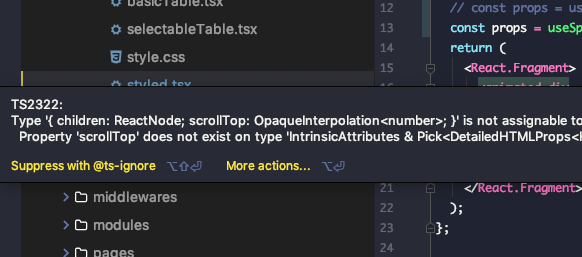
 rzkhosroshahi
on 28 Feb 2019
rzkhosroshahi
on 28 Feb 2019
@rzkhosroshahi use onFrame property to set window.scroll...
jascodes
on 28 Feb 2019
@rzkhosroshahi use onFrame property to set window.scroll...
I tried but I can't figure out how and where use onFrame...
Could you write basic example in codesandbox or sth, please?
rzkhosroshahi
on 5 Mar 2019
const [y, setY] = useSpring(() => ({
  immediate: false,
  y: window.scrollY,
  config: config.stiff,
  onRest: () => {
    setLock(false);
  },
  onFrame: (props: any) => {
    window.scroll(0, props.y);
  }
}));
Hey, for posterity and in case anyone runs into the same question, here is a functional code sandbox:
https://codesandbox.io/s/interesting-waterfall-pgo0y
 dbismut
on 4 Jun 2019
dbismut
on 4 Jun 2019
Why all of the thumbs down on the previous answer? It's the only example that I was able to create working code from.
Is there a better way?
Thanks dbismut, creating a working example is extremely helpful!
 SteveAtSentosa
on 3 Oct 2019
SteveAtSentosa
on 3 Oct 2019
I think it’s because the sandbox link was broken when I ran out of free sandboxes. Now that I’m on a paid plan I’ve been restoring those ones. Feel free to upvote if the code is useful to you 🤗
dbismut
on 3 Oct 2019
const targetElement = useRef(null)
const [, setY] = useSpring(() => ({ y: 0 }))

let isStopped = false
const onWheel = () => {
  isStopped = true
  window.removeEventListener('wheel', onWheel)
}

const scrollToTarget = () => {
  const element = targetElement.current
  const value = window.scrollY + element.getBoundingClientRect().top

  window.addEventListener('wheel', onWheel)

  setY({
    y: value,
    reset: true,
    from: { y: window.scrollY },
    onRest: () => {
      isStopped = false
      window.removeEventListener('wheel', onWheel)
    },
    onFrame: props => {
      if (!isStopped) {
        window.scroll(0, props.y)
      }
    }
  })
}
thx @dbismut. I adjusted your code a bit to allow a user to break out of the forced scrolling. Unfortunately the stop method which is returned by useSpring(fn) didn't stop the animation though. That's why there is an isStopped check.
 yannickschuchmann
on 10 Oct 2019
yannickschuchmann
on 10 Oct 2019
@yannickschuchmann Please try the latest canary if you have time. The stop function should be fixed in there.
 aleclarson
on 10 Oct 2019
aleclarson
on 10 Oct 2019
Is there a way to do this with the react-spring/renderprops API?
 raphtlw
on 21 Mar 2020
raphtlw
on 21 Mar 2020
Sorry to bump, but I had problems if the pageYOffset was not 0 (if the page was scrolled somewhere when clicking the link), so had a look at it. Don't expect the stopScroll() to work without _v9_ of _react-spring_, I tried with 9.0.0-canary.808.17.55c5691. This is about how it ended up on my end:
import { useSpring, config } from "react-spring"
/**
 * use like let { scrollTo } = useScrollToElement()
 * let elemRef = useRef()
 * scrollTo(elemRef.current)
 */
export function useScrollToElement() {
  let [, setScrollPos, stopScroll] = useSpring(() => ({
    immediate: false,
    y: window.pageYOffset,
    x: window.pageXOffset,
    onFrame: ({ x, y }) => {
      window.scrollTo(x, y)
    },
    onRest: () => {
      window.removeEventListener("wheel", stopScrollOnWheel)
    },
    config: config.slow,
  }))

  let scrollTo = node => {
    window.addEventListener("wheel", stopScrollOnWheel)
    setScrollPos({
      y:
        node.getBoundingClientRect().top >= 0
          ? node.getBoundingClientRect().top + window.pageYOffset
          : window.pageYOffset + node.getBoundingClientRect().top,
      // Also added support for vertical, shouldn't introduce any problem if your
      // page isn't wider than 100vw, but could reflect some unexpected behaviour
      // if you do, and want to scroll to element where element.left doesn't
      // intersect with the viewport's left edge.
      x:
        node.getBoundingClientRect().left >= 0
          ? node.getBoundingClientRect().left + window.pageXOffset
          : window.pageXOffset + node.getBoundingClientRect().top,
    })
  }

  function stopScrollOnWheel() {
    window.removeEventListener("wheel", stopScrollOnWheel)
    stopScroll()
  }

  return { scrollTo }
}
 martinhj
on 31 Mar 2020
martinhj
on 31 Mar 2020
@martinhj @yannickschuchmann - these implementations only run once for me. If I invoke scrollTo/scrollToTarget it works the first time but not on subsequent calls. Am I missing something?
 JakeElder
on 10 Apr 2020
JakeElder
on 10 Apr 2020
@JakeElder
subsequent calls are working for me. the only difference to the above snippet and my production is that instead of using the useRef I directly grab the dom element directly through document.getElementById('myId').
I can't remember why I changed that. Could be the issue you're describing.
Hope that helps
yannickschuchmann
on 21 Apr 2020
For anyone like me ended up with finding onframe had disappeared, now it is renamed to onchange
_This is a great animation library but I'd really hope it could have better and up-to-date document_
 juuyan
on 22 Jun 2020
juuyan
on 22 Jun 2020
_This is a great animation library but I'd really hope it could have better and up-to-date document_
Check out: https://aleclarson.github.io/react-spring/v9/
I think it is a bit too early to switch the documentation on the react-spring site when _v9_ still is rolling out release candidates.
martinhj
on 24 Jun 2020
@martinhj
Thanks a lot. Yeah I understand. But it would be better if someone could add a note or enter point for v9 doc in the current one. -> "If you are using v9, check the new document here."
juuyan
on 24 Jun 2020
@martinhj thanks for your answer, it got me where I need to be. Your expression
y:
        node.getBoundingClientRect().top >= 0
          ? node.getBoundingClientRect().top + window.pageYOffset
          : window.pageYOffset + node.getBoundingClientRect().top,
is a bit weird though, since the if and else branch are basically the same, just in different order (a+b vs b+a). I changed it to
node.getBoundingClientRect().top === 0
        ? 0
        : node.getBoundingClientRect().top +
          window.pageYOffset
since the only case which was not working with your solution was scrolling to the very first element. Didn't really investigate further, since this now works for me ¯\_(ツ)_/¯
Once again, thanks for your answer!
 stefanpl
on 30 Oct 2020
stefanpl
on 30 Oct 2020
@martinhj
do we have a comprehensive 9.0.0-rc.3 example for scroll to div? Not seeing anything.
 JaredDahlke
on 20 Nov 2020
JaredDahlke
on 20 Nov 2020
Related issues
 MaximeDenuit
·
4Comments
MaximeDenuit
·
4Comments
 anton-g
·
3Comments
anton-g
·
3Comments
 Daniel15
·
3Comments
Daniel15
·
3Comments
 cmmartin
·
3Comments
cmmartin
·
3Comments
 rockmandash
·
3Comments
rockmandash
·
3Comments
Most helpful comment
Hey, for posterity and in case anyone runs into the same question, here is a functional code sandbox:
https://codesandbox.io/s/interesting-waterfall-pgo0y