React-spring: documentation suggestions
I have a few questions that aren't answered by the documentation but eventually managed to figure it out. After reading/trying it out a few times.
So here are some suggestions that I believe will improve comprehension for new users.
animatedandnativeneeds to be used together. This piece of information needs to be on theprop pagefornative.
While reading the doc, the constant question I have is, what is animated ?
The only place where this is mentioned is on the perf page. The perf page is somewhat "hidden", i.e. the last place someone new to the library will read.
Unrelated: I realised that not all property are supported by native ? i.e. background ?
- The
configprop needs to be clarified better.
While reading, I noticed that the config prop allows easing, but at the same time allow physics based configuration. So my first impression is "What's happening?"
It is only later on the gotchas page that I understand what's happening.
- The documentation should list the exports of the library to let users know what can be done/ or not done.
 cusxio
All 12 comments
All great suggestions. I must say i am struggling a little with proper english and writing docs in general. Would you be up for a PR? I would be so happy if someone with a better grasp for structuring could take a look at this.
It's all under /documentation/*.mdx, simple markdown files with some components mixed in - easy to make changes.
Unrelated: I realised that not all property are supported by native ? i.e. background ?
native supports all styles and attributes, background works, too. Do you have a snippet that i could inspect? https://codesandbox.io/s/9z766oxwvp
 drcmda
on 28 Oct 2018
drcmda
on 28 Oct 2018
Would you be up for a PR? I would be so happy if someone with a better grasp for structuring could take a look at this.
Yea sure, I can take a stab at it.
Do you have a snippet that i could inspect? https://codesandbox.io/s/9z766oxwvp
My bad. I reported the wrong thing.
It's the transform property that is not working for me.
- Here's an example without
native:
https://codesandbox.io/s/628478kx5r
- Here's an example with
native:
https://codesandbox.io/s/l93o2m5067
The transform -40px doesn't seem to apply on native
cusxio
on 28 Oct 2018
Ah, that's an easy fix, it needs to be:
transform: styles.y.interpolate(y => `translate3d(0px, ${y}px, 0px)`)
Explained here: http://react-spring.surge.sh/perf#interpolation
But see, that's exactly the kind of stuff i have problems putting into understandable terms and structure. What native really does is spit out Objects instead of plain values. styles.y is not a number in other words, it's an instance of AnimatedValue. AnimatedValue receives updates on its own, and animated.div knows how to send these updates back into the dom, without ever going through React, so the component actually renders once that way.
<Spring from={{ opacity: 0 }} to={{ opacity: 1 }}>
{props => console.log(props) || <div style={props}>hello</div>}
</Spring>
Will literally "render" the animation, that console.log will be called 60 times per second until the animation concludes. Like most react animation libs, this is using forceUpdate behind the scenes. (react-motion, react-move, etc etc etc, they all do this). Now imagine if that leaf component was a huge route with scores of sub-trees, the entire structure would render on every frame.
But ...
<Spring native from={{ opacity: 0 }} to={{ opacity: 1 }}>
{props => console.log(props) || <animated.div style={props}>hello</animated.div>}
</Spring>
Will render once instead while all the animation updates will be applied in the background, which is highly efficient. But since props.opacity isn't a raw value any longer, you can't say
{ color: `rgba(10,20,30,${props.opacity})` }
Because that would end up being "rgba(10,20,30,[object Object])". That is why you need interpolation in cases where you can't apply the values as is.
drcmda
on 28 Oct 2018
Ah I see. Thanks for all the information. Really appreciate it.
So that's the behaviour of native.
I guess this leaves me to the next logical question. Why isn't native the default if it's more performant?
~EDIT:~
~Following the same updated example:~
~https://codesandbox.io/s/qv383wo2nw~
~Some values returned by native needs to be interpolated, but some values don't.~
~In what cases do I need to interpolate the values?~
~Sorry if this question sounds very basic !~
cusxio
on 28 Oct 2018
because it limits you to styles and attributes, you wouldn't be able to animate react component props with it. say you have a component that you fetch:
import { Donut } from 'ui-lib'
and you go
<Spring native ...>{props => <Donut value={props.value} />}</Spring>
This wouldn't work because props.value is a class. That's the biggest downside with libs like popmotion, because they can only animate dom elements, divs and spans. But with something like react-motion you could animate everything (with the downside of course that it couldn't animate without react). react-spring, by default, opts for the simple and more flexible way, which is letting react render out animations, and thereby it can animate plain everything. And most of the time it's fast enough.
But once you get serious with it, everything that can be native should be. I wouldn't animate any dom element without native. But when i fetch some foreign component, say a D3 graph, i'm happy that i can still animate it: https://codesandbox.io/embed/03q6lww2ov
If we can manage to put this into easy to understand terms, that would be great.
drcmda
on 28 Oct 2018
👌 Thanks again. I'll see what I can do about the docs. English is not first language too, but what I can offer is my fresh perspective on the documentation as a beginner.
cusxio
on 29 Oct 2018
@drcmda Love this library! Thanks so much for it. But also running into confusion when using native...
Ah, that's an easy fix, it needs to be:
transform: styles.y.interpolate(y =>translate3d(0px, ${y}px, 0px))
Does this mean that when using native, all numerical values need to be applied using interpolate (rather than just style={props}?
 ooloth
on 19 Nov 2018
ooloth
on 19 Nov 2018
Only if you need to interpolate (transform) values in any way. These aren’t numbers, they’re self updating objects that react otherwise couldn’t understand, that’s why you need animated.element.
drcmda
on 19 Nov 2018
Only if you need to interpolate (transform) values in any way.
Sorry if this is a stupid question: how do I know which values need to be interpolated/transformed and which don't?
ooloth
on 19 Nov 2018
It's quite simple, if you can use values as they are, you don't need to worry about anything because interpolation is done upfront:
native to={{ opacity: 0, transform: 'translate3d(10px,0.0)', color: 'blue' }}>
  {props => <animated.div style={props} />}
If you are using values that you shape into something else, you interpolate:
native to={{ something: 10, color: 0.75 }}>
  {props => <animated.div style={{
    transform: props.something.interpolate(x => `translate3d(${x}px,0,0)`,
    color: props.color.interpolate({ range: [0,1], output: ['red', 'blue'] })
  }}>}
Personally, for stuff like vectors and everything that is numeric by nature i prefer the second way, it's a tiny bit faster and gives you more possibilities. Interpolation can be a powerful tool since it can do more, like clamping, extrapolating, chaining.
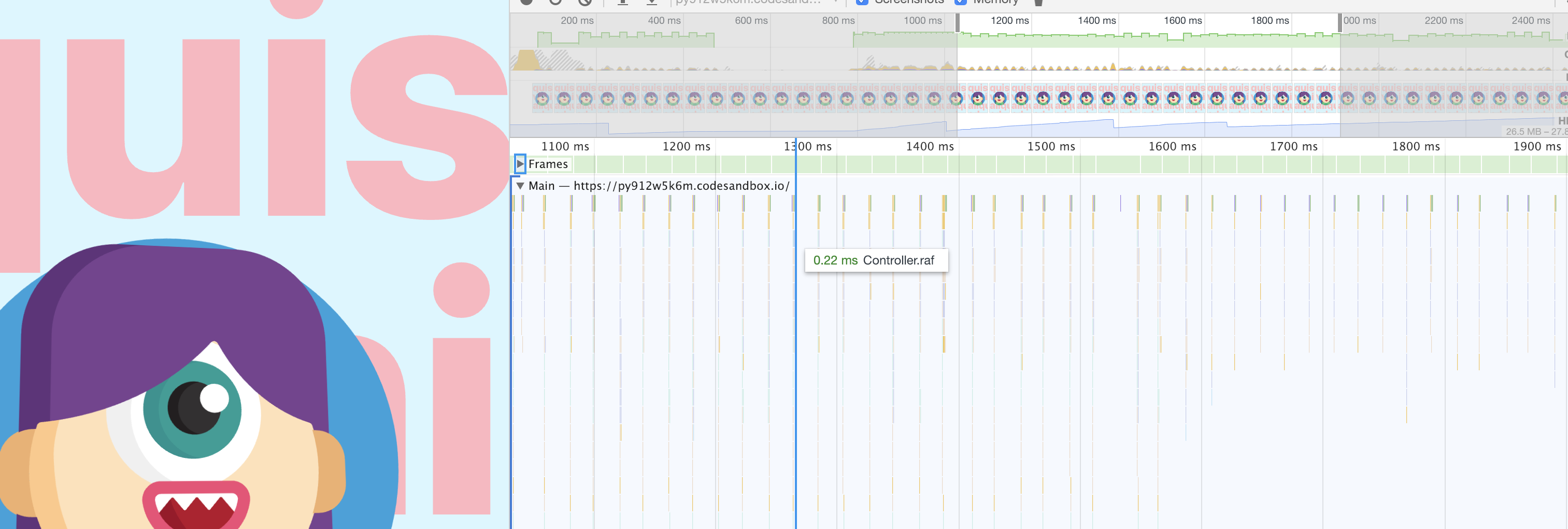
Here's an example interpolating mouse coordinates: https://codesandbox.io/embed/py912w5k6m the cool thing here is also that you only use a single spring, which gets mouse X/Y, but the interpolations create further animated-values from that.
Lil bit of overhead but the benefit is worth it, the entire thing animates without rendering (the component renders exactly once), the animation costs 0.22ms on mouse-move, which isn't much.
drcmda
on 19 Nov 2018
Interesting! Thanks for the thorough reply.
That demo is incredible, by the way. 👏
Just so I understand, when you say interpolating is "a tiny bit faster", do you mean it results in (slightly) better performance? I'm trying to understand if I should interpolate whenever I can (similar to using native whenever possible), or if the difference isn't noticeable.
I prefer the shorter syntax of your first code example but will adopt whatever approach results in the smoothest performance.
Your library is sweet and I want to use it properly. :)
ooloth
on 20 Nov 2018
Upfront interpolation has a small tax since it has to regexp the hell out of these strings to extract numeric data from it, but it isn’t that much.
drcmda
on 20 Nov 2018
Related issues
 chuckdries
·
3Comments
chuckdries
·
3Comments
 anton-g
·
3Comments
anton-g
·
3Comments
 fortezhuo
·
3Comments
fortezhuo
·
3Comments
 Oba-One
·
3Comments
Oba-One
·
3Comments
 rockmandash
·
3Comments
rockmandash
·
3Comments
Most helpful comment
It's quite simple, if you can use values as they are, you don't need to worry about anything because interpolation is done upfront:
If you are using values that you shape into something else, you interpolate:
Personally, for stuff like vectors and everything that is numeric by nature i prefer the second way, it's a tiny bit faster and gives you more possibilities. Interpolation can be a powerful tool since it can do more, like clamping, extrapolating, chaining.
Here's an example interpolating mouse coordinates: https://codesandbox.io/embed/py912w5k6m the cool thing here is also that you only use a single spring, which gets mouse X/Y, but the interpolations create further animated-values from that.
Lil bit of overhead but the benefit is worth it, the entire thing animates without rendering (the component renders exactly once), the animation costs 0.22ms on mouse-move, which isn't much.