React-sortable-tree: Question: how can i multiple inputs into a node?
first of all amazing implentation, thank you.
- What's your use case? (Tell me about your application and what problem you're trying to solve.)
i would like to add additional inputs into each node
- What interface do you have in mind? (What new properties or methods do you think might be helpful?)
(I pasted code that describes this)
i would like to add new porperties to each node, for example each node has title,subtitle
and i would like to add a type and a starts_with which are a string the user can change via input.
*Can you point to similar functionality with any existing libraries or components? (Working demos can be helpful.)
im basing it on the modify input functionallity you added but im stuck, this is my code so far:
import { render } from "react-dom";
import "react-sortable-tree/style.css";
import React, { Component } from "react";
import SortableTree, { changeNodeAtPath } from "react-sortable-tree";

export default class App extends Component {
  constructor(props) {
    super(props);

    this.state = {
      treeData: [
        { name: "IT Manager", type: "typeA" ,starts_with: "Tree"},
        {
          name: "Regional Manager",
          expanded: true,
          type: "typeB",
          starts_with: "simple",
          children: [{ name: "Branch Manager" ,starts_with: "Complex"}]
        }
      ]
    };
  }

  render() {
    const getNodeKey = ({ treeIndex }) => treeIndex;
    return (
      <div>
        <div style={{ height: 300 }}>
          <SortableTree
            treeData={this.state.treeData}
            onChange={treeData => this.setState({ treeData })}
            generateNodeProps={({ node, path }) => ({
              title: (
                <input
                  style={{ fontSize: "1.1rem" }}
                  value={node.name}
                  onChange={event => {
                    const name = event.target.value;

                    this.setState(state => ({
                      treeData: changeNodeAtPath({
                        treeData: state.treeData,
                        path,
                        getNodeKey,
                        newNode: { ...node, name }
                      })
                    }));
                  }}
                />
              ),
              subtitle: (
                <input
                  style={{ fontSize: "1.1rem" }}
                  value={node.starts_with}
                  onChange={event => {
                    const name = event.target.value;

                    this.setState(state => ({
                      treeData: changeNodeAtPath({
                        treeData: state.treeData,
                        path,
                        getNodeKey,
                        newNode: { ...node, name }
                      })
                    }));
                  }}
                />
              )
            })}
          />
        </div>
      </div>
    );
  }
}

render(<App />, document.getElementById("root"));
now for the function generateNodeProps:
can i stick all the inputs in a single label while its all in a
 starts_with: (
                <input
                  style={{ fontSize: "1.1rem" }}
                  value={node.starts_with}
                  onChange={event => {
                    const name = event.target.value;
                    this.setState(state => ({
                      treeData: changeNodeAtPath({
                        treeData: state.treeData,
                        path,
                        getNodeKey,
                        newNode: { ...node, name }
                      })
                    }));
                  }}
                />
              ),
              type: (
                <input
                  style={{ fontSize: "1.1rem" }}
                  value={node.type}
                  onChange={event => {
                    const name = event.target.value;
                    this.setState(state => ({
                      treeData: changeNodeAtPath({
                        treeData: state.treeData,
                        path,
                        getNodeKey,
                        newNode: { ...node, name }
                      })
                    }));
                  }}
                />
              )
            })}
etc....
i tried it but it seems i need to modify the node for this, Do i need to use nodeContentRenderer?
Thanks in advance!
 CrazyCodingBanana
All 4 comments
ok.....
im amazed that it took me so long but it seems i forgot how much the names matter in react so the solution is simple.
your custom data -> VARIABLE
 title: (
                <input
                  style={{ fontSize: "1.1rem" }}
                  placeholder="Name"
                  value={node.VARIABLE}
                  onChange={event => {
                    const VARIABLE= event.target.value;
                    this.setState(state => ({
                      treeData: changeNodeAtPath({
                        treeData: state.treeData,
                        path,
                        getNodeKey,
                        newNode: { ...node, VARIABLE}
                      })
                    }));
                  }}
                />
              )
however if the whole thing is parenthesized {title: (....)} with something that isnt title/subtitle
the input wont appear , how do i add my own unique variable?
CrazyCodingBanana
on 16 May 2019
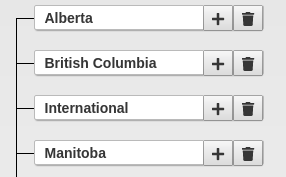
I didn't explore the possibility of adding custom props, but for multiple inputs you can wrap the inputs in a form tag and pass them either into the "title" or "subtitle" prop. If you want buttons, you can pass them into the "buttons" prop.
I've made a basic example here: https://codesandbox.io/embed/rstmultipleinputs-x39xqjx3xz
 nreis11
on 24 May 2019
nreis11
on 24 May 2019
I used the buttons prop in my implementation.
nreis11
on 24 May 2019
nice example @nreis11! Is the example sufficient @CrazyCodingBanana?
 lifejuggler
on 6 Jul 2019
lifejuggler
on 6 Jul 2019
Related issues
 kaueDM
·
3Comments
kaueDM
·
3Comments
 theonelucas
·
3Comments
theonelucas
·
3Comments
 oarashi
·
5Comments
oarashi
·
5Comments
 LogicMonsters
·
5Comments
LogicMonsters
·
5Comments
 robhadfield
·
3Comments
robhadfield
·
3Comments
Most helpful comment
I used the buttons prop in my implementation.
