React-sortable-tree: rowDirection warning
Since last update of react-sortable-tree v2.2.0, I have this new warning :
Warning: React does not recognize therowDirectionprop on a DOM element. If you intentionally want it to appear in the DOM as a custom attribute, spell it as lowercaserowdirectioninstead. If you accidentally passed it from a parent component, remove it from the DOM element.
I don't pass any rowDirection parameter on my instanciation ....
Can you check this ?
Thanks,
 jkeruzec
All 11 comments
I have the same problem. Would be nice to get this resolved.
 keymandll
on 27 Jul 2018
keymandll
on 27 Jul 2018
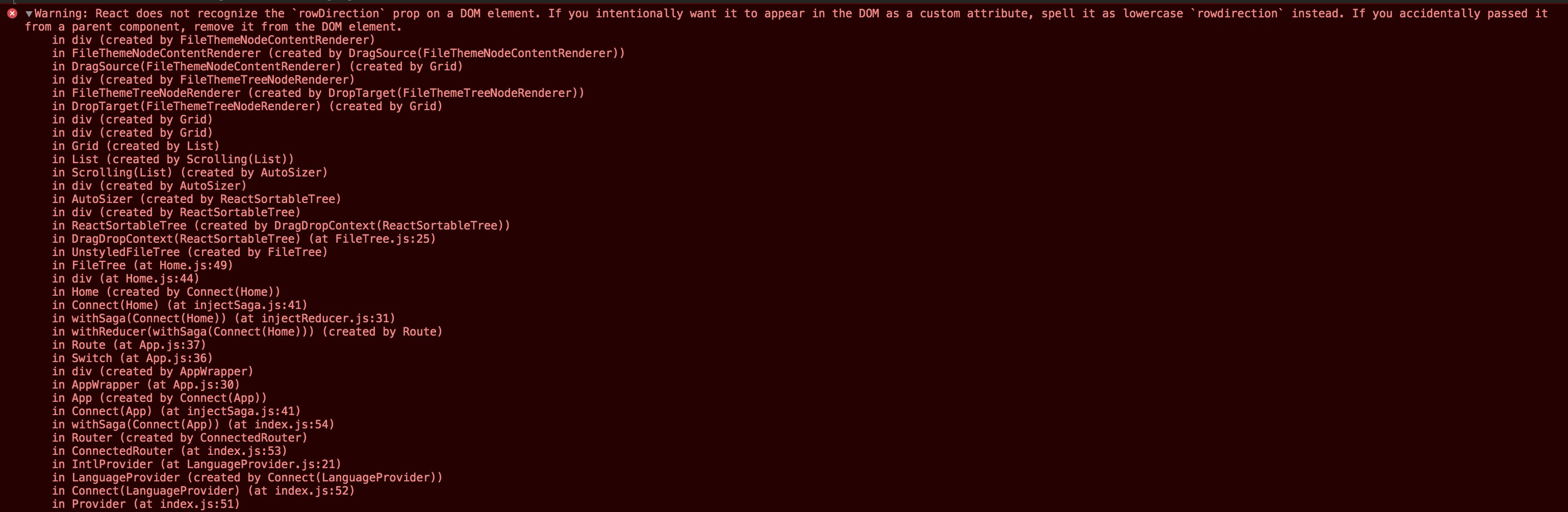
I am also seeing this console error. Here is the full stack trace:
 kaitmore
on 9 Aug 2018
kaitmore
on 9 Aug 2018
Any update on this ?
jkeruzec
on 14 Aug 2018
I'm also seeing this error
 jritts-g
on 16 Aug 2018
jritts-g
on 16 Aug 2018
yep.. ditto
 galileomd
on 24 Aug 2018
galileomd
on 24 Aug 2018
I have the same problem
 medslt
on 5 Sep 2018
medslt
on 5 Sep 2018
+the same problem
 tretjakan
on 26 Oct 2018
tretjakan
on 26 Oct 2018
Try this :
const { test, test2, ...rest } = this.props
delete rest['rowdirection']
 pmeteye
on 22 Nov 2018
pmeteye
on 22 Nov 2018
See #213. I solved #370 in exactly the same way as #213: by reading the current version of https://github.com/frontend-collective/react-sortable-tree/blob/master/src/tree-node.js and updating my code, namely:
class Node extends React.Component {
  render() {
    const { <a list of variables...>, rowDirection, ...restProps } = this.props;
    <...>
  }
  <...>
}

Node.defaultProps = {
  <...>,
  rowDirection: 'ltr', // like in the original tree-node.js
};

Node.propTypes = {
  <...>,
  rowDirection: PropTypes.string,
};
 kbulygin
on 28 Nov 2018
kbulygin
on 28 Nov 2018
@kbulygin Sorry can you explain how you fixed this problem. This seems more of a workaround then a proper fix.
I'm also not following the workaround you suggested. It looks like your adding the missing property and wrapping the original SortedTree Component created a new component.
 darewreck54
on 17 Jun 2019
darewreck54
on 17 Jun 2019
Actually, the issue is caused by the theme which i'm using. https://github.com/frontend-collective/react-sortable-tree-theme-full-node-drag/issues/6
Looks like the proper fix never moved over
darewreck54
on 17 Jun 2019
Related issues
 oarashi
·
5Comments
oarashi
·
5Comments
 2503shubham
·
3Comments
2503shubham
·
3Comments
 29er
·
5Comments
29er
·
5Comments
 bigjujube
·
4Comments
bigjujube
·
4Comments
 brendanmoore
·
5Comments
brendanmoore
·
5Comments
Most helpful comment
@kbulygin Sorry can you explain how you fixed this problem. This seems more of a workaround then a proper fix.
I'm also not following the workaround you suggested. It looks like your adding the missing property and wrapping the original SortedTree Component created a new component.