React-sortable-tree: How to duplicate/clone nodes?
Can anyone recommend what the best way to implement a button that when clicked clones a node in the current level of the tree?
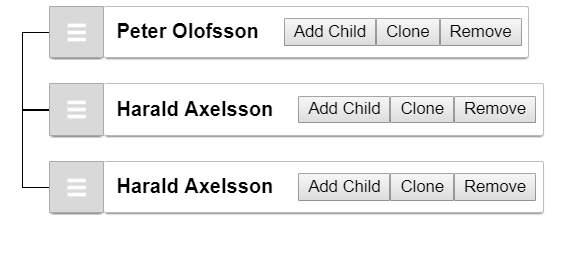
Before clicking the button

After clicking the button
 borisyordanov
All 6 comments
just create a custom function that is bound to the clone button that just inserts the node into the treeData
 lifejuggler
on 16 Nov 2017
lifejuggler
on 16 Nov 2017
Use either changeNodeAtPath or addNodeUnderParent, combined with the path (subtracting the last entry to get the parent path) value you’re given by the prop mapping api.
 fritz-c
on 17 Nov 2017
fritz-c
on 17 Nov 2017
@fritz-c I'm not 100% sure i understood what you mean, but this is how i ended up solving it (with addNodeUnderParent):
<button
    onClick={() =>
    {
        this.setState(state => ({
        treeData: addNodeUnderParent({
        treeData: state.treeData,
        parentKey: path[path.length - 2], //the "-2" adds the new node as a sibling, if it was "-1" it will add it as a child
        expandParent: true,
        getNodeKey,
        newNode: {
            title: node.title, //the new node's title should be the same as the clicked one
            subtitle: node.subtitle //the new node's subtitle should be the same as the clicked one
        }
        }).treeData
    }))}}
>Clone</button>
@borisyordanov thanks for the code!
The behavior I get with your code, is that it doesn't copy the child nodes of the node from which you click "clone".
Is there a way you think, to include all the subnodes as well?
 mariovde
on 1 Feb 2019
mariovde
on 1 Feb 2019
@mariovde I haven't used this library in a while. I think there was a way to include all the subnodes, but not sure what it is any more
borisyordanov
on 5 Feb 2019
Thanks for the reply, I already solved it by doing newNode: {...node }.
mariovde
on 5 Feb 2019
Related issues
 LogicMonsters
·
5Comments
LogicMonsters
·
5Comments
 jorgecuesta
·
4Comments
jorgecuesta
·
4Comments
 NickEmpetvee
·
3Comments
NickEmpetvee
·
3Comments
 29er
·
5Comments
29er
·
5Comments
 vaheqelyan
·
4Comments
vaheqelyan
·
4Comments
Most helpful comment
@fritz-c I'm not 100% sure i understood what you mean, but this is how i ended up solving it (with addNodeUnderParent):