React-sortable-tree: Dragging an item from react sortable tree to external element
Hi , is there any option to drag an item from react sortable tree to external element (like div) ? Should we add drop area in the div to accept the item, if it so please share the drop area method? or else is there any different approach?
Thanks!
 dharanidhanapalan
All 8 comments
Take a look at the "Drag out to remove" example in the Storybook:
https://fritz-c.github.io/react-sortable-tree/storybook/?selectedKind=Advanced&selectedStory=Drag%20out%20to%20remove&full=0&down=1&left=1&panelRight=0&downPanel=storybook%2Fnotes%2Fpanel
In this case I mostly ignore the drop result and throw it away, but you can use this as a base to create your own custom drop target.
 fritz-c
on 9 Aug 2017
fritz-c
on 9 Aug 2017
I don't want to remove the node from the tree. I just want a copy of the node and do drag and drop function. Is there any approach for this ?
Thanks!
dharanidhanapalan
on 9 Aug 2017
If you want to move a node to the external div without changing the appearance, you're probably going to want to use another instance of the SortableTree. See how to do so in the "Tree-to-tree dragging" example, found on the same page as the other example I linked above.
If you don't care about the appearance, and just want to create nodes of your own, you'll have to make a component that accepts dragSource-s from the tree. The setup for this will look similar to the example I linked above, but you'll have to write some code to handle the dropping, which will add and render nodes in whatever way you specify.
fritz-c
on 9 Aug 2017
Thanks for your immediate response :)
As you said I am using another instance of the SortableTree.
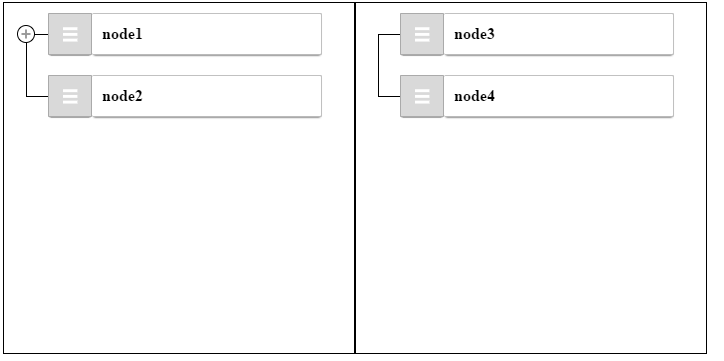

The problem is when you see the first image there are node1 and node2 in the left tree. when you drag and drop the node2 from left tree to right tree the node2 disappears in left tree and visible in the right tree alone.
I want the node2 to be displayed in both the trees.
And also i am not getting the placeholder when there is no tree data. I passed the treeData as
this.state = {
treeData: ' ',
}
Thanks!!
dharanidhanapalan
on 9 Aug 2017
Ok, that makes sense. I added a prop, shouldCopyOnOutsideDrop, to enable the copying behavior (#142). I updated the tree-to-tree example to demonstrate it.
As far as your placeholder issue, you should pass an empty array if you have no treeData. Let me know if that fixes it. If it doesn't, would you mind creating a new issue for that problem?
fritz-c
on 12 Aug 2017
Thanks for your quick support :)
The placeholder issue is fixed now :).
dharanidhanapalan
on 16 Aug 2017
So if I'm following this correctly you should be able to copy drag and drop in another div. My use case is making reusable library of things from a hierarchical tree.
 hellofantastic
on 2 Aug 2019
hellofantastic
on 2 Aug 2019
So if I'm following this correctly you should be able to copy drag and drop in another div. My use case is making reusable library of things from a hierarchical tree.
Yes I found it works.
hellofantastic
on 13 Aug 2019
Related issues
 vladimirsvsv77
·
5Comments
vladimirsvsv77
·
5Comments
 JonatanGarciaClavo
·
3Comments
JonatanGarciaClavo
·
3Comments
 mhiggs
·
3Comments
mhiggs
·
3Comments
 xmhscratch
·
5Comments
xmhscratch
·
5Comments
 vaheqelyan
·
4Comments
vaheqelyan
·
4Comments
Most helpful comment
Ok, that makes sense. I added a prop,
shouldCopyOnOutsideDrop, to enable the copying behavior (#142). I updated the tree-to-tree example to demonstrate it.As far as your placeholder issue, you should pass an empty array if you have no treeData. Let me know if that fixes it. If it doesn't, would you mind creating a new issue for that problem?