React-sortable-hoc: helperClass and styled-components
While using react-sortable-hoc I have to import a .css file with only a class to be passed to the helperClass prop in an otherwise css-file-free project using styled-components. In the API I couldn't find if a draggable element is dynamically assigned a prop (like isDragging or something similar) which I could use to dynamically update css.
Any suggestion on how I could avoid importing that .css file?
 artooras
All 9 comments
One work-around I've used to make this work is that I use the helper class in the Styled Component itself.
const ListElement = styled.div
background-color: white;
&.dragging-helper-class {
box-shadow: 0 4px 10px 0 rgba(0, 0, 0, 0.25);
}
 JRMaitre
on 28 Aug 2018
JRMaitre
on 28 Aug 2018
Thank you, that was exactly it.
artooras
on 29 Aug 2018
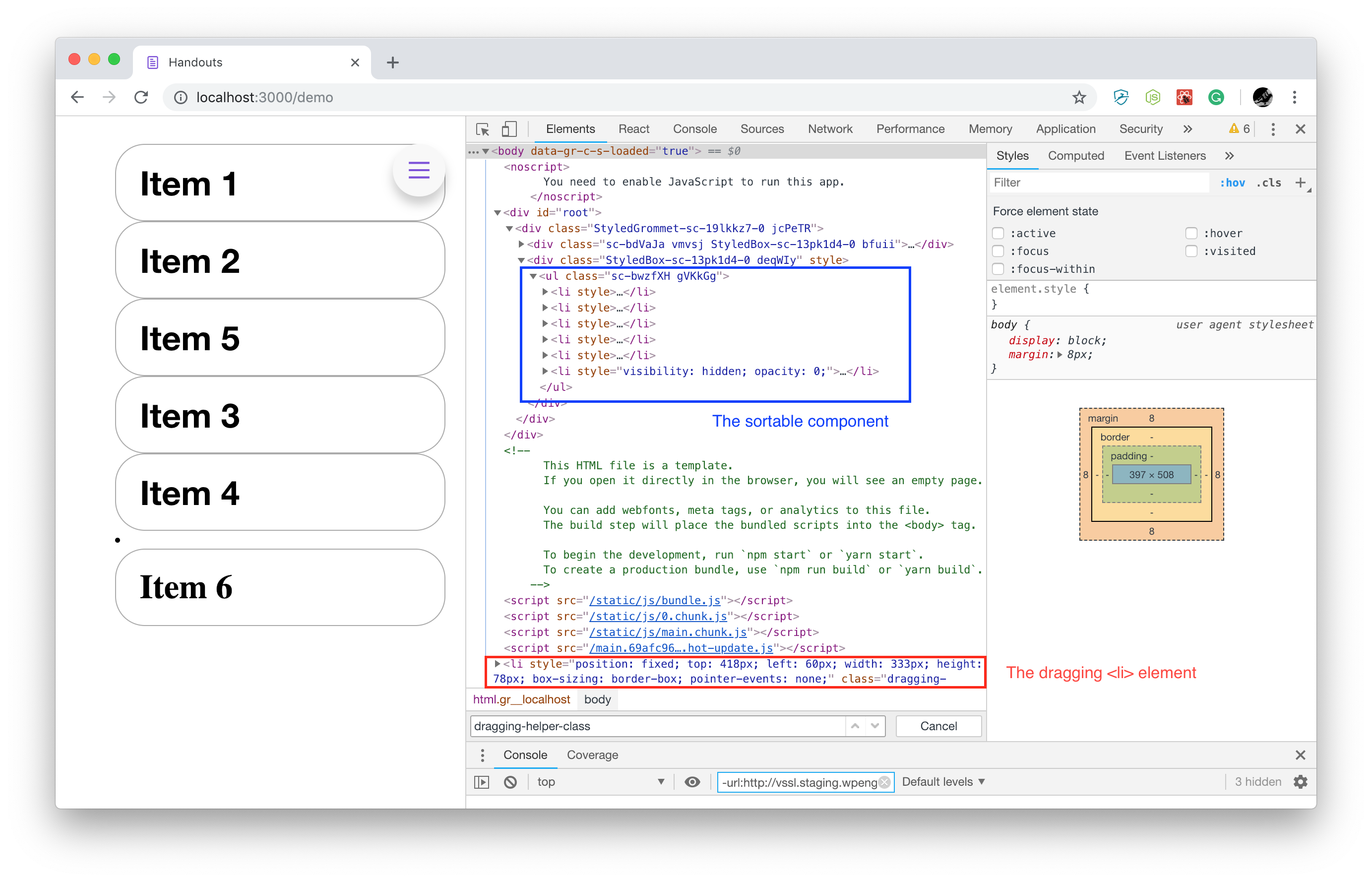
FYI, I don't think this works anymore. See the image, looks like the Dragged List Item is rendered at the React app root and outside the sortable list. So, this method only applies the class name to a child of ListItem. I may be missing something...
I was looking for this solution, because I'm using a theming system with styled components, so it would be nice to be able to set the style based on the theme and not have to import a single CSS file just for this.
 justdanallen
on 30 Jan 2019
justdanallen
on 30 Jan 2019
I'm having the same problem, I need to apply a class on the element being dragged. Any solution?
 cmateusmoraes
on 4 Apr 2019
cmateusmoraes
on 4 Apr 2019
@cmateusmoraes
The suggestion by @JRMaitre no longer works. I couldn't add more specificity in a styled-component, like he suggested because it is no longer rendered in the same parent container. I eventually just imported the css file, with a css class, which I was trying to avoid.
SortableComponent.js
import './SortableComponent.css'
...
<SortableList
renderItem={this.props.renderItem}
items={this.state.items}
onSortEnd={this.onSortEnd}
lockAxis="y"
helperClass="dragging-helper-class"
shouldCancelStart={ () => this.props.lock ? true : false}
disableAutoscroll={false}
useWindowAsScrollContainer={true}
pressDelay={ size==='small' ? 100 : 0}
/>
SortableComponent.css
.dragging-helper-class div {
font-family: Helvetica Neue, Helvetica, sans-serif;
background-color: white;
}
.dragging-helper-class .shadow{
box-shadow: 0 4px 10px 0 rgba(0, 0, 0, 0.25);
}
.dragging-helper-class {
list-style: none;
}
It's a bummer, but was the fastest way to get around it for now.
justdanallen
on 6 Apr 2019
In my case it still works, it doesn't matter that it's rendered outside of the parent because the styling is only applied to the ListElement which is a styled componentelement being dragged outside of the container. It's not scoped to only work in the container.
in this example
const ListElement = styled.div`
background-color: white;
&.dragging-helper-class {
box-shadow: 0 4px 10px 0 rgba(0, 0, 0, 0.25);
}
`
List Element is the styled component representing the element being dragged. If &.dragging-helper-class (it has the class dragging helper class) then it adds some styling to it.
JRMaitre
on 6 Apr 2019
@JRMaitre Thank you for chiming in! I must have been trying to apply it to the container... when applied to the actual List Element in SortableElement, it works! Not sure what I was thinking.
Just for anyone else here is the full example based on the example in the Readme.
import React, {Component} from 'react';
import {render} from 'react-dom';
import {SortableContainer, SortableElement} from 'react-sortable-hoc';
import arrayMove from 'array-move';
import styled from 'styled-components'

const ListElement = styled.div`
  background-color: white;

  &.dragging-helper-class {
    box-shadow: 0 4px 10px 0 rgba(0, 0, 0, 0.25);
  }
`

const SortableItem = SortableElement(({value}) => <ListElement>{value}</ListElement>);

const SortableList = SortableContainer(({items}) => {
  return (
    <ul>
      {items.map((value, index) => (
        <SortableItem key={`item-${index}`} index={index} value={value} />
      ))}
    </ul>
  );
});

class SortableComponent extends Component {
  state = {
    items: ['Item 1', 'Item 2', 'Item 3', 'Item 4', 'Item 5', 'Item 6'],
  };
  onSortEnd = ({oldIndex, newIndex}) => {
    this.setState(({items}) => ({
      items: arrayMove(items, oldIndex, newIndex),
    }));
  };
  render() {
    return <SortableList items={this.state.items} onSortEnd={this.onSortEnd} />;
  }
}

render(<SortableComponent />, document.getElementById('root'));
I was applying helperClass on the "SortableItem". Tks!
cmateusmoraes
on 8 Apr 2019
It's also worthy to note that, as pointed by @justdanallen's screenshot, the helper element (the one you see while dragging) is a child of <body>, regardless of where your SortableItem is. Therefore, in your CSS selector, do not treat your helper class as if it was a sibling of your SortableItems.
 jesobreira
on 28 Jul 2019
jesobreira
on 28 Jul 2019
Related issues
 TriStarGod
·
17Comments
TriStarGod
·
17Comments
 mccambridge
·
10Comments
mccambridge
·
10Comments
 stahlmanDesign
·
12Comments
stahlmanDesign
·
12Comments
 sahilchaddha
·
16Comments
sahilchaddha
·
16Comments
 slmgc
·
21Comments
slmgc
·
21Comments
Most helpful comment
@JRMaitre Thank you for chiming in! I must have been trying to apply it to the container... when applied to the actual List Element in SortableElement, it works! Not sure what I was thinking.
Just for anyone else here is the full example based on the example in the Readme.