React-sortable-hoc: How to prevent flicker after drop?
I am storing the list order in a Redux store instead of this.state. When an item is dropped at a new position, a callback is executed that eventually causes the Redux state to update, which in effect causes the render() function to be called with the new list order. The function that updates the Redux state is called in an async fashion (still on the client, but not in the same javascript tick).
However, this causes some kind of flickering. After I drop an item at its new position, it is displayed for some short time (only some milliseconds) at its old position, until it finally is visible at the new target position. It seems as if react-sortable-hoc makes the old item visible before the new position is being rendered.
Is there any chance to prevent this kind of flickering, i.e. by preventing the item at the "old" position to become visible again? It works if I store the state in this.state, but it doesn't work if state update is done asynchronously.
 derwaldgeist
All 9 comments
@derwaldgeist - Issue two actions from onSortEnd. First action will move item to new location in your item list store. Second will be your asynchronous call to update. If your async call fails, simply move item back to original location.
 dbknickerbocker
on 2 Oct 2017
dbknickerbocker
on 2 Oct 2017
I too am having this problem. I've tried a few different approaches including the one suggested by @dbknickerbocker with no success.
 chrismv48
on 3 Oct 2017
chrismv48
on 3 Oct 2017
I have solved this by using a local component state to cache the updates. This worked, but requires some additional logic to keep local and redux state in sync.
derwaldgeist
on 4 Oct 2017
After some further testing, I don't think that my issue with the flickering is related to redux. Instead it seems to have to do with the semantic UI card component: https://react.semantic-ui.com/views/card. I'm still not sure what the issue is, but will update this if/when I learn anything new.
chrismv48
on 8 Oct 2017
I have this issue with no outside state, the only thing that seems to somewhat fixing it is setting a specific height on my container. This however is not a suitable fix as my height must be dynamic.
 KasperPKOUT
on 22 Nov 2017
KasperPKOUT
on 22 Nov 2017
Make sure your item keys aren't mapped to the index as described in https://medium.com/@robinpokorny/index-as-a-key-is-an-anti-pattern-e0349aece318. You may see the flicker in that scenario when your list items have a CSS transition property
 bmelonis
on 29 Jan 2019
bmelonis
on 29 Jan 2019
Double check your UI libraries for global css transitions, I am using ant.design and the component had transitions set for all. I was able to resolve the issue by setting transition: none; on the element. Thanks @bmelonis !
 Rob-Page
on 24 May 2019
Rob-Page
on 24 May 2019
Had the same issue because of Redux. Seems that the redux store updates a fraction of a second too late, causing a slight flicker when the component resets for a second.
Similarly to @derwaldgeist, I solved the issue by using local state with my component. Had to use getDerivedStateFromProps with a small timer to stop props affecting state after the reordering has happened. I've put this all into a class that can be extended:
class DelayedSort extends React.Component {
  state = {
    deriveProps: true,
    items: this.props.items,
  }

  // We update both internal and external state onSortEnd
  handleOnSortEnd = ({ oldIndex, newIndex }) => {
    this.setState(({ items }) => ({
      deriveProps: false, // Temporarily stop props affecting state
      items: arrayMove(items, oldIndex, newIndex),
    }))
    // This wont affect the rendering of the component but we need to store the state properly in redux!
    this.props.onSortEnd(oldIndex, newIndex)

    // After a very short wait, allow props to affect state again
    setTimeout(() => {
      this.setState(() => ({
        deriveProps: true,
      }))
    }, 10)
  }

  // Update state with prop changes, except for a brief period after the order has changed,
  // to stop flickering from happening
  static getDerivedStateFromProps (props, state) {
    if (state.deriveProps) {
      return {
        items: props.items,
      }
    }
    return null
  }
}
Just extend the class to use:
// Using DelayedSort helper util to stop flickering
class SceneList extends DelayedSort {
  render () {
    return <SortableList
      items={this.state.items}
      onSortEnd={this.handleOnSortEnd}
    />
  }
}
 funwithtriangles
on 14 Aug 2019
funwithtriangles
on 14 Aug 2019
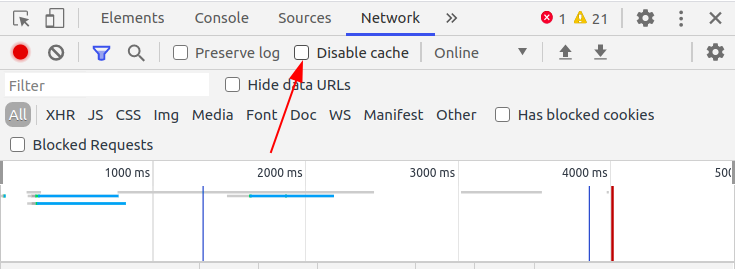
Make sure that caching is not disabled in ChromeDevTool
 bilobom
on 14 Oct 2020
bilobom
on 14 Oct 2020
Related issues
 curtd59
·
3Comments
curtd59
·
3Comments
 ianmstew
·
3Comments
ianmstew
·
3Comments
 therealedsheenan
·
4Comments
therealedsheenan
·
4Comments
 zhujunwei
·
3Comments
zhujunwei
·
3Comments
 silvenon
·
4Comments
silvenon
·
4Comments
Most helpful comment
Make sure your item keys aren't mapped to the index as described in https://medium.com/@robinpokorny/index-as-a-key-is-an-anti-pattern-e0349aece318. You may see the flicker in that scenario when your list items have a CSS transition property