React-slick: Slider single slide onClick event ES6
Hello, I've some troubles attaching a onClick event to the slides.
I didn't notice any advise in the console.
I tried to make also: {() => console.log('ehi')} inside the onClick handler but didn't work.
Any clue about how to resolve?
Thanks

 Riccardo-Zanutta
All 13 comments
I also meet this issue. Really a confusing thing while v0.12 works fine.
 xuchaobei
on 22 Aug 2016
xuchaobei
on 22 Aug 2016
@Riccardo-Zanutta I am experiencing the same issue. However for now it works for me to add event listener to any element inside the wrapper div. E.g. if you write, the event listener will run
<div className="single-artwork-slide">
  <div data-image={"http://unsplash.it/650/400"} onClick={this.changeMainImage} style={{backgroundImage: url(${urlYouDontCare})}}></div>
</div>
 trailingend
on 23 Aug 2016
trailingend
on 23 Aug 2016
Are you facing this issue on mobile or desktop browser ?
 akiran
on 23 Aug 2016
akiran
on 23 Aug 2016
desktop, hav'nt test on mobile yet
trailingend
on 23 Aug 2016
@trailingend1992 thanks! Moving the event listener to any element inside the div works. Facing the issue on desktop browser (chrome last versione for mac) , haven't tested on mobile yet.
Riccardo-Zanutta
on 23 Aug 2016
@akiran both on mobile and desktop.
xuchaobei
on 24 Aug 2016
I'm having the same problem
Here's a fiddle with react-slick 0.12.1 that works:
https://jsfiddle.net/Eschon/322u60ae/1/
And here's another one with 0.13.1 that doesn't:
https://jsfiddle.net/Eschon/322u60ae/2/
 Eschon
on 25 Aug 2016
Eschon
on 25 Aug 2016
Recent addition of focusOnSelect is overriding the click handler.
I will fix this soon
akiran
on 26 Aug 2016
I am also having trouble with the onClick event. My handler function calls with onMouseOver, but not with onMouseDown and onClick. I tried making focusOnSelect: false, but that didn't change anything.
I have only tested this on desktop in Chrome.
Edit: OnMouseUp works
 HunterManhart
on 22 Jun 2017
HunterManhart
on 22 Jun 2017
i had the same problem but i resolved whit this way:
the wrapper has the onclick and i generate a reference:
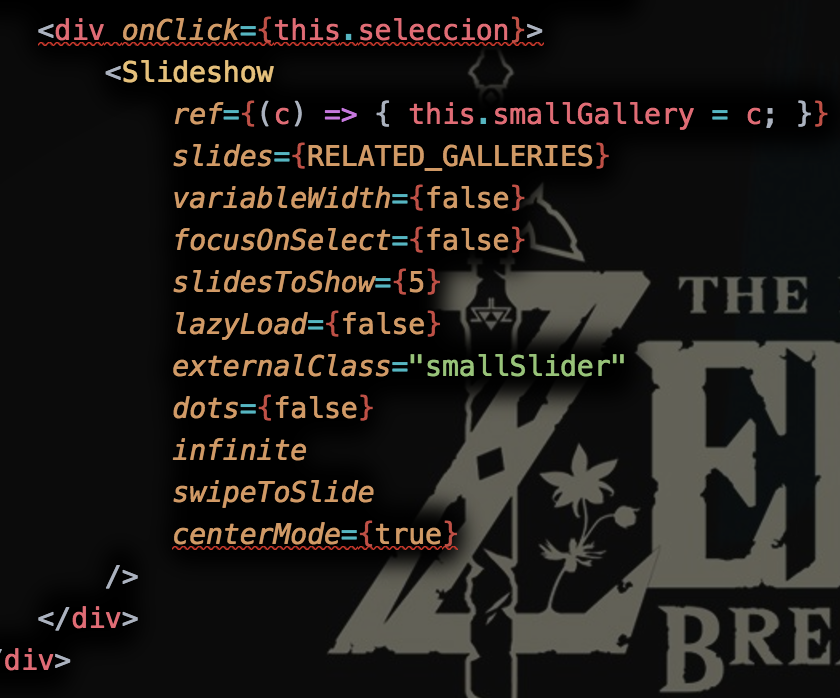
then: i get the index in seleccion metod:
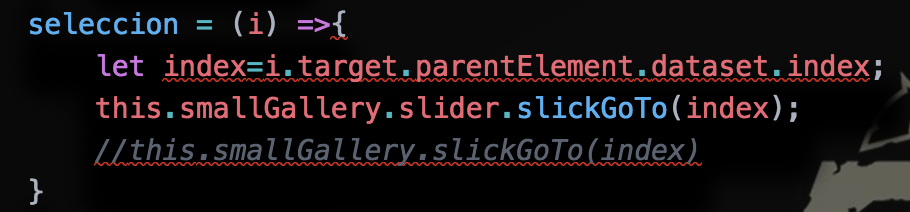
because i have the reference i can have access to all the slick context
i hope that this will ok for you
 carlosloaiza21
on 14 Nov 2017
carlosloaiza21
on 14 Nov 2017
I have a solution with the Lifecycle "componentDidMount" i know is not the ideal but works!
- the item slide :
<img className="class-img" src={myUrl} data-id={dataId} />); - in componentDidMount :
this.handlerBindClickImage(); - in handlerBindClickImage :
$(".class-img").on("click",(e)=>{
 this.myHandler(e.target.dataset.id)
});
 renerubio
on 24 Jul 2018
renerubio
on 24 Jul 2018
I have the same issue with the latest version 0.23.2 . but working fine with 0.14.11 for me.
 vaibhavi3t
on 27 Nov 2018
vaibhavi3t
on 27 Nov 2018
I just bind an onClick listener to every item dom element.But when beforeChange event fired, we should disable the item onClick and then afterChange recover the listener.
const SimpleSlider = (props) => {
  const { onChange, imageUrlsList, onItemClick } = props;
  const [index, setIndex] = useState(0);
  const [clickable, setClickable] = useState(true);
  const onSliderChange = (newIndex) => {
    setClickable(true);
    setIndex(newIndex);
    onChange(newIndex);
  };
  const options = {
    dots: false,
    infinite: true,
    speed: 500,
    slidesToShow: 1,
    slidesToScroll: 1,

    centerPadding: 0,
    centerMode: false,
    afterChange: onSliderChange,
    beforeChange: () => setClickable(false),
  };

  return (
    <Slider {...options}>
      {
        imageUrlsList.map((image, idx) => (
          <div className='slider-container'>
            <img onClick={() => clickable && onItemClick(idx) } className='slider-img' width='100%' height='500px' src={image} alt='' />
          </div>
        ))
      }
    </Slider>
  );
};
hope can help u
 TinyChou
on 4 Jul 2019
TinyChou
on 4 Jul 2019
Related issues
 PolGuixe
·
3Comments
PolGuixe
·
3Comments
 jfamousket
·
3Comments
jfamousket
·
3Comments
 ramyatrouny
·
3Comments
ramyatrouny
·
3Comments
 enriquelopez-atlas
·
3Comments
enriquelopez-atlas
·
3Comments
 will88
·
3Comments
will88
·
3Comments
Most helpful comment
I also meet this issue. Really a confusing thing while v0.12 works fine.