React-slick: Encountered two children with the same key warning
Encountered two children with the same key, .$.$1. Child keys must be unique; when two children share a key, only the first child will be used.
It keeps showing this error when mounted and also when changing slides. React 15.0.1, Chrome 50.0.2661.94.
 chrischen
All 23 comments
Can you give me code snippet to replicate this issue
 akiran
on 8 May 2016
akiran
on 8 May 2016
` render() {
let settings = {
dots: false,
infinite: true,
slidesToShow: 1,
slidesToScroll: 1
};
// const childElements = this.renderResults();
// const childElements = (<div>Test1</div><div>test2</div>);

  return (
    <Slider {...settings}>
    <div key="a1"><h3>1</h3></div>
    <div key="a2"><h3>2</h3></div>
  </Slider>
  );
}`
Here is the picture of the "slick-track" div that shows 4 child components (2 with duplicate keys).

I should also note the warning changed since I changed the name of the keys:
Encountered two children with the same key,
.$.$a2. Child keys must be unique; when two children share a key, only the first child will be used.warning
Encountered two children with the same key,.$.$a1. Child keys must be unique; when two children share a key, only the first child will be used.
The error does not show up and no duplicate child components are made if there is only 1 slide.
chrischen
on 8 May 2016
I have the same issue in a project I've started today, the strange thing is I've just copied the code from another working project. The only difference I can notice between both projects is on installed dependencies inside the react-slick node_modules directory, In one the slick-carrousel version points to 1.5.9 and the other to 1.6.0, which was released last friday. According to the current package.json, the version should not be greater than 1.6.0

 emartini
on 8 May 2016
emartini
on 8 May 2016
i have same issue with v0.12.1 downgrading to 0.12.0 solves the problem.
package.json:
"react-slick": "0.12.0",
 liesislukas
on 9 May 2016
liesislukas
on 9 May 2016
I will fix it today
akiran
on 9 May 2016
Getting the same problem, It looks to me like the duplicate key warnings might be from the extra slides that get created to do the infinite looping.
 corbanbrook
on 10 May 2016
corbanbrook
on 10 May 2016
checkout 0.12.2 version
akiran
on 10 May 2016
I still see this issue in 0.12.2 :(
 dsteinbach
on 1 Jul 2016
dsteinbach
on 1 Jul 2016
Same here :(

 jsiebern
on 5 Jul 2016
jsiebern
on 5 Jul 2016
Yeah, still get the warning with [email protected].
Warning: flattenChildren(...): Encountered two children with the same key, `cloned1`. Child keys must be unique; when two children share a key, only the first child will be used.
 creeperyang
on 12 Jul 2016
creeperyang
on 12 Jul 2016
I had the same issue, but I started to deep inside the code and I got this function in track.js file
var getKey = function getKey(child, fallbackKey) {
  // key could be a zero
  return child.key === null || child.key === undefined ? fallbackKey : child.key;
};
this function define what key use when key attr is no passed, but it is, so always return child.key, so, what I did to solved the warnings for the slick and react, just add this.
var getKey = function getKey(child, fallbackKey) {
  // key could be a zero
  return child.key === null || child.key === undefined ? fallbackKey : child.key + new Date().getTime();
};
or this works as well
var getKey = function getKey(child, fallbackKey) {
  // key could be a zero
  return child.key === null || child.key === undefined ? fallbackKey : child.key + fallbackKey;
};
I hope, it is useful for you.
 johuder33
on 16 Jul 2016
johuder33
on 16 Jul 2016
@akiran Still get the warning with [email protected].
 smilingpoplar
on 22 Jul 2016
smilingpoplar
on 22 Jul 2016
@smilingpoplar Can you replicate the issue in jsfiddle and post it hear
akiran
on 22 Jul 2016
@akiran Sorry, I don't know how to setup a react-slick example in fiddle. I've just used @johuder33 ‘s quick patch to work around this issue.
smilingpoplar
on 22 Jul 2016
why issues is closed if people are still experiencing this issue?
liesislukas
on 25 Jul 2016
More discussion is going on here https://github.com/akiran/react-slick/pull/362
akiran
on 25 Jul 2016
This issue is fixed in 0.12.3
akiran
on 14 Aug 2016
I am getting the same error how do i correct this.
My table.js file-
render() {
    return (
      <div className="table" >
        <div className="container" >
          <div className="show-grid row">
            <div className="col-xs-3 head1">Products</div>
            <div className="col-xs-3 head2">Variants</div>
            <div className="col-xs-3 head3">PSID</div>
            <div className="col-xs-3 head4">Updated</div>
          </div>
          {this.props.dataProp.map((data => {
            return (<Category key={data.categoryName + 'abc'} categoryData={data}/>);
          }))
          }
        </div>
      </div>
    )
  }
My category.js file -
render() {
        return (
            <div className="show-grid row category-row" key={this.props.categoryData.brandCategoryId + '123'}>
                <div className="col-md-8 text-left category" key={this.props.categoryData.categoryName + 'abcd'} >
                    <b>{this.props.categoryData.categoryName}</b>
                </div>
                {this.props.categoryData.productList.length > 0 &&
                    <div className="col-md-4 text-right">
                        <button className="edit" onClick={() =>
                            this.edit(this.props.categoryData.productList[0].brandProductSkuList)}>
                            {this.state.text}</button>
                    </div>
                }
                {this.renderParent.bind(this)()}
            </div>
        )
    }
}
ERROR--->
flattenChildren(...): Encountered two children with the same key,2:$King Combo. Child keys must be unique; when two children share a key, only the first child will be used.
in div (at Category.js:83)
in Category (created by Connect(Category))
in Connect(Category) (at Table.js:25)
flattenChildren(...): Encountered two children with the same key,1:$Make it a Combo - Mutton Whopperabc. Child keys must be unique; when two children share a key, only the first child will be used.
in div (at Table.js:17)
in div (at Table.js:16)
in DisplayTable (at map.js:90)
 sugandhhgoyal
on 19 Jul 2017
sugandhhgoyal
on 19 Jul 2017
I can confirm that I also get this issue, although only when using the lazy loading flag.
 mikeselander
on 19 Jul 2017
mikeselander
on 19 Jul 2017
This does not seem to be solved? I get this issue when using lazy loading, (same as @mikeselander)
 reft
on 12 Sep 2018
reft
on 12 Sep 2018
Hey @reft @mikeselander are you also using row ? I reproduced it and post a new issue here https://github.com/akiran/react-slick/issues/1422
 houkanshan
on 7 Nov 2018
houkanshan
on 7 Nov 2018
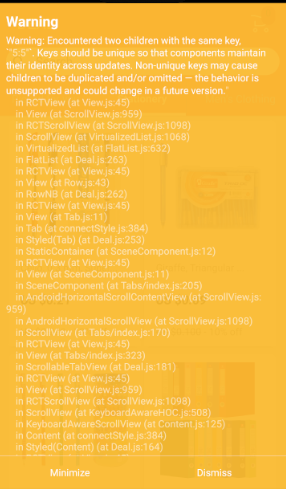
I got this warning, and I don't know where it from. Anyone help me, please?
 saiyapen
on 12 Sep 2019
saiyapen
on 12 Sep 2019
having simillar issue when rendering multiple 2x2 slides in a page.
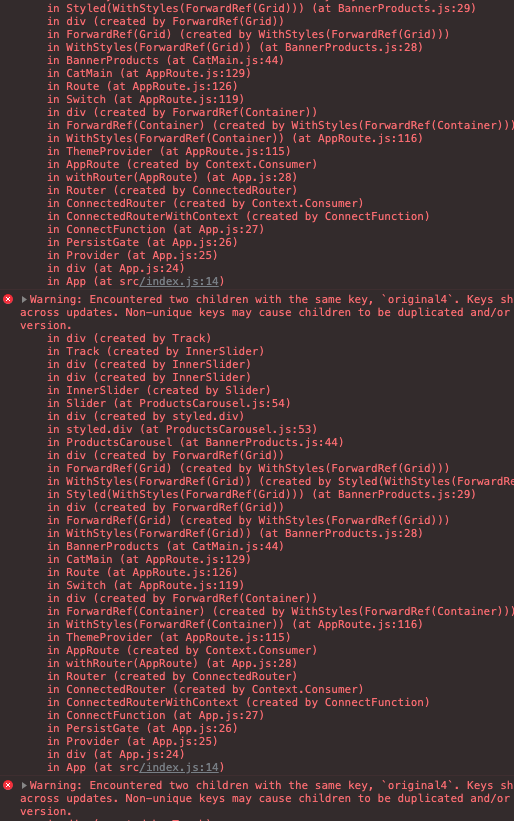
 TaekwanMin
on 19 Jan 2021
TaekwanMin
on 19 Jan 2021
Related issues
 PolGuixe
·
3Comments
PolGuixe
·
3Comments
 laveesingh
·
3Comments
laveesingh
·
3Comments
 slashwhatever
·
3Comments
slashwhatever
·
3Comments
 will88
·
3Comments
will88
·
3Comments
 amishPro
·
3Comments
amishPro
·
3Comments
Most helpful comment
I will fix it today