React-select: Multi select dropdown items removed
In MultiSelect, on selecting the dropdown menu items removing from menu and showing in selected lists
https://codesandbox.io/s/8qw3p?module=/example.js&file=/example.js
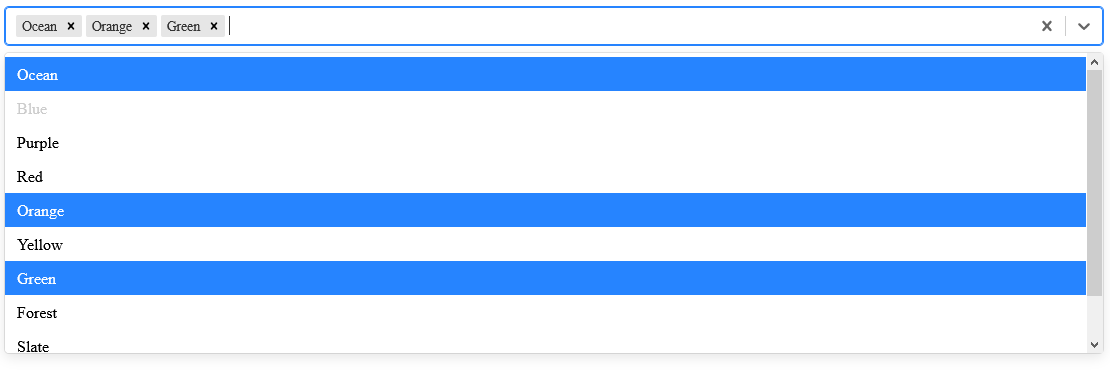
can we keep the selected items in dropdown menu itself and show selected.
can we keep Ocean in dropdown menu even it's selected.

 RahulShahUI
All 2 comments
Try adding the hideSelectedOptions={false} prop - that way the selected item remains in the dropdown menu.
Edited code taken from the CodeSandbox example:
import React from 'react';

import Select from 'react-select';
import { colourOptions } from './docs/data';

export default () => (
  <Select
    defaultValue={[colourOptions[2], colourOptions[3]]}
    isMulti
    name="colors"
    options={colourOptions}
    className="basic-multi-select"
    classNamePrefix="select"
    hideSelectedOptions={false}
  />
);
 Esskimo
on 21 Apr 2020
Esskimo
on 21 Apr 2020
Hello -
In an effort to sustain the react-select project going forward, we're closing issues that appear to have been resolved via community comments or issues that are now redundant based on their age.
However, if you feel this issue is still relevant and you'd like us to review it - please leave a comment and we'll do our best to get back to you, and re-open if necessary.
 bladey
on 29 May 2020
bladey
on 29 May 2020
Related issues
 pablote
·
3Comments
pablote
·
3Comments
 AchinthaReemal
·
3Comments
AchinthaReemal
·
3Comments
 MindRave
·
3Comments
MindRave
·
3Comments
 yrabinov
·
3Comments
yrabinov
·
3Comments
 steida
·
3Comments
steida
·
3Comments
Most helpful comment
Try adding the
hideSelectedOptions={false}prop - that way the selected item remains in the dropdown menu.Edited code taken from the CodeSandbox example: