React-select: Issue with the OptionsType definition
When trying to access properties of the value passed to the onChange function, I get typescript errors, even though, those properties exist.
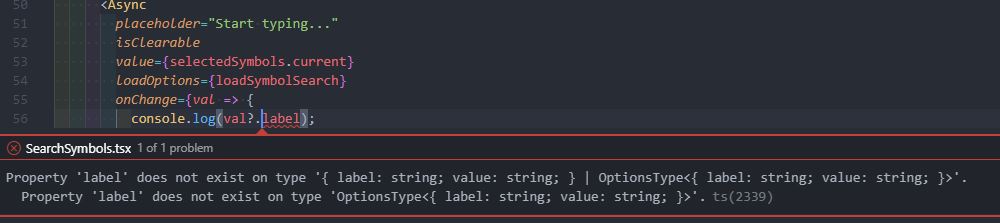
As you can see from the screenshot, I have the DefinitlyTyped package installed.
 josias-r
All 5 comments
And also OptionType is not exported, so you can't type it by yourself.
My current workaround is:
import Select, {ValueType, OptionTypeBase} from 'react-select';

// Provide your own interface for option that is extending OptionTypeBase
interface OptionType extends OptionTypeBase {
  value?: string;
  label?: string;
}

// And make sure it is set
const handleChange = (possibleValue: ValueType<OptionType>) => {
    if(!possibleValue) return;
    console.log((possibleValue as OptionType).value);
  };

<Select onChange={handleChange} ...
EDIT: Even that it is not working, there is so much mess in type desired by onChange handler, that i can't figure it out. The stack is terrible...
EDIT2: Finally got it working.
 damianprzygodzki
on 6 Feb 2020
damianprzygodzki
on 6 Feb 2020
Hey that looks like the correct or at least acceptable approach for typescript users.
Here's what i had, it relies on type guards to filter the different options: null, array, value.
<Select
  {...props}
  onChange={value => {
    if (!value) {
      // Handle the undefined / null scenario here
    } else if (value instanceof Array) {
      // Handle an array here
      // You will likely get an array if you have enabled
      // isMulti prop
    } else {
      // Handle a single value here
    }
  }}
/>
The reason this is required is because the type definitions don't change when isMulti is supplied. That's why we have to explicitly handle the array case.
 danieldelcore
on 2 Mar 2020
danieldelcore
on 2 Mar 2020
Thank you @danieldelcore, seems like a clean solution/workaround for now. I do think typescript would theoretically support the "automated" scenario though where the correct types are being interfered from the props.
josias-r
on 15 Apr 2020
Here's what worked for me based on what @damianprzygodzki suggested
import Select, { ValueType, OptionTypeBase } from 'react-select';

interface IOptionType extends OptionTypeBase {
    value?: number;
    label?: string;
  }

const MyComponent: React.FC = () => {
  const [campusId, setCampus] = useState<number>();


  function onChangeCampus(value: ValueType<IOptionType>) {
    const campusIdSelected = (value as IOptionType).value;
    if (campusIdSelected) {
      setCampus(campusIdSelected);
    }
  }
....
}
export default MyComponent;
 arthurmmedeiros
on 16 Apr 2020
arthurmmedeiros
on 16 Apr 2020
Hi all,
It looks like this TypeScript issue has been resolved as per @damianprzygodzki, @danieldelcore, and @arthurmmedeiros responses.
However, if you feel this issue is still relevant and you'd like us to review it - please leave a comment and we'll do our best to get back to you, and we'll re-open it if necessary.
Thanks!
 bladey
on 1 Jun 2020
bladey
on 1 Jun 2020
Related issues
 joshualimpj
·
3Comments
joshualimpj
·
3Comments
 steida
·
3Comments
steida
·
3Comments
 pashap
·
3Comments
pashap
·
3Comments
 MalcolmDwyer
·
3Comments
MalcolmDwyer
·
3Comments
 x-yuri
·
3Comments
x-yuri
·
3Comments