React-select: When typing continuously, select input keeps expanding rather than wrapping in new line
I have this scenario:
https://codesandbox.io/s/react-codesandboxer-example-4kz5f
If you keep typing continuously without stopping, the react-select component will keep expanding rather than keeping its original width.
 dannnylin
All 5 comments
I am encountering the same issue. How to fix the size of react-select? Would appreciate inputs from experts to resolve it.
 hnhegde
on 3 Jan 2020
hnhegde
on 3 Jan 2020
Same here. Is it not possible to prevent the component from growing?
 antonostrovsky
on 3 Apr 2020
antonostrovsky
on 3 Apr 2020
Have you tried setting a width on the container? The input will stay constrained to the container so long as you specify a width.
const styles = {
    container: css => ({ ...css, width: '200px' }),
};

return <Select isMulti={true} styles={styles} ... />
If you wanted to constrain the multi values into one-line, this is possible too, but be forwarned that you will run into spacing issues quickly.
const styles = {
  // ...other styles...
    valueContainer: css => ({ ...css, "flex-wrap": "nowrap", "white-space": "nowrap", overflow: "hidden", 'text-overflow': 'ellipsis' })
}
You will need to decide how you want to let the user select 8 options and display that in some defined space. Do you want to flex them into unreadable widths (default behavior with the above changes) OR did you want to fit them full width but just cut them off (overflow: hidden) possibly only showing 2-3 values without any way for the user to identify what else they've selected?
If you choose the latter, then you would need to apply some styles on the multiValue components.
Personally, I render my multiValue as a single comma separated sorted value as a SingleValue component using checkboxes, text-overflow, and a tooltip (if over-flowing).
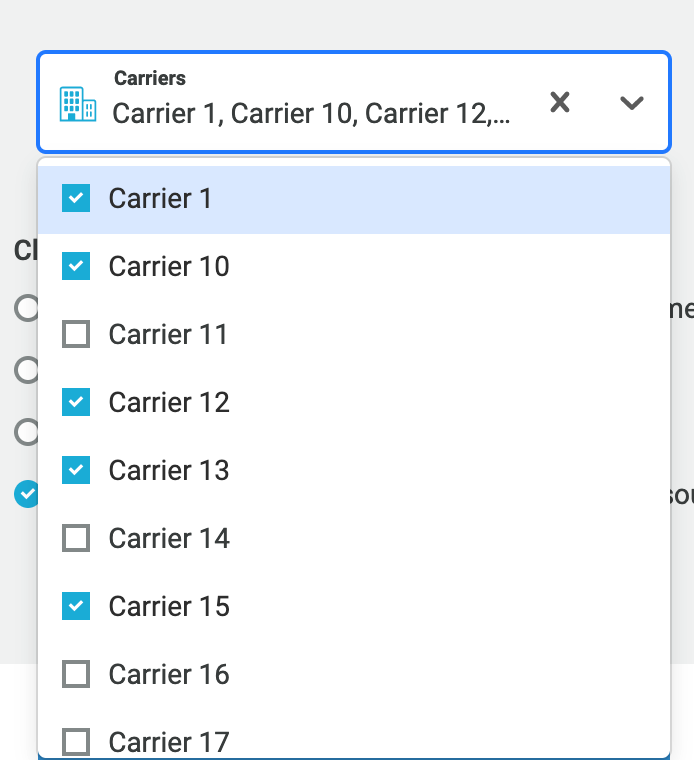
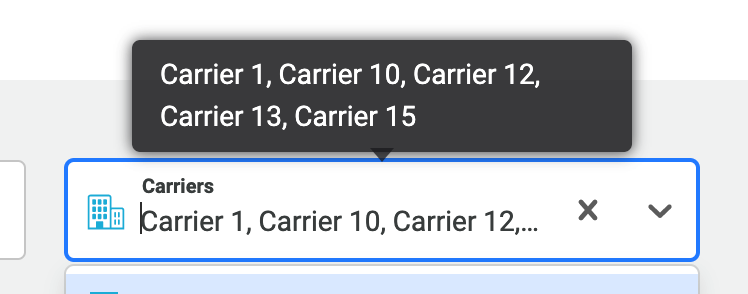
In any case, setting a width should be easy enough and should hopefully close out this issue. Good luck!
 ebonow
on 21 Jun 2020
ebonow
on 21 Jun 2020
Thanks for the assistance @ebonow.
@dannnylin, @hnhegde and @antonostrovsky could you please let me know if this solves your problem.
 bladey
on 23 Jun 2020
bladey
on 23 Jun 2020
This issue will now be closed due to inactivity as there has been no response for further information. If anyone has further feedback please let me know and the issue will be re-opened.
bladey
on 29 Jun 2020
Related issues
 mjuopperi
·
3Comments
mjuopperi
·
3Comments
 coder-guy22296
·
3Comments
coder-guy22296
·
3Comments
 batusai513
·
3Comments
batusai513
·
3Comments
 pashap
·
3Comments
pashap
·
3Comments
 yrabinov
·
3Comments
yrabinov
·
3Comments
Most helpful comment
Have you tried setting a width on the container? The input will stay constrained to the container so long as you specify a width.
If you wanted to constrain the multi values into one-line, this is possible too, but be forwarned that you will run into spacing issues quickly.
You will need to decide how you want to let the user select 8 options and display that in some defined space. Do you want to flex them into unreadable widths (default behavior with the above changes) OR did you want to fit them full width but just cut them off (overflow: hidden) possibly only showing 2-3 values without any way for the user to identify what else they've selected?
If you choose the latter, then you would need to apply some styles on the multiValue components.
Personally, I render my multiValue as a single comma separated sorted value as a SingleValue component using checkboxes, text-overflow, and a tooltip (if over-flowing).
In any case, setting a width should be easy enough and should hopefully close out this issue. Good luck!