React-select: Give me a way to do OptionContent without doing Option
I have a trivial use case: I get a dynamic list of [{label: 'formatted HTML', value: 'simple string'}] back from an async call that I want to display. I want to display custom content for options - but I don't want to change any behavior at all.
All the functionality of Option is perfect. The shape, the size, the clicking. Everything. It's just the content that I want to change. The best way for me to do that appears to be to
- add the component mapping Option: MyOption
- copy the Option function from react-select and paste it into MyOption
- replace the
{children}with my implementation
It works, but it's kind of gross. All I want to do is change the contents. In my case I want to render the HTML from the label. But it'd be the same if I wanted to render an image. Or some complex HTML for a complex Option object.
A component called OptionContent or OptionCell which would replace the {children} that is currently there would be slick.
While I'm here (and very related), I'm about to have to do the same kind of thing for making my selection. I'm displaying something "complex" for my option. When the user makes a selection, I want to set the string being displayed. It looks like that's going to be complicated - but I'd like for it to be easy by providing a valueForSelection or labelForSelection that is called with the selected item when it is selected. Then I could return the appropriate value and I'd be done. SingleValue has the same issue.
 kwerle
All 5 comments
This is the formatOptionLabel prop:
 razh
on 19 May 2019
razh
on 19 May 2019
@razh How do you use formatOptionLabel?
I am looking for a way to easily do this with react-select:
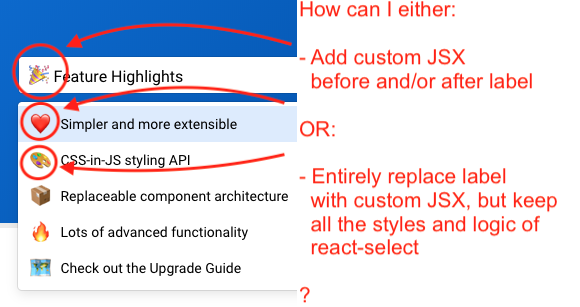
Can formatOptionLabel help me achieve that? How is custom content implemented in the react-list in the above screenshot?
Thank you!
 tonix-tuft
on 11 Sep 2019
tonix-tuft
on 11 Sep 2019
Hi @tonix-tuft,
I wanted to check in and see if you were still encountering this issue. We're triaging issues at the moment to sustain the project going forward.
 bladey
on 23 Jun 2020
bladey
on 23 Jun 2020
Thank you for your reply @bladey. I am still facing this issue, yes, I mean it would be great to have a simple and concise API to achieve what I mention in my comment above!
Thank you!
tonix-tuft
on 23 Jun 2020
@tonix-tuft
TLDR: The formatOptionLabel is the render function for the Options and SingleValue.
https://codesandbox.io/s/react-select-header-example-bf57o
1.formatOptionLabel
The function returns the JSX that is displayed for both the Option and Selected Value. There is a second parameter that is used to differentiate between the two and render them differently if you need it.
const formatOptionLabel = (({ icon, label }, { context, inputValue, selectValue }) => (
  <div style={{ alignItems: "center", display: "flex" }}>
    <span style={{ fontSize: 18, marginRight: "0.5em" }}>{icon}</span>
    <span style={{ fontSize: 14 }}>{label}</span>
  </div>
);

<Select formatOptionLabel={formatOptionLabel} ... />
- Custom components
Option refers to the menuOption and SingleValue for the selectedValue that shows in the input on selection.
const Option = ({ children, data, ...props }) => (
  <components.Option {...props}>
      <div style={{ alignItems: "center", display: "flex" }}>
        <span style={{ fontSize: 18, marginRight: "0.5em" }}>{icon}</span>
        <span style={{ fontSize: 14 }}>{label}</span>
    </div>
  </components.Option>
);

const SingleValue = ({ children, data, ...props }) => (
  <components.SingleValue {...props}>
      <div style={{ alignItems: "center", display: "flex" }}>
        <span style={{ fontSize: 18, marginRight: "0.5em" }}>{icon}</span>
        <span style={{ fontSize: 14 }}>{label}</span>
    </div>
  </components.SingleValue>
);

<Select components={{ SingleValue, Option }} ... />
Here is the actual code that renders that Select from the docs
https://github.com/JedWatson/react-select/blob/998c979b4ed51ee39b87c9b2f0f03da440017dcf/docs/App/Header.js#L16-L51
https://github.com/JedWatson/react-select/blob/998c979b4ed51ee39b87c9b2f0f03da440017dcf/docs/App/Header.js#L244-L256
 ebonow
on 7 Dec 2020
ebonow
on 7 Dec 2020
Related issues
 joshualimpj
·
3Comments
joshualimpj
·
3Comments
 steida
·
3Comments
steida
·
3Comments
 batusai513
·
3Comments
batusai513
·
3Comments
 coder-guy22296
·
3Comments
coder-guy22296
·
3Comments
 Meesam
·
3Comments
Meesam
·
3Comments