React-select: How to specify labelkey and valuekey in version 2.1.1
I updated package to 2.1.1 from 1.*, after that lablekey and valuekey stopped working.
 akprgm
All 15 comments
You forgot to actually ask your question (which should really go to StackOverflow in this scenario), but:
import React, {Component} from 'react';
import Select from 'react-select';

export default class MySelect extends Component {
  getOptionValue = (option) => option.id; // 'id' is my value, in this scenario

  getOptionLabel = (option) => option.name; // 'name' is my label, in this scenario

  render() {
    const { options, placeholder } = this.props;
    return (
      <Select
        getOptionValue={this.getOptionValue}
        getOptionLabel={this.getOptionLabel}
        options={options}
        placeholder={placeholder}
      />
    );
  }
}
 cutterbl
on 25 Oct 2018
cutterbl
on 25 Oct 2018
Here's a codesandbox example.
cutterbl
on 26 Oct 2018
Hey, I tried this but for me it does not work, description as follows:
<Select
  options={this.state.organisations}
  getOptionLabel={opt => opt.name}
  getOptionValue={opt => opt.organisationId}
  onChange={this.handleOrganisationChange}
  />
This does not work for me, the data is loaded into the select, I can print it in the onChange but the rows are just whitespace.
When I modify the dataset after receiving it like this, everything works as is should:
var i;
for(i = 0; i < response.data.content.length; i++) {
  organisations[i].label = organisations[i]['name'];
  organisations[i].value = organisations[i]['organisationId'];
}
Additional info:
- I am loading the data from a server
- The first few names are just "" due to them being alphabetically on the top and whitespace being allowed
- I tried setting a
organisationsLoadedflag and only openingSelectwhen the data finished loading, but it changed nothing - If I have the two solutions implemented at the same time, it works, so from what I am guessing there is something wrong with the
getOptionValueand thegetOptionLabel
Did I do something wrong or might there be a problem in the library?
I hope what I wrote is understandable, thank you for the great work
Regards
Anton
 AntonOellerer
on 29 Oct 2018
AntonOellerer
on 29 Oct 2018
Thanks, though I'm just a user who answers questions I've already figured out on my own. The other guys do the heavy lifting :)
In your example, if this.state.organizations is an array of options {name: 'foo', organizationId: 6}, and you have your select setup
<Select options={this.state.organizations}
              getOptionLabel={(opt) => opt.name}
              getOptionValue={(opt) => opt.organizationId} />
Then it should work fine. If you're using the AsyncSelect with the loadOptions prop for doing your external request, it changes only slightly
import React, { Component } from 'react';
import AsyncSelect from 'react-select/libs/Async';

export default MySelect extends Component {
  getOptions = (inputValue) => {
    return fetch(`${myurl}?myparam=${inputValue}`)
      .then(response => {
        // do you have to `parse`? I don't remember...
        if (response && response.data && response.data.content) {
          return response.data.content; // this is the options array?
        }
        return [];
      })
      .catch(error => {
        // whoops! what now?
      });
  };

  render() {
    return (
      <AsyncSelect defaultOptions={true}
        loadOptions={this.getOptions}
        getOptionLabel={(opt) => opt.name}
        getOptionValue={(opt) => opt.organizationId} />
    );
  }
}
@cutterbl Hi, is in your codesandbox, is getOptionValue actually doing something?
If I understand correctly what this should do, it changes the value which should be returned from onChange callback.
If we make the select controllable and logging the value, it still returns the full object instead of id.
https://codesandbox.io/s/l7pzz83k8q
is this a lib bug, or I just don't understand something?
 AntonPuko
on 29 Oct 2018
AntonPuko
on 29 Oct 2018
No, getOptionValue and getOptionLabel are used to map your options array object's keys to a 'value' and a 'label'. Rarely will a client-side dev have access to adjust the remote api to control these objects, so this allows you to say "this object key is the 'value', and this object key is the 'label'. onChange always returns your selected object(s) (that's the way onChange works).
cutterbl
on 29 Oct 2018
thanks. thats pretty controversial though that onChange returns an option, not value :/
AntonPuko
on 29 Oct 2018
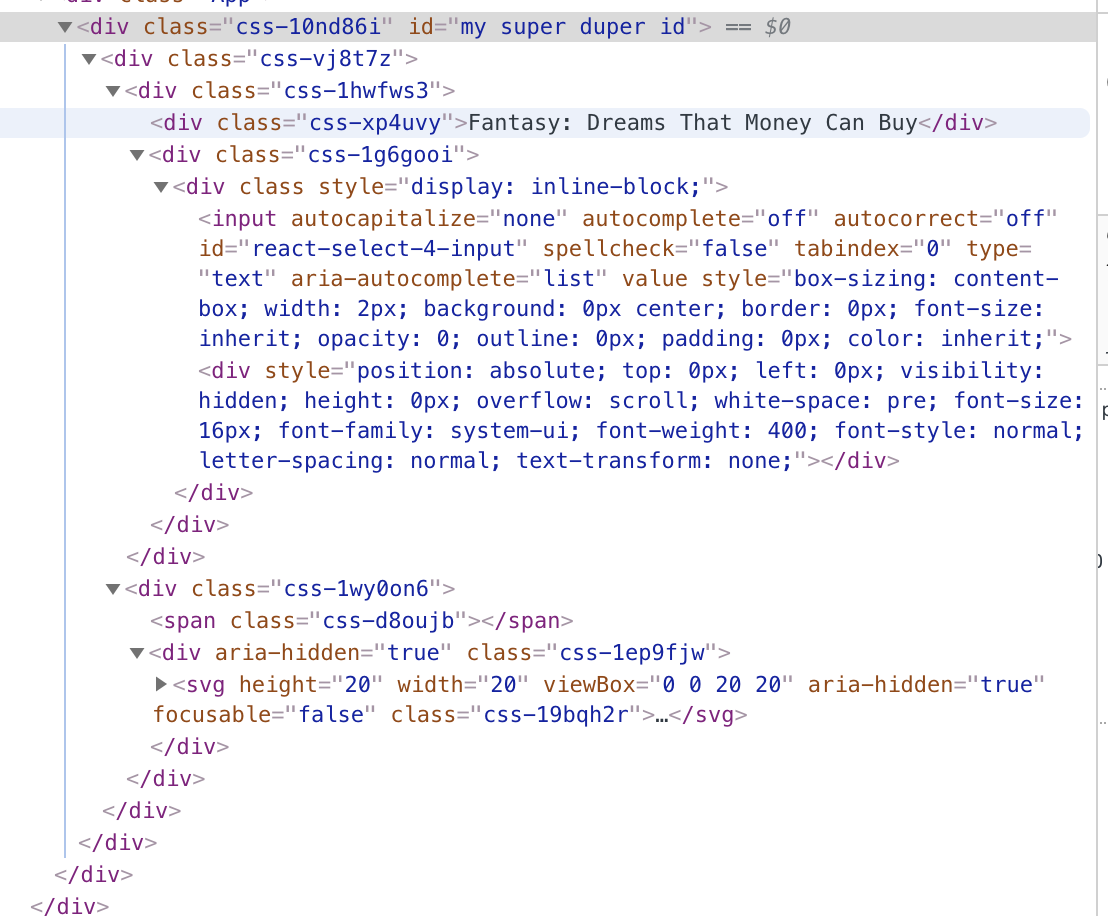
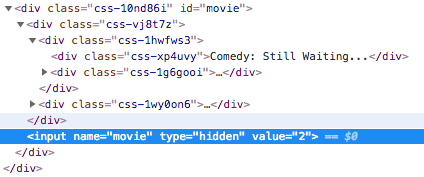
It is. If you add the id prop, it creates a hidden input with that id, whose value will get set to the value that you mapped through getOptionValue.
cutterbl
on 29 Oct 2018
hm... interesting, I potentially can build a hacky trick around it to achieve what I need. But i don't see any hidden inputs there:
AntonPuko
on 30 Oct 2018
Sorry, had it kinda backwards. It's when you put a name prop on the Select.
cutterbl
on 30 Oct 2018
Thanks, though I'm just a user who answers questions I've already figured out on my own. The other guys do the heavy lifting :)
In your example, if
this.state.organizationsis an array of options{name: 'foo', organizationId: 6}, and you have your select setup<Select options={this.state.organizations} getOptionLabel={(opt) => opt.name} getOptionValue={(opt) => opt.organizationId} />Then it should work fine. If you're using the AsyncSelect with the
loadOptionsprop for doing your external request, it changes only slightlyimport React, { Component } from 'react'; import AsyncSelect from 'react-select/libs/Async'; export default MySelect extends Component { getOptions = (inputValue) => { return fetch(`${myurl}?myparam=${inputValue}`) .then(response => { // do you have to `parse`? I don't remember... if (response && response.data && response.data.content) { return response.data.content; // this is the options array? } return []; }) .catch(error => { // whoops! what now? }); }; render() { return ( <AsyncSelect defaultOptions={true} loadOptions={this.getOptions} getOptionLabel={(opt) => opt.name} getOptionValue={(opt) => opt.organizationId} /> ); } }
The non async thing is what I tried and it did not work, but I will take another look at it when I'm back at work, thank you
AntonOellerer
on 30 Oct 2018
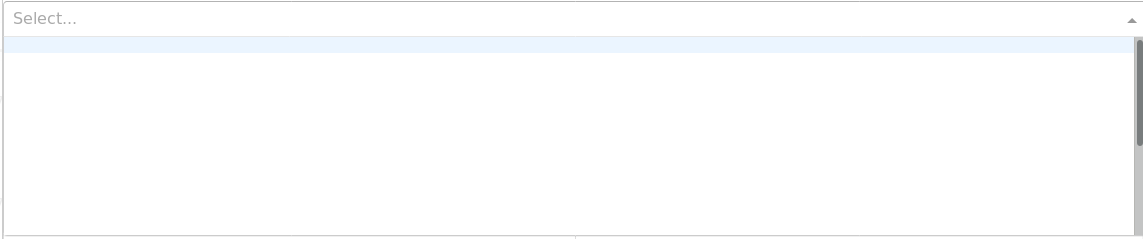
Hey, so i tried it again the way you suggested, and the problem still persist.
If I log the info about the selected organisation in an onChange method, I can see that the organisation got selected, but the list of the organisations is just white and the blue row does not move.
AntonOellerer
on 5 Nov 2018
Honestly can't say, without seeing your code and a sample of your loadOptions return.
cutterbl
on 5 Nov 2018
Thanks @cutterbl for jumping on this, closing this issue, @AntonOellerer if your problem still persists, please create a new issue with a codesandbox reproduction so that we can more easily triage the problem.
 gwyneplaine
on 28 Dec 2018
gwyneplaine
on 28 Dec 2018
Please check if you're using the latest version of react-select
The issue may be caused by react-select v1
Hey, so i tried it again the way you suggested, and the problem still persist.
If I log the info about the selected organisation in anonChangemethod, I can see that the organisation got selected, but the list of the organisations is just white and the blue row does not move.
 czsyjss
on 30 Aug 2019
czsyjss
on 30 Aug 2019
Related issues
 jonorogers
·
3Comments
jonorogers
·
3Comments
 mjuopperi
·
3Comments
mjuopperi
·
3Comments
 sampatbadhe
·
3Comments
sampatbadhe
·
3Comments
 batusai513
·
3Comments
batusai513
·
3Comments
 coder-guy22296
·
3Comments
coder-guy22296
·
3Comments
Most helpful comment
You forgot to actually ask your question (which should really go to StackOverflow in this scenario), but: