React-select: Feature Request: Filter From the MenuList
We're migrating an application from Angular to React. This is a gradual, incremental replacement, so it's critical that the user experience does not change. We decided to go with react-select as our replacement for UI-Select. So I'm tasked with creating the implementation.
I've been able to replicate nearly all functionality so far, except some final styling and function on the control.
I am attempting to separate the inputValue filter from the root Control and move it into the MenuList. I realize that I can override both of these Components to customize this functionality. The first hurdle I've encountered is that I cannot add an Input control (any input control) to the MenuList and give it focus. Any 'click' action just bounces off.
I'm looking to create something sort of similar to what is seen in the Experimental popup example, while keeping my ValueContainer in the core control. Anyone have direction on how to go about this?
 cutterbl
All 6 comments
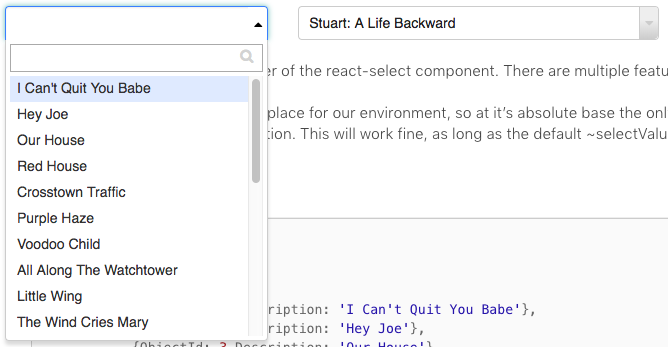
This is what it is I'm trying to accomplish. As you can see in the shot, I've been able to manage most everything, with the exception of the 'search'. Since the focus is retained on the Control, all key presses are retained by the Control itself.
cutterbl
on 12 Oct 2018
I'm interested in something similar, any luck on this one?
 chiplay
on 4 Dec 2018
chiplay
on 4 Dec 2018
Would definitely love to have this feature!
There is also a stack overflow thread about this that I made about a year ago.
 dan-kez
on 1 Mar 2019
dan-kez
on 1 Mar 2019
Here is a working example using the Components Framework.
I had to handle isFocused and menuIsOpen on my own by using a wrapper and checking, if a click in the document was inside the wrapper.
Also I had to prevent onMouseDown and onTouchDown to keep the events from bubbling to keep the menu open when clicking the input.
 Rall3n
on 8 Mar 2019
Rall3n
on 8 Mar 2019
@Rall3n Great stuff! I'll try to integrate some of what you've done with my own example, and see how far I can get...
cutterbl
on 11 Mar 2019
Hello -
In an effort to sustain the react-select project going forward, we're closing old issues.
We understand this might be inconvenient but in the best interest of supporting the broader community we have to direct our efforts towards the current major version.
If you aren't using the latest version of react-select please consider upgrading to see if it resolves any issues you're having.
However, if you feel this issue is still relevant and you'd like us to review it - please leave a comment and we'll do our best to get back to you!
 bladey
on 28 May 2020
bladey
on 28 May 2020
Related issues
 sampatbadhe
·
3Comments
sampatbadhe
·
3Comments
 joshualimpj
·
3Comments
joshualimpj
·
3Comments
 juliensnz
·
3Comments
juliensnz
·
3Comments
 x-yuri
·
3Comments
x-yuri
·
3Comments
 pashap
·
3Comments
pashap
·
3Comments
Most helpful comment
Here is a working example using the Components Framework.
I had to handle
isFocusedandmenuIsOpenon my own by using a wrapper and checking, if a click in the document was inside the wrapper.Also I had to prevent
onMouseDownandonTouchDownto keep the events from bubbling to keep the menu open when clicking the input.